
模型与 MCP
待识别

rea
morluto
Reverse engineer anything with agents, from app behavior down to native binaries.
PROJECT TOPICS
INSTALL REFERENCE
dsh plugin --profile web add github:tokener-ai/dsh-tokener-provider
该命令指向仓库当前默认分支;尚无绑定当前 commit 的完整验证结果。
PROJECT README
Use Tokener models in DeepSeek Harness.
dsh plugin --profile web add @tokener-ai/dsh-tokener-provider
dsh web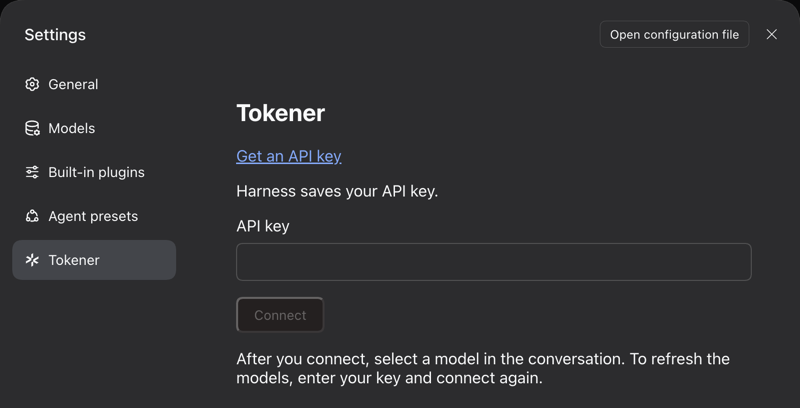
If Tokener is not in Settings, restart Harness. To refresh the models, enter your API key and connect again.
In Harness, open Plugins → Tokener → Versions and select Update. For a beta version, select Show prereleases first.
From the command line, name the version, then restart Harness:
dsh plugin --profile web add @tokener-ai/dsh-tokener-provider@<version>Without a version, the command can skip a release that is less than one day old.
Your API key goes only to Tokener. Harness saves it. Do not assume that Harness encrypts it.
dsh plugin --profile web remove @tokener-ai/dsh-tokener-providerHarness keeps your saved Tokener models and API key. To remove the models, delete the Tokener entries in Settings → Models. To stop the key from working, revoke it in your Tokener account.
CLASSIFICATION EVIDENCE
系统优先读取 GitHub Topics,再与站内分类词典和词根规则比对。当前命中: llm、deepseek、llm-provider、deepseek-harness。
morluto
Reverse engineer anything with agents, from app behavior down to native binaries.

deepseek-ai
DeepSeek Harness: Everything is a Plugin.

nexu-io
The 1st Collaborative AI Design Agent Workspace. Local-first and open source. Create motion, prototypes, websites, apps, dashboards, presentations, images, and videos with your team and AI agents. Share work, exchange feedback, and iterate together in one workspace.