
模型与 MCP
待识别

rea
morluto
Reverse engineer anything with agents, from app behavior down to native binaries.
PROJECT TOPICS
PROJECT README
Show live Excalidraw architecture scenes in the DSH sidebar.
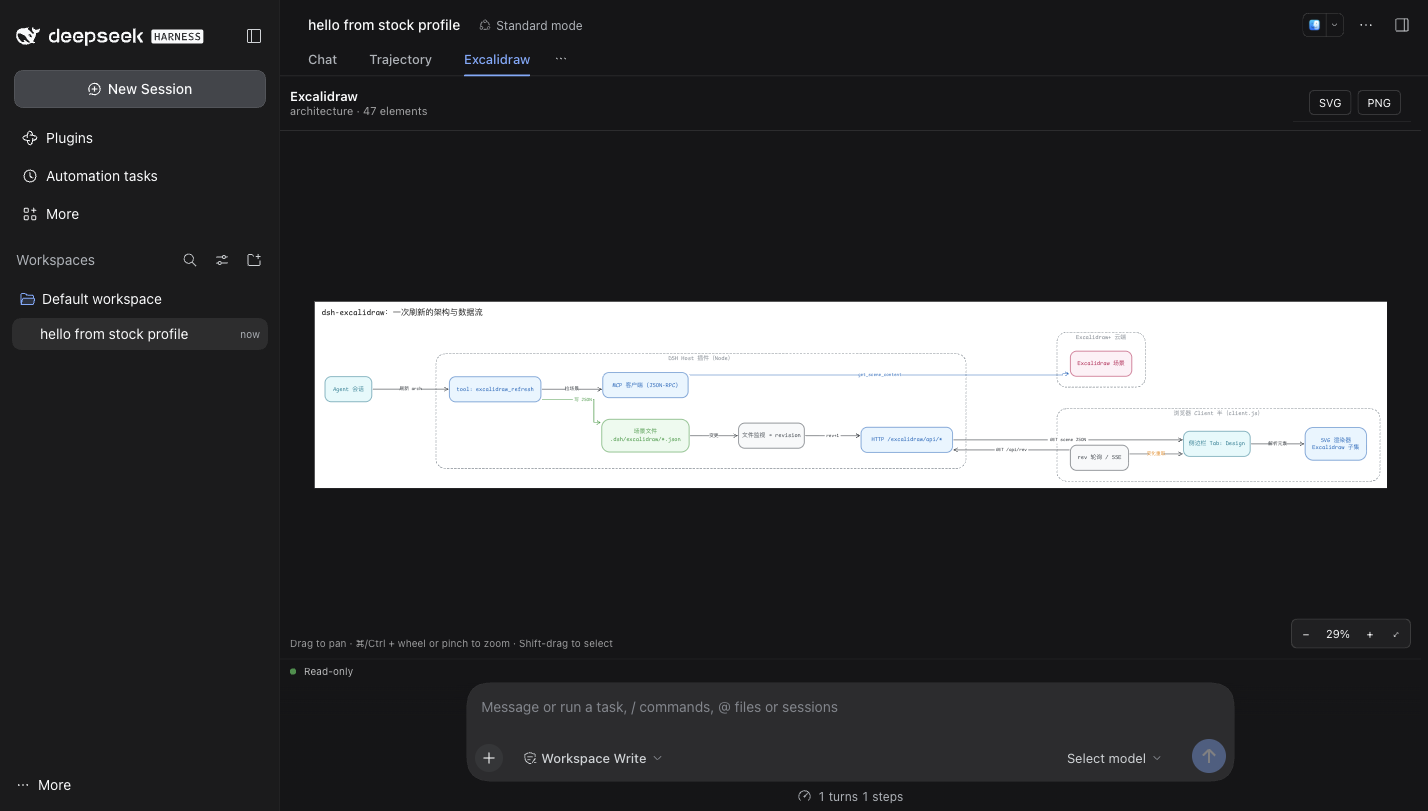
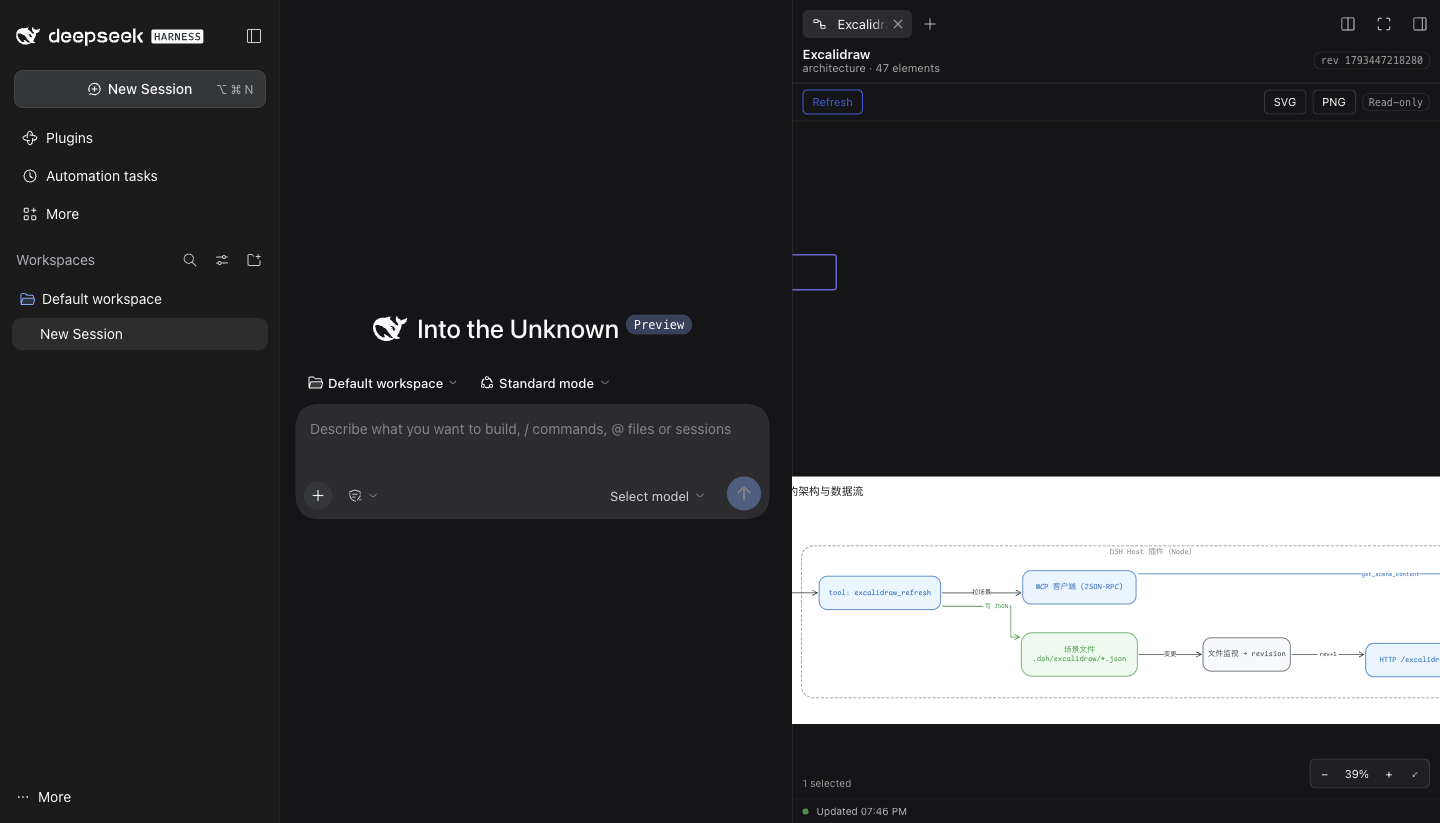
Ask the agent to draw or refresh the code architecture in Excalidraw; dsh-excalidraw pulls the scene through the Excalidraw+ MCP server, stores it in the workspace, and the Excalidraw sidebar tab re-renders it — no page refresh, no screenshots.
agent ──▶ tool: excalidraw_refresh ──▶ Excalidraw+ MCP (get_scene_content)
                                         │
                                         ▼
                       <cwd>/.dsh/excalidraw/<slug>.excalidraw
                                         │  (revision bump + focus pointer)
                                         ▼
  sidebar tab «Excalidraw» ◀── /excalidraw/api/* ◀── host HTTP routes
Design drawn in Excalidraw before a line of code: architecture · sidebar wireframe
The Excalidraw view on a stock DSH, beside Chat and Trajectory:
The same scene as the Excalidraw tab in dsh-better-sidebar:
# from a directory that holds this package
dsh plugin --profile desktop add "$PWD"
# then restart DSH so the Host row and the client bundle load
The version here is a plain ESM bundle: no build step is needed at install time
(client.js is committed). npm run build rebuilds it, however, so a checkout edited
in src/ must be rebuilt before installing.
When this repository lives inside LayerFS (as it does in tokenaissance), export it
to a real host directory first — dsh plugin add needs a filesystem path:
# from a session bound to the LayerFS project
layerfs fs read main /dsh-excalidraw/...  # or mount a Workspace and copy the tree out
dsh plugin --profile desktop add /path/to/exported/dsh-excalidraw
Two ways in. Local import works with no account at all: point
excalidraw_import at a .excalidraw/.json file in the workspace, or hand it
an inline Excalidraw JSON document, and the view renders it. Excalidraw+ refresh
needs an account and a token (below).
Refresh prerequisite: an Excalidraw+ MCP token. Pulling a scene from Excalidraw+
(excalidraw_refresh, the tab's Refresh button) needs an Excalidraw+ account and
its MCP bearer token — set mcpToken on the plugin row, or EXCALIDRAW_MCP_TOKEN,
or keep the Authorization: Bearer … header your profile already has for the
excalidraw MCP server; when empty, the tool fails at the MCP endpoint. Without a
token the viewer still works read-only for what is already local: the
.excalidraw file viewer opens any scene file, and the Excalidraw view renders
scenes already present in <workspace>/.dsh/excalidraw/.
Requirements: DSH 0.2.1-rc.1+ (the Excalidraw view renders on DSH's own
conversation.view slot, so no third-party sidebar is required). With
dsh-better-sidebar 0.28+ you
additionally get the right-sidebar tab, the .excalidraw file viewer, the file
icon and the auto-open focus watcher.
The scene view is a read-only viewer, but its navigation follows Excalidraw's:
| Gesture | Effect |
|---|---|
| drag (or middle-drag) | pan |
| wheel / two-finger scroll | pan (shift: horizontal) |
| ⌘/Ctrl + wheel, or pinch | zoom at the cursor |
| click | select the topmost element under the cursor |
| Shift + click | add/remove that element from the selection |
| Shift + drag | marquee-select everything the rectangle touches |
| ⌘/Ctrl + A | select every element · Esc clears |
| double-click | fit the scene (on an element: zoom to that element) |
+ / - / 0 |
zoom in / out / back to 100% |
Shift+1 or Home |
fit to the window |
Shift+2 |
zoom to the selection |
| arrow keys | pan by 40 px |
The zoom control in the bottom-right shows the current percentage and offers fit / 100%. Selection is drawn as an outline and never changes the scene: there is no editing, moving or resizing.
excalidraw_refresh with the Excalidraw+ scene id.get_scene_content, writes
<cwd>/.dsh/excalidraw/architecture.excalidraw, bumps the revision and
leaves a focus pointer for the calling session./excalidraw/api/rev while it is
visible, so nothing else is needed.Extras that come with the same sidebar service:
.excalidraw file opens in the sidebar as a diagram (read-only) instead
of raw JSON; legacy .excalidraw.json scenes stay readable through the Excalidraw
tab (better-sidebar only sniffs content for files with a head, so those keep
opening in the JSON preview);| Tool | Arguments | Effect |
|---|---|---|
excalidraw_refresh |
{ sceneId?, name?, slug? } |
pull a scene from Excalidraw+ into the workspace store; returns { ok, slug, file, sceneId, elements, revision, opened } |
excalidraw_import |
{ path?, scene?, name?, slug? } |
store a scene that already exists locally — a .excalidraw/.json file inside the workspace, or an inline Excalidraw JSON document — no Excalidraw+ account or token |
excalidraw_open |
{ slug? } |
focus the Excalidraw tab for an already-stored scene |
excalidraw_export |
{ slug?, format? } |
write the scene as <scenesDir>/<slug>.svg (PNG comes from the tab's button, which rasterises in the browser) |
The tab has no plugin-local settings: auto-open follows the host's autoOpen, and
the poll interval is the host's pollIntervalMs (delivered to the client in
/rev).
The plugin ships the Excalidraw web fonts it can redistribute — Comic Shanns
(MIT), Virgil (SIL OFL) and Lilita One (SIL OFL) — and serves them from the
package, so a scene's hand-drawn text renders the way Excalidraw draws it without
any third-party request. Excalifont (Excalidraw's own default) is not
included because it carries no licence grant; scenes that use it fall back to the
browser's font stack. See fonts/README.md and docs/FIDELITY.md.
config)| key | default | meaning |
|---|---|---|
mcpUrl |
https://api.excalidraw.com/api/v1/mcp |
Excalidraw+ MCP endpoint |
mcpToken |
'' |
bearer token; when empty it falls back to EXCALIDRAW_MCP_TOKEN, then to the profile's own mcp-excalidraw row |
scenesDir |
.dsh/excalidraw |
scene directory, relative to the session workspace |
extraFontsDir |
'' |
optional directory of user-supplied fonts (fonts.json + files); served to the tab and used by exports — the legal way to add Excalifont |
pollIntervalMs |
1500 |
client revision-poll interval (500–10000) |
autoOpen |
true |
open/focus the tab after a refresh |
maxSceneBytes |
4194304 |
refuse larger scene files |
index.js + lib/): a cordis plugin that registers seven HTTP
routes plus the /excalidraw/fonts/ prefix, three model tools, and a per-workspace scene store with atomic writes and
a monotonic revision. Zero runtime dependencies; the Excalidraw MCP client is
plain fetch + JSON-RPC over streamable HTTP.client.js, generated from src/client.mjs +
src/renderer.mjs + src/fonts-data.mjs by scripts/build-client.mjs): one
window.__ModuleLoader__.load module that mounts the scene view on two
surfaces — DSH's native conversation.view slot (an Excalidraw view beside
Chat/Trajectory, so a stock DSH works) and, when present, the
dsh-better-sidebar tab with its file viewer and file icon.src/renderer.mjs): pure, deterministic Excalidraw→SVG for the
element subset the diagram tools emit; no @excalidraw/* dependency.Read docs/DESIGN.md for the design, docs/CONTRACT.md for the normative wire contract, and docs/HOST-NOTES.md / docs/CLIENT-NOTES.md / docs/RENDERER-NOTES.md for per-half implementation notes.
agent ── excalidraw_import { path: "docs/flow.excalidraw" } ──▶ <cwd>/.dsh/excalidraw/flow.excalidraw
agent ── excalidraw_import { scene: { type: "excalidraw", elements: [...] } } ──▶ same store
Either form stores the scene locally and shows it in the Excalidraw view; the
file viewer opens .excalidraw files directly as well. Only excalidraw_refresh
(the pull from Excalidraw+) requires the token.
.tgz, or a Git URL; the CLI equivalent is
dsh plugin --profile desktop add <source>.npm publish --access public, then install by name
(dsh plugin --profile desktop add dsh-excalidraw).data/plugins/<owner>__<repo>.yml); the market and Plugins → Discover pick
it up after merge.See docs/PUBLISHING.md for the exact commands, the catalog entry, and the pre-announcement checks.
npm test        # node --test test/ (212 tests, zero deps) — it does NOT rebuild:
                # a stale client.js fails the build-signature test on purpose
npm run build   # regenerate src/fonts-data.mjs and client.js
node scripts/render-scene.mjs test/fixtures/design-scene.json /tmp/design.svg
The renderer is checked against the Excalidraw-rendered reference of the same scene (ink coverage and aspect ratio), the store and MCP client have unit tests, the host routes are exercised handler-by-handler, and the client module is loaded through a stubbed module loader.
Read-only: editing stays in Excalidraw (the viewer pans, zooms, selects and
marquees, but never writes the scene back). roughness/hachure are rendered clean;
image elements render only from a data:image/…;base64, URL already in the
scene's files; nothing is fetched from the network. Excalidraw's fonts are not
shipped, so family 5 (Excalifont) renders with the shipped Virgil fallback,
which is what Excalidraw's own stack does; families 2/3/4/6 fall back to the
browser stack. Comic Shanns (8), Virgil (1) and Lilita One (7) ship.
CLASSIFICATION EVIDENCE
系统优先读取 GitHub Topics,再与站内分类词典和词根规则比对。当前命中: mcp、deepseek-harness。
morluto
Reverse engineer anything with agents, from app behavior down to native binaries.

deepseek-ai
DeepSeek Harness: Everything is a Plugin.

nexu-io
The 1st Collaborative AI Design Agent Workspace. Local-first and open source. Create motion, prototypes, websites, apps, dashboards, presentations, images, and videos with your team and AI agents. Share work, exchange feedback, and iterate together in one workspace.