
模型与 MCP
待识别

rea
morluto
Reverse engineer anything with agents, from app behavior down to native binaries.
PROJECT TOPICS
INSTALL REFERENCE
dsh plugin --profile web add github:tieveto666-code/dsh-memory-migration
该命令指向仓库当前默认分支;尚无绑定当前 commit 的完整验证结果。
PROJECT README
A DeepSeek Harness plugin that gives stock DSH long-term memory: a key/value store of who you are and how you work, recalled into later chats when the question matches.
You can add memories by hand. Memory migration is one extra path: import an official ChatGPT, Claude, Gemini, or DeepSeek export and extract a small core of reusable pairs.
It is an out-of-tree Cordis plugin. It does not fork or patch DSH source, and it does not turn old chats into sidebar sessions.
The npm / plugin id remains @tieveto666-code/dsh-memory-migration (needed by dsh plugin add). The product name in Settings is Long-term memory.
DSH starts every conversation blank. Preferences, methods, constraints, and settled decisions have to be re-explained, or they sit unused in another product’s export.
This plugin keeps a compact standing memory on the machine, then injects only the entries that match the current question—not the entire history.
Typical uses:
Settings → Long-term memory (key/value list, recall switch, and Memory migration):
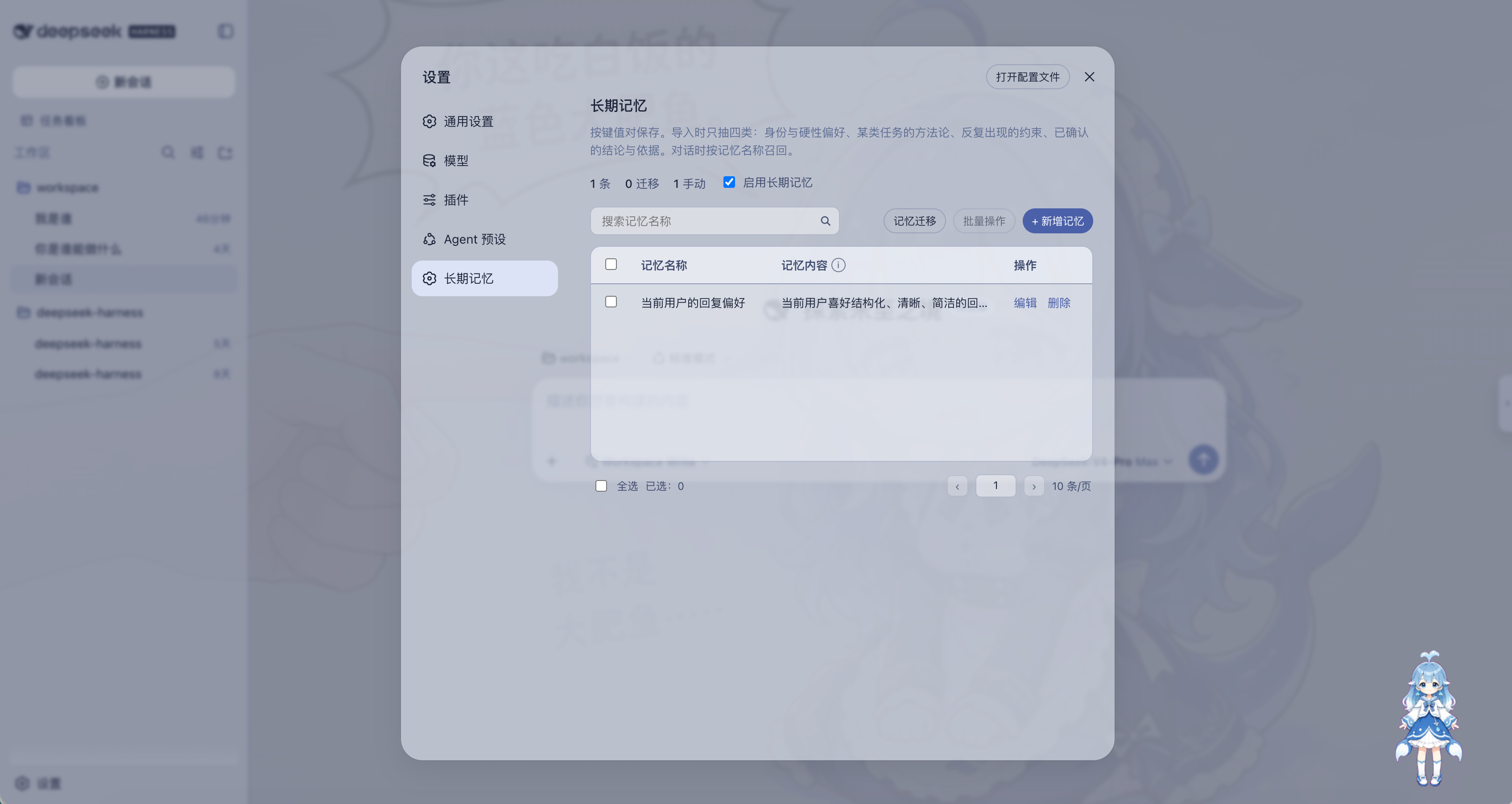
Settings → Long-term memory:
Data lives under $DSH_HOME/memory-migration/ (usually ~/.dsh/memory-migration/).
On each turn, only keys are scored against the current user message (values never participate):
max(0.55, best × 0.4)Hits are injected as system context. Off-topic questions inject nothing.
The Memory migration button imports a ZIP or JSON export. It does not dump whole transcripts. With DSH’s DeepSeek model it scans recent substantial conversations, then keeps at most 10 core pairs that fit one of:
One-off tasks, appointments, secrets, assistant opinions, and single-ticket conclusions are dropped. Near-duplicates are merged. Re-import skips pairs similar to memories you already have (including manual ones).
If DeepSeek is not available, import only lifts enabled facts from files the export already contains (memory.json / memories.json). Gemini Takeout and DeepSeek’s official bundle usually have none of those files.
Dropping a ZIP into $DSH_HOME/memory-migration/inbox/ also runs this import.
Manual add / edit  ─┐
                    ├→ key/value store ($DSH_HOME/memory-migration/)
Export ZIP/JSON  ───┘     extract at most 10 core pairs when migrating
                          → on later chats, match the user message against keys
                          → inject hits into the system prompt
The settings UI talks to a plugin-owned loopback HTTP API (/memory-migration/api, via official ctx.webServer.register). Stock DSH does not need a settings-namespace allowlist change.
Migration extraction uses ctx.llm (DeepSeek chat) and does not create a sidebar Session.
Requires a working DSH Web profile (same Node range as DSH: 22.19+ or 24+).
dsh plugin --profile web add github:tieveto666-code/dsh-memory-migration
dsh --profile web
Then open Settings → Long-term memory.
pnpm 10+ may refuse the git prepare script until you allow it. Copy the package name from the CLI error into the profile pnpm-workspace.yaml:
allowBuilds:
  '@tieveto666-code/dsh-memory-migration': true
Then run dsh plugin add again.
From a local checkout:
dsh plugin --profile web add link:$(pwd)
dsh --profile web --dump-config # look for the memory-migration layerUsed only by Memory migration. You can skip this section if you only add memories by hand.
| Source | What to import | Conversations | Saved memories in the zip |
|---|---|---|---|
| ChatGPT | Settings → Data controls → Export data (emailed ZIP) | conversations.json (current mapping / current_node branch only) |
memory.json when present |
| Claude | Settings → Privacy → Export data | conversations.json (chat_messages) |
memories.json / memory.json when present |
| Gemini | Takeout → My Activity → Gemini Apps, activity records as JSON (not HTML) | MyActivity.json grouped by chat URL |
Usually absent (Saved Info is not in Takeout) |
| DeepSeek | Settings → Data management → Export chat history | Chat JSON (several unpublished shapes are accepted) | None in the official bundle |
Unrecognized dumps fail loudly instead of importing silently. Account emails stay in local metadata and are not injected.
Gemini HTML Takeout is rejected; re-export with JSON activity records. The top-level Takeout “Gemini” product is Gems, not chat history.
Parse, unzip, extract, and store on the DSH host. There is no telemetry and no upload of the export to a third-party service. Migration extraction calls the DeepSeek model already configured in your DSH, the same as a normal chat.
Uninstall:
dsh plugin --profile web remove @tieveto666-code/dsh-memory-migrationThat removes the plugin layer only. Delete $DSH_HOME/memory-migration/ yourself to wipe stored memories.
pnpm install
pnpm test
pnpm buildMIT
CLASSIFICATION EVIDENCE
系统优先读取 GitHub Topics,再与站内分类词典和词根规则比对。当前命中: deepseek-harness。
morluto
Reverse engineer anything with agents, from app behavior down to native binaries.

deepseek-ai
DeepSeek Harness: Everything is a Plugin.

nexu-io
The 1st Collaborative AI Design Agent Workspace. Local-first and open source. Create motion, prototypes, websites, apps, dashboards, presentations, images, and videos with your team and AI agents. Share work, exchange feedback, and iterate together in one workspace.