

其他
完整应用

deepseek-harness
deepseek-ai
DeepSeek Harness: Everything is a Plugin.
PROJECT TOPICS
PROJECT README
English | 中文


Turn the official DSH Web GUI trajectory ledger into an interactive DAG: the same live records as the built-in「轨迹」tab, rendered as a ReactFlow graph so you can see execution order and proven structure at a glance.
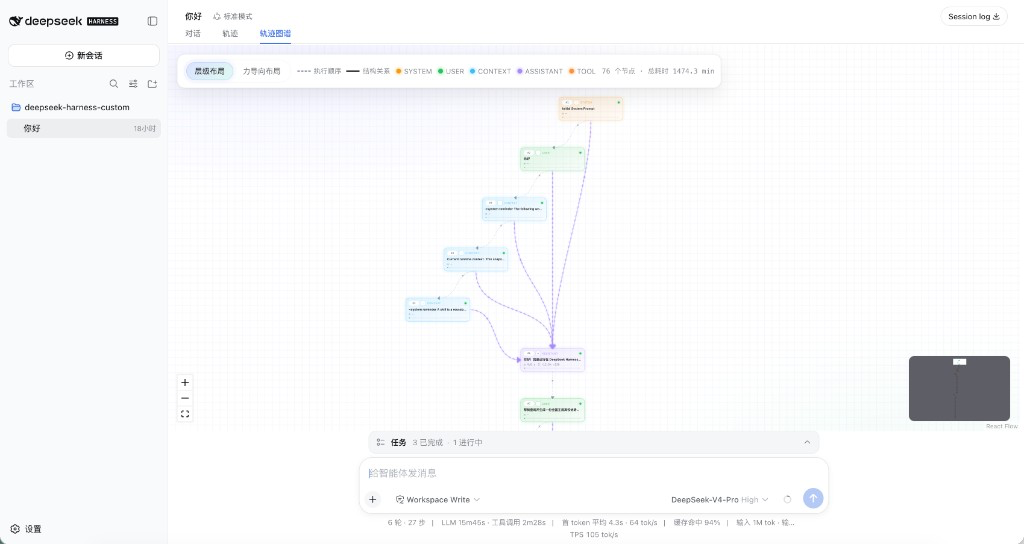
Official「轨迹」is a powerful inspection table. This plugin keeps that same source of truth and adds a spatial reading of the run:
snapshot.views.get('trajectory') (plus safe fallbacks). What you see in the graph is what the session already recorded, not a mock or a parallel log.--dsw-* themes and skins.| Visual | Meaning |
|---|---|
Gray dashed edge (sequence) |
Chronological execution order. Always drawn between adjacent trajectory records: A happened, then B. Legend: 「执行顺序 / Sequence」. |
Colored solid edge (structure) |
Proven structure / causality (semantic color by target label). Emitted only when fields prove a link — e.g. prompt/context → next assistant, assistant → tool call, tool/subtool nesting, tool result consumed by a later assistant. Legend: 「结构关系 / Structure」. |
| Node label | Real trajectory label (SYSTEM, USER, CONTEXT, ASSISTANT, TOOL, …). |
| Node body | Real summary, sequence number, latency, status, token usage. |
| Detail panel | Click a node to inspect recorded Input / Output JSON. |
Reading tip: gray only = order is known, stronger relationship is not proven; gray + color = order plus a verified upstream/downstream link.
enabled, announceToAgent, defaultLayout.^22.19 || >=24dsh web install (official @deepseek-ai/dsh SDK)dsh plugin --profile web add github:tieveto666-code/dsh-client-ui-trace-graphpnpm ≥10 may block the package prepare script on first install. If dsh tells you to allow builds, add the printed package key to that profile's pnpm-workspace.yaml under allowBuilds, then run add again.
git clone https://github.com/tieveto666-code/dsh-client-ui-trace-graph.git
cd dsh-client-ui-trace-graph
pnpm install
pnpm build
dsh plugin --profile web add link:$(pwd)
Restart dsh web and refresh the page; the Trace Graph tab appears beside the conversation tabs.
pnpm install
pnpm typecheck
pnpm test
pnpm build
After upgrading @xyflow/react, regenerate the scoped ReactFlow stylesheet:
pnpm gen:reactflow-cssThe browser adapter projects each live trajectory row into a TraceSpan, preserving label, summary, source seq, turn, step, status, timing, and Input/Output references. Every pair of adjacent records gets a sequence edge; structure edges are added only for relationships proven by row fields (see How to read the graph).
backdrop-filter on nodes.MIT © Changsheng Tie (tieveto666-code)
CLASSIFICATION EVIDENCE
系统优先读取 GitHub Topics,再与站内分类词典和词根规则比对。当前命中: 无有效分类标签。
deepseek-ai
DeepSeek Harness: Everything is a Plugin.

anywhere-labs
为 DeepSeek Harness (DSH) 插件生态打造的现代化桌面端解决方案。万物皆「插件」,桌面本身也是「插件」。

walkinglabs
Harness engineering beginner tutorial, from 0 to 1