
模型与 MCP
待识别

rea
morluto
Reverse engineer anything with agents, from app behavior down to native binaries.
PROJECT TOPICS
INSTALL REFERENCE
dsh plugin --profile web add github:tan90tan90/dsh-custom-menu
该命令指向仓库当前默认分支;尚无绑定当前 commit 的完整验证结果。
PROJECT README
侧栏启动器:把网页和本地文件夹钉在 DSH 左侧栏。 Sidebar launcher for DeepSeek Harness: pin web pages and local folders to the sidebar.
在左侧栏加上你自己的入口,点一下:网页在新标签页打开,本地文件夹直接用资源管理器弹出来。顺带可以把自带菜单分组、隐藏掉不用的那些。
Add your own rows to the DSH sidebar. One click opens a web page in a new tab, or opens a local folder in your file manager. Built-in entries can be grouped and hidden as well.
侧栏整理这一格已经有人占着了:排序、分组、隐藏、按钮行布局、溢出收进「更多」,市场里都有更完整的实现(见文末 边界)。但有一件事一直空着——把本地文件夹钉上侧栏,点一下就打开。
Sidebar organizers already exist (sorting, grouping, hiding, layout modes, overflow into “More”), and bookmarks docks exist for URLs. What was missing: a one-click shortcut to a local folder. That is the first feature here, not an afterthought.
第二个边界:不做内嵌浏览。很多站点要么 X-Frame-Options: DENY,要么登录态在 iframe 里直接失效,嵌在面板里显示的结果是白屏或未登录。这里只负责「打开」,把页面交回浏览器。
Second scope decision: no embedded browsing. Sites that refuse framing or need sign-in break inside an iframe. This plugin only opens things.
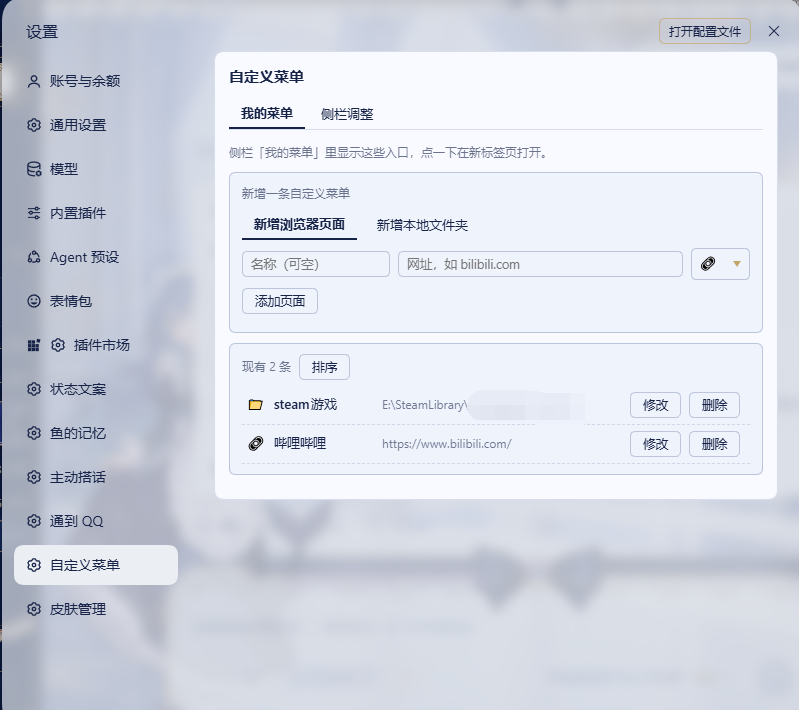
自定义菜单 / Custom entries
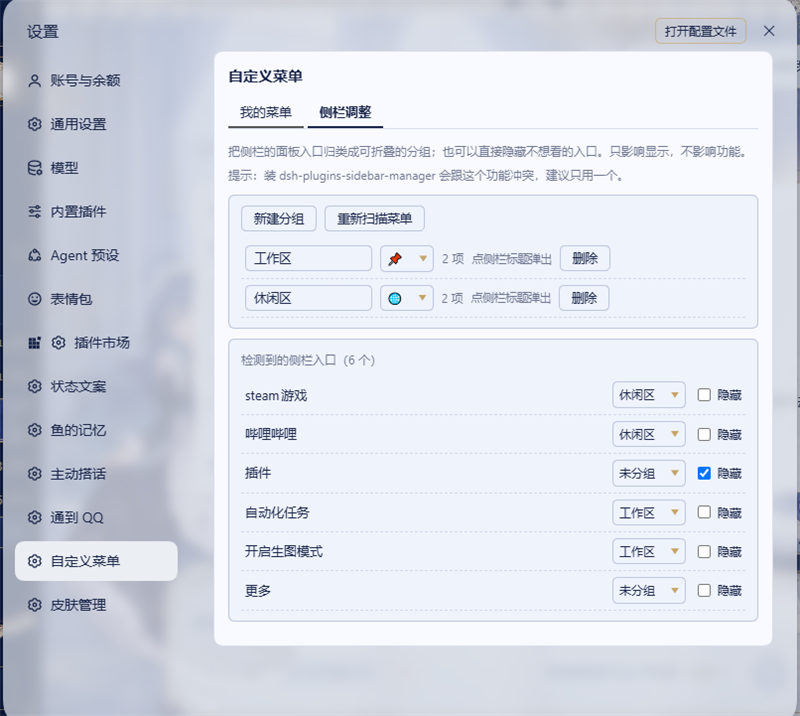
侧栏调整 / Sidebar adjustment
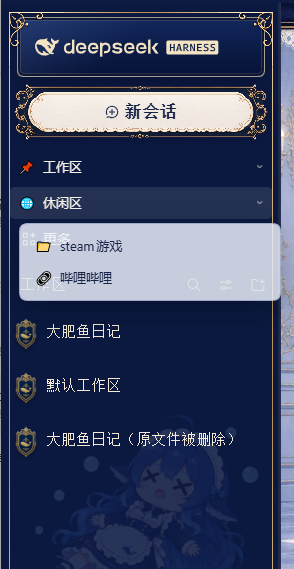
分组浮层与整理后的侧栏 / Group popover and the organized sidebar

把任意目录钉进侧栏,点一下就弹出系统文件管理器。
Pin any directory to the sidebar; clicking it opens your file manager at that path.
D:\照片、D:/work、\\nas\share\项目 这类绝对路径(UNC 也可以)explorer.exe,macOS 用 open,Linux 用 xdg-openhttps://… 在新标签页打开。地址栏会被限宽,长链接不会把侧栏撑开。
https://… opens in a new tab. Long URLs are truncated in the row, so they cannot stretch the sidebar.
名称、地址、图标随时改,不用删了重建。图标可以直接填 emoji 或图片 URL。
Name, address and icon are editable inline after creation. The icon accepts an emoji or an image URL.
点「排序」进入拖动模式,抓住 ⠿ 直接拖,松手即生效;再点一下退出。
Toggle「排序」, drag by the ⠿ handle, and the new order is saved on drop.
把自带菜单项归进可折叠的分组,分组可以自定义名称和图标;点分组弹出浮层列出组内条目(行为和自带的「更多」一致)。
Group built-in entries under a custom name and icon; clicking a group opens a popover listing its entries.
单独隐藏用不上的菜单项,只影响显示,功能照旧可达。
Hide individual entries you never use. Hidden entries stay functional and reachable elsewhere.
自带的「更多」入口始终排在侧栏末尾,分组标题按顺序插在它前面。
The built-in “More” row is always pinned to the end of the column.
dsh plugin --profile desktop add github:tan90tan90/dsh-custom-menu装完重启 DSH,然后在 设置 → 自定义菜单 里加条目。
After installing, restart DSH, then open Settings → 自定义菜单.
设置页通过宿主的 settings.section 槽注册,客户端用官方的 window.__ModuleLoader__.load 约定加载。
侧栏行是「装饰」出来的,不是搬动机有的 React 节点:插件把自己的行作为面板列的直接子节点追加,隐藏用 display: none,排序在自己插入的节点之间用 DOM 顺序完成(该列不是 flex 容器,CSS order 无效)。MutationObserver 在宿主重渲染后补写,并带内容签名与自身写入的抑制标记,避免反复插入。
打开本地文件夹走宿主路由 POST /dsh-custom-menu/open:只接受绝对路径(^[A-Za-z]:[\\/] 或 UNC)且必须是已存在的目录,参数以数组传递、不经过 shell。Windows 上 explorer.exe 成功时也可能返回退出码 1,所以只判定进程是否启动,不看退出码。请求需要一次性令牌,详见下面的安全一节。
Opening a local folder goes through a host route. Only absolute paths are accepted, the target must be an existing directory, and arguments are passed as an array (no shell interpolation). On Windows explorer.exe can return exit code 1 even on success, so the spawn is treated as fire-and-forget. Requests need a one-time token — see Security.
从 v0.9.2 起,那个「打开文件夹」的宿主路由不再是裸接口。它现在要过四道门:
Since v0.9.2 the open-folder host route is no longer a bare endpoint. A request must clear four gates:
| 约束 | Why | |
|---|---|---|
| 1 | 一次性令牌:GET /dsh-custom-menu/token 领取,X-CM-Token 头带上,用一次即失效(60 秒过期) |
跨站页面读不到同源响应正文,也就伪造不出请求 |
| 2 | 来源校验:Sec-Fetch-Site: cross-site 直接 403;Origin 若是 http(s) 源,必须与 Host 一致 |
挡住「浏览器里随便打开一个网页就能调用本机接口」 |
| 3 | Content-Type: application/json |
跨站表单提交发不出这个类型,只能走被 CORS 拦下的 fetch |
| 4 | 只允许目录(statSync().isDirectory()),文件一律拒绝 |
堵掉把本地已存在的可执行文件交给默认程序打开这条路 |
其余同上:绝对路径白名单、路径存在性检查、参数数组传参不经过 shell、响应带 X-Content-Type-Options: nosniff、不留 CORS 头。
回归测试不需要启动 DSH:node test/smoke-route.mjs(10 个用例,覆盖上面四道门 + 一次令牌一次的语义)。
Regression test without booting DSH: node test/smoke-route.mjs — 10 cases covering the four gates above plus single-use token semantics.
所有配置都存在浏览器 localStorage,插件不往 DSH 的 profile 文件里写任何东西。Config lives in localStorage; nothing is written into DSH profile files.
lib/client.js 里的 KNOWN_LABELS。http(s) 链接和绝对本地路径,不支持自定义 URI scheme。这个插件不是一个完整的侧栏菜单编辑器。如果你要的是顶栏一起管、按钮行/列表布局、行数上限、溢出收纳、Agent 可调接口,市场里有更完整的实现:
window.__dshSidebarManager本插件的定位只有一条:把入口钉上去,点一下就打开,包括本地文件夹。
This plugin is deliberately scoped: pin entries, open them on click — local folders included. For full sidebar/top-bar menu editing, use the plugins above.
The sidebar grouping approach borrows its idea from HighToward/dsh-plugins-sidebar-manager: rather than moving nodes that React owns, decorate the rendered column (self-inserted group titles, display: none for hidden rows). No code was copied; the implementation here is written independently.
侧栏分组的实现思路借鉴了 HighToward/dsh-plugins-sidebar-manager:不移动 React 拥有的节点,改用 DOM 装饰(自插标题行、display:none)实现分组与隐藏。未复制其代码,本插件为独立实现。
The settings-page registration follows the settings.section slot usage documented by Yuuyuko-uu/dsh-speak-up and DSH's own window.__ModuleLoader__.load client-side convention.
设置页的注册方式参考了 Yuuyuko-uu/dsh-speak-up 的 settings.section 用法,以及 DSH 官方的 window.__ModuleLoader__.load 客户端加载约定。
MIT
CLASSIFICATION EVIDENCE
系统优先读取 GitHub Topics,再与站内分类词典和词根规则比对。当前命中: deepseek-harness。
morluto
Reverse engineer anything with agents, from app behavior down to native binaries.

deepseek-ai
DeepSeek Harness: Everything is a Plugin.

nexu-io
The 1st Collaborative AI Design Agent Workspace. Local-first and open source. Create motion, prototypes, websites, apps, dashboards, presentations, images, and videos with your team and AI agents. Share work, exchange feedback, and iterate together in one workspace.