
其他
完整应用

deepseek-harness
deepseek-ai
DeepSeek Harness: Everything is a Plugin.
PROJECT TOPICS
PROJECT README
A DeepSeek Harness plugin for durable, configurable cron jobs. Each occurrence starts a fresh persisted Harness Agent in a selected workspace with an explicit model route, agent preset, and permission preset.
Status: MVP compatible with
@deepseek-ai/dsh0.1.1-rc.2and0.1.2-rc.1. The current worker is single-host. Cron admission and run history are durable; an already-started run is deliberately not retried after a host crash.
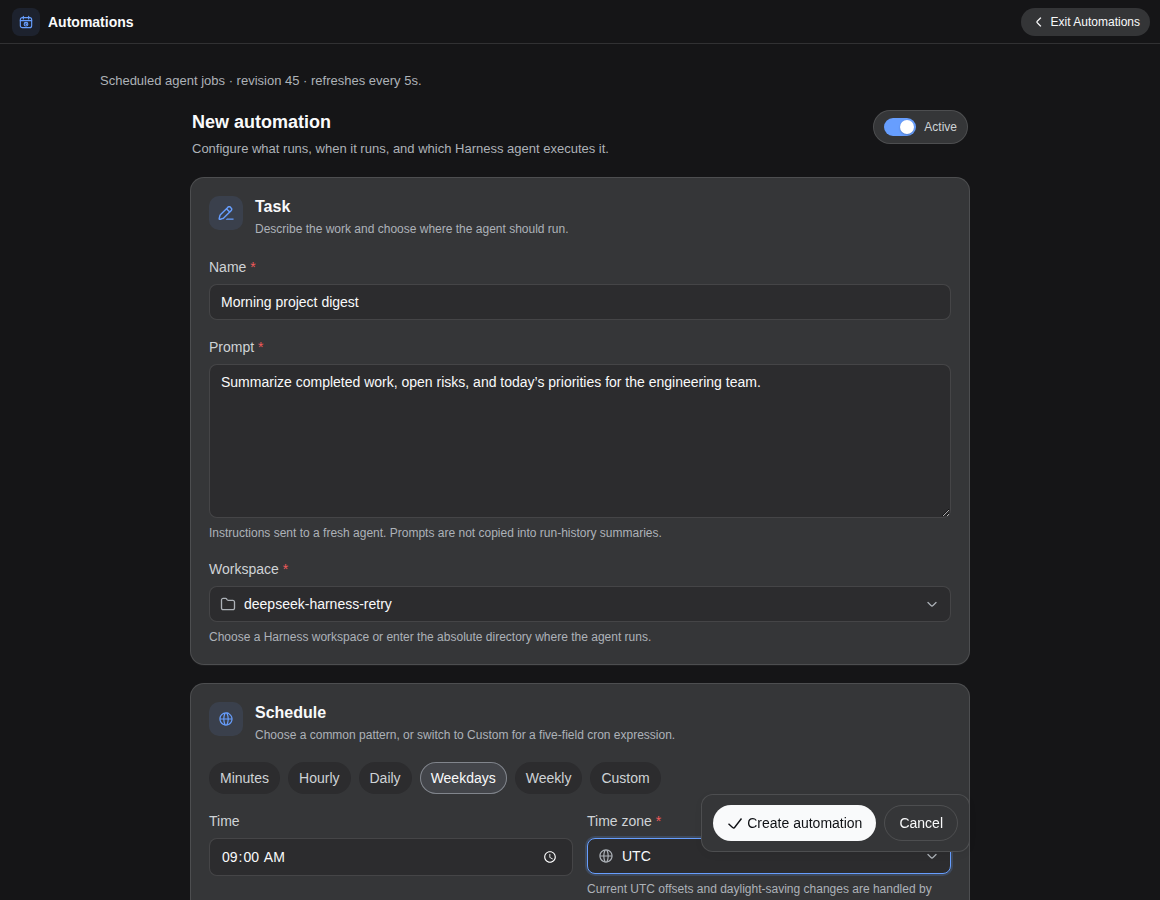
UTC or IANA timezones.skip — record and skip an occurrence while the job has queued/running work.queue — serialize occurrences for the same job.allow — permit concurrent occurrences, bounded by the global concurrency limit.skip — record an overdue occurrence as skipped.run-once — coalesce missed occurrences to the latest due time.$DSH_HOME/automations/state.json by default.agent; future workflow and task-graph executors do not need scheduler changes.The in-box @deepseek-ai/dsh-schedule plugin remains the right tool for reminders attached to one live Session. This plugin owns deployment-level jobs that can start a fresh workspace Session while no chat is open.
Requirements:
0.1.1-rc.2 or a compatible release with a working dsh web profile.From npm:
dsh plugin --profile web add @syncended/dsh-automationsOr from this checkout:
pnpm install
pnpm check

dsh plugin --profile web add .
The package declares a DSH bundle, so dsh plugin appends it to the Web profile automatically. Restart the running dsh web process after installing or upgrading, refresh the existing page, and open Automations from the main sidebar or Settings → Automations. Create a small disabled job first, save it, then use Run now to verify the selected model, workspace, and permission preset.
The browser client uses the same-origin /api/automations endpoint exposed by that Host. No separate connection URL, token, or plugin-specific environment variable is required; DSH_HOME only controls the normal Harness state location.
To remove it:
dsh plugin --profile web remove @syncended/dsh-automations| Field | Meaning |
|---|---|
| Name | Human-readable job name. |
| Schedule | Choose Minutes, Hourly, Daily, Weekdays, or Weekly and adjust its simple controls. Custom exposes the raw five-field cron (minute hour day-of-month month day-of-week) with an inline field guide. |
| Time zone | Search by city or region in the picker, or enter UTC / an IANA name such as Europe/Berlin. Current UTC offsets are shown; DST is handled by cron-parser. |
| Workspace | Choose an existing Harness workspace or enter an absolute directory manually. Its canonical filesystem identity becomes the Session cwd and workspace-write root. |
| Prompt | The user message sent to a fresh Harness Agent. |
| Model | Choose from one searchable model list grouped under provider titles, or enter an unlisted provider/model route. Leave blank to resolve the current Harness default at dispatch time. |
| Reasoning effort | Choose Default or an exact-model effort advertised by the adapter. If capability lookup is unavailable, common IDs are shown as advisory fallbacks; custom IDs remain editable and are validated when the run starts. |
| Agent preset | Leave blank for the current Harness default, or select a specific composition. |
| Permission preset | Bundles DSH sandbox and approval policies. Default: workspace-write. |
| Timeout | Wall-clock run limit. Cancellation is cooperative through the Agent loop. |
| Overlap / misfire | Admission behavior described above. |
The form groups common settings into Task, Schedule, and Agent & access. Job ID, timeout, overlap, and misfire stay available in the collapsed Advanced section. A paused job may still be started with Run now.
Defaults are suitable for a local Web profile. Edit the existing automations row in $DSH_HOME/profiles/web/cordis.patch.yml when needed; do not add a duplicate row with the same id. Restart the Host after changing it:
- id: automations
  config:
    maxConcurrentRuns: 2
    historyLimit: 1000
    misfireGraceMs: 60000
    maxOutputChars: 65536
    allowedProjectRoots:
      - /home/me/projects
    # Optional alternate Harness home used only to derive the default state path.
    # dshHome: /absolute/private/dsh-home
    # Optional; otherwise <dshHome or $DSH_HOME>/automations/state.json.
    # A leading ~ is expanded; the resulting path must be absolute.
    # statePath: /absolute/private/path/state.json
allowedProjectRoots: [] means the plugin accepts any existing directory the Harness host account can resolve. Configure one or more existing roots when the Web surface is exposed beyond a trusted local machine. Roots and job workspaces are canonicalized with realpath, so deleted paths and symlink retargeting fail closed.
Validated service ranges: maxConcurrentRuns 1–32, historyLimit 10–10,000, misfireGraceMs 0–86,400,000, and maxOutputChars 1,024–1,048,576. Job names are limited to 120 characters, prompts to 131,072 characters, IDs to 63 lowercase letters/digits/hyphens, and timeouts to 1 second–24 hours. Blank model or preset selections resolve against the current Harness defaults at dispatch time, so future runs can follow later default changes.
nextRunAt watermark in the same atomic state mutation.queued runs are dispatched after restart.running before any Agent work starts.running records become interrupted and are not retried automatically, avoiding silent duplicate file/network effects.This is not exactly-once execution. Exactly-once external side effects require idempotency in the task itself or in the target system.
0600; created directories use 0700.realpath; optional allowed roots are checked against that canonical identity.workspace-write cannot silently widen itself; unattended approval failures remain fail-closed.danger-full-access is intentionally available only when the job author selects a configured preset that grants it.See docs/security.md for the threat model.
pnpm typecheck
pnpm test
pnpm check
The Host plugin is TypeScript in src/. The browser half is deliberately plain JavaScript in lib/client.js, matching the external DSH Client Plugin loader format and avoiding a dependency on monorepo-only frontend build tooling.
MIT
CLASSIFICATION EVIDENCE
系统优先读取 GitHub Topics,再与站内分类词典和词根规则比对。当前命中: 无有效分类标签。
deepseek-ai
DeepSeek Harness: Everything is a Plugin.

anywhere-labs
为 DeepSeek Harness (DSH) 插件生态打造的现代化桌面端解决方案。万物皆「插件」,桌面本身也是「插件」。

awesome-dsh-plugin
A curated list of plugins for DeepSeek Harness (dsh) · DeepSeek Harness 插件精选列表