DSH 自定义模型提供方设置插件
中文 | English
为 DeepSeek Harness WebUI 增加全局模型请求头,并为用户添加的自定义模型提供方补充局部请求头、图像输入、思考等级和原生 system 角色兼容设置。插件通过 DSH 插件机制加载,不修改 Harness 源代码。
全局请求头会作用于所有渠道和所有模型,包括 DeepSeek 官方、内置第三方和自定义提供方;局部请求头、模型能力和兼容性设置仍只显示在带“自定义”标记的提供方中。
功能
- 为每个自定义提供方配置
User-Agent 和其他 HTTP 请求头。
- 在 WebUI 中配置全局
User-Agent 和其他请求头,作为所有模型 API 请求的通用请求头。
- 为全局和局部
User-Agent 提供常用预设,同时保留自由输入。
- 将同一组自定义请求头用于普通模型请求和“获取可用模型”。
- 将每个自定义模型声明为仅文本或支持文本与图像输入。
- 配置模型可选择的思考等级,并把每个等级映射为 API 实际接收的值。
- 设置提供方默认思考等级。
- 为
openai-completions 提供方配置思考参数格式。
- 按自定义提供方管理 DSH 原生的
compat.supportsDeveloperRole,兼容拒绝 developer 消息的 OpenAI 协议第三方接口。
- 清空全局请求头后恢复 Harness 原有请求头行为。
实机演示
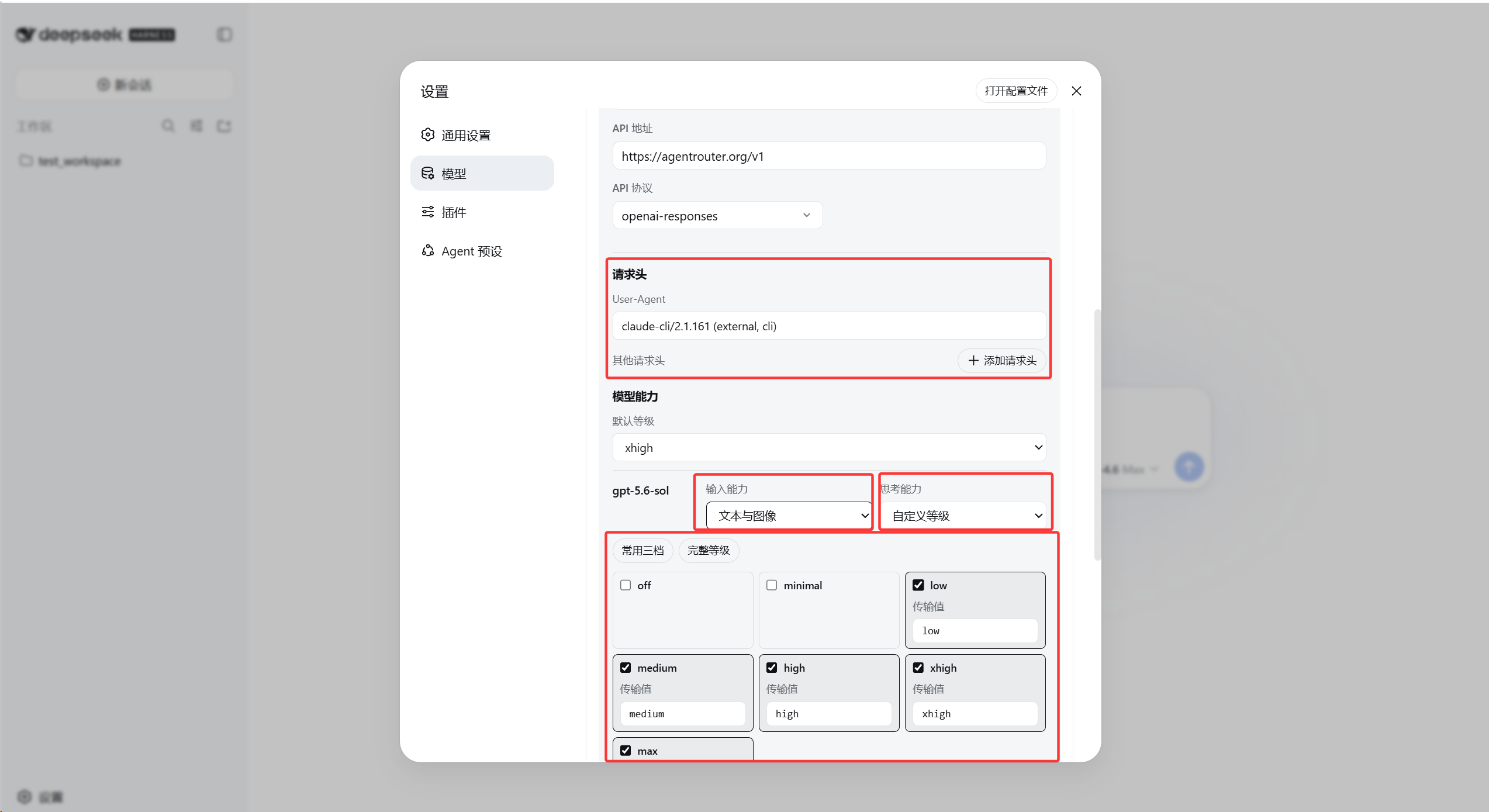
自定义提供方设置
插件会在原有的自定义提供方表单中插入请求头和模型能力配置。红框区域展示了 User-Agent、其他请求头、图像输入、默认思考等级以及每个模型的思考等级映射。
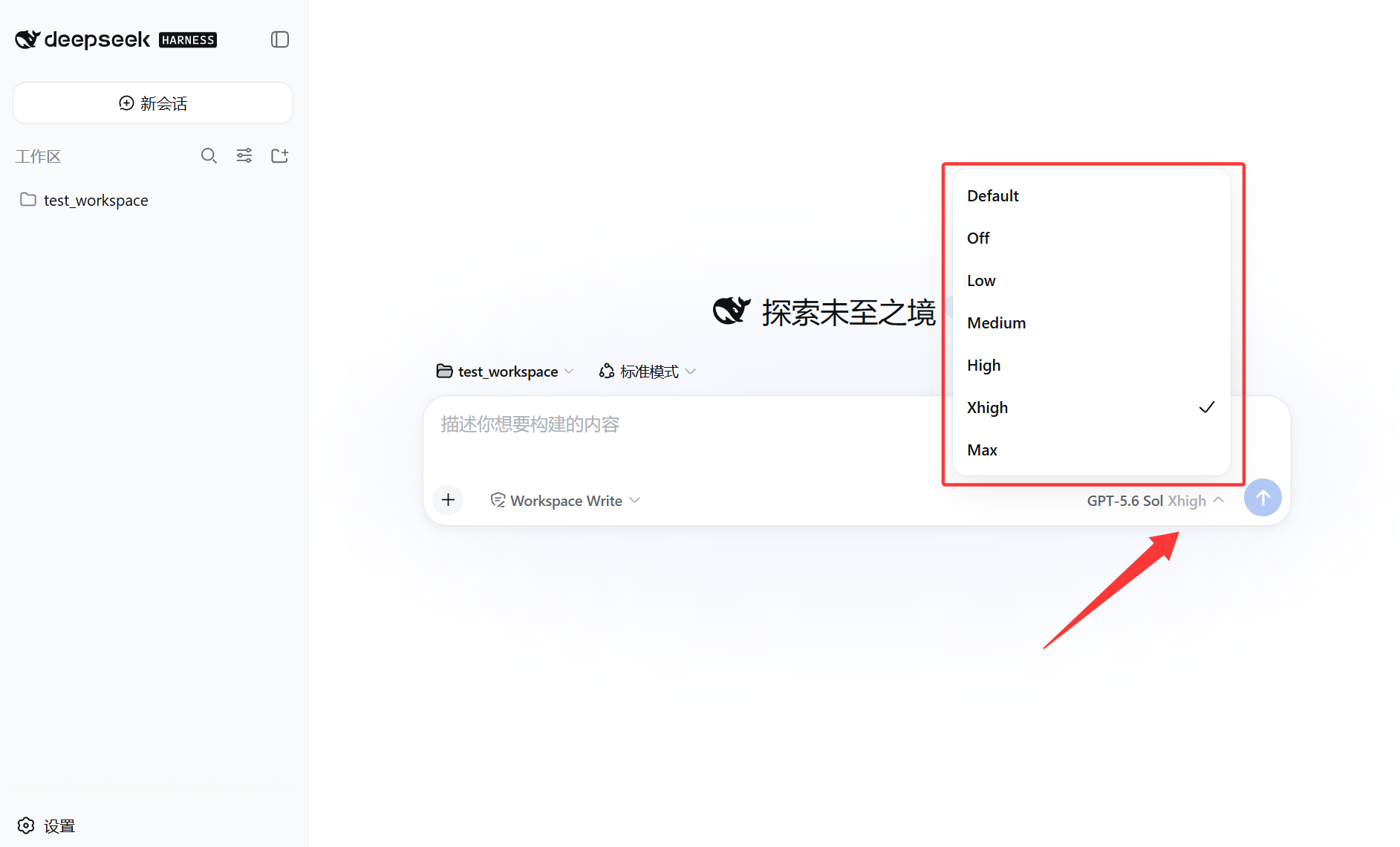
思考等级选择器
启用的思考等级会出现在对话输入框中。图中提供 Default、Off、Low、Medium、High、Xhigh 和 Max,并选择了 Xhigh。
安装
安装前准备
- Node.js
^22.19.0 或 >=24.0.0,建议使用 Node.js 24 LTS。
- Git,用于从 GitHub 获取插件。
- pnpm。
dsh plugin 会在 Web profile 目录中调用 pnpm 管理插件。
- DeepSeek Harness
0.1.1-rc.2 或兼容版本的 web profile,并且原生支持 supportsDeveloperRole。
可先在 PowerShell 中检查环境:
node --version
npx --version
git --version
corepack enable
pnpm --version
如果 corepack enable 因权限不足失败,请使用管理员 PowerShell 再执行一次,或者按照 pnpm 官方安装说明安装。
安装、升级或卸载插件前,建议先停止正在运行的 WebUI,操作完成后再重新启动。
方法一:安装 Release TGZ(推荐)
这种方式安装经过测试的固定版本,不会随着 main 分支变化。安装 v0.5.0:
npx --yes -p @deepseek-ai/dsh dsh plugin --profile web add https://github.com/supersealwqas/dsh-custom-provider-settings/releases/download/v0.5.0/dsh-custom-provider-settings-0.5.0.tgz
安装完成后启动 WebUI:
npx --yes -p @deepseek-ai/dsh dsh web
WebUI 默认地址为 http://127.0.0.1:3080。如果已经全局安装 dsh,可以使用更短的 dsh plugin ... 和 dsh web。
方法二:从 GitHub 主分支安装
这种方式直接安装仓库当前的 main 分支,适合希望立即获取最新改动的用户。首次运行时,npx 会下载官方 DSH NPM 包及其依赖:
npx --yes -p @deepseek-ai/dsh dsh plugin --profile web add github:supersealwqas/dsh-custom-provider-settings
安装完成后启动 WebUI:
npx --yes -p @deepseek-ai/dsh dsh web
方法三:从本地仓库安装
这种方法适合修改或调试插件。进入本仓库后生成 TGZ 安装包,再安装到 Web profile:
New-Item -ItemType Directory -Force .\dist
npm pack --pack-destination .\dist
npx --yes -p @deepseek-ai/dsh dsh plugin --profile web add .\dist\dsh-custom-provider-settings-0.5.0.tgz
npx --yes -p @deepseek-ai/dsh dsh web
dist 目录和 TGZ 文件已被 .gitignore 忽略,不会上传到仓库。
升级
停止 WebUI 后,再次执行对应的 add 命令即可更新插件,不需要先卸载。使用 TGZ 方式时,请把安装命令中的版本号和文件名改为目标版本,可用版本见 Releases。完成后重新启动 WebUI。
卸载
npx --yes -p @deepseek-ai/dsh dsh plugin --profile web remove dsh-custom-provider-settings
重新启动 WebUI 后,插件加入的配置区域和功能会被移除;已经写入 settings.yaml 的全局请求头和提供方扩展字段不会被主动删除。
使用方法
- 打开“设置” > “模型”。
- 在模型列表顶部的“全局模型请求头”区域填写
User-Agent 或其他请求头。留空表示继续使用 Harness 内置默认请求头。
- 需要时编辑带“自定义”标记且已经包含模型的提供方,或者选择“添加提供方” > “添加自定义提供方”并填写模型。
- 在插件插入的“请求头”区域配置仅针对该自定义提供方的请求头;同名时由这个局部值覆盖全局值。
- 如果兼容的 OpenAI 协议自定义提供方拒绝
developer 角色,请勾选“使用 system 角色发送系统提示词”。已有原生 supportsDeveloperRole: false 配置会自动显示为已勾选。
- 在“模型能力”中选择每个模型的输入能力和思考能力。只有 API 和模型都支持图像输入时,才选择“文本与图像”。
- 使用原表单的“保存”或“创建提供方”按钮。Harness 原表单保存成功后,插件会继续保存扩展字段。
- 新建对话,选择模型;全局请求头会自动用于该模型请求。
“获取可用模型”会使用同一表单中当前填写的请求头,包括尚未保存的值。因此,必须依赖特定 User-Agent 或其他请求头的接口也可以正常获取模型列表。
全局请求头也会用于模型发现请求。请求头合并顺序为 Harness 默认值、全局请求头、自定义提供方局部请求头,因此局部同名字段的优先级最高。
全局和自定义提供方局部的 User-Agent 输入框都提供以下预设:
claude-cli/2.1.161 (external, cli)claude-cli/2.1.161claude-code/1.0.0claude-code/0.1.0Kilo-Code/1.0
选择预设后会替换输入框当前内容;输入框仍然可以手动编辑,也可以填写列表之外的任意 User-Agent。
验证图像输入
- 将模型的输入能力设为“文本与图像”,然后保存提供方。
- 使用该模型新建对话。
- 上传一张包含唯一字符串的 PNG 或 JPEG,例如
VISION-7392。
- 要求模型只返回图片中看到的字符串。
模型正确返回字符串,说明 Harness 已接受附件,并且接口成功处理了图片。这个设置只是向 Harness 声明模型能力,无法让原本不支持视觉输入的 API 或模型获得图像识别能力。
system 角色兼容
这个复选框只是 DSH 原生 pi-ai 兼容配置的 WebUI,不会由插件拦截或改写 JSON 请求体。
- 勾选:为当前自定义提供方写入
compat.supportsDeveloperRole: false。
- 取消勾选:只删除
supportsDeveloperRole,恢复 DSH/pi-ai 自动检测。
- 作用范围:影响当前提供方下面的所有模型,不影响其他提供方。
- 字段保留:不会删除同一
compat 下的 thinkingFormat、supportsReasoningEffort 等其他配置。
只有原生 pi-ai 兼容类型支持该字段的 OpenAI 协议自定义提供方才会显示此选项。
保存的配置
下面的示例展示了 settings.yaml 中实际的命名空间层级:
dsh-custom-provider-settings:
  globalHeaders:
    User-Agent: my-global-client/1.0
    X-Client-Name: all-models

llm-pi-ai:
  providers:
    agdsf:
      headers:
        User-Agent: my-client/1.0
        X-Client-Name: my-client
      reasoning: high
      compat:
        thinkingFormat: deepseek
        supportsDeveloperRole: false
      models:
        - id: example-model
          input: [text, image]
          reasoningEfforts:
            low: low
            medium: medium
            high: high
请求头值会以普通文本存入 settings.yaml。API 密钥和其他秘密信息应放在 Harness 的凭据字段中,不要写进自定义请求头。
清空全局请求头会删除全局覆盖配置,并恢复 Harness 原有的请求头行为;清空某个提供方请求头只会清除该提供方的额外覆盖。
常见问题
页面没有显示插件配置
确认插件已安装到 web profile,并在安装后重启 WebUI。全局请求头区域位于“模型”列表顶部;自定义提供方中没有模型时,不会出现可编辑的模型能力配置。
“获取可用模型”仍然失败
先确认 Base URL、API Key 和 API 协议正确,再检查接口要求的 User-Agent 或其他请求头是否已经填写。插件会把表单中尚未保存的请求头一起用于本次模型列表请求。
对话中没有思考等级或图像上传入口
保存提供方后新建对话并重新选择模型。思考等级必须在对应模型上启用;图像上传还要求该模型被声明为“文本与图像”。
第三方 DeepSeek 接口拒绝 developer 角色
编辑对应的兼容 OpenAI 协议自定义提供方,勾选“使用 system 角色发送系统提示词”并保存,然后新建对话。这个设置只作用于当前提供方,官方 DeepSeek 和其他自定义提供方的消息角色保持原样。
接口可以使用,但复选框显示未勾选
重新启动 WebUI 后再打开提供方编辑页面。复选框会读取原生 llm-pi-ai.providers.<provider>.compat.supportsDeveloperRole 的有效值。如果 YAML 中已经是 false,界面仍未勾选,请强制刷新页面,确保浏览器加载当前版本的插件前端代码。
兼容性与限制
- 当前版本基于 DeepSeek Harness
0.1.1-rc.2 的插件接口和 WebUI 开发。
- 全局请求头会注入所有模型渠道;自定义提供方专属的图像输入、思考等级、兼容性设置和请求头编辑器只挂载到 Harness 报告为
declared: true 的提供方。
- 插件不会修改 DeepSeek 官方和内置第三方提供方的模型配置,但全局请求头仍会作用于它们的 API 请求。
- 保存插件设置时,会保留原表单管理的模型名称、上下文窗口、最大输出值和其他字段。
- 当前“模型”页面没有提供方表单插件插槽。本插件通过原页面的无障碍标签定位表单,并在运行时挂载 React 控件,因此 Harness 以后修改表单结构时可能需要更新插件。
- 插件不会修改 DeepSeek Harness 源代码文件。
开发与验证
npm test
node --check client.js
npm pack --dry-run
致谢
思考等级客户端逻辑改编自 JuneLearn/dsh-reasoning-settings,遵循 MIT License。
许可证
本项目使用 MIT License,详见 LICENSE。许可证同时保留本仓库和改编来源的版权声明。


