
模型与 MCP
待识别

rea
morluto
Reverse engineer anything with agents, from app behavior down to native binaries.
PROJECT TOPICS
INSTALL REFERENCE
dsh plugin --profile web add github:sumarilkkxx/dsh-atlas
该命令指向仓库当前默认分支;尚无绑定当前 commit 的完整验证结果。
PROJECT README

English · 简体中文
A visual session workspace for DeepSeek Harness Web.
Keep DSH models, commands, tools, and history while reorganizing long sessions into cards and real branches.
Live Demo · Quick Start · Core Capabilities · Development · Design Guidelines
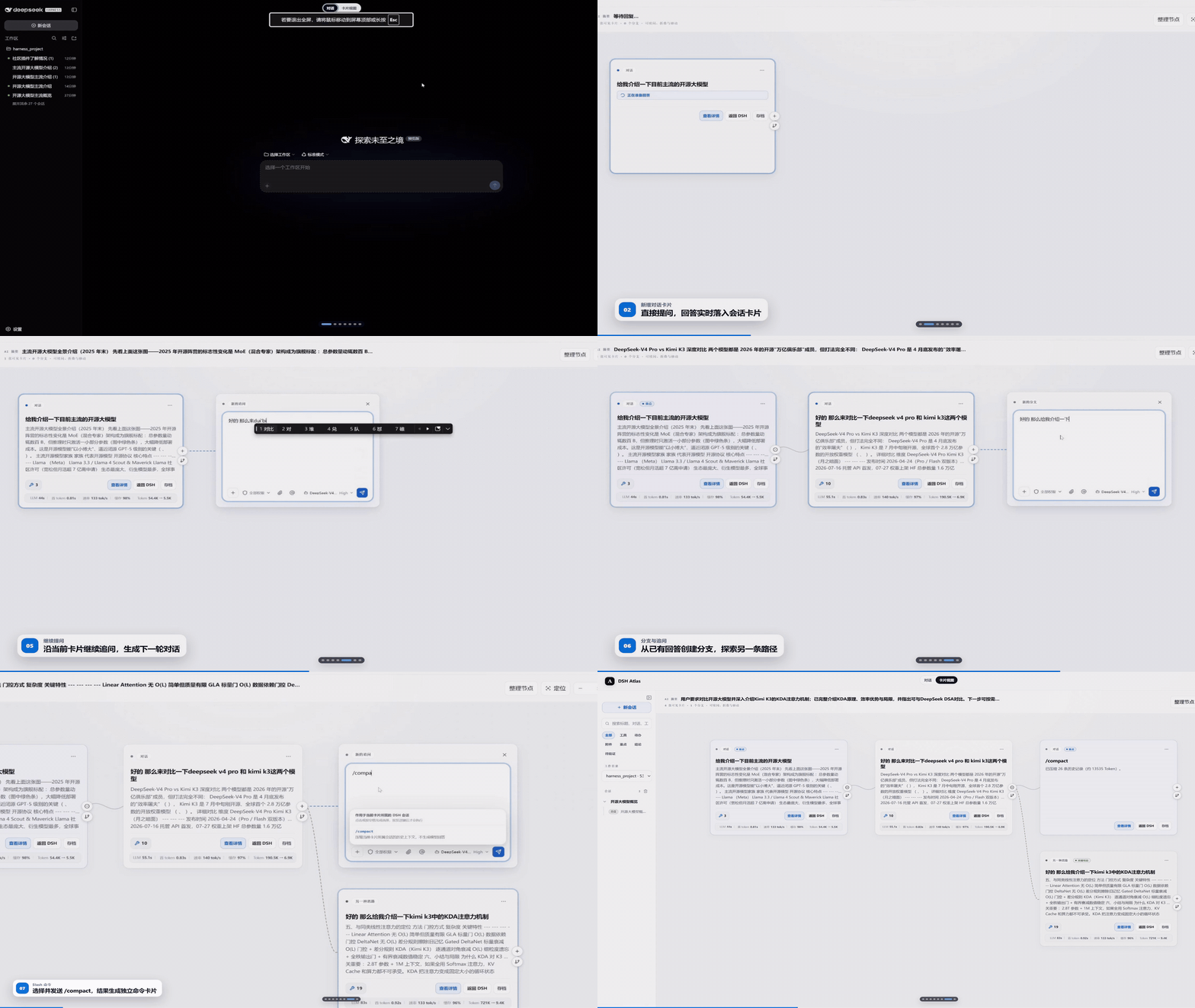
A 34-second loop: switch from native DSH to Atlas → create a card and send a prompt → watch the model response → open full conversation details → continue from the current card → branch from an existing answer → select and send
/compactfrom the Slash command menu → inspect the standalone command card → label cards as Important, Key Conclusion, or Needs Verification.Charts and visual artifacts in conversation details are generated by the optional dsh-artifact plugin. Atlas mounts and displays those tool outputs in their original message order.
DeepSeek Harness executes the work. Atlas makes that work easier to understand, organize, and continue.
Atlas treats the DSH Session Log as the single source of truth and projects each turn—user message, model response, and tool activity—into a card. From the canvas, you can review context, arrange nodes, mark conclusions, create real session branches, and keep using every model, permission preset, Slash command, Skill, and file context already connected to DSH.
Atlas does not duplicate the chat system or rewrite original conversations. It is a visual working layer built on top of DSH.
Install Node.js and pnpm, then install Atlas through the official DSH npm package and start DSH Web:
npx @deepseek-ai/dsh plugin --profile web add github:sumarilkkxx/dsh-atlas
npx @deepseek-ai/dsh web
DSH Web opens at http://127.0.0.1:3080 by default. Configure a model and choose a workspace in Settings, then click Card View in the top navigation. Atlas automatically resolves the active workspace and native session.
Source development requires Node.js
>= 22.19.0and pnpm. Full session, model, and command behavior must be verified inside a DSH Host.
| Capability | How it works in Atlas |
|---|---|
| Independent session canvases | Every primary session owns its own canvas. Creating a conversation creates a new DSH history and canvas instead of inserting a card into the current one. |
| Cards and real branches | Each turn becomes a card. Branches created from any answer use native DSH Fork and preserve their context relationship. |
| Live execution status | Cards show preparation, reasoning, tool calls, and generation as they happen. Once complete, the persisted DSH history becomes authoritative, preventing stale “Thinking” states. |
| Tools and artifacts | Details preserve original tool-event order and embed ECharts / ECharts-GL, Mermaid, and sandboxed render_html canvases. New artifacts can appear incrementally while details remain open. |
| Native input capabilities | Atlas reads the complete DSH model directory and supports providers, reasoning levels, real permission presets, Slash commands, files, conversation history, and Skills. |
| Aggregated performance metrics | Every card shows LLM time, time to first token, token rate, cache hit rate, and input/output tokens without exposing individual model-call breakdowns. |
| Canvas controls | Drag cards, pan the canvas, zoom from 50% to 400%, auto-arrange nodes, locate the active node, and collapse downstream cards. |
| Information organization | Search sessions and cards, then scan long-running work using Important, Key Conclusion, and Needs Verification states. |
New-session and follow-up cards expose the same session-level capabilities as native DSH:
@ context menu is organized into local files, conversation history, and Skills. History cards support multi-select and inject real message content.Enter to send, Shift + Enter for a new line, and Esc or the empty canvas to close menus.flowchart LR
DSH[DSH session history] --> Atlas[Atlas session canvas]
Atlas --> Cards[Conversation cards and branches]
Atlas --> Summary[Session summary]
Atlas --> Native[DSH models, commands, and tools]
Cards --> DSHAttachments are parsed locally in the browser. Supported formats include:
.docx; convert legacy .doc files before attaching.xlsx, .xls, and CSVLimits: 12 MB per file and 24 MB in total per send. Atlas extracts up to 48,000 characters from each file and 96,000 characters in total. Extracted text is written into the DSH history as context for that turn; Atlas does not upload or retain the original binary files.
git clone https://github.com/sumarilkkxx/dsh-atlas.git
cd dsh-atlas
pnpm install
pnpm build
Link the local directory to the DSH Web profile:
dsh plugin --profile web add link:D:\path\to\dsh-atlas
dsh web
Local preview and checks:
pnpm dev       # Vite UI preview, usually http://127.0.0.1:5173/
pnpm test      # Run the test suite
pnpm build     # Build installable frontend assets
pnpm preview   # Preview the production build
Do not open
dist/index.htmldirectly. Atlas depends on same-origin APIs and DSH Host context, so production capabilities must load through HTTP / DSH Web Server.
dsh-atlas/
├─ client.js                     # DSH browser bridge and view switching
├─ index.js                      # Host plugin, static assets, and API mounts
├─ cordis.patch.yml              # DSH Web profile injection configuration
├─ src/
│  ├─ app.tsx                    # React session canvas and native composer
│  ├─ index.css                  # Theme, card, detail, and menu styles
│  ├─ lib/conversation-graph.js  # Session nodes and performance aggregation
│  └─ server/store.js            # SQLite session-event projection
├─ dist/                         # Installable production assets
├─ docs/design/                  # Interface design principles
└─ assets/readme/ # README visual assets$DSH_HOME/atlas/atlas.db by default and stores display projections, branch relationships, card positions, and versioned summaries.render_html uses a restricted iframe and Content Security Policy that blocks external networking, forms, objects, and top-level navigation.React 19 · TypeScript · Vite 7 · Tailwind CSS 4 · Radix UI · React Markdown + GFM · SQLite (node:sqlite) · DeepSeek Harness / Cordis
CLASSIFICATION EVIDENCE
系统优先读取 GitHub Topics,再与站内分类词典和词根规则比对。当前命中: deepseek。
morluto
Reverse engineer anything with agents, from app behavior down to native binaries.

deepseek-ai
DeepSeek Harness: Everything is a Plugin.

nexu-io
The 1st Collaborative AI Design Agent Workspace. Local-first and open source. Create motion, prototypes, websites, apps, dashboards, presentations, images, and videos with your team and AI agents. Share work, exchange feedback, and iterate together in one workspace.