

Agent 与会话
插件

nuwa-skill
alchaincyf
你想蒸馏的下一个员工,何必是同事。蒸馏任何人的思维方式——心智模型、决策启发式、表达DNA。Distill how anyone thinks.
PROJECT TOPICS
INSTALL REFERENCE
dsh plugin --profile web add github:stickyfinger7/dsh-quote-annotation
该命令指向仓库当前默认分支;尚无绑定当前 commit 的完整验证结果。
PROJECT README


Quote a passage from a DeepSeek Harness (DSH) conversation, attach an optional note, and send it with your next message as structured reference context. The quote never enters your draft and never shows up as raw JSON in Chat.
中文 · Changelog · Maintainer notes
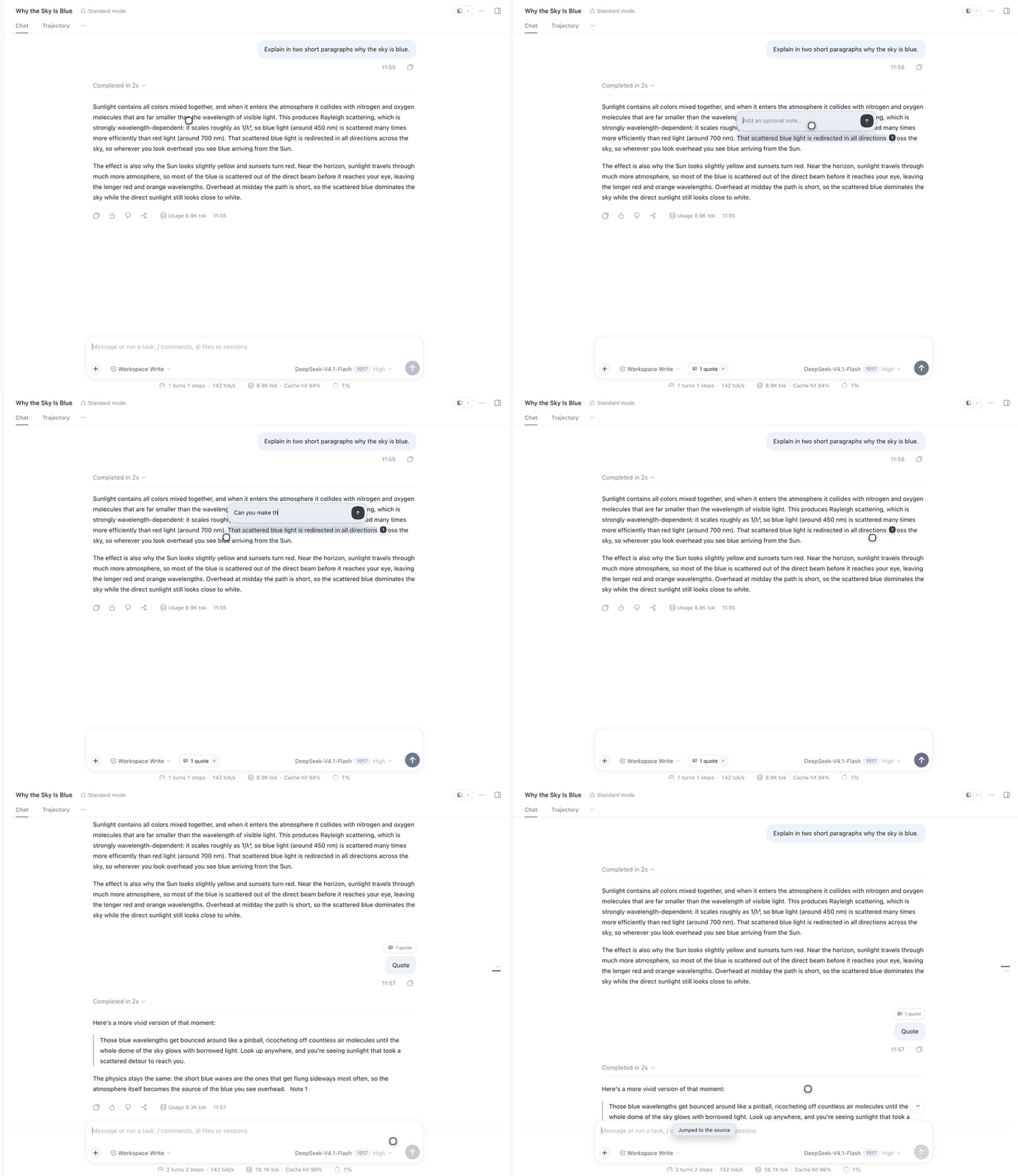
Select → Add to chat → optional note → send with the composer still empty. The reply keeps a Note N marker: hover to preview the quote, click to jump back to the source. The Chinese demo is here; step-by-step stills live in docs/media.
Enter confirms, Shift+Enter inserts a newline.注释 N marker appears in the assistant reply at the paragraph that mentions the quote. Hover to preview, click to jump back to the source.UI copy is Chinese for a Chinese DSH UI (
添加到对话,N 条注释,注释 N) and English otherwise (Add to chat,N quotes,Note N).
selection ──► client ──► POST /dsh-quote-annotation/add
                              │
                              ▼
                       pending store (Host)
                              │
                    agent/pre-step (next user message)
                              │
                              ▼
        user message + hidden context message
source.kind = "conversation-quote"user/message after the direct user message. Chat hides ordinary context nodes, so the raw reference block never renders in the conversation.source.references carries the quote, the optional annotation, and source metadata (nodeKey, anchorKey, turn, kind).GET /dsh-quote-annotation/sent backfills sent records from the Session log, so historical quotes get pills after a Host restart.U+2063) to keep the native send button enabled. The Host strips it before the model step and falls back to (引用).[data-chat-flow-kind="user"][data-chat-turn=…]; the React tree is never overridden.turn:index.0.2.x with the Web client modules (DSH Desktop or dsh web), including
@deepseek-ai/dsh-client-locale for the language switch.web, desktop, …).>=22.19.0 for the Host.From GitHub:
dsh plugin --profile web add github:stickyfinger7/dsh-quote-annotationPin a release:
dsh plugin --profile web add github:stickyfinger7/dsh-quote-annotation#v1.1.0DSH Desktop installs into its own profile:
dsh plugin --profile desktop add github:stickyfinger7/dsh-quote-annotationFrom a local checkout (useful while developing):
git clone https://github.com/stickyfinger7/dsh-quote-annotation.git
dsh plugin --profile web add ./dsh-quote-annotation
Restart the profile once — Host routes and agent/pre-step load at Host startup — then refresh an open page.
Enter.N 条注释 and the send button is enabled.N 条注释 pill appears above the user message; click it to jump to the source.注释 N appears in the assistant text; hover to preview.## Quoted conversation references.To disable the plugin without uninstalling, set disabled: true on the quote-annotation entry in the profile's cordis.patch.yml.
Defaults live in cordis.patch.yml and can be overridden in the profile patch under the quote-annotation entry:
| Option | Default | Meaning |
|---|---|---|
maxQuotes |
8 |
Pending quotes kept per session |
quoteMaxChars |
8000 |
Max characters per quoted passage |
annotationMaxChars |
4000 |
Max characters per annotation |
pendingTtlMs |
86400000 |
How long a pending quote stays alive |
Tested with DSH 0.2.1-rc.3 (Web).
Client-side selectors:
[data-conversation-scroll][data-chat-flow-kind="user"][data-chat-turn][data-chat-node-key] / [data-chat-anchor-key]Host-side contracts:
agent/pre-step waterfallctx.sessions.get(id).snapshotEvents() for historical backfillIt deliberately does not depend on conversation.draftContexts, native Lexical chips, or the reference pipeline.
npm run check     # node --check on both sources
npm test          # node:test smoke tests
npx prettier@3 --write lib test
There is no install step: the plugin has no runtime or dev dependencies.
See AGENTS.md for the runtime model and the invariants to keep.
CLASSIFICATION EVIDENCE
系统优先读取 GitHub Topics,再与站内分类词典和词根规则比对。当前命中: context。
alchaincyf
你想蒸馏的下一个员工,何必是同事。蒸馏任何人的思维方式——心智模型、决策启发式、表达DNA。Distill how anyone thinks.

freestylefly
Prompt as Code | GPT Image 2 / 2.5 提示词与案例库,530+ 个案例、20+ 套工业级模板与可复用 Skills,新增 2.5 同提示词对比专区,附完整提示词与生成记录,持续更新。

titanwings
Distilly — Distill how they think into reusable Skills for any Agent or Bot. Formerly Colleague Skill(原同事 Skill).