
模型与 MCP
待识别

rea
morluto
Reverse engineer anything with agents, from app behavior down to native binaries.
PROJECT TOPICS
PROJECT README
Let your MCP client talk to DeepSeek Harness sessions~
@stellarie/dsh-session-bridge (≧∀≦)
Unofficial. This project has no tie to DeepSeek. It targets DeepSeek Harness
0.2.1-rc.3. It also runs on0.2.1-rc.2.
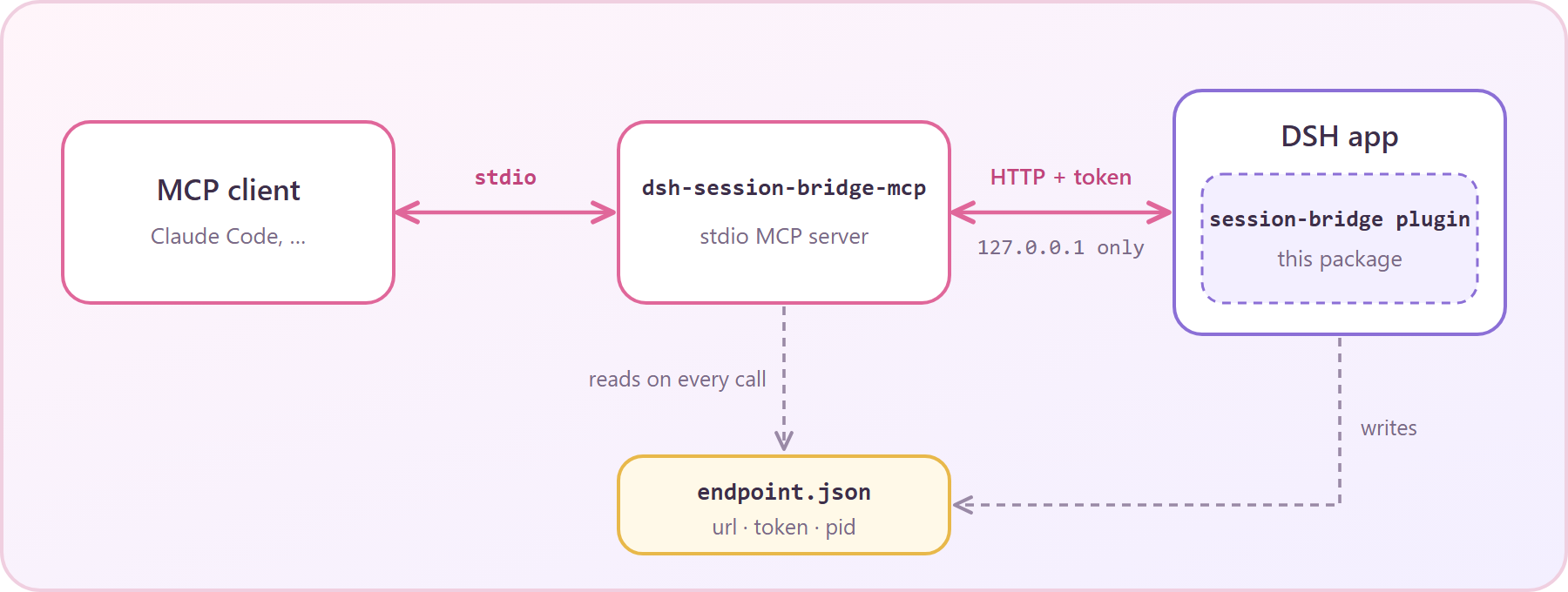
DeepSeek Harness (DSH) is a desktop agent app. This package lets another agent drive it.
You get two small parts:
Your client opens a normal DSH session, sends it messages, waits for the reply, and reads it. The session shows in the app like any other session. You can watch it, or take it over, any time ♡
0.2.1-rc.3 or 0.2.1-rc.2, with a profile you can edit.^22.19.0 or >=24.0.0.Use the dsh CLI. Replace default with the name of your profile.
dsh plugin --profile default add @stellarie/dsh-session-bridgeOr install straight from GitHub. The install builds the package on your machine, so the profile must allow build scripts:
dsh plugin --profile default add github:stellarie/dsh-session-bridgeOr edit the profile by hand. Add the package to the profile package.json. Then list it in the bundles, after @deepseek-ai/dsh-web-app.
{
  "dependencies": {
    "@stellarie/dsh-session-bridge": "^0.1.0"
  },
  "dsh": {
    "profile": {
      "bundles": [
        "@deepseek-ai/dsh-base",
        "@deepseek-ai/dsh-web-app",
        "@stellarie/dsh-session-bridge"
      ]
    }
  }
}
The package ships a cordis.patch.yml. It inserts the plugin row for you. Restart the app.
The log shows session-bridge: serving http://127.0.0.1:…/session-bridge.
Point your MCP client at the copy inside the profile (<profile-dir> is your DSH profile directory):
claude mcp add dsh-session-bridge -- node <profile-dir>/node_modules/@stellarie/dsh-session-bridge/lib/mcp.jsOr run it from npm, with no profile install:
claude mcp add dsh-session-bridge -- npx -y -p @stellarie/dsh-session-bridge dsh-session-bridge-mcpAny other MCP client works too. The command is dsh-session-bridge-mcp. The transport is stdio.
The MCP server reads the endpoint file on every call. An app restart needs no MCP restart.
| Tool | What it does |
|---|---|
dsh_list_sessions |
List sessions: id, title, preset, working directory, running or idle. |
dsh_open_session |
Open a session in the Workspace of cwd. The app creates the Workspace when none exists. Reuses the newest idle session with the same preset and cwd. Pass reuse: false for a new one. A new session starts at effort (default high). |
dsh_send |
Send a message. Mode queue runs after the current turn. Mode steer joins the running turn. Returns afterSeq. |
dsh_wait |
Wait until the session ends a turn after afterSeq. Default 600 s, maximum 600 s. |
dsh_read |
Read your prompts and the assistant text after afterSeq. Tool calls and thinking are left out. |
dsh_cancel |
Interrupt the running turn. Queued messages stay queued. |
A typical round trip:
dsh_open_session { cwd: "C:/repo", preset: "my-preset" }  → { sessionId, reused, workspaceId, effort }
dsh_send         { sessionId, text: "Fix the failing test" } → { accepted, afterSeq: 41 }
dsh_wait         { sessionId, afterSeq: 41 }               → { ended: true, lastSeq: 58 }
dsh_read         { sessionId, afterSeq: 41 }               → { messages: [ … ] }
dsh_open_sessiondefaultspresettoyuu, the author's own preset. Pass your own preset id. See BACKLOG 1.
A new session sets its effort through the app's model selection. The app also saves that effort as its default for every session. See BACKLOG 5.
The bridge gives full owner control of your sessions. Read this part, please.
Every request must pass these checks, in this order:
Origin header. Browser pages always send one, so they are refused.Host (127.0.0.1, localhost, or [::1]) with the server port.POST only, with a JSON body of at most 1 MiB.create, prompt, page, projections, list, cancel, selectModel, modelCatalog. Workspace method: create.The token is 32 random bytes. The plugin mints a new one at each start.
It writes endpoint.json (url, token, pid, startedAt) with mode 0600 (POSIX) and deletes it on shutdown.
dsh_open_session creates a Workspace for cwd when none exists, and it saves the new session's effort as the app default.| Setting | Where | Default |
|---|---|---|
endpointPath |
plugin config in cordis.patch.yml |
$DSH_HOME/session-bridge/endpoint.json |
DSH_SESSION_BRIDGE_ENDPOINT |
environment of the MCP server | unset |
DSH_HOME |
environment | ~/.dsh |
Set the same path on both sides when you move the file.
pnpm install
pnpm run typecheck
pnpm test
pnpm run build
The build writes lib/index.js (the plugin) and lib/mcp.js (the MCP server).
MIT © stellarie. Made with ♡ (๑˃ᴗ˂)ﻭ
CLASSIFICATION EVIDENCE
系统优先读取 GitHub Topics,再与站内分类词典和词根规则比对。当前命中: mcp、model-context-protocol、deepseek。
morluto
Reverse engineer anything with agents, from app behavior down to native binaries.

deepseek-ai
DeepSeek Harness: Everything is a Plugin.

nexu-io
The 1st Collaborative AI Design Agent Workspace. Local-first and open source. Create motion, prototypes, websites, apps, dashboards, presentations, images, and videos with your team and AI agents. Share work, exchange feedback, and iterate together in one workspace.