
其他
完整应用

deepseek-harness
deepseek-ai
DeepSeek Harness: Everything is a Plugin.
PROJECT TOPICS
PROJECT README
English | 简体中文
Unattended scheduled-jobs plugin for DeepSeek Harness (dsh): run agent tasks (spawn a one-shot agent to execute a prompt through the full dsh toolchain) or command tasks (run a script directly) on a cron expression, a fixed interval, or a one-time instant. Complementary to @deepseek-ai/dsh-schedule — that one is persistent in-session reminders, this one is a host-side job scheduler: jobs belong to no interactive session and fire automatically while the process is up.
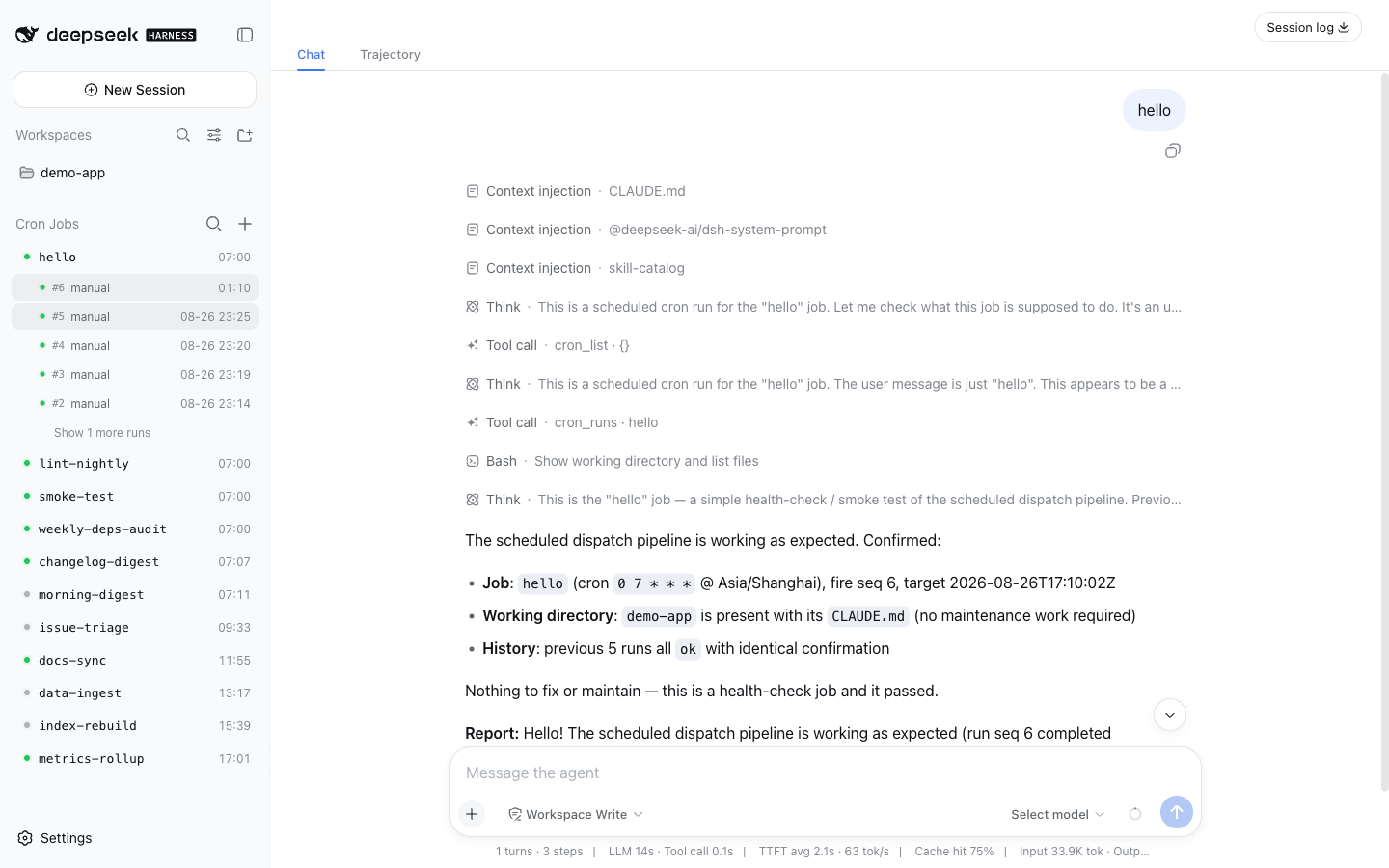
| Create a job | Row actions |
|---|---|
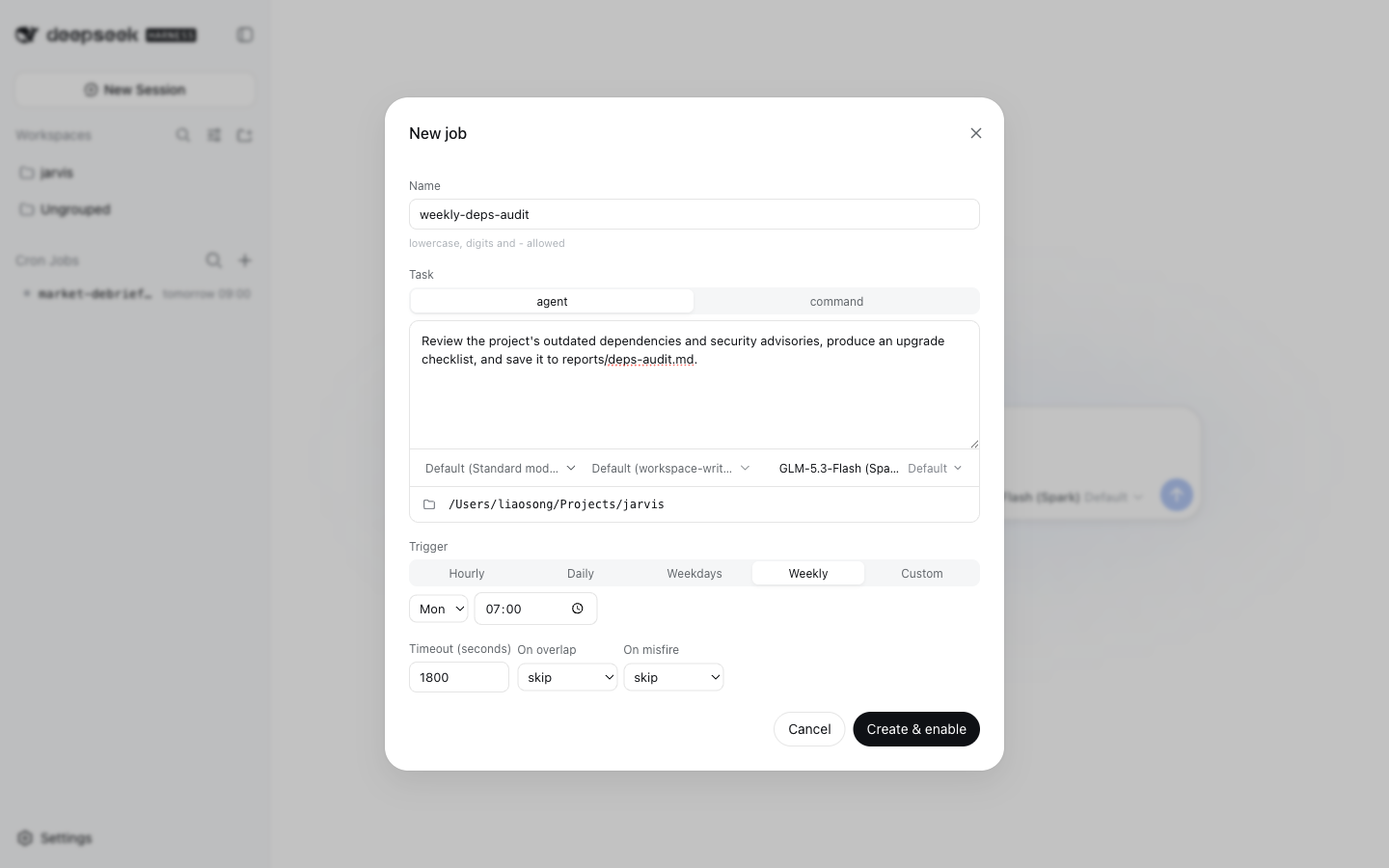 |
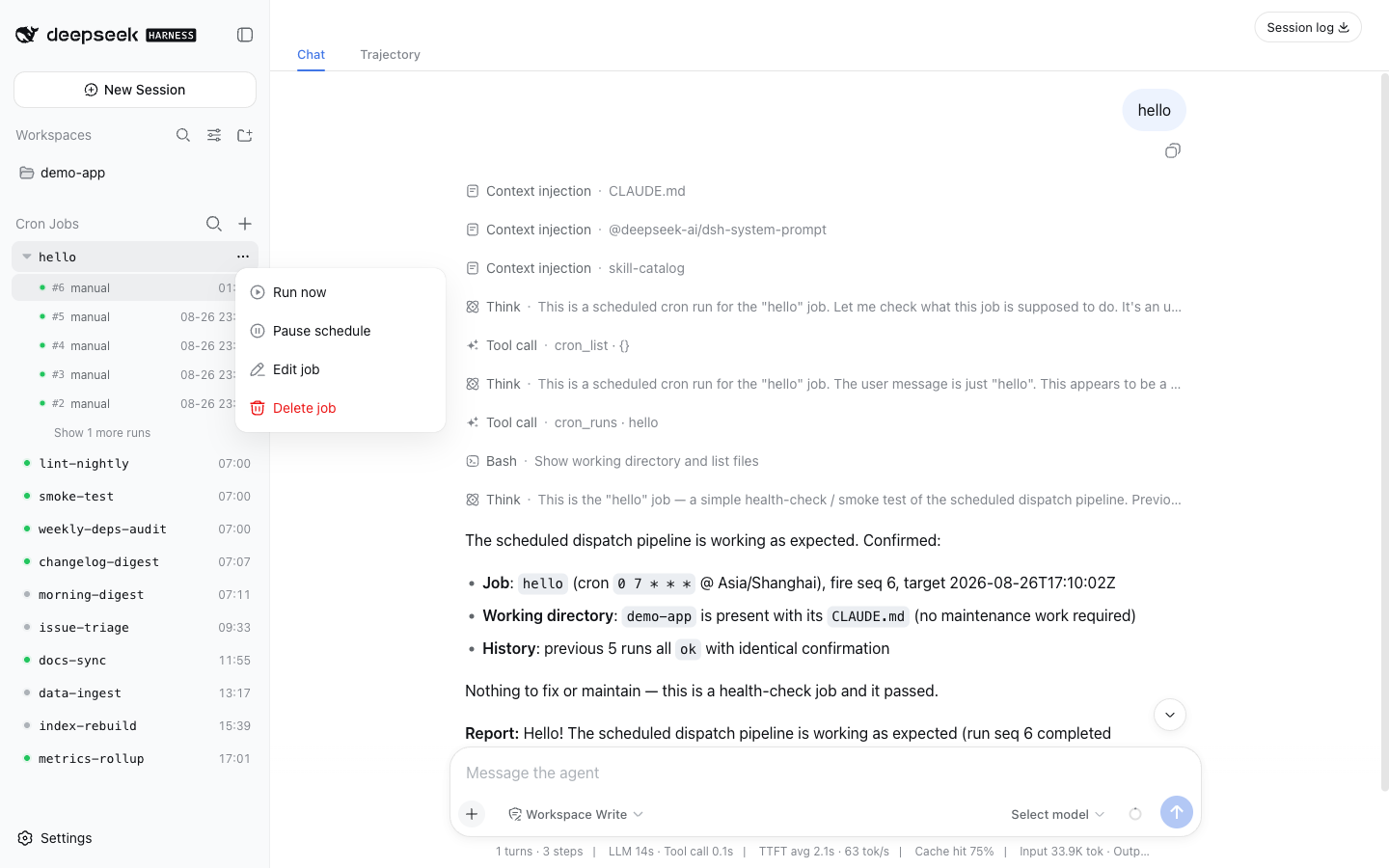 |
cron (5-field expression + explicit IANA timeZone; the process time zone is never consulted), everySeconds (anchor-aligned interval, 60s minimum), at (one-time RFC 3339 instant; a Z or numeric offset is required).+ in the sidebar, or cron_create from a session — persisted as "manual" jobs), and other plugins through the cron service (ctx.cron.registerJob, see Adding jobs from a plugin).agent (create a one-shot agent via ctx.agents.create, submit the prompt, wait for quiescence, take the last assistant message as the summary, dispose to finish — i.e. the dsh-headless one-shot recipe); command (spawn a child process, record exit code and output tail); callback (a plugin-registered handler run in this process — plugin jobs only, see Adding jobs from a plugin).ctx.storage.domain, domain name cron), never in session event logs.lastFiredMs is persisted before execution); missed occurrences are never replayed one by one (the misfire policy runs at most once, against the latest due occurrence); runs interrupted by a crash are repaired to aborted on the next startup.overlap: skip | queue | replace (when the previous run is still going: skip / queue the latest one occurrence / kill and restart); misfire: skip | runOnce (occurrences missed while the process was down: ignore / catch up once).With dsh-market installed, open Settings → Plugin Market, search dsh-cron, and install with one click — the market adds both the dependency and the profile bundle entry for you, and most installs go live after a page refresh.
Or install the release tarball from the command line (this only runs the package install — add "dsh-cron" to dsh.profile.bundles yourself, as shown below):
dsh plugin --profile web add https://github.com/squirrel20/dsh-cron/releases/latest/download/dsh-cron.tgzThe npm package named
dsh-cronis an unrelated project — install from the market or the release tarball, not from the npm registry.
In your profile's package.json:
{
  "dependencies": { "dsh-cron": "link:/path/to/dsh-cron" },   // or a git checkout / release tarball
  "dsh": { "profile": { "bundles": [ /* …existing bundles… */, "dsh-cron" ] } }
}Declare always-on jobs by overriding the config in the profile's cordis.patch.yml — or skip this entirely and create jobs from the UI or a session (see Usage):
- id: dsh-cron
  config:
    historyLimit: 50
    jobs:
      - name: daily-log-review
        schedule: { cron: "0 7 * * *", timeZone: "Asia/Shanghai" }
        task:
          kind: agent
          prompt: Read yesterday's logs under logs/, summarize anomalies and suggest remediations.
          cwd: /path/to/project
          timeoutSeconds: 1800
        policy: { overlap: skip, misfire: skip }
        delivery:
          argv: ["/usr/local/bin/notify", "--stdin"]
          onlyOnFailure: true
      - name: heartbeat
        schedule: { everySeconds: 3600 }
        task: { kind: command, argv: ["./scripts/heartbeat.sh"], cwd: /path/to/project }
    sessionGc:            # optional; defaults: enabled: true, graceMinutes: 30, root: ~/.dsh/sessions
      enabled: true
      graceMinutes: 30
Job misconfiguration (duplicate names, invalid expressions, missing time zone, …) fails loud at mount time — it is never swallowed silently.
The same block takes an optional maxConcurrentRuns: 0 (the default) means unbounded — unrelated jobs have no reason to queue behind each other, and a job's own overlap is already governed by policy.overlap. Set a positive number only to deliberately cap host-wide load; 1 serializes every job, so jobs due at the same minute run one after another.
Click + in the sidebar's Cron Jobs section header. The New job dialog configures everything on one screen:
- and _; no spaces.cron (5-field expression + IANA time zone), interval, or one-shot.agent (a prompt executed unattended through the full dsh toolchain) or command (an argv to spawn).Create & enable persists the job (a "manual" chip marks it apart from config-declared jobs). Afterwards, each row's ⋯ menu offers Run now / Pause schedule / Edit job / Delete job; clicking a row expands its run history; clicking an agent run opens that run's full session replay, and clicking a command run (or a pruned-session agent run) opens its run-detail page over the center column.
Just ask the agent in any session:
Every Monday at 07:00 review our outdated dependencies and save an upgrade checklist to reports/deps-audit.md.
The bundled cron-create skill (auto-registered when the host has a skill registry) walks the model through collect → confirm → create → verify, calling the cron_create tool under the hood; cron_delete removes a manual job the same way. Jobs created from a session are ordinary manual jobs — the exact same overlay the web dialog writes — so they show up in the sidebar immediately and can be edited there later. The read/steer tools (cron_list, cron_runs, cron_run_now, cron_enable, cron_disable) work on config-declared jobs too.
A schedule often belongs with a piece of software rather than with one host: the package that ships a refresh script also knows how often it should run. Such a package can register its own jobs — installing it creates them, unmounting it retires them, and nobody transcribes a spec into a dialog on every machine.
The provider injects the cron service and registers inside an effect, exactly like a dsh-ingest source plugin:
export const name = "cron-source-kb";
export const inject = ["cron"];

export function apply(ctx, config) {
  ctx.effect(() => ctx.cron.registerJobs([
    {
      name: "kb-refresh",
      description: "Re-index the knowledge base",
      schedule: { cron: "30 7 * * *", timeZone: "Asia/Shanghai" },
      task: { kind: "command", argv: ["/bin/sh", `${config.repoRoot}/scripts/kb-refresh.sh`] },
      policy: { overlap: "skip", misfire: "runOnce" },
    },
  ], { owner: "dsh-cron-source-kb" }), "kb.cron()");
}
A provider that wants to run its own code — rather than shell out to a script or curl its own host — registers a callback task and passes the function:
ctx.effect(() => ctx.cron.registerJob({
  name: "ingest-notes",
  schedule: { cron: "10 23 * * *", timeZone: "Asia/Shanghai" },
  task: { kind: "callback", timeoutSeconds: 700 },
}, {
  owner: "dsh-ingest-source-notes",
  run: async ({ signal }) => {
    const record = await service.run("notes-research", { signal });
    return { ok: record.status === "ok", summary: `${record.itemsNew} new` };
  },
}), "notes.cron()");
The handler receives { job, target, seq, signal } and returns a summary string or { ok?, summary?, error? }; throwing settles the run as failed, and the timeout aborts signal. callback is the one task kind config and cron_create cannot use — a spec on disk has nobody to supply the function — so it is refused there by name.
cron_create use, and it is validated synchronously: a bad schedule throws inside the provider's own apply, naming the field.owner is required — the overlay uses it to tell the user which package brought a job.registerJob returns a disposer (registerJobs returns one for the batch, and rolls back if any member is defective, so a provider never mounts half its schedules).Plugin jobs are ordinary jobs in the list — the same run history, run-now, pause and session jump-through — but they are read-only in the overlay and to cron_create / cron_delete: editing means editing the provider, and removing means uninstalling it (updateJob / cron_delete answer plugin_job). Pausing is the exception: an enable override is the user's, and it survives re-registration.
A runnable copy of the provider above lives in examples/dsh-cron-source-demo — add it to a profile's dependencies and dsh.profile.bundles to watch a plugin job appear.
Unmounting a provider stops its jobs but keeps their dispatch state and whole run history — reinstalling resumes the same job rather than starting a stranger under its name. What is left behind shows as an orphan row (marked "plugin gone", sorted last, no next occurrence) whose only action is Delete job, which clears that leftover history for good.
The runs table keeps the most recent historyLimit entries keyed by <job>#<seq>:
{
  "job": "daily-log-review", "seq": 42,
  "target": "2026-08-26T23:00:00.000Z",       // the occurrence this run is for
  "startedAt": "…", "finishedAt": "…",
  "status": "ok",                              // ok|failed|timeout|skipped-overlap|replaced|aborted
  "summary": "…",                              // agent's last reply / command output tail (truncated)
  "sessionId": "cron-daily-log-review-…"       // agent task's session, inspectable under ~/.dsh/sessions
}[CRON RUN] framing that states the run is unattended and questions are forbidden. It is injected as a scoped system-prompt section, so the user message holds only the job's prompt; hosts without the system-prompt service fall back to prepending it to the message.cron_list / cron_runs / cron_run_now / cron_enable / cron_disable) observe and steer them but never create or delete them. Runtime "manual" jobs are the exception: cron_create / cron_delete manage those from a session, guided by the bundled cron-create skill (registered into the host's skill registry when one exists), through the same manual-table overlay as the web dialog.source: "plugin") are owned by their provider package: they can be run, paused and inspected, but not edited or deleted from the overlay or a session — that is what installing and uninstalling the provider is for. Unmounting a provider leaves an orphan row holding the job's history until the user deletes it.queue depth is 1: only the single latest squeezed-out occurrence is kept.dsh-headless shape), so its conversation stays openable after the run settles. A conversation that is on screen at that exact moment returns to the workspace, and the run row reopens the persisted transcript (the client re-pulls the host session list once when the id is no longer listed). Run Sessions persisted by earlier versions still carry the origin: "subagent" header and stay unopenable.origin: "subagent" Sessions), so every run — live or settled — is listed there; a high-frequency job accumulates entries, and a settled run can be resumed from the sidebar without the [CRON RUN] framing.When the profile includes @deepseek-ai/dsh-web-app, the plugin also ships a
sidebar overlay: a clock badge at the sidebar foot opens a panel listing
every job (kind, schedule, next occurrence, latest outcome); a job row
drills into its recent run history; clicking a command run (or an agent
run whose session was pruned) opens a run-detail page over the center
column — status, scheduled/start/finish instants, duration, exit code,
argv, and the stored summary tail. Rows carry hover actions — run an idle job
now (the cron_run_now semantics), or stop the run in flight (the record
settles as killed; later occurrences are untouched). The panel's +
opens a create form (name; trigger presets — hourly/daily/weekdays/weekly,
compiled to plain cron shapes and mapped back onto the presets on edit, with
cron expression/interval/one-shot in a custom tier and the time zone taken
silently from the browser; agent/command task; working directory with a
browse dialog over the host's directory capability; timeout; overlap/misfire
policy); created jobs persist in the
storage domain's manual table, re-normalize on every boot, and show a
"manual" chip beside config-declared jobs — a config job with the same name
wins and evicts the manual copy. A manual job's drill-in view carries a
two-click delete (trash, then confirm) that drops the job and its whole run
ledger; config jobs and jobs with a run in flight are refused.
The browser half is lib/client.js (declared via exports["./client"] +
the dsh.client package field). The host half (lib/web.js) serves
GET /dsh-cron/api/state plus four writes — POST …/run-now, …/stop,
…/jobs, …/delete — which demand application/json bodies so cross-site simple
requests die before dispatch; routes register on ctx.webServer only while
a webserver is present, so headless profiles mount unchanged.
npm test # unit tests for the scheduling math (cron parsing, time zones, anchor alignment, misfire collapsing)CLASSIFICATION EVIDENCE
系统优先读取 GitHub Topics,再与站内分类词典和词根规则比对。当前命中: 无有效分类标签。
deepseek-ai
DeepSeek Harness: Everything is a Plugin.

anywhere-labs
为 DeepSeek Harness (DSH) 插件生态打造的现代化桌面端解决方案。万物皆「插件」,桌面本身也是「插件」。

awesome-dsh-plugin
A curated list of plugins for DeepSeek Harness (dsh) · DeepSeek Harness 插件精选列表