
其他
完整应用

deepseek-harness
deepseek-ai
DeepSeek Harness: Everything is a Plugin.
PROJECT TOPICS
PROJECT README
English | 中文


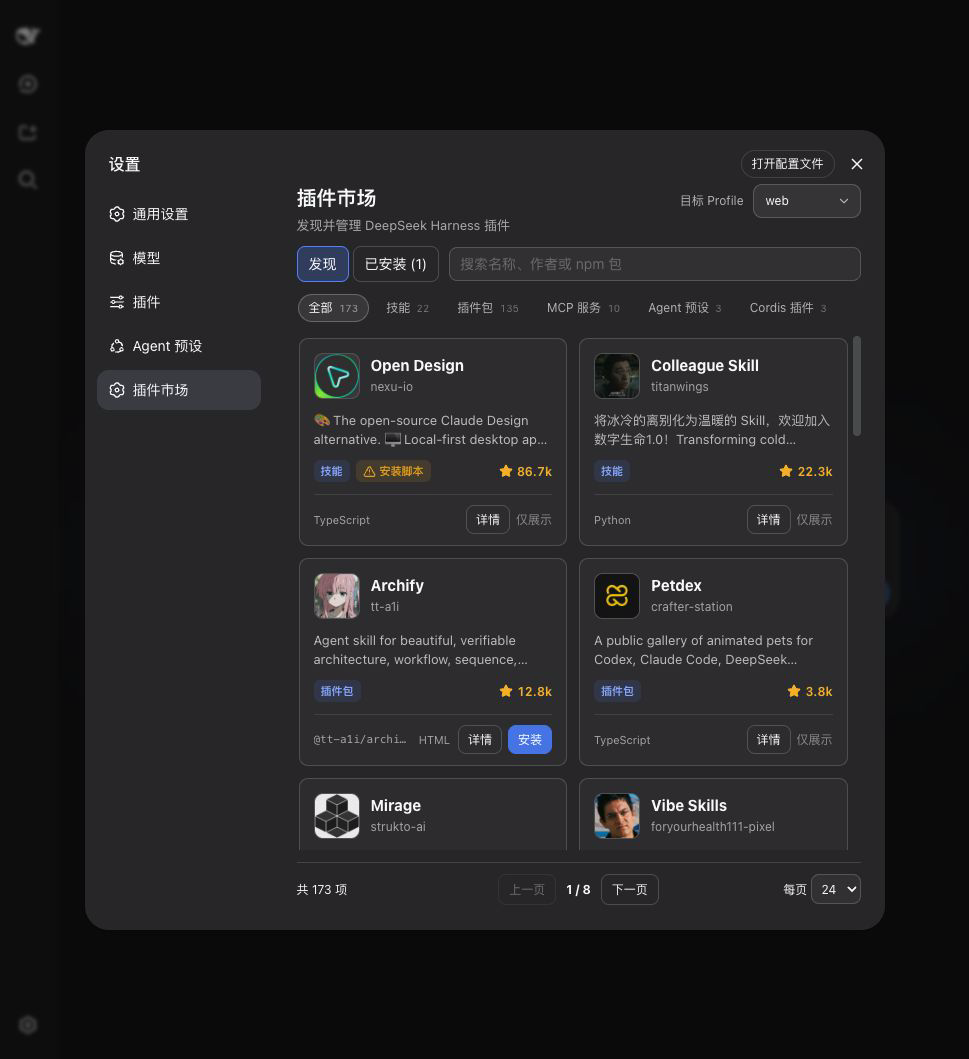
The visual plugin marketplace built into DeepSeek Harness Web settings and bundled with SpringBrand Desktop. Open Settings → Plugin Marketplace to browse and search the catalog, then install, update, or remove plugins.
You do not need DSH preinstalled.
Install the LTS version of Node.js, then close and reopen your terminal.
Install DSH and pnpm:
npm install --global pnpm @deepseek-ai/dshConfirm that DSH is available:
dsh --versionInstall the marketplace:
dsh plugin --profile web add @springbrand/dsh-plugin-marketplaceStart DSH Web:
dsh webKeep the terminal open. Your browser normally opens automatically; otherwise, open the http://127.0.0.1:... address printed in the terminal. Then go to Settings → Plugin Marketplace.
If dsh is still not found after reopening the terminal, use:
npx @deepseek-ai/dsh plugin --profile web add @springbrand/dsh-plugin-marketplace
npx @deepseek-ai/dsh webdsh plugin --profile web add @springbrand/dsh-plugin-marketplace
dsh webweb, headless, and other local profiles under ordinary DSH; SpringBrand Desktop limits operations to its active profile.bundle, installable, and npm.Plugins are third-party code. Catalog inclusion is not a security endorsement; install only sources you trust.
[Web settings]
      |
      v
[Local HTTP API from this plugin]
      |
      +--> [dshplugin.market/api/catalog]
      |
      +--> ordinary DSH: dsh plugin --profile <profile> add|update|remove <package>
      |
      +--> SpringBrand Desktop plugins: desktopPnpm.runPlugin()
      |
      +--> SpringBrand Desktop marketplace override: desktopPnpm.run()
Under ordinary DSH, the marketplace targets the running profile by default and can select another profile in the UI. SpringBrand Desktop exposes only its active profile, runs package operations through desktopPnpm, and requests an orderly application restart through desktopProfiles. Third-party plugins use runPlugin() so DSH reconciles their bundle layers. The marketplace's own profile override uses direct run() because its row already belongs to Desktop; reconciling it as another bundle would duplicate that row. The plugin does not provide arbitrary hot-mounting or seamless port handoff.
Under ordinary DSH the profile list is web, headless, the profile this process was launched with, and every directory under <DSH home>/profiles, sorted by name. The DSH home is DSH_HOME when set, otherwise ~/.dsh. profiles/node_modules is never offered as a target.
A profile appears in the list before it has been initialized, so a plugin can be installed into headless from a web session without creating the profile first. What the Installed view reports for each profile is that profile's own package.json dependency map — which is why it also lists packages that were installed outside this marketplace and are absent from the catalog. SpringBrand Desktop also reports the marketplace version bundled with the app; its first self-update creates a profile dependency that takes precedence after restart.
Override these fields in the profile's Cordis configuration:
config:
  profile: web
  catalogUrl: https://dshplugin.market/api/catalog
restartDelayMs: 1500profile: the profile used by an ordinary DSH process; read from the launch arguments by default. SpringBrand Desktop always uses its active profile.catalogUrl: the plugin catalog JSON URL; HTTP and HTTPS are supported.restartDelayMs: delay before restarting an ordinary DSH process, from 500 to 30000 milliseconds. SpringBrand Desktop owns its restart timing.Remove the package from the marketplace's Installed tab, or run:
dsh plugin --profile web remove @springbrand/dsh-plugin-marketplacenpm install
npm run checkMIT
CLASSIFICATION EVIDENCE
系统优先读取 GitHub Topics,再与站内分类词典和词根规则比对。当前命中: plugin-marketplace。
deepseek-ai
DeepSeek Harness: Everything is a Plugin.

anywhere-labs
为 DeepSeek Harness (DSH) 插件生态打造的现代化桌面端解决方案。万物皆「插件」,桌面本身也是「插件」。

walkinglabs
Harness engineering beginner tutorial, from 0 to 1