其他
完整应用

deepseek-harness
deepseek-ai
DeepSeek Harness: Everything is a Plugin.

sky-unicorn/dsh-enhanced-plugins
DeepSeek Harness(DSH)一站式增强套件,基于公开插件扩展点构建,无需修改 DSH Core。提供 Windows Launcher、桌面通知与动态桌宠、Plugin Community、MCP Server Manager、模型输入类型配置、最后一条消息编辑与重新生成,以及 Claude Code / Codex Subagents 实时控制。所有功能均可独立安装,支持全量部署、按需组合、升级迁移与安全卸载。
PROJECT TOPICS
PROJECT README
中文 | English
An enhancement suite for DeepSeek Harness (DSH): seven independently installable Cordis bundles plus one Windows companion.
Features · Quick start · Feature guide · Compatibility and migration · Configuration · Development
The installer only needs the stable “feature ID.” Every feature also has a self-contained selective package.
| Feature | Feature ID | Selective package | Platform and entry point | What it adds |
|---|---|---|---|---|
| Windows Launcher | windows-launcher |
dsh-enhanced-windows-launcher |
Windows Start menu | Tray controls for Web, Headless, profiles, source builds, and diagnostics |
| Desktop alerts and pet | notification |
dsh-enhanced-notification |
Windows; Settings → Desktop Pet | Task sounds, a custom WAV library, and a native animated pet |
| Plugin Community | plugin-market |
dsh-enhanced-plugin-market |
Web; Settings → Plugin Community | Discover community plugins and install through the DSH manager |
| MCP server manager | mcp-server-manager |
dsh-enhanced-mcp-server-manager |
Web; Sidebar Plugins → bundle → row configuration | Manage stdio / Streamable HTTP servers and import local configuration |
| Edit last message | edit-last-message |
dsh-enhanced-edit-last-message |
Web; latest user message | Change that turn and regenerate in the same session |
| Product subagents | sub-agent |
dsh-enhanced-sub-agent |
Web; Settings → Subagents | Enable or disable Claude Code / Codex tools in real time |
| Execution monitor | agent-team-monitor |
dsh-enhanced-agent-team-monitor |
Web; current conversation composer | Dispatch, member progress, callbacks and internal step/tool details |
| Model collaboration V3 | model-router |
dsh-enhanced-model-router |
Web; Settings → Model collaboration; conversation composer | Configured model picker, role cards, right-sidebar details, role routing and evidence-based upgrades |
The historical aggregate package is dsh-enhanced-plugins. Launcher-managed installs now express “all” as every independent Profile package plus the required global Launcher, so any one Profile feature can later be removed without changing the others.
0.1.7-rc.1 at verified commit 46a7f68b0922371ce7144b668b90e377d8e799f4. This release fixes icons and message-editing interfaces, migrates legacy MCP and subagent settings, and improves Launcher installation state and source-change detection.8.1.0. The Beta agent-team-monitor and model-router features remain limited to DSH 0.1.7-alpha.1, so the aggregate declares only that version. Select the non-Beta features individually on rc.1.Updated settings forms to the DSH 0.1.7 volatile configuration API, migrated Agent Team session projections and tool-result messages, and preserved edit-last-message attribution.
The aggregate, all standalone bundles, and Windows Launcher use 7.3.0, supporting DSH 0.1.7-alpha.1 at verified commit c36a83ff6bb95e3f82cf79f9be7c724270a8aa61. The Beta agent-team-monitor and model-router features target this DSH release.
Plugin Community delegates to the native DSH plugin manager through its Host endpoint, without its own preflight, installation records, or removal flow. DSH owns build approval and installation outcomes.
Windows Launcher uses the current system manual HTTP/HTTPS proxy only while it updates/builds DSH source or installs this project and its plugins. Web Plugin Community sends install requests through the same install-only Host scope. Normal DSH sessions do not receive this fallback, so changing the Windows proxy while a session is running does not invalidate that session.
The aggregate, all seven standalone bundles, and Windows Launcher use 7.2.5, supporting DSH 0.1.6-alpha.2 at the verified baseline ddefc45fbc7f8e46dd73185e68295696d1297887. agent-team-monitor and model-router are Beta and remain restricted to this DSH version.
Cannot read properties of undefined (reading 'prepare'): source checkouts now launch Web, Headless, and profiles through the built apps/cli/lib/bin.js, avoiding mixed source/build module identities under tsx. Reinstall Launcher and restart Web after updating.Plugin 7.2.3 was validated against DSH 0.1.6-alpha.2 at source commit ddefc45fbc7f8e46dd73185e68295696d1297887. Current supported pairings are maintained in dsh-compatibility.json. If the remote table lacks this plugin version or DSH version, the installer checks the bundled table before refusing installation.
The model-input-types feature is retired because DSH now provides per-model Text and Image controls under Settings → Models → Custom settings → Model options. An update removes the old standalone bundle while preserving model settings in DSH. MCP configuration remains on the bundle row in sidebar Plugins and discards unsaved drafts when its page closes. Team Monitor follows the main Conversation through mainView references and opens members through uiWorkspace.openSession(), independently of sidebar-retained children. All six bundles and Windows Launcher share this release. Typecheck rejects DSH artifacts missing the new configuration and session-reference APIs.
This release reduces repeated Launcher layout during navigation, scrolling, and feature filtering, and refreshes button labels when launch mode changes. Each function retains its latest execution log, with bounded reads for the UI.
Choose Browser or Source Desktop at the top of Launcher Overview. The saved choice also controls login startup; existing settings default to Browser. Source Desktop reuses the bound DSH checkout and the Launcher toolchain: Start Desktop runs pnpm run start:desktop, while Build and Start runs pnpm run dev:desktop. Missing build artifacts disable ordinary startup and direct you to Build and Start. Install the checkout dependencies with pnpm install --frozen-lockfile first. Desktop output and failures appear in Desktop Logs; Stop terminates only the Launcher-owned invocation. An active build invocation blocks starting Web against the shared artifacts. The old DesktopExecutable setting is ignored; no EXE selection is required.
The official source command regenerates apps/desktop/.desktop-build/development/project on each launch. Its data defaults to the sibling home directory there, or the inherited DSH_HOME; DevTools stay closed unless explicitly enabled with DSH_DESKTOP_OPEN_DEVTOOLS=1. This source mode disables the official package-management UI and has no public argument to inherit Web bundles. Launcher therefore does not copy Web plugins into its generated profile. The packaged Desktop application owns its separate desktop profile; dsh plugin --profile desktop remains unsupported.
Recovered inbox edits retain replacement semantics. Missing or stale edit targets fail explicitly instead of silently appending ordinary input.
0.1.7-rc.1. The two Beta features remain limited to 0.1.7-alpha.1. See dsh-compatibility.json and each standalone manifest for feature limits and other versions.fs-ext for Session locking. Follow the target checkout’s native build requirements; Launcher uses the system .NET Framework csc.exe. Do not skip dependency install scripts.tar.exe. The remaining features are cross-platform.[!IMPORTANT] DSH remains a developer preview. If a DSH upgrade causes compatibility issues, check the verified version and commit above first.
[!CAUTION] Check the DSH/plugin repository layout before copying an install command:
- Sibling-directory install: both repositories share the same parent directory; use the commands below as written.
- Different-directory install: the repositories have different parent directories; add
-DshCheckout "absolute path to the DSH source"to the command.
When both repositories share a parent directory, run this from the root of this repository:
<workspace>/
├── deepseek-harness/
└── dsh-enhanced-plugins/
powershell.exe -NoProfile -ExecutionPolicy Bypass -File .\scripts\migrate-to-enhanced-plugin.ps1Omitting -Features, or passing -Features all, installs the six independent Cordis packages and the required Windows Launcher; it no longer uses the root aggregate package to represent “all.” The launcher is deployed to %LOCALAPPDATA%\DeepSeekHarness\Launcher and creates a Start menu shortcut. Add -CreateLauncherDesktopShortcut if you also want a desktop shortcut. Running the installer directly only installs or updates the program files; it does not start or open Launcher. An update initiated inside Launcher still performs the required version restart and readiness check.
If the DSH checkout is not a sibling, provide its location explicitly:
powershell.exe -NoProfile -ExecutionPolicy Bypass -File .\scripts\migrate-to-enhanced-plugin.ps1 `
-DshCheckout "E:\projects\deepseek-harness"List the stable feature IDs exposed by this version:
powershell.exe -NoProfile -ExecutionPolicy Bypass -File .\scripts\migrate-to-enhanced-plugin.ps1 -ListFeaturesThen pass the final set you want to keep. For example, install desktop alerts, MCP management, and message editing only:
powershell.exe -NoProfile -ExecutionPolicy Bypass -File .\scripts\migrate-to-enhanced-plugin.ps1 `
  -Features notification,mcp-server-manager,edit-last-message
Common combinations can replace the -Features value in that command:
| Goal | Feature set |
|---|---|
| Windows desktop experience | windows-launcher,notification |
| Agent enhancements | mcp-server-manager,edit-last-message,sub-agent |
| Plugin discovery and integration management | plugin-market,mcp-server-manager |
-Features is not an additive list. It describes the final project feature set that the target Profile should retain. Windows Launcher is a required global component: it is added by the backend, is not written in the list, and cannot be removed through feature selection. -Features none removes this project's Profile packages while keeping Launcher. The installer:
The installer packs selected bundles before installing them inside the Profile, avoiding source-directory links that prevent the built DSH entry from resolving plugin dependencies. Content-addressed tarballs remain in the Profile's .dsh-enhanced-bundles directory for future pnpm reinstalls; retain archives while the Profile references them. When every selected archive and installed package already matches, the installer skips pnpm add. Reinstalling replaces legacy source links.
The source installer records the DSH checkout, this repository's source path, Git remote/ref, source revision, and each managed Profile's desired set in %LOCALAPPDATA%\DeepSeekHarness\Launcher\install-state.json. The control center's Plugin Management page then provides:
packages/*/package.json, so normal new features do not require Launcher changes;fetch; when Windows selects a proxy, a command-scoped Git setting applies it to every backoff attempt and expires afterward without changing existing Git configuration. Connection-reset retries switch to HTTP/1.1, followed only by a local merge --ff-only so pull does not make a second network request; when Git is unavailable, Launcher downloads an exact-commit source ZIP, while an extracted source directory or manual source ZIP can be bound without network access;npm ci, a production npm run build, and runtime-entry validation in a persistent isolated sources/runtime-* snapshot only when the source revision or desired feature set changed; built bundles are packed and installed inside the Profile, while old source snapshots no longer referenced by any Profile are safely removed; repository-wide development typechecks remain a source-checkout concern so sibling DSH type paths do not block an isolated install; native stderr warnings remain in the log while failure is determined by the real process exit code; Launcher-owned DSH is stopped only after these checks pass;The first version supports only a local DSH source checkout and source installs of this repository. It does not support npx, a global dsh, npm-published packages, or GitHub Releases. A dirty, ahead, or diverged Git checkout is never reset, rebased, or overwritten.
If a prerequisite step fails, the installer does not dismantle the previously working combination. Restart the current Web profile once after a successful install if DSH is already running.
windows-launcher · Start → DeepSeek Harness Launcher · Windows 10+
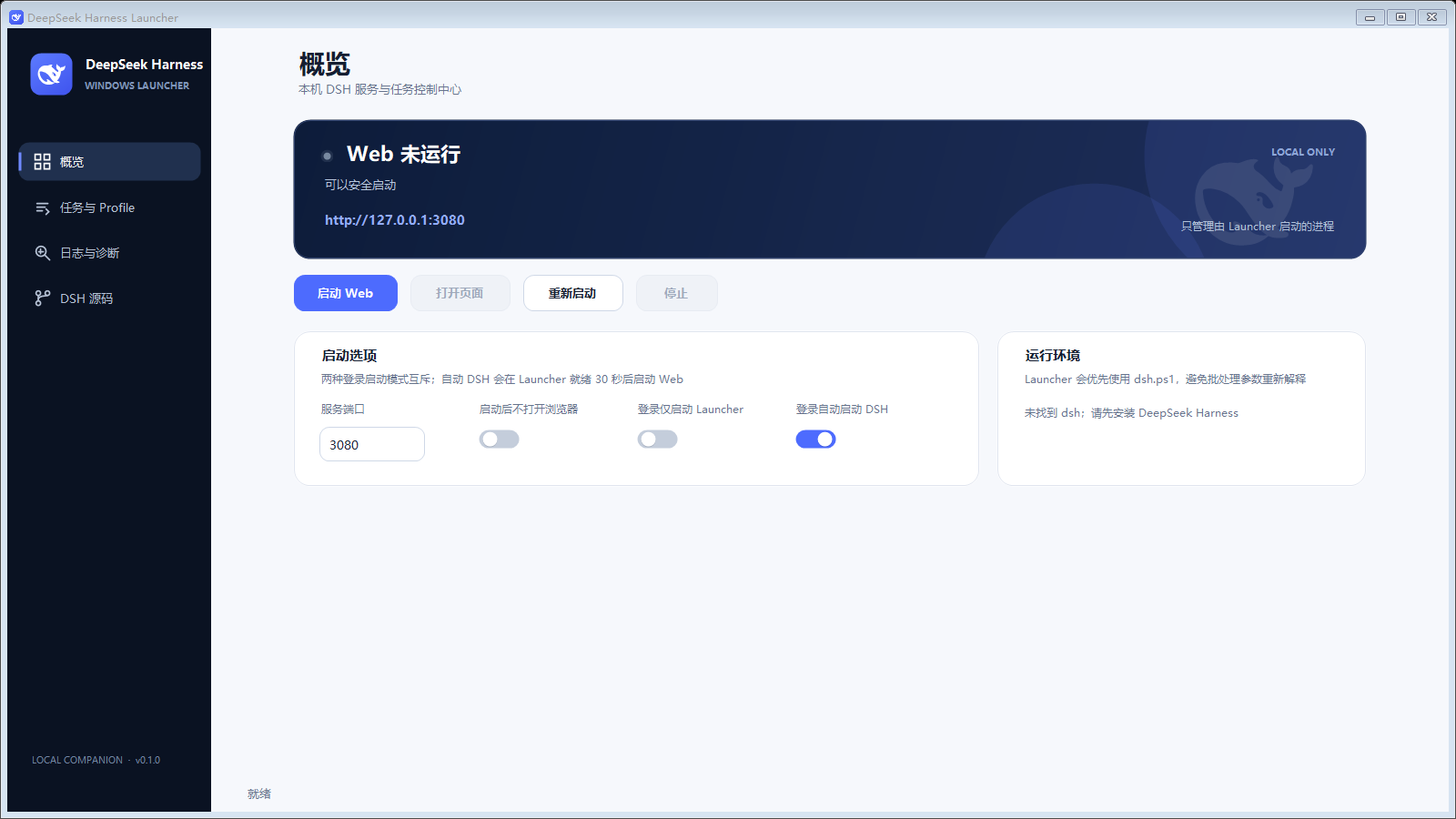
A Windows control center outside the Cordis plugin tree for local DSH users who do not want to keep a terminal open.
Web control: inspect status, start, open, restart, or stop Web; identify services already bound to the port without taking ownership of them. Even when browser auto-open is disabled, Open Page uses the authentication entry for the current Launcher-owned DSH process, and launch tokens are not written to Launcher logs.
Tasks and profiles: run one-shot Headless tasks and background profiles with unified UTF-8 results and logs.
CLI entry: bound source checkouts use the built apps/cli/lib/bin.js. Both NVM runtime arguments and the managed system-mode launcher script use this entry; missing output reports that DSH must be built first. Build after updating or editing DSH source before starting it. Source builds and official Desktop retain their own command paths.
Web runtime: Overview places a compact Browser / Source Desktop selector beside the title and combines service status with primary actions in one light card. Runtime and startup options follow below. The selector supports Left/Right keys; actions fit one row or a balanced two-row layout in narrow windows. The runtime card shows NVM sandbox/system mode, required and actual Node and npm/pnpm/Yarn versions, detection sources, and preparation/failure status. The Node version selector offers Automatic (highest compatible version) and the installed NVM versions. Choosing a version saves it for subsequent Web/Desktop starts, DSH builds, and plugin source operations; existing settings default to Automatic. Refresh updates the installed-version list. A manual version must still satisfy project requirements; a missing or incompatible selection fails without switching to another Node. Missing saved versions remain visible so you can choose another version or return to Automatic. Running versions come from the current launch record; changing the selection does not restart an existing process, and external service versions are never inferred.
Every Web start, including tray, restart, and login startup, detects nvm-windows. When installed, Launcher reads the bound DSH checkout or a recognizable npm DSH shim. Node selection follows .nvmrc, .node-version, volta.node, then engines.node, always respecting engines.node, and chooses the highest matching installed NVM version in Automatic mode; manual mode uses only the saved version. Manager selection prefers packageManager/devEngines.packageManager, then Volta, engines, and lockfiles. Lockfiles identify the tool or Yarn generation, not an exact version. Missing manager versions download into Launcher's sandbox directory on first start and are reused; conflicting declarations produce an error.
Sandbox mode invokes the same DSH CLI directly with the selected Node, isolating the service PATH, npm/Yarn global install directories, and npm/Yarn/Corepack caches without running nvm use or changing system Node, NVM links, or DSH source. pnpm retains its user/project store configuration and normal store location so existing source and profile dependencies can be reused. Launcher and the candidate installer clear only storage overrides inside the Launcher sandbox inherited from older versions; the installer restores its caller environment on exit. This is process-level toolchain isolation, not a file or network permission sandbox. Without NVM, the original launch path remains intact. Missing compatible Node, invalid declarations, or download failures stop startup with an explanation; install missing Node with nvm install. Unrecognized custom launchers need a DSH source binding. DSH source builds and plugin source operations reuse the Overview Node selection and sandbox, including the declared DSH pnpm and npm bundled with that Node. After a DSH pull, detection runs again before clean; build detection does not require installed dependencies or CLI artifacts. Plugin operations validate the candidate source Node/npm requirements before npm ci, building, stopping DSH, or installing profiles; incompatible requirements fail instead of selecting a different Node. Build/update logs record the selected runtime. Without NVM, Automatic mode retains the system toolchain; a saved manual selection reports an error until NVM is restored or Automatic is selected. Headless and other profiles retain their existing flows.
Network proxy: Normal Web, Profile, Headless, and Desktop launches do not add the Windows system proxy. During DSH source builds, project/plugin installation, and Web Plugin Community installation, the current enabled manual HTTP/HTTPS proxy is applied to that operation only and then restored. Existing explicit HTTP_PROXY, HTTPS_PROXY, ALL_PROXY, and DSH home .env values retain their normal DSH behavior. Logs identify the operation without addresses or credentials; system environment, registry settings, and .env remain untouched. Bypass follows the operation’s NO_PROXY and DSH loopback rules. PAC/WPAD, SOCKS-only, and single-protocol settings still require explicit HTTP/HTTPS proxy variables.
Source maintenance: Update Source and Build (更新源码并构建) runs git pull --ff-only against the bound DSH checkout, then pnpm run clean, pnpm install --frozen-lockfile, and pnpm run build in order. Before pulling an HTTP(S) remote, Launcher resolves the current Windows system proxy for that remote URL. When Windows selects a proxy, Launcher applies it through a command-scoped Git setting for this pull only; the setting expires after success or failure and never writes or overwrites repository, user, or system Git proxy configuration. SSH remotes do not use this HTTP(S) proxy discovery. Build Only (仅构建) uses the current local source, skipping Git updates while still running all three pnpm steps. Without Git, Update Source and Build can also skip the pull after confirmation. Both build buttons stay disabled during an operation to prevent duplicate runs. Before cleaning, Launcher checks the checkout for clean/build scripts and a lockfile, and verifies that pnpm is available. Any failed step stops the remaining steps; lockfile errors never fall back to an unfrozen install. Git progress and pnpm warnings are not treated as failures: the real exit code determines the outcome. The page distinguishes pull, clean, dependency-install, build, and environment failures, with larger log text and an Open Log Folder action. Full UTF-8 output, command-engine errors, and the final outcome remain in logs/dsh-build.log across refreshes and page navigation. Stop DSH instances using this checkout before running: clean removes existing build artifacts, which are not restored if a later step fails. Launcher does not automatically stop or restart DSH for this action; start it manually after a successful build.
The source-operation process temporarily sets pnpm_config_verify_deps_before_run=false so pnpm's automatic install before scripts cannot change the lockfile before the explicit frozen install. This does not edit repository or global pnpm settings.
Diagnostics: collect command, port, working directory, status, and log information, with a dedicated DSH Source page.
Desktop behavior: system tray, optional login startup, a centered vertical layout at every window size, per-monitor DPI scaling, and consistent rounded scrollbars for both pages and text areas independent of the Windows theme. Diagnostics, task input/output, source-build logs, and plugin-operation logs share the same styling, with mouse-wheel, touchpad, thumb-dragging, track-paging, and keyboard support. Every log view filters ANSI/ECMA-48 terminal controls that a plain text box cannot interpret, preserving readable content without rewriting the original UTF-8 log file. Launcher remembers the last display and normal window bounds, then remaps them into a visible work area when the display topology changes.
Launcher only stops DSH process trees that it started. A service already using the configured port is shown as an external Web service: the page can be opened, but Launcher will not take it over, restart it, or terminate it.
The tray exposes two exit paths. “Exit Launcher Only” leaves DSH running; “Exit Launcher” first requests a safe stop of Launcher-owned services. If the service is external or the stop times out, exit is cancelled with a reason.
Tasks and profiles run in no-console child processes. User task content travels through a UTF-8 request file to the PowerShell command engine and is never concatenated into cmd.exe. Hiding the main window stops foreground polling while the tray and background services continue running.
Web, source Desktop, source builds, and each profile retain only their latest execution log. A new run replaces the previous one while keeping all stages, errors, and exit codes from that run together. The Launcher log resets after a new UI instance acquires the singleton lock; activating an existing window does not clear it. Update cleanup keeps its latest log, and plugin updates continue to reuse updates/current. Another run cannot overwrite an active execution log. Headless output is displayed after completion and replaced by the next task.
Each diagnostics or build-log read accesses at most the last 256 KiB before selecting the requested lines, avoiding full-file scans of a large current run during navigation and refresh; reads do not modify that run's log. Page scrolling does not trigger layout. Feature filtering reuses rows and preserves selections, and select-all/clear updates the change summary once. Switching launch mode refreshes button labels without requiring a scroll.
Login startup is off by default. You can start Launcher in the tray only, or start Launcher and launch DSH Web in the background after a 30-second initialization delay. The modes are mutually exclusive and can both remain disabled.
Versioned deployment directories keep Start menu and login-startup entries pointed at the current release without depending on profile node_modules. The installer preserves an explicitly configured DSH command. For a local DSH checkout, it generates and verifies a safe direct CLI entry and records that checkout as the only permitted source-build root.
Settings, runtime state, install state, update requests, and logs live under %LOCALAPPDATA%\DeepSeekHarness\Launcher. Tray updates and plugin changes reuse the fixed updates\current workspace. Before the next operation, its previous requests, results, logs, and source ZIP are cleared, retaining only the latest operation. A running coordinator prevents the workspace from being overwritten, and Launcher resumes tracking it after restarting. After the control center loads the installation state and after update operations finish, Launcher automatically removes unused legacy GUID update directories in the background, including their build files, node_modules, and logs. Directories with a running coordinator, a source binding, or references from any Profile remain and are checked again when the control center is opened or a later update finishes. Source bindings inside old update directories migrate to retained sources snapshots during successful installation; active plugin snapshots are still managed under sources. Cleanup supports long paths and never follows directory links. Unverifiable or failed deletions are logged and retained without failing an otherwise successful installation. Launcher remains selected and required in the management UI. The control center does not self-uninstall; run migrate-to-enhanced-plugin.ps1 -UninstallLauncher from this repository to remove the program files, shortcuts, and login-startup entry. Logs and user settings are preserved by default.
notification · Settings → Desktop Pet · Sounds and pet require Windows 10+
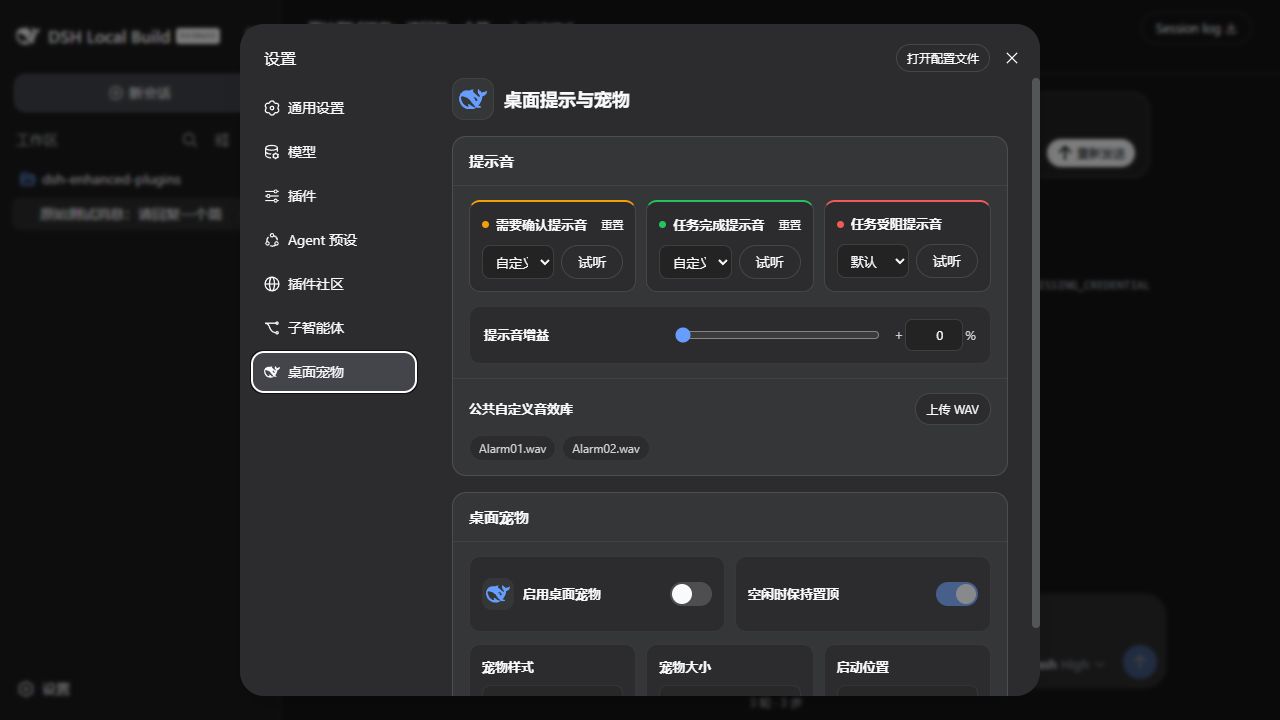
| Aggregate state | Pet behavior |
|---|---|
| Idle | Sleeping loop; mouse contact or dragging triggers an interaction, with optional non-topmost idle mode |
| Working | Focused swimming or operating a task panel |
| Confirmation | Surprise, head turn, or question-mark cue; highest priority |
| Completed | A short celebration for top-level tasks only |
| Blocked | A short tired or concerned response for top-level tasks only |
The pet can be dragged across monitors and stores normalized per-monitor positions. Resolution, scale, work-area, or display-topology changes remap it into a visible area; changing the startup corner clears the drag record. The pet stays out of the taskbar and Alt+Tab task switcher; disable it in Settings when you want to hide it. Windows “Show animations” accessibility preferences reduce every state to a representative still frame when animations are disabled.
Both the resident pet and short-lived sound processes are owned by the DSH subprocess service and exit cooperatively when disabled. Companion pipe closure during Ctrl+C, plugin reload, or ordinary shutdown is treated as a normal teardown condition. A known retired pet ID is migrated to Flat Whale on the next launch; other unknown values continue to fail validation.
plugin-market · Settings → Plugin Community
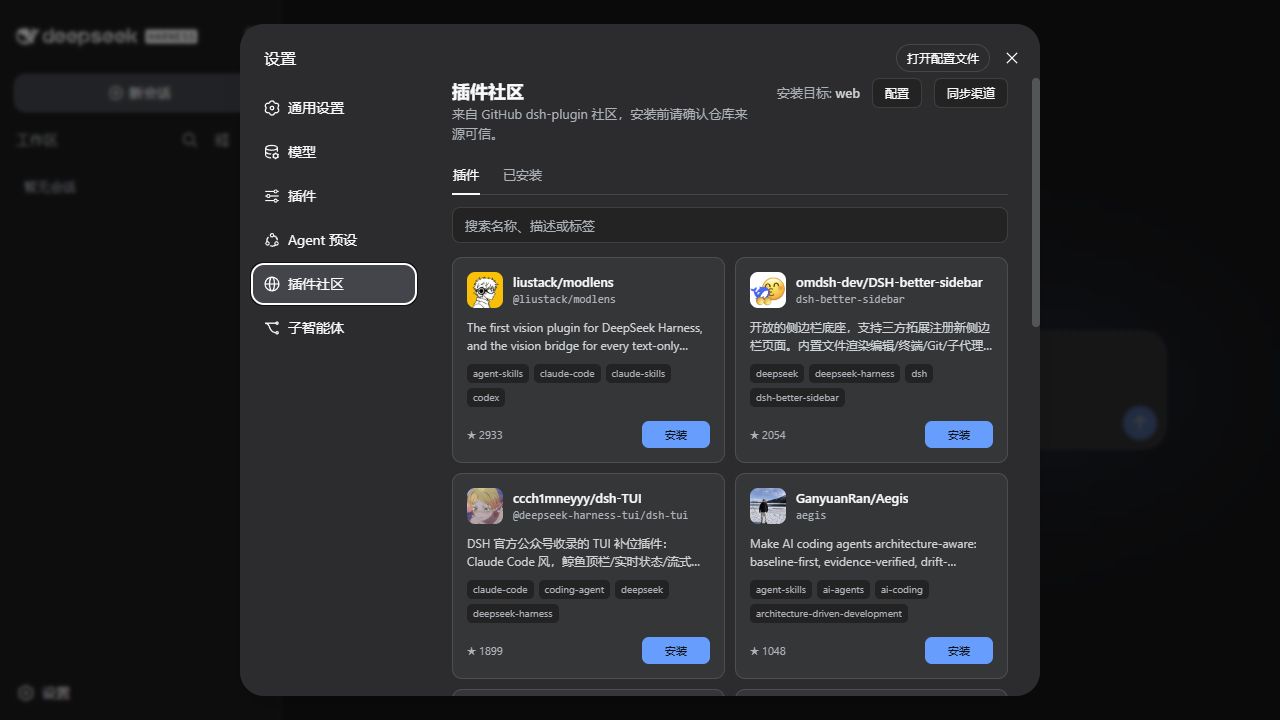
pluginManager.installBundle() runs; the market no longer preflights GitHub/npm or decides whether a package is installable.profile, cliPath, operationTimeoutMs, and githubTokenEnv options no longer affect market operations; existing plugins and credentials are left intact.The .github/workflows/update-plugin-index.yml workflow publishes the market-index branch. It enumerates the complete topic, revalidates only new or changed repositories, and refuses to overwrite the last result after an abnormal shrink or failed build. This project is also a built-in verified channel contribution, so it remains discoverable before the remote mirror catches up and is not duplicated afterward.
The bundled snapshot and index synchronization need no GitHub token, so the market’s token settings have been removed. Index downloads use DSH’s explicit global transport and proxy rules. Launcher-managed source and plugin installation operations, plus the Web Plugin Community install endpoint, receive the current Windows manual HTTP/HTTPS proxy only for the duration of those operations; normal DSH traffic remains direct unless the user explicitly configured a proxy. The market supplies github:owner/repo from the index rather than assuming a matching npm package has been published. Catalog validation is an index-quality check, not an installation guarantee.
This implementation is verified against the public Remote interface in local DSH commit c36a83ff. The online publishing tutorial primarily describes the CLI path; the browser uses the current pluginManager without importing private native UI components or state.
The page displays index generation time. An index older than 24 hours receives an explicit warning while the last usable snapshot remains available.
mcp-server-manager · Sidebar Plugins → dsh-enhanced-mcp-server-manager → Configure mcp-manager
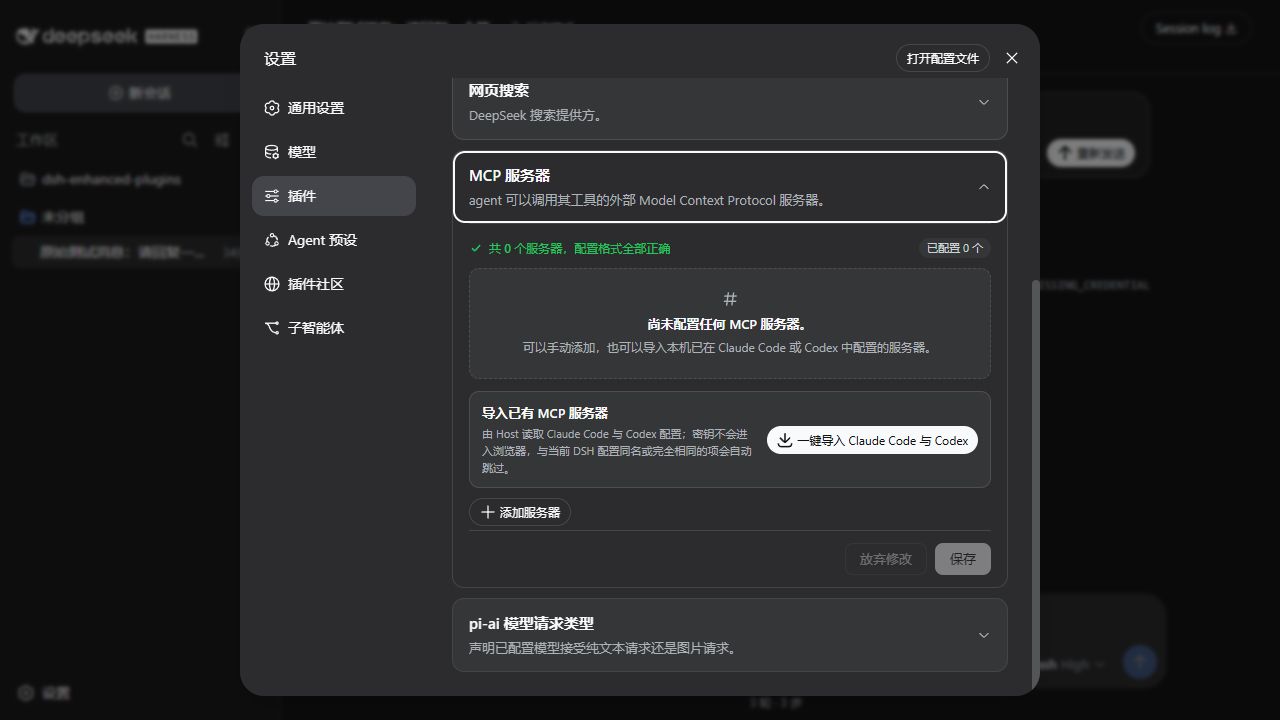
stdio; configure an HTTP(S) URL and headers for HTTP. Both transports support a tool call timeout.Environment and header values are masked when existing servers reach the browser. Keep a masked value to preserve it, enter a new value to replace it, or remove its row to delete it. Changing an environment or header key also requires a new value. The Host applies edits to the unmasked definition; unchanged secrets are not reconstructed from, or overwritten by, redacted snapshots. Switching transport discards the old transport's environment or headers.
Servers declared directly in the cordis.yml composition layer support field edits under the same name. DSH settings inheritance prevents renaming or removing them from this page; the Host rejects those operations before writing.
Drafts retain the configuration revision at the start of editing. If another page or external editor changes the configuration, saving an older draft is refused without deleting the other editor's new servers; leave the page to discard the draft, then reopen it, review the latest configuration, and edit again. Only Save commits staged MCP changes. Interrupted saves leave the saving state and retain the draft. Failed writes re-read Host configuration, and older read responses cannot overwrite newer refresh results.
In DSH 0.1.7-rc.1, MCP settings live in the current profile's mcp-manager Loader entry. On the first upgrade, the plugin merges servers from the old settings.yaml.imported once. Existing server names win, and the original file remains as a backup. Deleting a server later does not import it again on restart.
edit-last-message · Latest editable user-message bubble in the current session
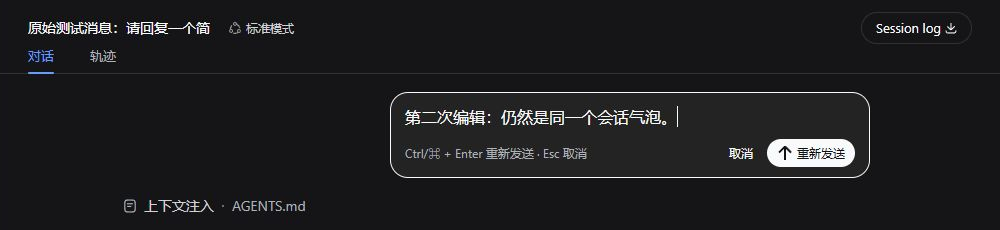
Ctrl/⌘ + Enter; press Esc or Cancel to leave edit mode.Resend stays inside the current session: the plugin replaces model context starting at the edited user message, then generates through the same AgentLoop. The DSH Session log remains an append-only audit record, and side effects from tools that already ran are not rolled back. Uploaded generic files render with the DSH file-card presentation, while messages containing any attachment or other non-text block do not expose the editor, preventing silent data loss.
Sent-reference previews are preserved: selecting a file or a Skill actually loaded in that step opens the current session's right sidebar without changing or resending the text. Edited bubbles also preview files; their Skill labels use only invocation records from the edited step, never records from the replaced turn. Resends keep plugin attribution, so slash text alone does not trigger a new user Skill invocation.
Current V4 messages use the producer-owned edit-last-message source kind with the original message ID, without embedding event sequence numbers. The plugin also recognizes earlier V3 plugin attribution after DSH migrates it to V4. Older nested markers and the 5.x edit-last-message source kind are not accepted by the V2-to-V3 migrator. Before opening such sessions in the new DSH, stop every DSH Host and run the offline repair on each affected log:
node .\scripts\repair-edit-last-message-session.mjs "C:\path\to\session.jsonl.zstd"
node .\scripts\repair-edit-last-message-session.mjs --write "C:\path\to\session.jsonl.zstd"
The first command is read-only. The second writes migration-safe plugin attribution for pre-V4 logs, or a producer-owned source for V4 logs, and creates a timestamped backup beside the original artifact. It also repairs V4 logs containing the retired plugin wrapper. A truncated, corrupt, mismatched, or concurrently changed log is refused instead of being silently rewritten.
sub-agent · Settings → Subagents
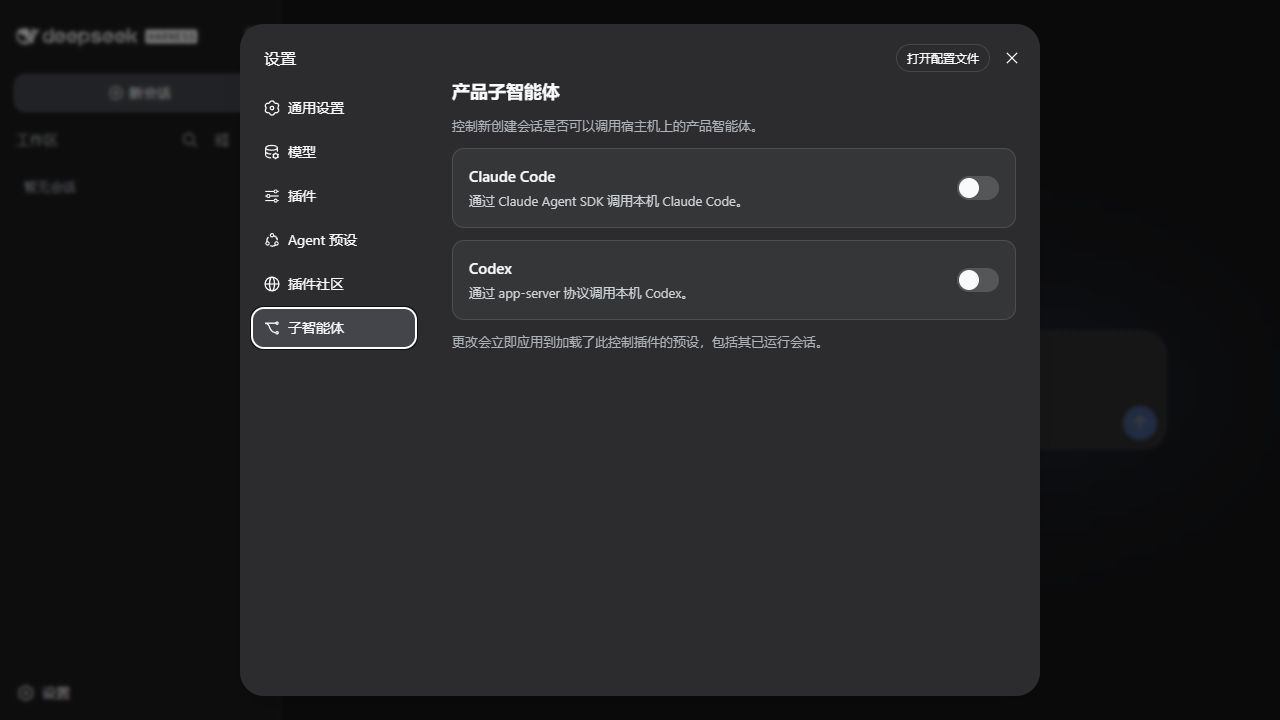
Enabling Claude Code or Codex applies immediately to every Agent preset carrying this controller, including running sessions. Disabling a toggle removes the matching tool in real time. The corresponding product must be installed locally, and its official @deepseek-ai/dsh-subagent-claude-code or @deepseek-ai/dsh-subagent-codex bundle must be installed in the current profile at the matching DSH version.
On upgrade to DSH 0.1.7-rc.1, product toggles from the old settings.yaml.imported are merged once into the current profile. Existing profile values take precedence.
Both toggles default to off. Writes use path-addressed operations and settings revisions, so a redacted or stale snapshot cannot overwrite changes from another page or an external editor.
On DSH 0.1.7, settings use the Loader ID subagent-product-toggles and persist in the current profile's configuration patch. The settings page, live tool toggles, and external-edit refresh share that identity. The sidebar uses the current public branch icon in both light and dark themes.
agent-team-monitor · Current conversation composer → Team icon
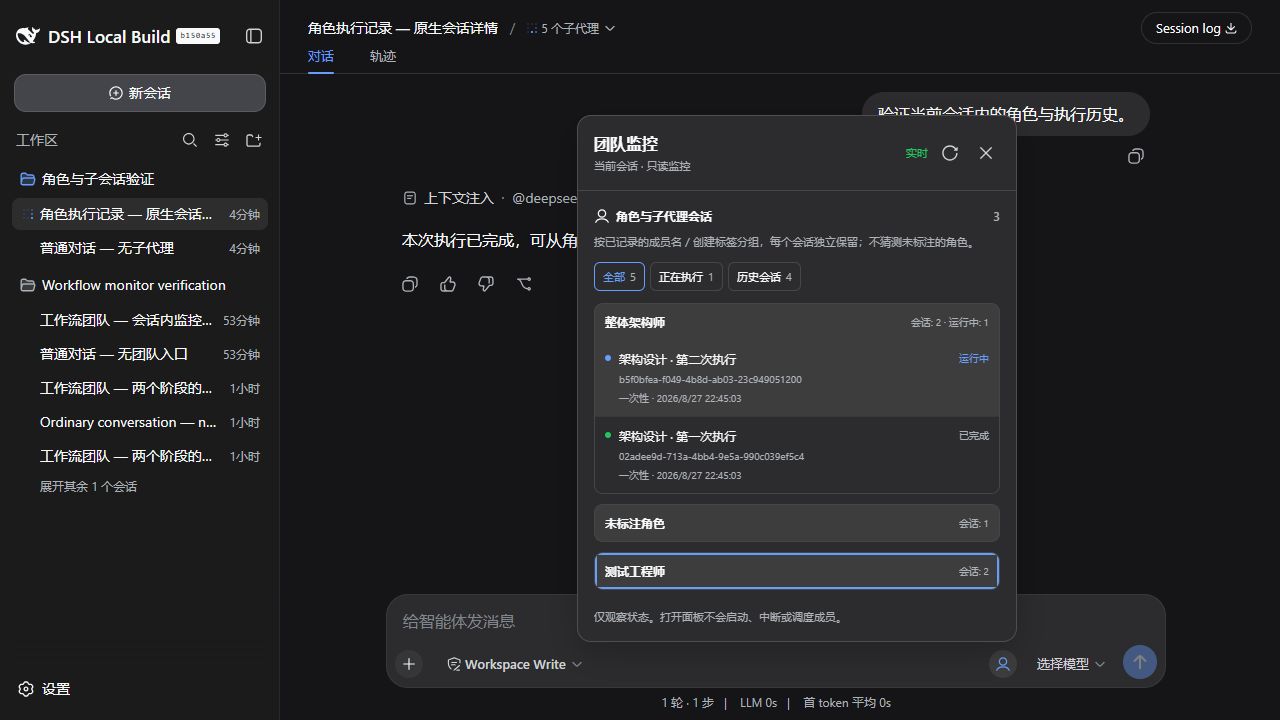
uiWorkspace.openSession() view, using exact parent/child IDs and freshly checked catalog mode. Running, historical and nested sessions share this path. Selection changes or plugin disposal fence late navigation; missing/corrupt records remain visibly unavailable rather than becoming fabricated sessions.workflow and experimental Agent Teams are separate mechanisms and are displayed separately. The monitor reads the current session's own tool-workflow/* durable records for run names, actually started members, phases and completion/failure/cancellation. It never infers future roles, task dependencies or mailbox data from a script. Members pair by runId + seq; inherited workflow history cannot become a new fork's team.ctx.agentTeams service. For cold history, the official Agent Teams runtime owns and registers the agentTeam projection, which the monitor replays through public ctx.sessionProjections.restore(). Logs come from read-only sessionQuery.observeSession() observations; no Agent is activated and no second team state is created.inactive does not mean completed. Task-board state depends on model updates; execution state comes from logs. Team summaries exclude mailbox bodies. Views cap at 256 members / 1,000 tasks with explicit truncation and complete totals.subagents.listDescendants; read-only sessionQuery.observeSession() supplies own titles and turn outcomes. Exact Agent running/idle state takes precedence; residency alone is not execution. History means currently non-running, not necessarily successful. At most 256 child rows are inspected/displayed, prioritizing executing Agents; truncation shows displayed/total counts and filters count displayed rows only. Catalog failures do not hide existing Team/workflow data.Install only this Profile feature with -Features agent-team-monitor; use -ListFeatures to inspect all choices. The normal required Windows Launcher behavior is unchanged. Light/dark/system themes and English/Chinese follow DSH settings.
npm run verify:execution-web uses a temporary profile and a keyless fixture adapter against the local DSH Web app to verify lanes, nested children, tool details, failures, live completion, transcript navigation, narrow layouts and light/dark/system switching. Set DSH_VERIFY_AGGREGATE=1 for the aggregate bundle; the default verifies standalone installation and removal of unselected features after a multi-feature install.
dsh-compatibility.json is the authority for each plugin release’s supported DSH versions and verified commits. The aggregate, all seven standalone bundles, and Windows Launcher use 8.1.0.agent-team-monitor and model-router remain limited to 0.1.7-alpha.1; the aggregate bundle containing them declares only that version. Launcher and the installer check the final selected features before building or changing a Profile.startSeq/endSeq; current attribution retains the root message ID across event renumbering. Run the offline repair described above before migrating historical edit logs. Attachment bubbles use the current public FileTypeIcon export instead of the removed DocumentFileIcon.sessionQuery.observeSession() API with projectionMode: 'none', release the observation after reading, and never activate an Agent or commit crash recovery. Custom profiles need a sessionQuery provider for historical monitoring; the standard Web profile already supplies one. Agent Teams v1/v2 history compatibility remains owned by the active official Team projection; rejected history is shown as incompatible, never rewritten by this plugin.master branch. A failed request, an eight-second download timeout, or malformed/oversized data falls back to the bundled file with a warning. Every check fetches again; it does not overwrite the local fallback. The remote table takes precedence when it contains the current plugin and DSH version. If it omits either, or lists no DSH version for that plugin, the installer checks the bundled table; installation stops only when neither supports the checkout. Mixed package versions also stop installation. Commits belong to individual DSH versions; an unlisted commit, local tracked changes, or no Git metadata produces an unverified-source warning.client-store, ui-session, ui-chat, and public Remotes, without the removed dsh-client-runtime, connection.api, or hostDescription. Host settings owners pass validated namespace literals and use SettingsProvider.installSection(). Session consumers use eventAt() / snapshotEvents() and keep SessionLogOffset inheritance metadata separate from SessionHeader; Team Monitor preserves that exact cut through query observations and projection replay. This project follows the public interfaces of the source commit above.sub-agent installs only the product toggles and tool Consumer. Codex and Claude Code's official DSH Providers are optional bundles; install either separately when needed, and its own patch registers subagent-codex or subagent-claude-code. This package retains its existing re-export entry points for older compositions, but no longer loads an absent Provider by default.npm install --legacy-peer-deps, npm run prepare, and npm pack work without a sibling DSH checkout; the matching DSH runtime still supplies public peer services. Rebuilding Windows Launcher requires Windows and a .NET Framework 4.x compiler.Check the version pairing without building or installing (add -DshCheckout when the checkouts are not siblings):
powershell.exe -NoProfile -ExecutionPolicy Bypass -File .\scripts\migrate-to-enhanced-plugin.ps1 -Features edit-last-message,mcp-server-manager,notification,plugin-market,sub-agent -CheckCompatibilityUse the matching plugin release for an older DSH version instead of bypassing peer dependency checks or forcing this release to install.
To declare compatibility after validating a newer DSH checkout, edit only the root dsh-compatibility.json: keep schemaVersion: 1, find the exact pluginVersion in releases, and append { "version": "<exact DSH version>", "commits": ["<full lowercase 40-character Git hash>"] } to its dsh array. If only the commit changed, append it to that version’s commits. Keep older plugin entries for existing installers. Push this file to GitHub master; users with this new installer can then receive it without downloading new plugin code. Older installer releases must first be updated to this mechanism. GitHub’s caching can delay visibility briefly.
peerDependencies remain exact package-manager declarations, generated from the table and each feature's own version limit. npm run build (or npm run sync:compatibility) synchronizes source manifests and root lock metadata; installation synchronizes them again from the resolved remote/fallback table after building, including -SkipBuild. Non-Beta standalone bundles can declare rc.1, while the two Beta bundles and the aggregate remain at alpha.1. Direct dsh plugin add/Desktop imports bypass this installer and use their packaged peer snapshot; rebuild/repack from the updated table for that route.
The default endpoint is the GitHub raw compatibility file. DSH_COMPATIBILITY_URL can point to an HTTPS mirror; HTTP is accepted only for loopback test servers. The file contains data only and cannot change code, package URLs, or build commands. -CheckCompatibility remains read-only.
@ file references. Type @ in the composer, or @" for paths containing spaces. The old referenced-file feature ID and # snapshot syntax are no longer provided.-Features model-input-types is rejected. A normal installer run removes the historical selective package or replaces an older aggregate bundle without deleting existing model capability settings.model-input-types selected, its update coordinator cannot resolve the new feature catalog. Obtain the new source and run its migrate-to-enhanced-plugin.ps1 once with the final feature set you want (for example, -Features all). This removes the old bundle and updates Launcher; subsequent updates can run there normally.-Features referenced-file is also rejected explicitly. A normal installer run removes the historical selective package or the feature carried by an older aggregate install.The default composition lives in cordis.patch.yml. A later profile patch replaces the target Loader row's entire config, so an override must restate every field that row still needs.
| Field | Default | Purpose |
|---|---|---|
completionSound |
subtle |
Completion sound: off, subtle, prominent, or uploaded custom |
confirmationSound |
prominent |
Attention sound: off, subtle, prominent, or uploaded custom |
blockedSound |
prominent |
Blocked sound: off, subtle, prominent, or uploaded custom |
soundGain |
0 |
Shared 0–100% positive gain; 100 is approximately +6 dB |
petEnabled |
false |
Show the native global desktop pet |
petCharacter |
classic |
classic (Flat Whale), multiview (3D Whale), or whale-girl |
petIdleTopmost |
true |
Keep the idle pet topmost |
petSize |
112 |
80, 112, 144, or 176 device-independent pixels |
petPosition |
bottom-right |
top-left, top-right, bottom-left, or bottom-right |
Six *CustomSoundFile / *CustomSoundName fields are Host-owned selection references for the three events. The shared catalog is stored at desktop-notifications/sound-library.json inside the profile. Upload and choose sounds through Settings instead of editing these fields manually.
| Field | Default | Purpose |
|---|---|---|
topic |
dsh-plugin |
Topic required by validated channel entries |
channelUrl |
HTTPS snapshot on market-index |
Publication used by Sync latest index |
pageSize |
12 |
Plugins per page |
Bundled assets/plugins-cache.json is a read-only bootstrap snapshot and the incremental-validation seed for the first automated index run. The market Host owns catalog snapshots, ETags, index synchronization, and the scoped install endpoint; cache files live under DSH home. The DSH plugin manager owns installed state. Plugin Community never parses shell commands out of READMEs and never enables dangerouslyAllowAllBuilds.
To expose product-subagent tools to selected Agent presets only, disable or remove the root subagent-product-toggle-tools row and mount the appropriate entry inside each target preset:
dsh-enhanced-plugins/sub-agent/presetdsh-enhanced-sub-agent/presetDo not mount both layouts in the same scope.
This repository uses the following read-only sibling checkout as its DSH API, type, and assembled Web UI baseline:
D:\work\workspace\github\deepseek-harnessRegular verification commands:
DSH's runtime and lib/types must come from the same source build. Passing typecheck against stale declarations does not verify compatibility with an updated checkout.
npm install
npm run typecheck
npm test
npm run build
npm run pack:dry-run
git diff --check
On Windows, npm run verify:compat additionally installs all six features individually into an isolated DSH home, then checks all-features, reselection, retired model bundle cleanup, and aggregate profiles against the real Host and Client artifacts. It requires built DSH and plugin artifacts and leaves the normal profiles untouched. Reports stay under the Git-ignored .verify-dsh-home/. Interactive behavior and light/dark appearance still require the real Web page.
Set DSH_VERIFY_CHECKOUT to a prepared copy of the verified DSH source commit when running npm test or npm run verify:compat against an isolated build. The default remains the sibling checkout, and the installer still checks the declared version.
npm run verify:desktop-launcher verifies source command selection, build prerequisites, duplicate suppression, pnpm version failures and process-tree cleanup with the compiled Launcher. npm run verify:desktop-source executes the unchanged official start:desktop script through Launcher in a temporary source view, waits for the actual Electron page, and stops the owned process tree. It leaves the sibling checkout unchanged.
npm run verify:desktop-host loads the official Desktop Host with a fixed plugin snapshot in an isolated directory and verifies the actual Client index response. It does not build or modify the DSH checkout.
npm run verify:launcher exercises the compiled Launcher and PowerShell command engine in temporary directories, including clean/install/build ordering, failure stops, and real pnpm frozen-lockfile rejection. It requires Windows, Git, and pnpm on PATH; it does not clean or rebuild the real DSH checkout.
npm run verify:launcher-tools installs Launcher and the MCP manager into temporary directories, starts and stops DSH through the real Launcher, and has a local test model call the official read tool to verify file contents. It covers system mode and, when NVM is present, sandbox mode without real model or MCP credentials. Set DSH_VERIFY_MANAGER_ROOT to an existing pnpm package directory to copy it into the temporary cache; the runtime verifies its version, avoiding cold-download delays in this gate.
npm run verify:launcher-ui compiles real WinForms controls in an isolated directory and checks scrolling, filtering, bulk selection, page/mode changes, repeated layout, bounded UTF-8 log reads, and disposal of retired controls. It measures navigation with an approximately 64 MB log and checks all five pages at normal, compact, wide, and 150% layouts, saving screenshots under .verify-dsh-home/ui-performance/. Timings measure UI processing and offscreen drawing, not display frame rates; pass/fail checks avoid fixed timing thresholds that vary with machine load.
npm run test:launcher-toolchain covers version detection, NVM fallback, declaration conflicts, and isolated environments (build Launcher first). On Windows, node scripts/verify-launcher-sandbox.mjs <DSH-checkout> verifies real Web readiness, the selected manager, cached restart, and stop using a temporary DSH Home. It may download the required manager, references DSH source read-only, and saves screenshots and results in .verify-dsh-home/sandbox-artifacts.
npm run verify:pack packs each standalone distribution, installs only its build dependencies in an isolated directory without DSH peers, runs prepare, and checks its repacked entries. The Windows Companion part requires Windows as well.
Browser bundles use CSS Modules and consume only DSH --dsw-alias-* semantic theme tokens, so they follow light, dark, and system appearance automatically. See the DSH plugin development guide and architecture reference for public extension points.
npm run verify:edit-web installs the editor in an isolated profile and drives Chromium against the real Web composition with a local SSE model fixture. It checks repeated edits, request-history replacement, file and Skill reference previews, reload, and light/dark screenshots without a real model key. The default run exercises DSH's Messages protocol; set DSH_VERIFY_PROTOCOL=chat-completions to verify that explicit protocol as well. The fixture disables session-log upload and keeps Launcher files inside its temporary home. It uses Playwright from the built DSH checkout and requires its Chromium browser. typecheck rejects mismatched Session declarations, stale Chat declarations without openSkill, and builds missing the new plugin-configuration and session-reference APIs. Web and Desktop verification commands accept DSH_VERIFY_CHECKOUT for an isolated build.
npm run verify:plugin-ui checks MCP saves and discarded drafts, live plugin disable/enable, and real Team monitoring and member navigation in an assembled Web profile, including light/dark appearance. Set DSH_VERIFY_AGGREGATE=1 for the aggregate bundle; the default tests the two affected standalone bundles together. Before publication, DSH_COMPATIBILITY_URL can select an isolated test server serving the pending compatibility table; production selection checks the bundled table when valid remote data lacks a matching plugin/DSH pair.
The validated DSH 0.1.7-alpha.1 source uses plugins.row.config / plugins.bundle.config; the online settings-card cookbook may still show settings.plugin.item. This release follows the tested source and type declarations.
Choose only the Light, Normal and Strong models from the configured DSH catalog. Missing any role disables activation in Settings and conversations, with the missing roles listed and Host validation enforced. Backup selection and failure-driven backup switching are removed; legacy backup references are ignored. Role cards contain one model each; concurrency, retry and routing controls expand on demand. The composer menu opens a right-sidebar single-flow view with the task summary, models actually called and task assignments; request details and session history expand on demand, using DSH controls and theme tokens.
Cumulative token limits and model pricing have been removed. Legacy token settings no longer block requests; new attempts do not reserve tokens or snapshot prices. Request and child-execution counts are statistics only; there is no cumulative 30/12 cap. Reported usage, concurrency controls, bounded failure retries and record-capacity protection remain. Legacy fields are retained only for compatibility.
Model collaboration settings save automatically after a 400 ms pause in editing; leaving the settings page flushes pending changes. Manual save and restore-inheritance buttons are removed. Failed or conflicting writes preserve the draft and show a status message.
When the global collaboration switch is off, the composer entry is hidden. Committed setting changes update it without a reload; disabling removes any open menu, stops entry polling and releases ordinary model selection. Session mode and task history are retained and applied again when globally re-enabled. New sessions opt in explicitly. Composer controls match DSH’s native model/permission trigger appearance, sizing and states. Collaboration management and single-model selection are separate controls. While collaboration is on, the model selector is disabled and displays “Model collaboration active”; the Host rejects ordinary selection calls as well. The ordinary selector retains DSH’s original model/value menu and provider-grouped list. Turning collaboration off restores the original model/effort without changing the global default. Reversible compatibility adapters provide the navigation icon and selection guard without editing DSH core files..
Managed sessions now receive scoped coordination and role instructions with recorded reasons for direct work or delegation. Before the main assistant edits, writes, runs shell/code, the Host requires a work-type decision; implementation requires a NORMAL child and diagnosis/analysis requires a STRONG expert, so a prompt alone cannot silently keep all work on the main model. Structured acceptance separates execution ending from verified outcomes; main review of every child precedes root success. Handoffs retain essential constraints and retrievable history, and file changes invalidate read-only findings. V5 storage imports V4/V3/V2/V1 records read-only..
CLASSIFICATION EVIDENCE
系统优先读取 GitHub Topics,再与站内分类词典和词根规则比对。当前命中: 无有效分类标签。
deepseek-ai
DeepSeek Harness: Everything is a Plugin.

anywhere-labs
为 DeepSeek Harness (DSH) 插件生态打造的现代化桌面端解决方案。万物皆「插件」,桌面本身也是「插件」。

walkinglabs
Harness engineering beginner tutorial, from 0 to 1