
其他
插件

dsh-bili-scroll
c1overzz
DSH 插件:每天替你刷一轮 B站,读字幕挑出值得的、写一份日报,值得的 @ 你
PROJECT TOPICS
INSTALL REFERENCE
dsh plugin --profile web add github:silverze/dsh-work-plugin
该命令指向仓库当前默认分支;尚无绑定当前 commit 的完整验证结果。
PROJECT README

Turn a stated goal into a tracked work task inside DeepSeek Harness — plan, execute, collect deliverables, schedule reruns, and share results to Feishu.



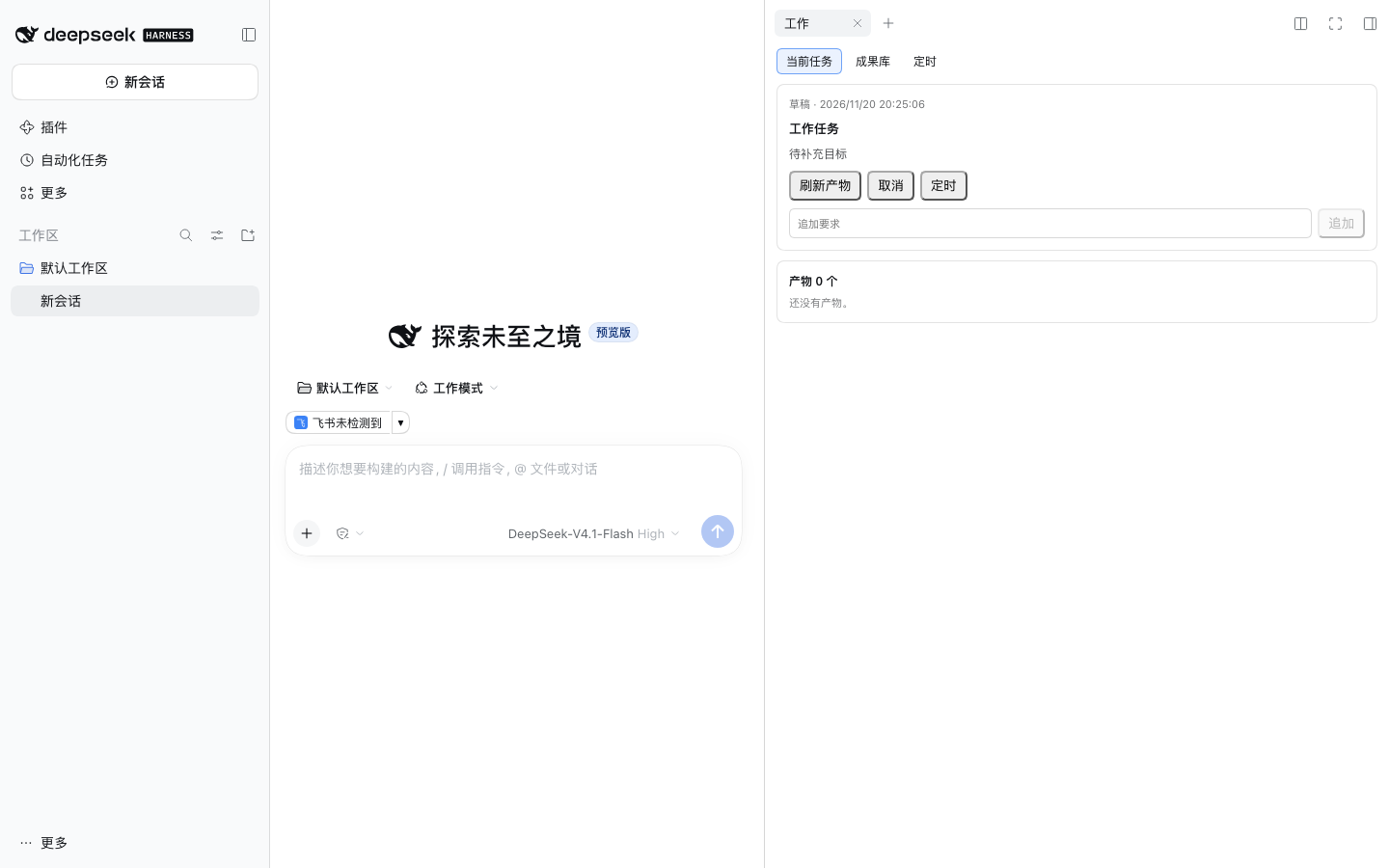
DSH Work adds a work layer to DeepSeek Harness: a session can be attached to a work task that survives the conversation, collects its own deliverables, can rerun on a schedule, and — on macOS — can quote the Feishu conversation you are looking at straight into the composer.
It is a plugin bundle, not a fork: when you turn it off, DeepSeek Harness is exactly what it was.
Open Settings → Plugins, search for DSH Work, click Install, then restart the app.
dsh plugin add @dsh-work-plugin/bundle
# restart DeepSeek Harness afterwardsgit clone https://github.com/silverze/dsh-work-plugin.git
cd dsh-work-plugin
pnpm install
pnpm build
pnpm --filter './packages/*' pack --pack-destination dist
./scripts/install-work-profile.sh work distThe script installs the five packed tarballs into a profile named work and
registers the bundle layer. Start it with
dsh --profile work. A plain dsh plugin add ./packages/bundle is not enough:
the CLI links a single directory, so the host, client, Feishu and skills
packages the bundle depends on are never installed.
| Requirement | Notes |
|---|---|
DeepSeek Harness >= 0.2.2-rc.2 |
engines.dsh of the bundle enforces this |
Node.js >= 24 |
only needed to build from source |
| macOS 13+ | required for the Feishu conversation chip and screen text tools |
| Xcode Command Line Tools | the screen helper is compiled with swiftc on first use (~25 s, then cached) |
| Screen Recording permission | macOS asks once when the chip first reads Feishu |
| Feishu app credentials | only for the Feishu tools; see docs/feishu-app-setup.md |
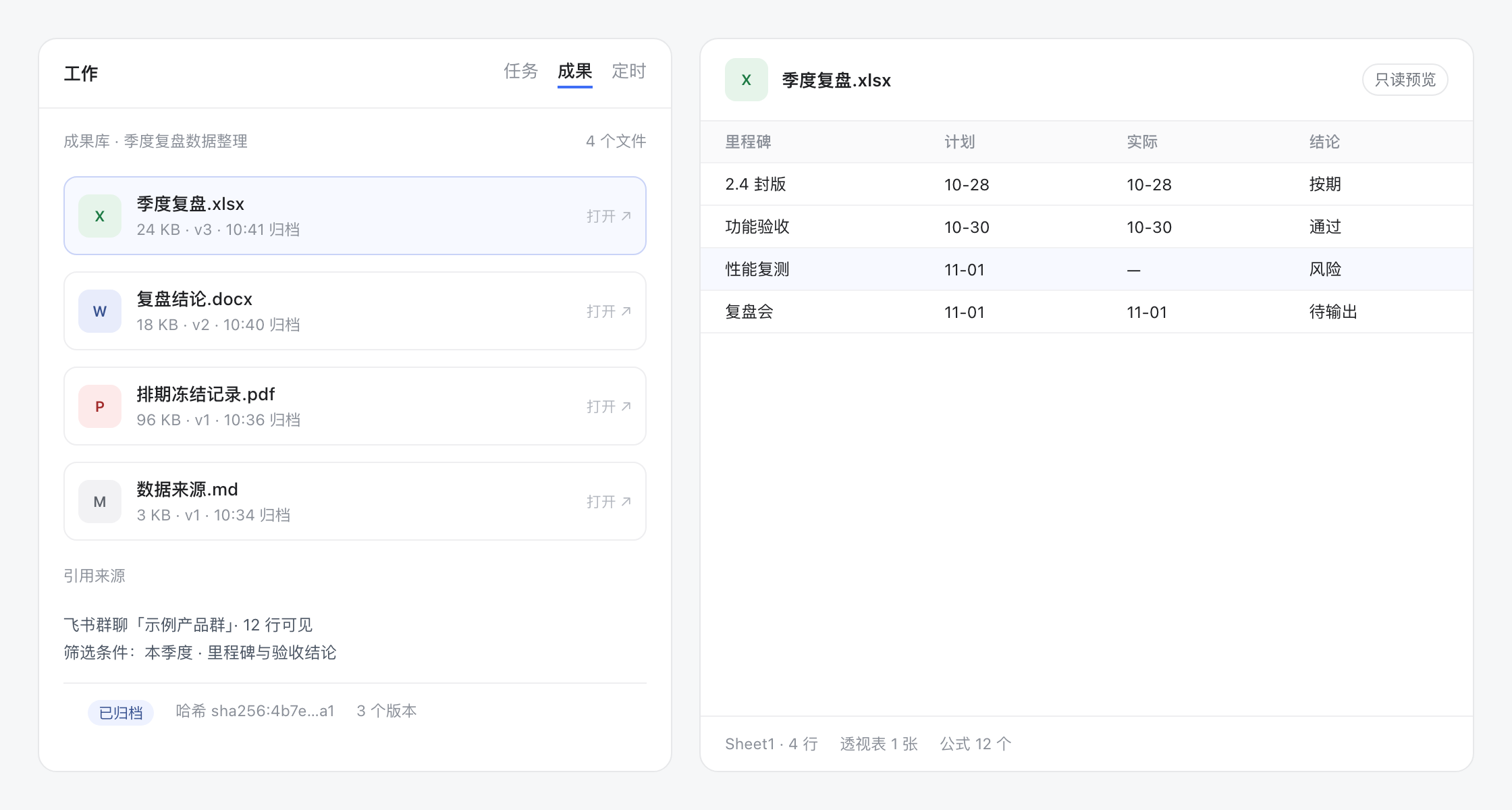
When work mode is on, a chip appears above the composer with the Feishu chat you were last looking at:

OCR runs locally. The recognized text goes to the current session only; this plugin uploads nothing. Three appearances (DSH default, Codex, Claude) are selectable in Settings → Feishu → Preferences.
| Group | Tools |
|---|---|
| Work tasks | work_task_create, work_task_list, work_task_get, work_task_prompt, work_task_cancel, work_task_schedule |
| Artifacts | work_artifact_list, work_artifact_get, work_artifact_scan |
| Screen awareness | work_frontmost_app, work_screen_text, work_feishu_screen, work_feishu_focus |
| Diagnostics | work_ping |
| Feishu | feishu_auth_start, feishu_auth_status, feishu_auth_disconnect, feishu_whoami, feishu_doc_create, feishu_doc_read, feishu_doc_append, feishu_wiki_get, feishu_sheet_read, feishu_sheet_write, feishu_sheet_append, feishu_im_send, feishu_drive_upload, feishu_share_artifact |
work-research · work-weekly-report · work-meeting-minutes · work-data-analysis · work-deck · work-doc-polish · work-screen-awareness
| Key | Default | Effect |
|---|---|---|
accessTokenEnv |
DSH_FEISHU_USER_ACCESS_TOKEN |
Environment variable read for a Feishu user token |
presence |
true |
Enables the screen/Feishu awareness tools and chip capture on the host |
presenceStyle |
dsh |
Chip appearance: dsh, codex or claude |
Task data lives in the DSH storage domain work, so turning the bundle off keeps your tasks, artifacts and schedules.
packages/bundle        patch + preset + locale: wires the plugin set into a profile
packages/host-work     tasks, artifacts, schedules, presence tools, screen helper
packages/host-feishu   OAuth, OpenAPI client, Feishu tools
packages/client-work   workbench panel, composer chip, settings (web client plugins)
packages/skills-work   seven bundled skills
The host reads the focused Feishu window with a small Swift helper (CGWindowList + screencapture -l + Vision OCR); the web client only renders snapshots returned by the host. Details: docs/architecture.md.
| Platform | Work tasks / artifacts / schedules | Feishu tools | Feishu chip / screen text |
|---|---|---|---|
| macOS 13+ | yes | yes | yes (Screen Recording + Xcode CLT) |
| Linux | yes | yes | no — the tools return an actionable message |
| Windows | yes | yes | no |
Troubleshooting:
| Symptom | Fix |
|---|---|
Chip says 飞书未检测到 |
Bring Feishu to the front on the same desktop/Space; the window must be on screen |
| Chip says permission missing | System Settings → Privacy & Security → Screen Recording → enable DeepSeek Harness |
| First read takes ~25 s | swiftc is compiling the helper; later reads are ~1.2 s |
ERESOLVE on install |
Use DSH >= 0.2.2-rc.2 < 0.3.0; peer ranges include the pre-release line |
| Feishu tools say not connected | Run feishu_auth_start and finish the browser flow |
pnpm install
pnpm build
pnpm test            # builds host/client/feishu, then node --test tests/unit/*.test.mjs
pnpm -r typecheck
pnpm check:public    # internal-identifier and secret guard
pnpm docs:check      # relative links and images
See CONTRIBUTING.md for the package layout, how to add a tool or skill, and the fixture rules.
Issues and pull requests are welcome. Please read CONTRIBUTING.md and CODE_OF_CONDUCT.md first.
MIT © 2026 silverze
DSH Work is an independent community project. It is not affiliated with, endorsed by, or sponsored by DeepSeek or Feishu/Lark.
CLASSIFICATION EVIDENCE
系统优先读取 GitHub Topics,再与站内分类词典和词根规则比对。当前命中: 无有效分类标签。
c1overzz
DSH 插件:每天替你刷一轮 B站,读字幕挑出值得的、写一份日报,值得的 @ 你

hellowind777
一个自主的高级智能伙伴,不仅分析问题,更持续工作直到完成实现和验证。

xing-shuyin
Just open your browser — get all your work done.