
Agent 与会话
插件

nuwa-skill
alchaincyf
你想蒸馏的下一个员工,何必是同事。蒸馏任何人的思维方式——心智模型、决策启发式、表达DNA。Distill how anyone thinks.
PROJECT TOPICS
INSTALL REFERENCE
dsh plugin --profile web add github:sherconan/dsh-task-mascot
该命令指向仓库当前默认分支;尚无绑定当前 commit 的完整验证结果。
PROJECT README
真跟着 Agent 每一步工具调用在动。 DeepSeek Harness(dsh)Web 插件 · by metsh
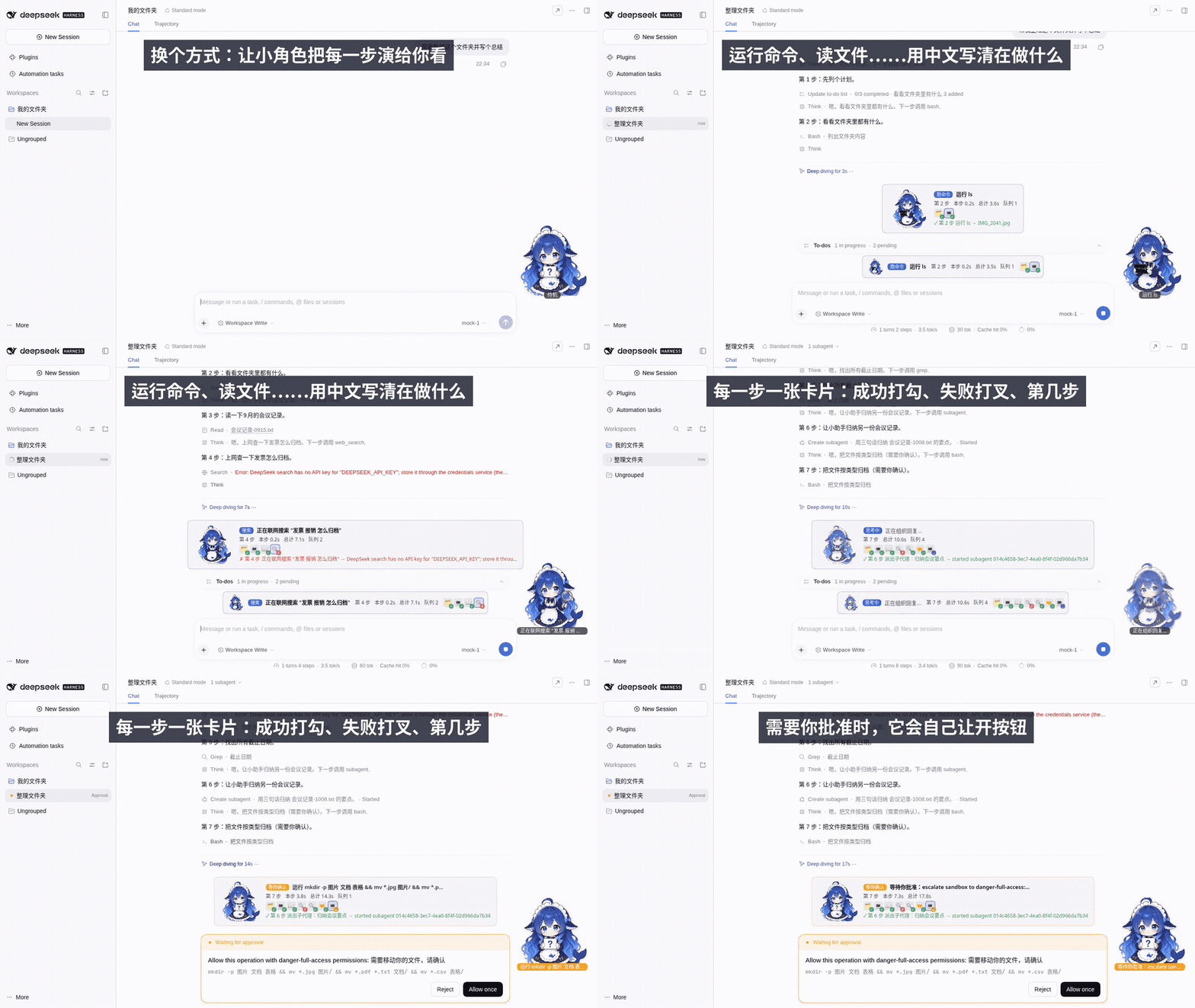
大部分"桌宠"只是挂在角落循环播放动画。Task Mascot 直接订阅会话的实时事件流:Agent 每调用一个工具,角色就切到对应动作,同时告诉你它正在对哪个文件 / 哪条命令 / 哪个关键词做什么,成功失败一目了然。
已验证:DSH 0.2.2-rc.2(npm
next,2026-11-12,Linux ·dsh web;此前 2.1.1 已在 0.2.2-rc.1 验证安装路径)。要求 dsh ≥ 0.2.0-rc.2、Node ≥ 22.19。
dsh web(命令行)
dsh plugin --profile web add github:sherconan/dsh-task-mascot # 或 npm 包:dsh-task-mascot然后重启 dsh web。安装会自动把插件加进 web profile 的 bundles,不用手改配置。
dsh web(界面里装):左侧栏 Plugins(插件) → Add plugin(添加插件) → 输入 dsh-task-mascot → Install(安装) → 打开插件卡片右侧的开关(启用),刷新页面即可。
DSH Desktop(桌面版):Desktop 用自己独占的 desktop profile,上面 --profile web 的命令装进的是 web profile,Desktop 里看不到;npm 装的 dsh 也不能改 Desktop 的 profile。请在 Desktop 里按同样步骤 Plugins → Add plugin → dsh-task-mascot 安装并启用;或者用 Desktop 自带的 dsh 命令(应用菜单「管理 dsh 命令…」安装),先完全退出 Desktop,再运行 dsh plugin --profile desktop add dsh-task-mascot,重新打开即可。(以上 Desktop 步骤依据 官方 Desktop 文档,尚未在 Desktop 实机验证,遇到问题欢迎提 issue。)
设置入口(0.2.1 起没有独立的 Settings 页面):左下角 More(更多)→ Settings(设置)→ 任务角色 Mascot。插件页里 dsh-task-mascot 的卡片只有启用开关和说明页,配置项不在卡片上。
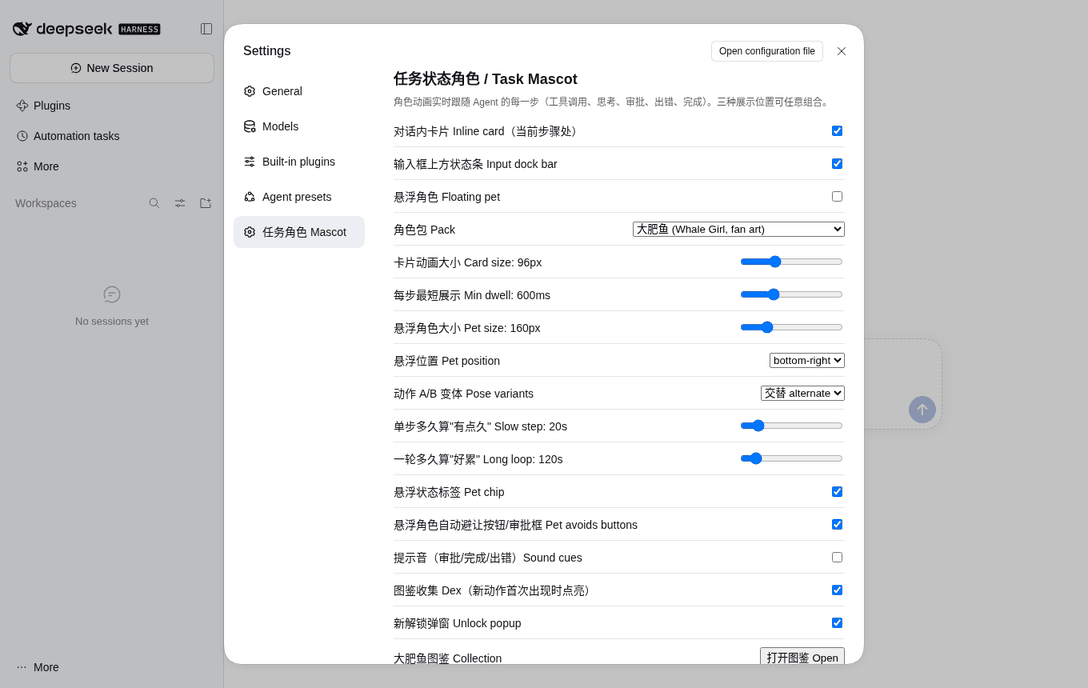
旧版本:0.2.0 及更早的设置入口在 Settings 页面里,同样找「任务角色 Mascot」(本次没有在旧版重测)。
| 常见桌宠插件 | Task Mascot | |
|---|---|---|
| 驱动方式 | 定时 / 随机 / 只区分"忙/闲" | 实时订阅 tool-call-delta、tool/call、结果、审批、turn 结束 |
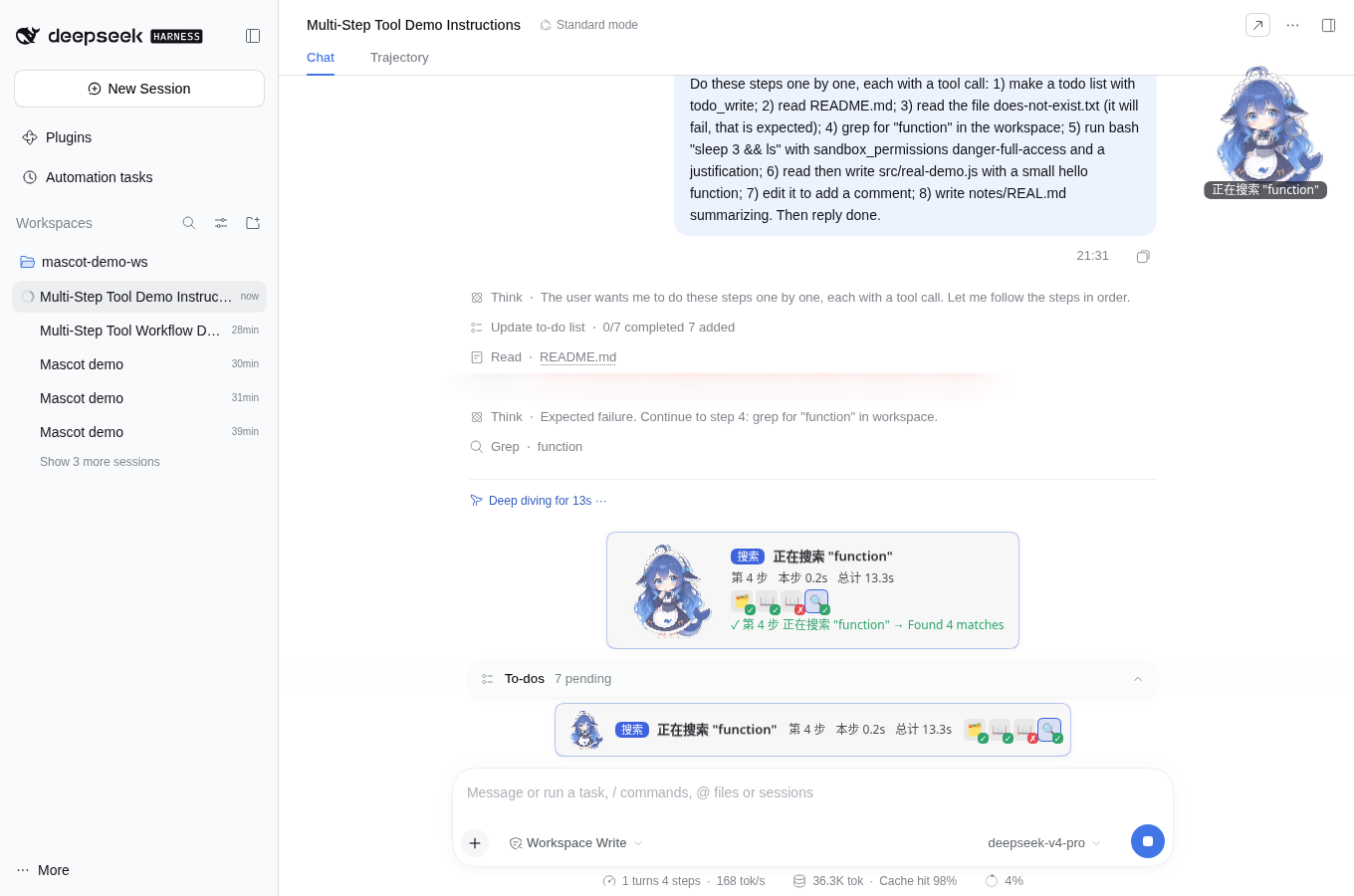
| 显示内容 | 一个动画 | 动作 + 工具参数("正在改 src/app.js"、"运行 npm test"、"正在搜索 \"function\"") |
| 步骤感 | 无 | 第 N 步、本步耗时、总耗时、迷你时间线 |
| 聊天里 | 无 | 对话流里的内联步骤卡片,每步 ✓ 成功 / ✗ 失败,本轮结束有总结 + 回放 |
| 状态粒度 | 2–3 种 | 读文件 / 写代码 / 新建 / 改代码 / 对比 / 搜索 / 上网 / 跑命令(git·测试·装依赖·下载·删除)/ MCP / 做计划 / 派子代理 / 等你确认 / 完成 / 出错 … 共 37 种(v2) |
| 看懂循环 | 无 | 第 N 轮、重试、连续失败会着急、连发工具会手忙脚乱、子任务完成、被拒绝 / 被中断(v2) |
| 时长 | 无 | 一步超过 20 s 冒汗、60 s 犯困,长任务结束欢呼,阈值可调(v2) |
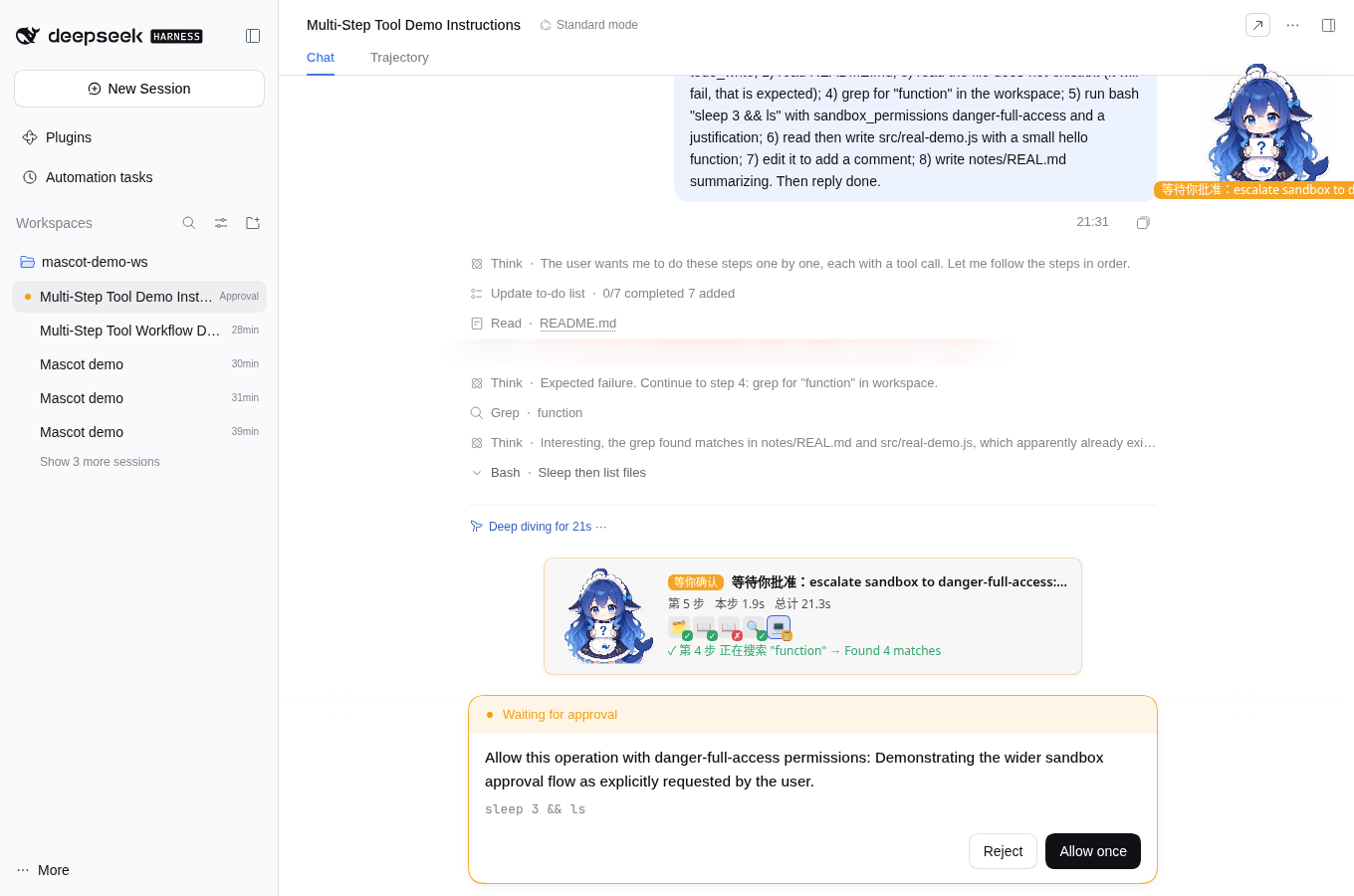
| 审批 | 会挡住按钮 | 显示"等你确认",并自动避让审批按钮和输入框 |
| 角色 | 固定 | 可替换角色包(自带 大肥鱼、Claude娘),丢个文件夹就能加 |
| 映射 | 写死 | 设置里可编辑 工具 → 动画 映射规则(正则) |
| 体积 | — | 两个角色包合计约 18 MB(VP9 透明 webm + Safari 用 WebP 兜底) |
其他细节:每步至少停留 600 ms 排队播放不丢步;流式参数只显示已闭合的值不闪烁;三种展示面(内联卡片 / 输入框上方 Dock 条 / 悬浮宠物)可任意组合,默认内联卡片在视野里时不再重复显示 Dock 条,卡片滚出视野才出现(设置里「状态条何时显示」可改成「总是」);宠物可拖动、双击归位;可选提示音(默认关)。
v2 新增的状态、bash 命令细分、轮次/重试/时长规则见 docs/states-v2.md。
按顺序匹配,第一条命中生效(tool、ext 均为正则,ext 匹配目标文件扩展名)。在设置里可以编辑 JSON 覆盖。
First match wins (tool/ext are regexes; ext = target file extension). Editable in Settings.
| dsh 工具 / tools | 状态 / state | 大肥鱼实际动画 |
|---|---|---|
write / edit / str_replace_editor / apply_patch 且目标是 md/txt/rst/doc/tex |
writingdoc 写文档 |
editing(回退) |
write |
coding 写代码 |
coding |
edit, str_replace_editor, apply_patch |
editing 改代码 |
editing |
read, read_image, read_mcp_resource, lsp, user_terminal_list, user_terminal_read |
reading 读文件 |
reading |
glob, grep, session_*, web_search, web_fetch, stagehand_* |
search 搜索 |
search |
bash, pwsh, terminal_*, job_* |
cmd 跑命令 |
cmd |
run_code, workflow, office_recalculate |
data 跑数据 |
reading(回退) |
office_convert, office_render |
writingdoc 写文档 |
editing(回退) |
todo_write, exit_plan_mode, *_goal, schedule_* |
planning 做计划 |
planning |
subagent, subagent_fork, subagent_oar, send_message, list_agents, interrupt_agent, spawn_teammate, wait_agent, team_task_*, ralph |
subagents 派子代理 |
subagents |
ask_user_question, propose_action |
waiting 等你确认 |
waiting |
list_mcp_resources, list_mcp_resource_templates, mcp__* |
mcp 调用 MCP |
tools(回退) |
present |
summary 总结 |
thinking(回退) |
| 其它 (MCP 等) / anything else | tools |
cmd(回退) |
生命周期 / lifecycle(优先级从高到低 / priority high→low):
| 事件 / event | 状态 |
|---|---|
turn/end 完成 / error |
done / error 一次性 3 秒,之后回到 idle 或进行中的状态 |
审批或提问挂起 (approval/*, pendingInteraction) |
waiting |
有进行中的 tool/call |
上表映射 |
| turn 进行中、模型在输出 | thinking |
| 无活动 | idle |
assets/packs/<id>/manifest.json:
{
  "schema": 1, "id": "mypack", "title": "My Character", "author": "...", "license": "...",
  "preview": "thinking.png",
  "states": {
    "thinking": { "webm": "thinking.webm", "webp": "thinking.webp", "poster": "thinking.png", "loop": true },
    "done":     { "webm": "done.webm", "webp": "done.webp", "poster": "done.png", "loop": false, "durationMs": 3000 }
  },
  "fallback": { "writingdoc": ["editing"], "idle": ["waiting", "thinking"], "*": ["thinking"] }
}thinking;缺的状态会按 fallback → 内置回退链 → * 依次找。Only thinking is required; missing states resolve through fallback → built-in chain → *.idle thinking reading search coding editing writingdoc cmd data planning subagents tools summary waiting done error。webm:VP9 + alpha(Chrome/Edge/Firefox/桌面端);webp:动画 WebP,给 Safari(Safari 解 VP9 会丢透明通道);poster:首帧 PNG。scripts/encode-packs.sh(384px 30fps VP9 yuva420p crf38;WebP 256px 15fps)。把母版放 masters/<pack>/,按脚本里的命名改一下即可。assets/packs/<你的id>/,放入每个状态的 *.webm(VP9 + alpha)、*.webp(动画 WebP,给 Safari)、*.png(首帧海报)。manifest.json(只有 thinking 是必需的,缺的状态按 fallback 回退):{
"schema": 1, "id": "mypack", "title": "My Character", "author": "you", "license": "CC BY 4.0",
"preview": "thinking.png",
"states": {
"thinking": { "webm": "thinking.webm", "webp": "thinking.webp", "poster": "thinking.png", "loop": true },
"done": { "webm": "done.webm", "webp": "done.webp", "poster": "done.png", "loop": false, "durationMs": 3000 }
},
"fallback": { "writingdoc": ["editing"], "idle": ["waiting", "thinking"], "*": ["thinking"] }
}idle thinking reading search coding editing writingdoc cmd data planning subagents tools summary waiting done error。masters/<pack>/,运行 npm run encode(scripts/encode-packs.sh:384px 30fps VP9 yuva420p;WebP 256px 15fps)。npm test # 单元测试(映射 / 状态机 / 事件归一化 / 路径穿越防护)
npm run check # 语法检查
node test/mock-llm/server.mjs # 免 key 的模拟 LLM(:8899),用来跑真实 dsh 做端到端演示E2E 脚本在 test/e2e/(Playwright),截图输出到 qa/(已 gitignore)。
assets/packs/dafeiyu/dex/)为上述大肥鱼动画的衍生素材,同样按 CC BY-NC-SA 4.0 发布、署名链不变。metsh · Task Mascot — a DeepSeek Harness Web plugin whose mascot really follows every tool call the agent makes.
tool-call-delta, tool/call, results, approvals, turn end) — not a timer.Install (verified on DSH 0.2.2-rc.2, Linux, dsh web; 2.1.1 was verified on 0.2.2-rc.1; requires dsh ≥ 0.2.0-rc.2, Node ≥ 22.19):
dsh web: dsh plugin --profile web add github:sherconan/dsh-task-mascot (or the npm package dsh-task-mascot), then restart dsh web. Or in the UI: Plugins → Add plugin → dsh-task-mascot → Install, turn on the switch on its card, and refresh.desktop profile, so a --profile web install does not show up there. Install from Desktop's Plugins → Add plugin, or quit Desktop and run its bundled dsh plugin --profile desktop add dsh-task-mascot. (Per the official Desktop docs; not yet tested on Desktop.)Code MIT © metsh. Artwork: 大肥鱼 CC BY-NC-SA 4.0 (「溟月」 by 上善无形 → ZipZipPipe → community 大肥鱼; via TreapGoGo/deepseek-whale-girl), Claude娘 CC BY-SA 4.0 — see ART_LICENSE.md. Unofficial; not affiliated with DeepSeek or Anthropic.
CLASSIFICATION EVIDENCE
系统优先读取 GitHub Topics,再与站内分类词典和词根规则比对。当前命中: agent。
alchaincyf
你想蒸馏的下一个员工,何必是同事。蒸馏任何人的思维方式——心智模型、决策启发式、表达DNA。Distill how anyone thinks.

freestylefly
Prompt as Code | GPT Image 2 / 2.5 提示词与案例库,530+ 个案例、20+ 套工业级模板与可复用 Skills,新增 2.5 同提示词对比专区,附完整提示词与生成记录,持续更新。

titanwings
Distilly — Distill how they think into reusable Skills for any Agent or Bot. Formerly Colleague Skill(原同事 Skill).