
模型与 MCP
待识别

rea
morluto
Reverse engineer anything with agents, from app behavior down to native binaries.
PROJECT TOPICS
INSTALL REFERENCE
dsh plugin --profile web add github:seudut/dsh-remote-sudo
该命令指向仓库当前默认分支;尚无绑定当前 commit 的完整验证结果。
PROJECT README

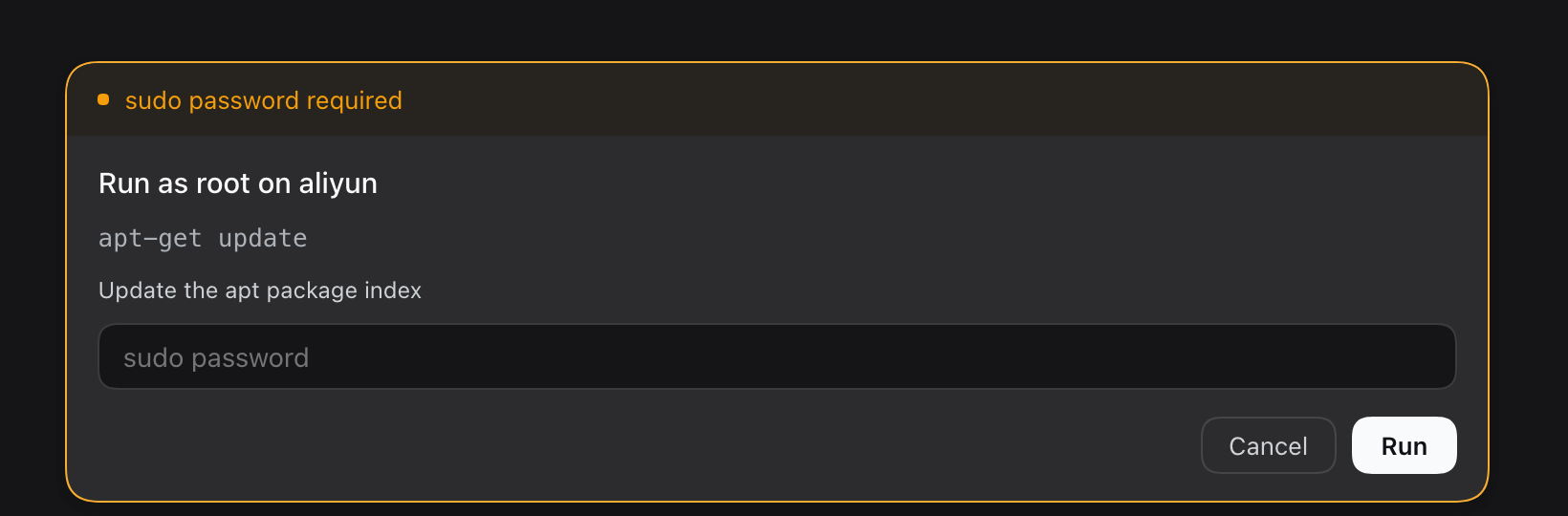
DSH 的远端 sudo 密码面板:在输入框位置弹出,密码只走 stdin,不进对话、工具参数、环境变量或磁盘。
A composer-hosted sudo password prompt for DeepSeek Harness: the password goes to the remote sudo over stdin and never enters the transcript, tool arguments, environment, or disk.
approval 交互上报,侧栏出现等待授权标记,通知插件(如 dsh-session-notification)会照「权限请求」播放提示音并发系统通知;是否在你正盯着该会话时提醒,由通知插件自己的设置决定。passwordTtlMs: 0 每次都要密码;正整数时密码只在宿主内存保留该时长。sudo -k,不假设 ticket 能跨 ssh 复用。command -v sudo 兜底。/dev/null。从 npm(推荐):
dsh plugin --profile desktop add dsh-remote-sudo从 GitHub:
dsh plugin --profile desktop add github:seudut/dsh-remote-sudo#v0.1.3或在插件管理器里选“从 Git 仓库安装”,填 github:seudut/dsh-remote-sudo#v0.1.3。
然后在 profile 的 cordis.patch.yml 加入:
- insert:
    - id: sudo-askpass
      name: 'dsh-remote-sudo'
重启 DSH。前置条件:ssh <host> 能密钥登录。
插件管理器安装会同时处理 bundle 选择;命令行安装需要手动加这一行。本地开发时,把 github:... 换成插件目录的绝对路径即可。
config:
passwordTtlMs: 0 # 0 = 每次都要密码;正整数 = 内存缓存毫秒数| 键 | 默认 | 说明 |
|---|---|---|
passwordTtlMs |
0 |
0 = 每次都要密码;正整数 = 密码在宿主内存保留的毫秒数 |
让 agent 调用 remote_sudo:
用
remote_sudo在 aliyun 上执行apt-get update
| 参数 | 必填 | 说明 |
|---|---|---|
host |
是 | ~/.ssh/config 别名 |
command |
是 | 远端 root 命令 |
description |
否 | 面板里的短标签 |
需要密码时弹面板;passwordTtlMs 内不重复弹;取消/停止会结束调用。多端同时打开时每端都会看到同一个 prompt,先提交者生效,其余端自动撤销。
NOPASSWD。timeout。npm test
node test/real-host-probe.mjs # 手动:真实主机 + 错误密码验证链路approval interaction, so the session list shows a waiting marker and notification plugins (such as dsh-session-notification) play the permission sound and raise a system notification; whether that happens while you are already looking at the session is up to the notification plugin's own settings.passwordTtlMs: 0 asks every call; a positive value keeps the password in host memory for that window.sudo -k after every command and never assumes a no-TTY ticket survives across ssh.command -v sudo./dev/null.From npm (recommended):
dsh plugin --profile desktop add dsh-remote-sudoFrom GitHub:
dsh plugin --profile desktop add github:seudut/dsh-remote-sudo#v0.1.3Or use the plugin manager's "install from Git repository" with github:seudut/dsh-remote-sudo#v0.1.3.
Then add this row to the profile's cordis.patch.yml:
- insert:
    - id: sudo-askpass
      name: 'dsh-remote-sudo'
Restart DSH. Requires key-based ssh <host> access.
The plugin manager also selects the bundle; a CLI install needs this row manually. For local development, replace the github:... spec with the absolute path of the checkout.
config:
passwordTtlMs: 0 # 0 = ask every call; positive = in-memory TTL in ms| Key | Default | Meaning |
|---|---|---|
passwordTtlMs |
0 |
0 asks every call; a positive value is the in-memory password TTL in milliseconds |
Ask the agent to call remote_sudo:
Use
remote_sudoto runapt-get updateon aliyun
| Argument | Required | Meaning |
|---|---|---|
host |
yes | SSH alias from ~/.ssh/config |
command |
yes | root command to run remotely |
description |
no | short label shown in the panel |
The panel appears when a password is needed; within passwordTtlMs it does not ask again. Cancel/stop ends the call. When several browsers are open, each shows the same prompt; the first answer wins and the others dismiss themselves.
NOPASSWD.timeout in the remote command for a hard limit.npm test
node test/real-host-probe.mjs # manual: real host + wrong passwordMIT
CLASSIFICATION EVIDENCE
系统优先读取 GitHub Topics,再与站内分类词典和词根规则比对。当前命中: deepseek-harness。
morluto
Reverse engineer anything with agents, from app behavior down to native binaries.

deepseek-ai
DeepSeek Harness: Everything is a Plugin.

nexu-io
The 1st Collaborative AI Design Agent Workspace. Local-first and open source. Create motion, prototypes, websites, apps, dashboards, presentations, images, and videos with your team and AI agents. Share work, exchange feedback, and iterate together in one workspace.