
模型与 MCP
待识别

rea
morluto
Reverse engineer anything with agents, from app behavior down to native binaries.
PROJECT TOPICS
INSTALL REFERENCE
dsh plugin --profile web add github:seally-web/dsh-r-runner
该命令指向仓库当前默认分支;尚无绑定当前 commit 的完整验证结果。
PROJECT README


Run R inside the DeepSeek Harness sidebar: a persistent R session, a file tree, a syntax-highlighted editor, a console, an environment table, and plot thumbnails — laid out like RStudio, with the keyboard habits of VS Code.
Status: v0.1.6 on npm, macOS + R 4.6 tested. See docs/PLAN.md for the design notes and roadmap.
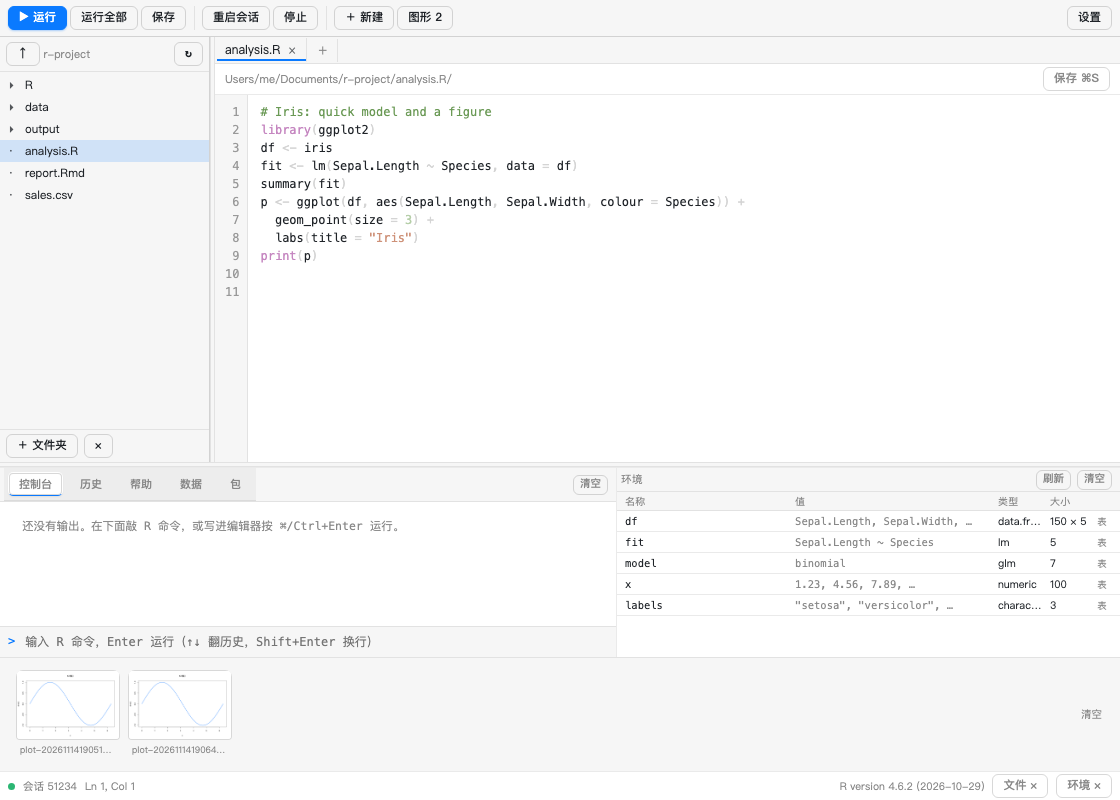
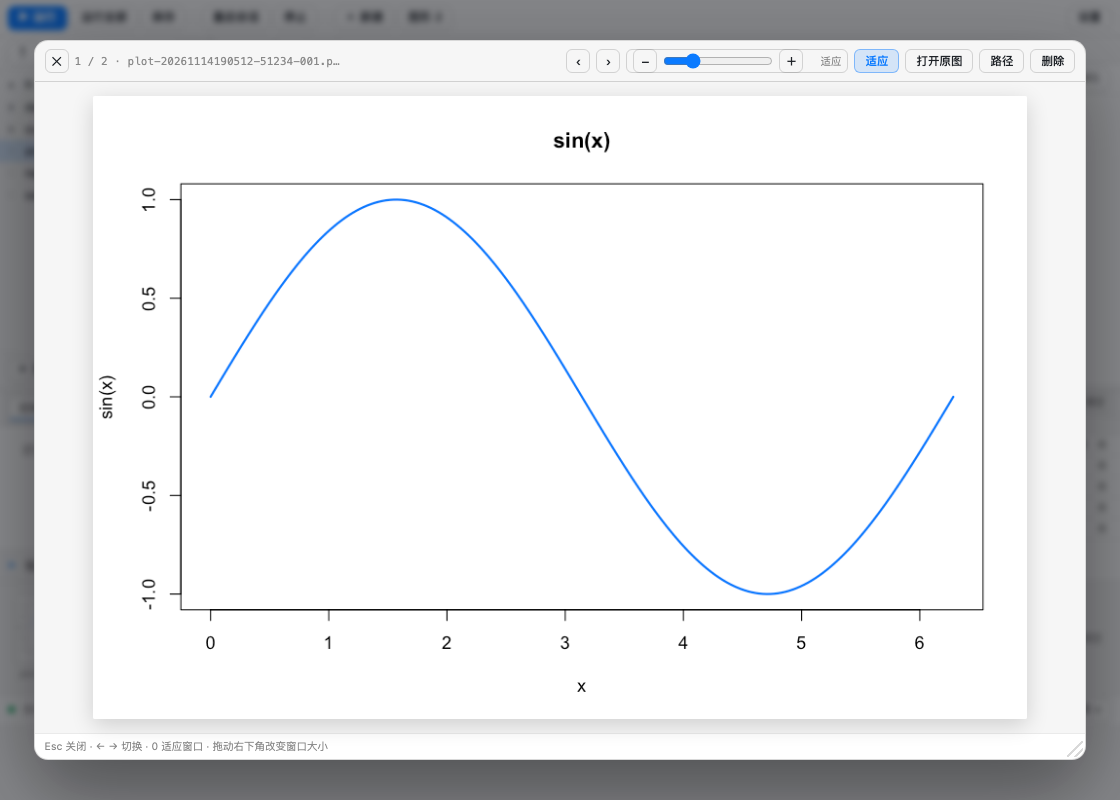
Click any plot thumbnail to open it full-size — fit-to-window or 100 %, flip through the set with ← →, copy the path, or open the PNG in a new tab:
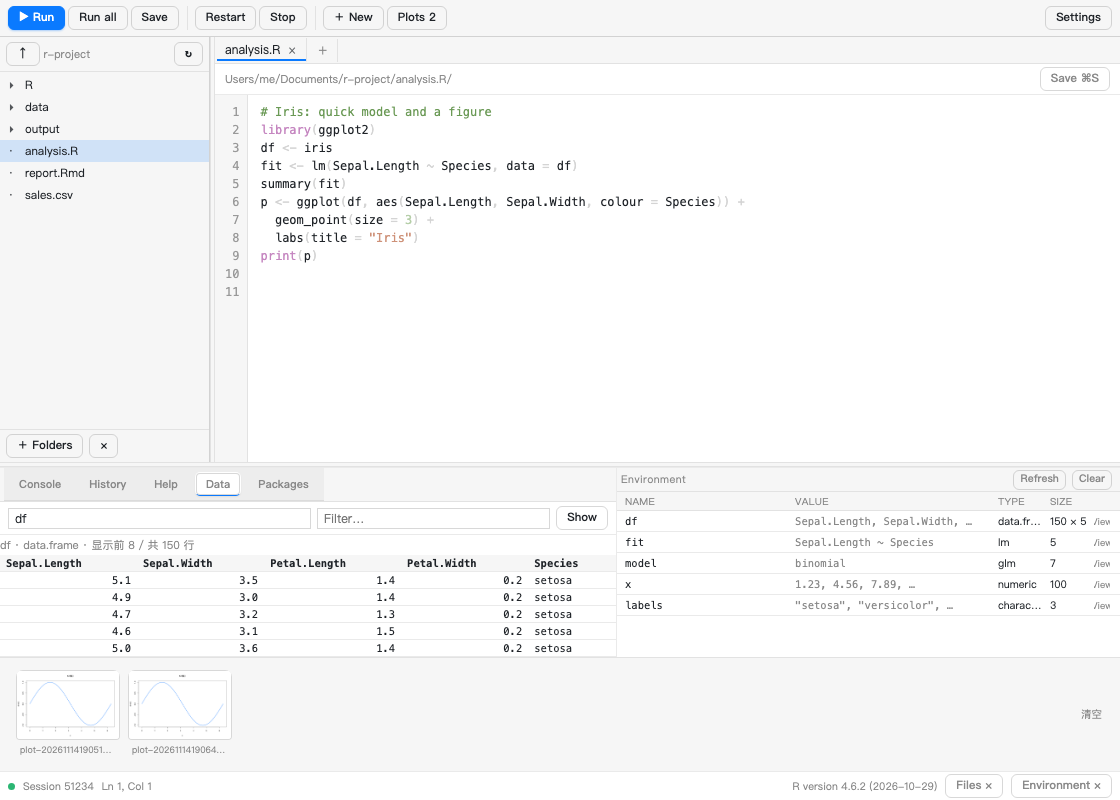
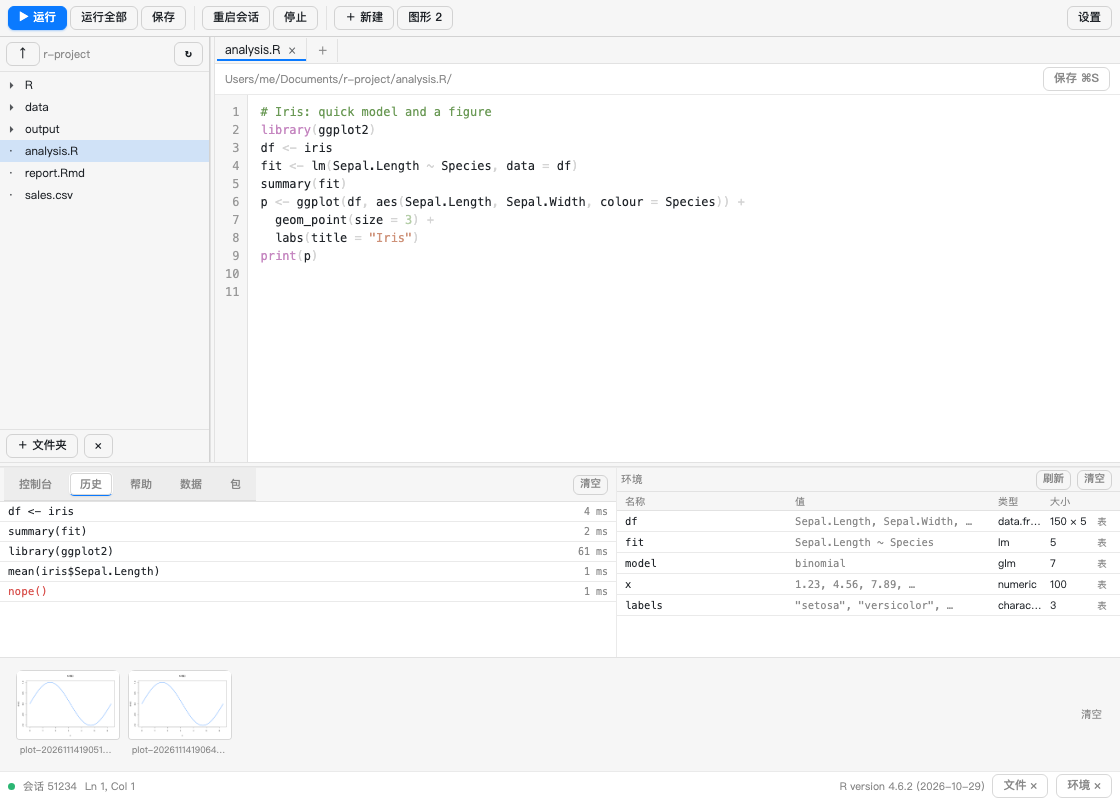
The bottom pane has five tabs — console (with a real prompt), history, help, the data viewer and the package manager:
R --slave process: variables,
loaded packages and the graphics device survive between runs. A run costs 1–40 ms
after the ~1 s boot.⌘/Ctrl+Enter runs the selection (or the buffer),
⌘/Ctrl+S saves, Tab indents two spaces, the breadcrumb shows where you are.1:10, c("a","b"), …); the 表 button opens
the object in the data viewer.Shift+Enter adds a
line, ↑/↓ walk the commands you already sent. Output lands in the same log as
editor runs.r_run) is kept in
~/.dsh/r-runner-history.json; the 历史 tab lists them, click a row to put the code
back in the prompt.?topic: it renders the real R help page
(utils:::.getHelpFile + tools::Rd2txt) for anything installed locally.data.frame / matrix / vector — first 100
rows, numeric columns right-aligned, <NA> marked.plot() is written to
.dsh-r-runner/plots/plot-<ts>-<pid>-NNN.png. Clicking a thumbnail opens it in a
centred window (portalled to document.body, so the sidebar cannot clip it):
‹ › browse, 适应 ⇄ 100%, 原图 opens the PNG in a tab, 路径 copies the
file path, 删除 removes that one plot, and the strip has a 清空 button.
The files are plain PNGs an agent can read..Rmd runs one chunk. With the caret inside an {r} fenced chunk, ⌘/Ctrl+Enter
runs just that chunk (the prompt says chunk 2/3 · L12-18); outside any chunk it
falls back to the first one.Ctrl+Space (or just typing .,
$, ::) opens a suggestion list built from your objects, the exports of every
loaded package and base R; the gutter marks parse() errors and a few lint rules
(setwd(, attach(, = for assignment), and F12 / ⌘-click jumps to a
function's source — source()d files keep their file:line.library()); install.packages() runs in a
separate Rscript --vanilla process so the session never blocks, and the log stays
on screen. If a run failed with there is no package called 'x', the panel offers a
one-click install.rmarkdown::render() into
<workdir>/.dsh-r-runner/rmd and shows the HTML in an iframe; a failed render shows
the tail of the log, and if rmarkdown is missing it offers to install it.window.prompt(), so
+ 文件夹 (tree header and settings) opens an in-panel browser
(GET /r/api/browse): ⤴ up, 主目录, 工作区, click a folder to walk in,
double-click or 添加此文件夹 to add it as an extra root. The picker ignores the
workdir guard on purpose — it only lists directory names.autoDetect off so the choice sticks), the 会话工作区 dropdown lists
the DSH workspaces, and 跟随当前会话 makes the panel follow the session again.*.Rproj in the working directory
(settings → 信息 → 项目), and the default scriptDir follows the project root
(<project>/R) instead of the bare working directory.app.R / ui.R / server.R open the toolbar shows
运行 Shiny (shiny::runApp() on a free loopback port, embedded in an iframe,
停止 kills it); with a .qmd open it shows 预览 Quarto
(quarto render --output-dir .dsh-r-runner/quarto, then the HTML is embedded). Both
degrade to a readable message plus an install button when shiny or the quarto CLI
is missing.r_run({ code }) / r_run({ file }) lets the model run R directly
and get back the console output plus plot paths.Requires R on the machine (R on PATH, or point the
plugin at it in settings). No R packages are required.
Search for R Runner in the plugin market, install, reload the page (⌘/Ctrl+R), then open the right sidebar → add control → R Runner.
cd plugins/dsh-r-runner
sh bin/install-local.sh          # copies the payload into the desktop profile
# reload the page, then open the R panel

# verify the host half is live (routes registered, R spawns, plots work)
node bin/check.mjs http://127.0.0.1:<gui-port>
bin/install-local.sh writes ~/.dsh/r-runner.json on first run and adds the bundle
to the profile manifest; bin/reload-host.sh forces the host to re-compose.
| Action | Shortcut |
|---|---|
| Run selection / buffer | ⌘/Ctrl+Enter |
| Run everything | toolbar 运行全部 |
| Save (overwrite the real file) | ⌘/Ctrl+S |
| Open the panel | ⌘⇧R (web: ⌥⇧R) |
| Restart the R session | toolbar 重启会话 |
| Edit a variable | double-click its row in the environment table |
| View a data frame | the 表 button on its environment row, or the 数据 tab |
| Run a console command | type in the prompt, Enter |
| Previous / next command | ↑ / ↓ in the prompt |
| Look up help | 帮助 tab, type a topic, Enter |
| Completion | Ctrl+Space, or type after . / $ / :: |
| Jump to definition | F12 or ⌘-click on a name |
| Install a package | 包 tab → type a name → install.packages() |
| Add a folder | + 文件夹 (tree) or 添加文件夹 (settings) → browse |
| Change the working directory | Settings → 选择目录 → 浏览… / 会话工作区 |
| Run a Shiny app | open app.R → toolbar 运行 Shiny |
Preview a .qmd |
open it → toolbar 预览 Quarto |
Render the .Rmd |
预览 Rmd in the toolbar |
Run the current .Rmd chunk |
⌘/Ctrl+Enter inside an {r} chunk |
| Enlarge a plot | click its thumbnail (floating window) |
| Close / browse the plot window | Esc / ← → / 0 (fit ⇄ 100 %) |
| Zoom a plot | the slider in the window bar, or − / + |
| Resize the plot window | drag its bottom-right corner |
| All plots | 图形 N in the toolbar |
| Delete a plot | hover a thumbnail → ×, or 删除 in the window |
| Empty the environment | 清空 next to 刷新 in the 环境 header |
Notes:
+新建 creates a draft that is
written to <scriptDir>/<name>.R when you save it.localStorage, so reloading the page does not lose them.runInFileDir), which is what read.csv("data.csv") usually wants.plot() output is a PNG per plot. par(mfrow = c(2, 2)) therefore yields four files.rm(list = ls(envir = globalenv())), so it
empties your objects but keeps the session (and its loaded packages) alive.~/.dsh/r-runner.json (edited from the panel's settings page, or by hand):
{
  "rBinary": "/usr/local/bin/R",
  "rscriptBinary": "/usr/local/bin/Rscript",
  "sessionArgs": "",
  "workdir": "/path/to/your-project",
  "scriptDir": "/path/to/your-project/R",
  "extraRoots": [],
  "runInFileDir": true,
  "autoSave": true,
  "plotWidth": 960,
  "plotHeight": 640,
  "plotRes": 110,
  "timeoutMs": 600000,
  "maxOutputChars": 400000,
  "env": {}
}
R is resolved from the setting, then PATH, then the common macOS
framework locations.autoDetect (default on) makes it follow the current DSH
session workspace: switching projects in DSH moves the tree and the R cwd, and the panel
re-checks every 15 s without a reload. Turn the checkbox off (or pick a folder) to pin it.scriptDirAuto (default on) keeps drafts in <workdir>/R, or
<project>/R when the folder holds an *.Rproj. Untick it to write to a fixed scriptDir
(older installs pinned scriptDir; that stale value is now ignored while auto is on).sidebar (lib/client.js: React via ModuleLoader, no build step)
│ fetch /r/api/*
host half (lib/index.js: webServer + subprocess + workspaceRegistry)
│ loopback TCP, newline-delimited JSON
R session (lib/driver.R: ping / run / vars / assign / rm / quit)lib/driver.R — the in-R server. Everything is wrapped in local({ … }) so the
driver's own objects never land in globalenv; options(device = …) redirects plots
to PNG files; capture.output(type = "output") collects what print/cat printed.lib/runner.js — config, RSession (spawn, connect with retries, request queue),
and the file helpers (tree, read/write, path policy).lib/index.js — routes, the r_run agent tool, workspace detection.lib/client.js — the panel. Hand-written window.__ModuleLoader__.load({ factory })
bundle; no bundler, so editing it and reloading the page is the whole dev loop.npm test # import / driver / host-unit / client-tokenize / client-smoke
node bin/preview-ui.mjs # writes /tmp/rr-panel.html + /tmp/rr-settings.html
node bin/check.mjs <gui-url> # live check against a running DSHtest/import.mjs enforces the rule that keeps this plugin loadable across DSH
releases: the host half may only import Node built-ins (see Troubleshooting).
The panel is missing from the sidebar, and r_run is not in the tool list.
The host half did not load. Check the route first:
curl -s -o /dev/null -w '%{http_code}\n' http://127.0.0.1:<gui-port>/r/api/state200 means loaded; 404 means it is not. On DSH ≥ 0.2.2 the usual cause is an import
that the profile can no longer resolve (@deepseek-ai/dsh-tools and friends). The
plugin then disappears silently — the plugin manager shows enabled: true with
fiberPhase: null (not failed, so there is no diagnostic). test/import.mjs exists
to catch exactly this; keep the host half on Node built-ins only.
The tab opens but stays blank after an update. A render-time throw leaves React with
no boundary to catch it. Two traps, both hit once in this plugin: the client factory only
receives require — ctx exists only inside apply(ctx), so never read a free ctx in a
component; and the client context refuses services that are not declared in the plugin's
inject list (cannot get property "sessions" without inject). POST /r/api/debug/props
reports what the shell actually hands the panel (propsKeys, sessionId, resolved cwd)
when a slot seems to give nothing.
The tree does not follow the session. The panel asks for its seat's workspace through
props.sessionId → ctx.sessions → ?cwd=; if that chain breaks it falls back to the
first registered workspace and settings shows 「来自注册工作区」 instead of 「来自当前会话」.
"R 不可用" in the settings page. Point rBinary at the real binary
(which R, e.g. /usr/local/bin/R), then press 重启会话.
Run does nothing / hangs. Open the toolbar 重启会话, then run
1 + 1. If the session keeps dying, check sessionArgs (a bad flag kills R at
boot) and the console's error line.
No plot thumbnail. Plots come from the graphics device, so plot() must actually
be called; ggplot2 objects need print(p). Output lands in
.dsh-r-runner/plots/ of the workdir — check the directory exists and is writable.
First run feels slow. The session boots R (~1 s) the first time; later runs reuse
it. 重启会话 pays that cost again.
Warning: the R process can touch anything your user can. It is not sandboxed;
extraRoots is a UI convenience, not a security boundary.
MIT
CLASSIFICATION EVIDENCE
系统优先读取 GitHub Topics,再与站内分类词典和词根规则比对。当前命中: deepseek-harness。
morluto
Reverse engineer anything with agents, from app behavior down to native binaries.

deepseek-ai
DeepSeek Harness: Everything is a Plugin.

nexu-io
The 1st Collaborative AI Design Agent Workspace. Local-first and open source. Create motion, prototypes, websites, apps, dashboards, presentations, images, and videos with your team and AI agents. Share work, exchange feedback, and iterate together in one workspace.