
模型与 MCP
待识别

rea
morluto
Reverse engineer anything with agents, from app behavior down to native binaries.
PROJECT TOPICS
INSTALL REFERENCE
dsh plugin --profile web add github:seally-web/dsh-matlab-runner
该命令指向仓库当前默认分支;尚无绑定当前 commit 的完整验证结果。
PROJECT README


A DeepSeek Harness plugin that puts a VS Code–shaped MATLAB panel in the right
sidebar: edit .m code, press ⌘/Ctrl+Enter, watch the console, open figures
inline, keep a warm MATLAB session between runs, browse several folders like
MATLAB's add-to-path list, and inspect/assign workspace variables.
dsh-matlab-runner is a UI plugin: the host half spawns MATLAB with the
system user's permissions (not the agent's sandbox) and the browser half gives
you an editor + runner + workspace inspector. Unlike the MCP-based MATLAB
plugins, it is not an agent tool wrapper — the agent does get a matlab_run
tool, but the panel is the product.
Two halves in one package:
| Half | File | What it does |
|---|---|---|
| Host | lib/index.js, lib/runner.js |
Owns the persistent MATLAB session and the run registry, serves /matlab/api/*, and registers the matlab_run agent tool. |
| Browser | lib/client.js |
A page-type sidebar tab (editor, gutter, script picker, Run/Stop/Save, live console, figure previews, settings) plus a guide card and the matlab-runner.open shortcut. |
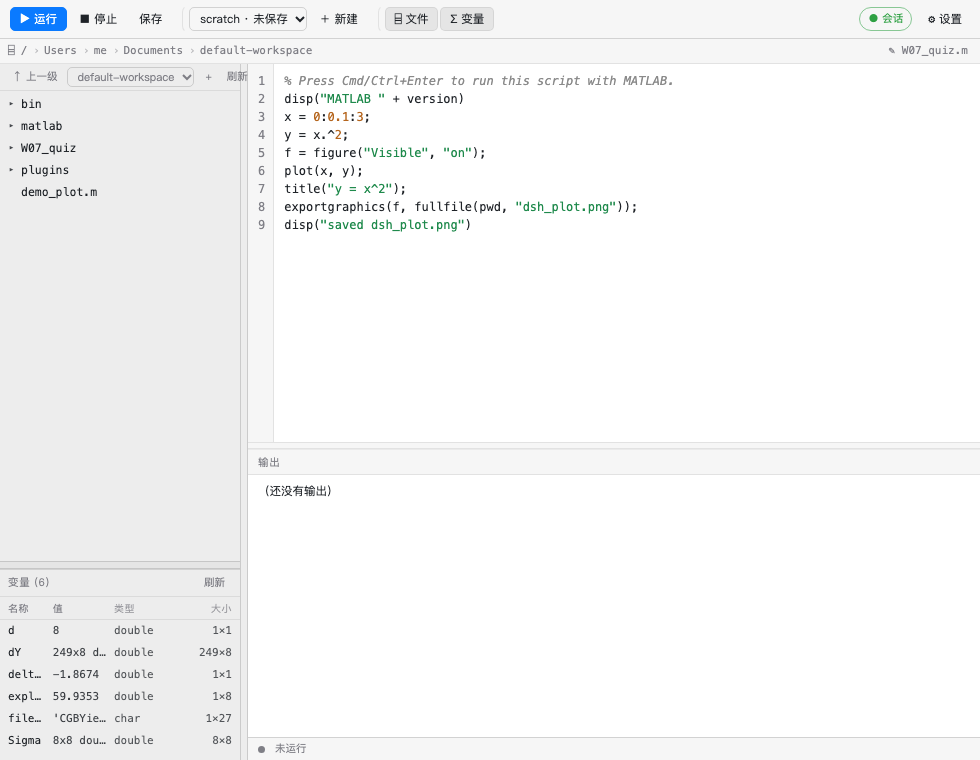
A real run: file tree + variables on the left, editor in the middle, live console below, exported figures as thumbnails. Dividers resize the tree, the variables pane and the console; settings are one click away.
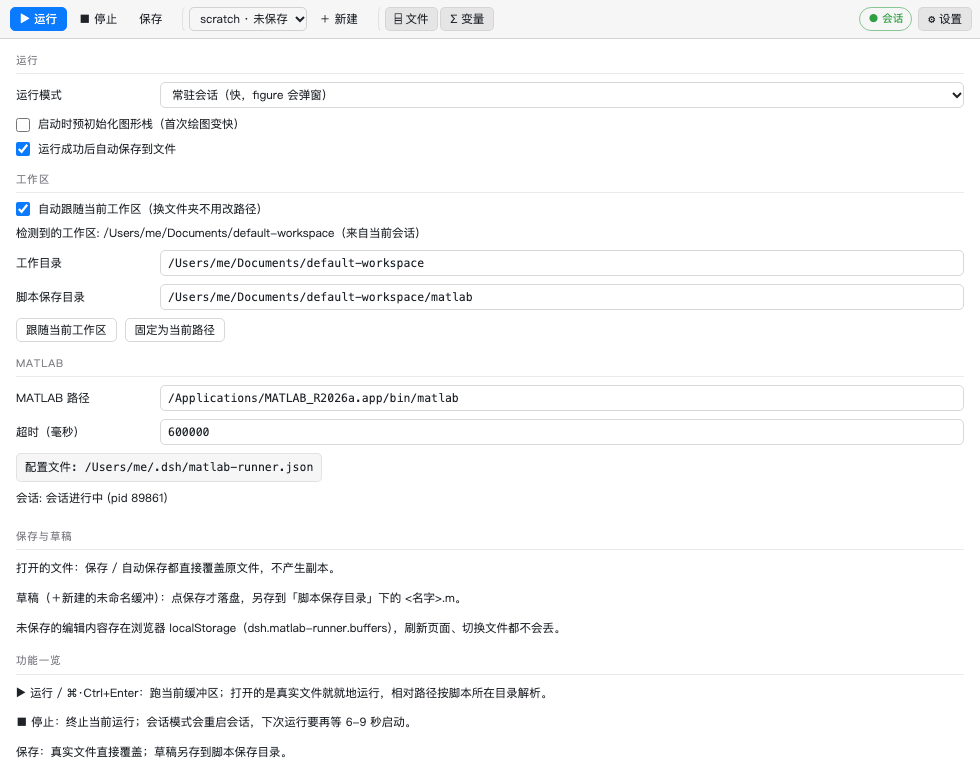
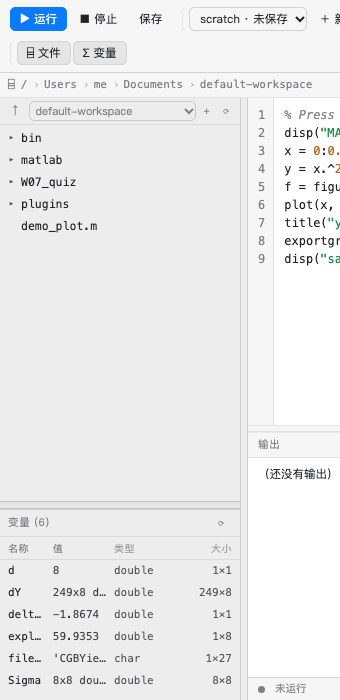
| Settings | Narrow sidebar |
|---|---|
 |
 |
session (default) — one long-lived matlab -nodesktop -nosplash process
fed through stdin. After the first boot (≈6–9 s) a run costs ~10–30 ms, the
prompt keeps your variables between runs, and figure windows really open on
the desktop while the panel also shows the exported PNG. Output is streamed
into the console while the script is still running.batch — matlab -batch per run, headless, exits with the script
(15–20 s per call, no windows). Kept for CI-ish, leave-nothing-behind work.The session is shared between the sidebar and the agent tool, so what the model runs and what you type land in the same MATLAB workspace.
MATLAB needs to write ~/Library/Application Support/MathWorks before it will
start. A sandboxed shell (workspace-write) makes matlab -batch exit 1 with
an empty console, and a PTY tab owned by the agent is subject to the same
sandbox. The host half spawns MATLAB with node:child_process from the host
process, i.e. with the system user's permissions, independently of the agent's
sandbox mode — so this panel runs MATLAB without switching the session to Full
access.
From npm (once published):
dsh plugin --profile web add dsh-matlab-runnerFor the desktop app, whose profile is owned by the Electron application, use the
bundled script — it copies the payload into the profile, wires the dependency and
the dsh.profile.bundles row, seeds the config, and re-composes the plugin:
node bin/install-local.sh # or: plugins/dsh-matlab-runner/bin/install-local.shThe official desktop app owns its profile, so the script copies the payload
into ~/.dsh/profiles/desktop/node_modules/dsh-matlab-runner, adds the
dependency and the dsh.profile.bundles row, seeds the config, and re-composes
the plugin's Loader entry.
About that last step: the app watches ~/.dsh/profiles/desktop/package.json, so
dropping the bundle row and putting it back reloads the plugin from disk —
no app restart, no lost session. bin/reload-host.sh does exactly that:
plugins/dsh-matlab-runner/bin/reload-host.sh # host half picked up new filesThen reload the page (⌘/Ctrl+R) so the browser half updates too. A full app restart is only needed if the tab still shows the old panel.
Right sidebar → the add control (+) → the MATLAB 运行器 / MATLAB runner
card. After the first visit the tab is in the strip; ⌘/Ctrl+Shift+M opens it
from anywhere (web builds: ⌘/Ctrl+Shift+Alt+M).
⌸ 文件) — browse workdir from the panel, expand folders
lazily, click any text file to open it in the editor (↑ 上一级 walks up,
刷新 re-reads). Only files with a text extension are editable; anything else
reports binary.Tab = two spaces.<workdir>/.dsh-matlab-runner/<stem>.m and runs it in the persistent session..m in scriptDir plus every unsaved draft.
Picking one loads it into the editor. + New starts a blank buffer, and
every buffer is remembered (per file path, plus each draft) so switching
files or tabs never throws typed code away.+ mounts any absolute path (~ works) as an extra tree root, exactly like
MATLAB's "add to path" list; mounts are persisted in matlab-runner.json as
extraRoots and can be removed again from the same row. Mounted folders are
browsable and editable, but a run's working directory still follows the
workspace (relative paths stay anchored to the script being run).evalin('base', '<name> = <literal>;'), so it really replaces the MATLAB
variable (the panel refreshes right after). Numerics are shown with
mat2str, anything else through evalc('disp(x)').<scriptDir>/<name>.m.getReport(e,'extended'), so line numbers survive.scriptDir. Turn it off with the autoSave setting or the Settings
checkbox.Σ 变量) — the live workspace: name, class, and size for every
base-workspace variable. The host asks MATLAB to write whos as JSON into
.dsh-matlab-runner/vars.json and reads it back, so the list is never
truncated by the console. Refreshed automatically after each run..png/.jpg/.svg/.gif/.webp) show
as thumbnails under the console; click one to open the full image in a tab.
With session mode the figure window also opens on the desktop..mlx) — clicking an .mlx in the file tree opens a
read-only preview: text with headings, colourised code blocks, text outputs,
and inline figures. Parsing is local (lib/livemd.js: ZIP + OOXML, no MATLAB
needed). Run/Save are disabled while previewing; close the preview to edit.The panel follows the VS Code / MATLAB layout conventions:
| Area | What it holds |
|---|---|
| Toolbar | Three groups: run (▶ Run / ■ Stop / Save), files (script picker + New), views (file tree / variables). The session badge and the settings gear sit on the right. |
| Breadcrumb | The folder the panel currently points at, clickable per segment, plus the edit target on the right. |
| Left column | File tree on top, MATLAB workspace variables underneath (name / value / class / size), with a drag bar between them and a vertical drag bar against the editor. |
| Editor | Gutter, syntax highlighting, splitter above the console — drag it to resize. |
| Console | Header strip, streaming output, figure thumbnails, and a status bar with phase, exit code, elapsed time and the script path. |
| Settings | Three labelled sections — run, workspace, MATLAB — as a label/control grid, with the current detection source, "follow this workspace", "pin to this path", Save and Restart session. |
Panel toggles (tree / variables) are remembered per browser. node bin/preview-ui.mjs
renders the two views to /tmp/mrun-*.html for a quick headless look:
node bin/preview-ui.mjs
"/Applications/Google Chrome.app/Contents/MacOS/Google Chrome" --headless=new \
--screenshot=/tmp/panel.png --window-size=980,760 file:///tmp/mrun-panel.html| Buffer | What Save does | Where it lives |
|---|---|---|
| An opened file (picked from the tree or the script picker) | Overwrites that file in place — same as the editor's ⌘S. Auto-save (after a clean run) does the same. | the file itself |
A draft (+ new, name without a path) |
Saves a copy to <scriptDir>/<name>.m and switches the buffer to that file. |
<scriptDir> (default <workspace>/matlab) |
| Unsaved edits of either kind | Kept in browser localStorage under dsh.matlab-runner.buffers, so switching files or reloading never loses them. |
browser storage |
| The script MATLAB actually executes | A draft runs from a temporary copy in <workspace>/.dsh-matlab-runner/; an opened file runs in place, so relative paths resolve next to it. |
workspace |
~/.dsh/matlab-runner.json ($DSH_HOME/matlab-runner.json when set), created
on first boot with the paths this machine actually uses:
{
  "mode": "session",
  "warmFigures": false,
  "autoSave": true,
  "autoDetect": true,
  "matlabPath": "/path/to/MATLAB/bin/matlab",
  "sessionArgs": ["-nodesktop", "-nosplash"],
  "extraArgs": ["-nodisplay", "-nosplash"],
  "workdir": "~/your-project",
  "scriptDir": "~/your-project/matlab",
  "timeoutMs": 600000,
  "env": {}
}
mode — session (persistent, fast, figures open) or batch (one process per
run, headless).warmFigures — true initializes the graphics/Java stack during boot, so the
first figure costs ~2 s instead of ~13 s; the first run pays that cost up
front instead.autoSave — true (default): a successful run writes the buffer back to the
open file (or saves a draft as scriptDir/<name>.m).autoDetect — true (default): workdir follows the folder the DSH session
has open and scriptDir becomes <workspace>/matlab, so switching projects
needs no config edit. false pins the two paths below.matlabPath — the launcher binary (an app bundle's bin/matlab, not the
Contents/MacOS payload).sessionArgs — flags after matlabPath for the persistent process.extraArgs — flags before -batch in batch mode.workdir — the session's working directory, and the root scratch scripts are
written under. With autoDetect on this is derived, not fixed.scriptDir — where Save puts .m files and where the picker looks
(<workspace>/matlab in auto mode).timeoutMs — hard cap per run; Stop is the manual version.env — extra environment variables for MATLAB.Everything except env is editable in the panel's Settings pane.
A buffer that maps to a real file runs that file, so MATLAB's working
directory is the file's own folder and readmatrix('data.xlsx') resolves next
to the script (same as the editor's Run button). Drafts still run from the
scratch copy under <workspace>/.dsh-matlab-runner/, and when MATLAB cannot
find a relative path the console shows the base folder:
相对路径以脚本所在目录为基准: /…/W07_quiz(数据文件放这里,或用绝对路径)The tab sends its session's workspace root with every API call (?cwd=), so:
ctx.workspaceRegistry, then the host process
cwd (this is what the agent tool sees when no panel is talking).matlab_run never
inherits a folder you closed long ago.autoDetect: false skips all of the above and uses workdir/scriptDir.Settings shows the detected root and its source, with 跟随当前工作区 and
固定为当前路径 buttons. Path rejections name the folder you are on, e.g.
path outside the configured roots: /etc · 当前工作区: /tmp(面板 → 设置 → 自动检测 / 使用当前工作区).
matlab_run({ code | file, name? }) runs one script through the same registry
and returns its console text, so the model can iterate on MATLAB code, read the
output, and see errors (the wrapper prints getReport(e,'extended')).
node plugins/dsh-matlab-runner/test/host-unit.mjs     # names, argv, config dialect, path containment, vars helper
node plugins/dsh-matlab-runner/test/client-smoke.mjs  # loader shell + registration order
node plugins/dsh-matlab-runner/test/client-render.mjs # renders the panel body once against stubs
node plugins/dsh-matlab-runner/test/client-tokenize.mjs # highlighter token split (transpose vs string, comments, numbers)
node plugins/dsh-matlab-runner/test/livemd.mjs        # .mlx parser, self-contained fixture
node plugins/dsh-matlab-runner/test/host-apply.mjs    # the whole apply(): routes, tool, tree, vars, session (~40 s)
node plugins/dsh-matlab-runner/test/session.mjs       # real MATLAB: boot, warm reuse, errors, figures, stop (~50 s)
node plugins/dsh-matlab-runner/test/host-run.mjs      # real MATLAB batch path (needs an unsandboxed shell)
bin/check.mjs is the live one: it talks to the running app over loopback
(DSH_GUI_URL, default http://127.0.0.1:54501), prints the resolved config,
runs a script, proves the session is reused on the next run, and fetches the
exported figure through the artifact route. A pass proves the host half is live
and MATLAB is reachable; only the page can prove the tab rendered.
The MATLAB tests fail under a sandboxed shell by design — they exercise the same spawn path the app uses, which only exists outside the sandbox.
warmFigures to move that cost to boot.plot.m, mean.m, …): run
resolves the script first and shadows the function, so plot.m fails with
"不支持将脚本 plot 作为函数执行".pause
or an infinite loop blocks that session until Stop.sessionArgs/extraArgs and the launcher path would need
adjusting.localStorage only, so they survive tab switches and page reloads but not a
different browser or a cleared profile.% inside an unusual context can still be read as a comment..mlx is preview only — the panel renders what MATLAB saved, but cannot
edit or run a live script (that needs the Live Editor engine). Section counts
are a heuristic for live scripts imported from Word; the order of blocks is
always the document order.exit first, so no
-nodesktop process is left behind. A long-running -nodesktop MATLAB does
register with macOS under MATLAB's bundle id, which can make a Finder
double-click look like a no-op (the windowless instance receives the
activation). Fix: open -n -a /Applications/MATLAB_R2026a.app or quit the
session; in VS Code set MATLAB.matlabConnectionTiming to onDemand.workdir; it does not follow the DSH workspace
switcher or show git status._vars.m fails with "文本字符无效".Start here when the panel does not behave.
matlab_run is not in the tool listBoth symptoms at once mean the host half never loaded; the browser half is
still fine, so nothing renders. Check the plugin manager (Settings → Plugins, or
plugin_manager({action:"list_plugins"})): the entry ui-matlab-runner should
show enabled: true, fiberPhase: "active".
fiberPhase: null — the module threw while being imported and the loader
swallowed it. This is the silent failure mode; there is no diagnostic text.fiberPhase: "failed" — the entry carries a diagnostic string; read it.The host half may only import Node built-ins (node:fs, node:path,
node:child_process, …). A bare import … from '@deepseek-ai/…' resolves on one
DSH release and fails on the next, taking the whole plugin down with
ERR_MODULE_NOT_FOUND. Version 0.2.2 of this plugin hit exactly that: it
imported defineTool from @deepseek-ai/dsh-tools, a helper that is a no-op at
runtime, and every DSH ≥ 0.2.2 dropped it. test/import.mjs now imports
lib/index.js in a bare Node process and fails the suite if a host package
dependency creeps back in.
Quick check that the host half is live:
curl -s -o /dev/null -w '%{http_code}\n' http://127.0.0.1:<port>/matlab/api/state200 = loaded; 404 = not loaded (or the route path changed); 401 = loaded
and the request just needs the panel's auth cookie.
The console reports exit code 1 with no output when MATLAB could not start.
The panel spawns MATLAB from the app host process, so a sandboxed agent shell
is not the problem — but a missing or broken MATLAB install is. Confirm the path
in Settings (matlabPath) points at a working launcher:
/Applications/MATLAB_R2026a.app/bin/matlab -batch "disp(version)"If that prints a version, restart the session (Settings → Restart session) and
run again; a -nodesktop session that died leaves the panel reporting a stale
"session running" until it is restarted.
不支持将脚本 plot 作为函数执行 / "not supported to execute script as function"The script is named after a MATLAB builtin (plot.m, mean.m, sum.m, …).
run resolves the file first, so the builtin is shadowed. Rename the script.
figure takes ~13 sJava/desktop initialization of the graphics stack. Set warmFigures: true in
~/.dsh/matlab-runner.json to pay it during boot instead of on the first plot.
The panel keeps one session shared with the agent tool. An infinite loop or
a long pause blocks both until Stop (which asks MATLAB to exit, then
kills the process group). Start a new session if Stop does not return.
npm publish fails with 409 / the version is invisibleTwo things bite here:
0.0.0-stage placeholder. If publish
returns 409 Cannot publish over previously staged version and
npm stage list shows nothing, bump the patch version instead of fighting it.
That is why this package skipped 0.2.3 and shipped 0.2.4.--otp). A token without publish rights fails with E403.awesome-dsh-plugin is regenerated by a daily catalog build (cron 23 2 * * *
UTC, published around 04:30 UTC). The market fetches that catalog on every page
load, so there is no "refresh" button to press — hard-reload the page (⌘R) after
the build lands. Check whether your entry made it:
curl -s https://registry.npmjs.org/dsh-plugin-catalog/latest \
  | node -e "let s='';process.stdin.on('data',d=>s+=d).on('end',()=>console.log(JSON.parse(s).version))"
A new plugin also needs the repository to be at least one day old before the submission gate turns green.
A running -nodesktop session registers under the same bundle id, so a Finder
double-click just activates the windowless instance. Quit the session first, or
use open -n -a /Applications/MATLAB_R2026a.app.
MIT © 2026 seally-web
CLASSIFICATION EVIDENCE
系统优先读取 GitHub Topics,再与站内分类词典和词根规则比对。当前命中: deepseek-harness。
morluto
Reverse engineer anything with agents, from app behavior down to native binaries.

deepseek-ai
DeepSeek Harness: Everything is a Plugin.

nexu-io
The 1st Collaborative AI Design Agent Workspace. Local-first and open source. Create motion, prototypes, websites, apps, dashboards, presentations, images, and videos with your team and AI agents. Share work, exchange feedback, and iterate together in one workspace.