




模型与 MCP
待识别

rea
morluto
Reverse engineer anything with agents, from app behavior down to native binaries.

scientificmaniac/dsh-ssh-vault
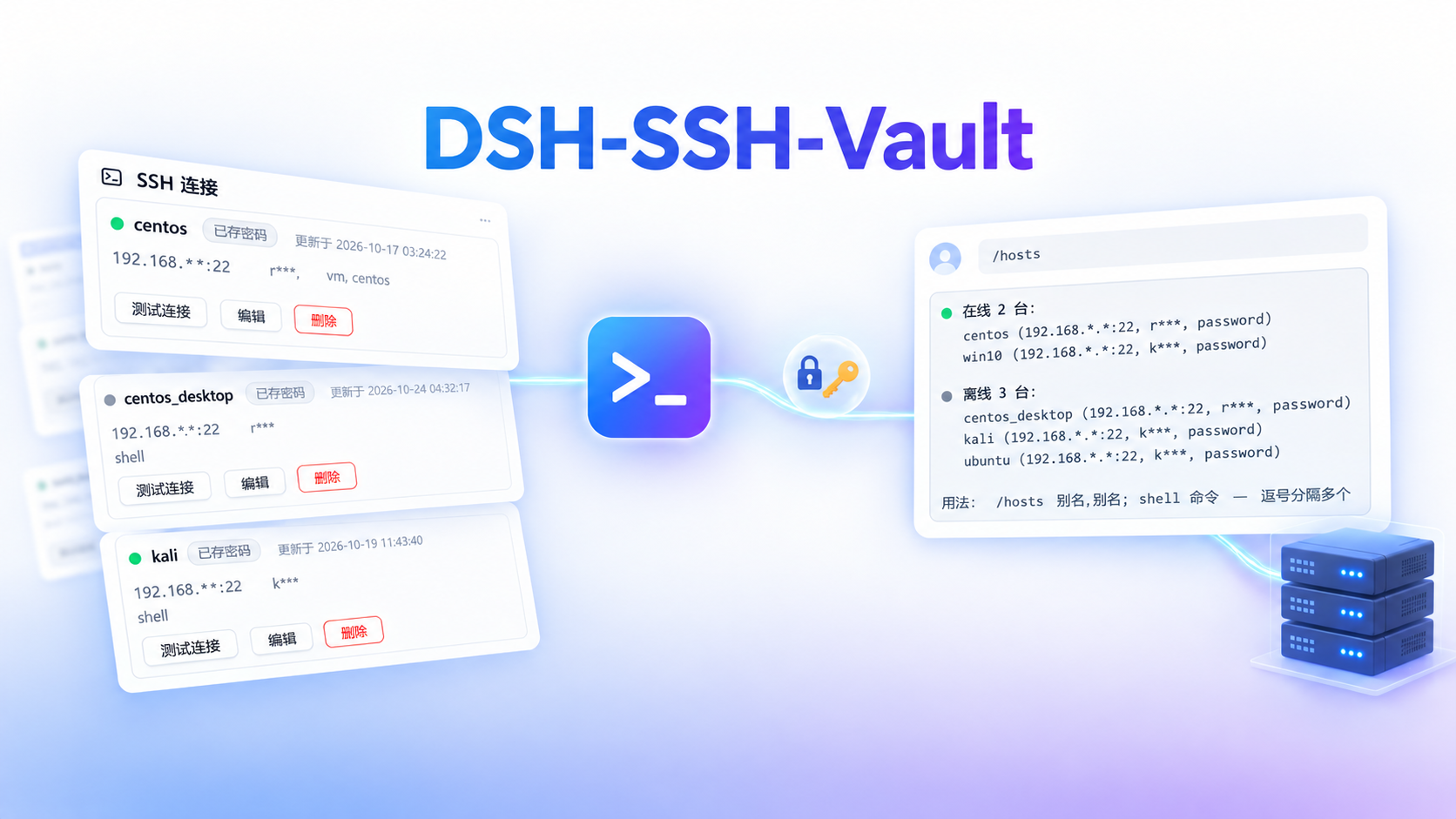
SSH for DeepSeek Harness agents: host address, port, account, password and private key live in an encrypted vault, and the conversation only ever uses an alias. The model never sees a password, and a password never reaches a command line or a remote process list.
PROJECT TOPICS
INSTALL REFERENCE
dsh plugin --profile web add github:scientificmaniac/dsh-ssh-vault
该命令指向仓库当前默认分支;尚无绑定当前 commit 的完整验证结果。
PROJECT README
SSH for DeepSeek Harness agents: host address, port, account, password and private key live in an encrypted vault, and the conversation only ever uses an alias. The model never sees a password, and a password never reaches a command line or a remote process list.
Windows only. The vault data key is protected by Windows DPAPI and the SSH_ASKPASS helper is a Windows .cmd wrapper; the plugin declares os: ["win32"] and refuses to start anywhere else rather than storing the key as plaintext.
Three capabilities in one plugin:
ssh_hosts, ssh_run, ssh_transfer, ssh_probe, so the agent operates remote hosts by alias./hosts command — probe hosts and run commands from the conversation without going through the model.Under the hood it drives the local OpenSSH client (ssh / scp). It does not implement the SSH protocol itself.
From npm. The plugin is published as dsh-ssh-vault; the bare name below resolves against the registry:
dsh plugin --profile desktop install dsh-ssh-vaultTo pin a release or install offline, fetch the tarball with npm and hand the file to the same command:
npm pack dsh-ssh-vault        # writes dsh-ssh-vault-<version>.tgz into the current directory
dsh plugin --profile desktop install ./dsh-ssh-vault-<version>.tgz
From a local checkout. The argument is a path, so . works when you are already inside the plugin directory:
# inside the checkout
dsh plugin --profile desktop install .

# or point at it from elsewhere
dsh plugin --profile desktop install ../dsh-ssh-vault

# or install from a packed tarball
dsh plugin --profile desktop install ./dsh-ssh-vault-<version>.tgz
--profile is required. DSH isolates plugins per profile, and one machine can carry several (desktop, cli, …). Omitting it falls back to whichever profile is currently default, which is an easy way to install into the wrong place. Confirm the landing spot with:
dsh plugin --profile desktop listRestart DSH after installing. Host-side tools and routes are loaded at startup.
This package is Windows only. package.json declares os: ["win32"], so dsh plugin ... install refuses to install it on Linux or macOS; a checkout loaded on another platform refuses to start for the same reason (see Known limitations).
| Item | Requirement |
|---|---|
| Node | ≥ 20 |
| Machine | Windows 10 / 11 with the OpenSSH Client enabled (ssh -V prints a version) |
| Platform | Windows only (win32) — installation and loading are refused on Linux / macOS |
Install, then restart DSH.
Open Settings → SSH Connections, click "Add connection", fill in alias, address, port, account, and choose password or private-key authentication. Each card carries a health dot that is checked automatically: grey = not checked, yellow = checking, green = reachable, red = unreachable.
Say something in the conversation, for example:
run uptime on kaliThe model calls ssh_run and the result appears as a terminal card.
Do not paste passwords into the conversation. A password entered in Settings goes straight into the encrypted vault and never enters the model context.
| Tool | Purpose | Typical phrasing |
|---|---|---|
ssh_hosts |
Manage the vault (list / show / add / update / remove) | "which hosts do I have", "change kali's note" |
ssh_run |
Run a command on a host, return stdout and stderr | "check disk usage on kali" |
ssh_transfer |
Upload or download a file (scp), optionally with sudo | "copy this file to /tmp on kali" |
ssh_probe |
Reachability self-check that also records capability metadata | "is kali still reachable" |
ssh_tunnel |
Maintain local port forwards (ssh -L) |
"map kali's 8787 to local 18787" |
Conventions for ssh_run:
bash --norc -c 'eval "$(cat)"': the script is fed over stdin and evaluated inside the target shell, so it is still parsed exactly once by bash (not by the remote login shell), yet the command text never appears in argv — a pkill -f pattern cannot match the shell that runs it, and there is no temp file to leak. login_shell: true switches to bash -l -c. The returned remoteShell states what was actually used.
--norc is not cosmetic: RHEL/CentOS builds of bash carry the SSH_SOURCE_BASHRC patch, so a non-interactive bash inside an SSH session still sources ~/.bashrc; one failing source line there puts noise on the stderr of every command and derails failure diagnosis.command_array: ["find", ".", "-name", "*.log"] quotes each element, so the remote shell performs no word splitting, globbing or variable expansion — the double-shell quoting trap disappears.workdir: "/srv/app" runs the command in that directory: a cd (POSIX) or Set-Location (PowerShell) is prepended to the same script, and with sudo it happens inside the elevated context, so root-only directories work. A failed cd aborts the command instead of silently running in the login directory. cmd targets reject workdir with an explanation: Windows sshd wraps the whole command in another cmd.exe /c "...", which tears the quotes out of a quoted cd — write cd /D <dir> && <command> into the command yourself there.sudo: true picks one automatically; sudo: "wrap" prepends sudo -n to the fixed eval "$(cat)" invocation, so the script is evaluated as root while the command text still never enters argv; sudo: "script" writes a temporary script and runs it as root, so heredocs, pipelines, background jobs and multi-line flows never deform at the privilege boundary — the script is deleted right after, and the password reaches sudo -S through a base64 pipe, invisible to either command line and to the remote ps; sudo: "prime" only pre-warms the cache while the command keeps writing its own sudo. The password always comes from the vault. Once elevated, do not write sudo inside the command again.pkill -f / pgrep -f / ps aux | grep <word> patterns cannot match the shell carrying the command. A real session kill (killing sshd, restarting sshd or the network) still surfaces as [exit code: -1] with the raw 0xFFFFFFFF value named and a connection-layer classification.⚠ 输出不完整 / INCOMPLETE OUTPUT notice: the output is partial and the remote command may still be running. The result is also classified as an execution timeout instead of being reported as a normal failure.outputs/ in the vault directory with the absolute path attached.ssh_transfer adds four things to scp: sudo: true moves root-only files (remote temporary staging plus cleanup); normalize_eol: true converts CRLF to LF before uploading, so a script written on Windows does not fail with $'\r': command not found (binaries are detected and skipped); mode / owner / preserve_mode set remote permissions and ownership; and recursive copies are content-based by default — flatten (default true) puts the source directory's contents into the target directory, merging when it already exists, so src/ → /root/app lands in /root/app/* rather than /root/app/src/* and no cp -f src/* . && rm -rf src cleanup is needed. Pass flatten: false for raw scp nesting.
ssh_tunnel reads the remote sshd -T forwarding policy before opening a tunnel: with AllowTcpForwarding no it hands back a paste-ready Match User <user> snippet that allows LocalForwarding (rather than globally enabling it) plus the PermitOpen explanation, instead of making you hit administratively prohibited. It manages the tunnel lifecycle (local port precheck, drop events, exponential-backoff reconnect, cleanup on unload) and returns the local addresses.
Where to see the result: calls to ssh_run, ssh_probe, ssh_transfer and ssh_tunnel render as a terminal card — a header with "host · command" and a state dot, above a scrollable monospace output area. The dot is blue while running, grey on success, red on failure (including a non-zero exit code).
Settings → SSH Connections provides:
Everything the plugin shows follows the language chosen in Settings → General → Language; there is no separate switch here.
/hosts output, transport diagnostics, Settings-API errors, vault errors and background-job status are generated on the Host; they read the same persisted preference (locale.preference) and follow later changes, falling back to the request's Accept-Language only when nothing was ever chosen./hosts commandStart a line with / in the composer and the command runs without going through the model.
/hosts                    list every host, grouped into online / offline
/hosts kali               probe one
/hosts kali,win10         probe several (either comma form works)
/hosts kali; apt update   run a command on kali
/hosts kali,win10; uptime run on every reachable host, and ,, ; and ;/hosts from the / menu only claims it: the composer shows the command token with its hint. Press Enter again to run it bare (list hosts), or type alias; shell command as its arguments. To go back to a normal prompt instead, delete the command token — until then, whatever you type is the command's argument/hosts in a brand-new conversation used to look like "nothing happened" until you sent a message. The plugin now mirrors the /hosts cards (running state included) in the composer dock while the session is still blank; once the first message exists the transcript takes over, so nothing is duplicatedThis is a Host + Client plugin; the two halves load through different mechanisms:
| Half | Entry | Loading |
|---|---|---|
| Host | index.js |
Cordis plugin, inserted into the Loader through cordis.patch.yml |
| Client | client.js |
Browser module, declared via dsh.client in package.json and injected into the page by the host |
The Host half carries every sensitive operation: vault encryption, driving the local ssh client, web routes, and the registration of commands and tools.
The Client half only renders and collects form input; it never executes a command.
flowchart TB
    subgraph entry [Entry points]
        chat[Conversation / model tool call]
        settings[Settings form]
        cmd["/hosts command"]
    end

    subgraph host [Host half — index.js]
        resolve[Resolve alias → read credentials → build ssh args]
        vault[(Vault<br/>AES-256-GCM ciphertext)]
        api["Web routes /ssh-vault/*"]
        exec[Spawn local ssh / scp]
    end

    subgraph client [Client half — client.js]
        toolcard[Tool terminal card]
        cmdcard["/hosts double card"]
        form[Connection form]
    end

    proxy[Remote host]

    chat --> resolve
    cmd --> resolve
    settings -->|POST JSON| api
    form -->|same-origin, document-relative| api
    api --> vault
    resolve --> vault
    resolve --> exec
    exec -->|stdout / stderr| toolcard
    exec -->|stdout / stderr| cmdcard
    exec <--> proxy
Three invariants hold across that chain:
SSH_ASKPASS; remote sudo is primed over stdin~/.ssh is never touched — known_hosts points into the vault directory and HashKnownHosts is enabledThe plugin needs no configuration: config: {} in cordis.patch.yml can stay an empty object, and the Loader entry id is fixed as ssh-vault.
Behaviour is shaped by the following:
| Item | Notes |
|---|---|
| Vault directory | Defaults to $DSH_HOME/ssh-vault; DSH_HOME is decided by DSH |
| Key protection | dpapi (Windows DPAPI, the default) or passphrase (scrypt-derived key, no key material on disk). file stores the key as plaintext and is an explicit opt-in only |
| Timeouts | ssh_run defaults to 120s, adjustable, capped at 30 minutes; commands inside /hosts are fixed at 120s |
| Health checks | Settings page and /hosts probe with a 15s timeout; the background sweep refreshes every 5 minutes |
| Error log | Off by default. Turn it on with the “Error log” card at the bottom of the settings page (or logging: true) and tool and settings failures are written to <vault>/logs/diagnostics.log: with source and stack, rotated to .1 past 512 KiB, and anything shaped like password=… replaced by ***. The switch itself lives in diagnostics.json next to it, so it survives a restart. Use logging: { enabled, dir, maxBytes } to change the location or size |
| VM integration | Enabled by default. Recognizes and validates dsh-vm-control and exposes vmStatus / vmImport; see “Compatibility with dsh-vm-control” below for the directory, alias policy and cache. vmControl: false or vmControl.enabled: false turns it off entirely |
Host-side services are reached through ctx.inject as optional dependencies; a missing service does not fail the plugin, it just disables that capability.
ctx.tools.register)| Tool | Key parameters |
|---|---|
ssh_hosts |
action required (list / show / add / update / remove); reveal controls whether address and account are masked |
ssh_run |
host, command required; optional sudo, timeoutMs, workdir, run_in_background, wait_for, bindAddress |
ssh_transfer |
host, direction, local, remote required; optional recursive and flatten (default true) |
ssh_probe |
host required; optional timeoutMs, bindAddress |
The three terminal-style tools also register presentCall / presentResult hooks, but the current DSH version has no consumer for them; presentation is handled by the slots below.
ctx.slots.register)| Slot | Key | Effect |
|---|---|---|
settings.section |
id: ssh-vault, order: 20, label |
The "SSH Connections" page in the settings panel |
tool.call.toolview |
ssh_run, ssh_probe, ssh_transfer |
Renders those tool calls as terminal cards |
conversation.chat.commandview |
hosts |
Renders /hosts output as two terminal cards |
The tool.call.toolview key space is open; none of these three names were taken, so no built-in UI is shadowed.
All three registrations also carry locale: 'ssh-vault' — the namespace registered with the host's locale service — which is what makes the rendered cards re-render and re-read their copy when the language changes.
ctx.commands.register)| Command | Notes |
|---|---|
/hosts |
Probe hosts / run a command on them. Form: alias[,alias][; shell command] |
The command's description and input.hint are re-registered only when the interface language changes. The disposer returned by commands.register destroys the current definition, so replacing it while the user is typing arguments strips the composer of its command context (backspace stops working, and the UI needs a restart). That is why registration is never driven by timers or health results; a locale switch is a deliberate Settings action with nothing being typed, making it the one safe moment to swap the definition.
ctx.webServer.register)Mounted at /ssh-vault (kind: 'prefix', no trailing slash). POST only, JSON in and out, with an envelope of { ok: true, value } or { ok: false, error }.
| Path | Effect |
|---|---|
/ssh-vault/list |
Host list (address and account masked, no passwords) |
/ssh-vault/save |
Create / update / rename |
/ssh-vault/remove |
Delete |
/ssh-vault/test |
Reachability probe |
/ssh-vault/reveal |
Return unmasked address and account |
/ssh-vault/openVault |
Open the vault directory in the system file manager |
/ssh-vault/diagnostics |
Error log state plus the last 40 entries |
/ssh-vault/setDiagnostics |
Turn the error log on / off (boolean enabled only) |
/ssh-vault/clearDiagnostics |
Delete the log file and the in-memory buffer |
/ssh-vault/openLogs |
Open the log directory in the system file manager |
/ssh-vault/vmStatus |
Discovery result and contract check of the VM compatibility layer (refresh: true forces a probe) |
/ssh-vault/vmImport |
Import one VM's SSH access details under the field whitelist and conflict policy |
openVault and openLogs accept no path argument at all — they can only open the plugin's own directories.
Every request crosses the Host Connection trust fence before the handler looks at the method, the body or the vault: it calls ctx.connection.requestRejection(req), the same Host/Origin check and browser-session authentication used by /api. A rejected request gets 401 / 403 and never reaches the vault, so a DNS-rebinding or cross-site call cannot read host data or trigger a probe.
ctx.systemPrompt.sectionThis plugin does not use that extension point. Every tool carries its own description, and no section is injected into the system prompt, so prompt length and ordering are unaffected.
dsh-vm-controldsh-vm-control is a separate plugin that sits next to this one (the dsh-vm-control/ directory in this repository). It drives VMware VM power, snapshots and configuration, and offers a settings panel that imports a VM's SSH access details into the SSH vault. This plugin provides an optional compatibility layer on its side so that import path has an explicit contract, conflict semantics and a fallback when it fails.
| Does | Does not |
|---|---|
Recognize <package root>/dsh-vm-control, a sibling directory, a -main source checkout, and vmControl.dir / DSH_VM_CONTROL_DIR |
Load or activate the other plugin, or call its apply |
Read the manifest, check the >=1.0.0 <2.0.0 range, the entry exports (name / apply / inject: ['tools']), ESM and engines.node |
Register any vm_* tool, /vm-control route or /vm command |
Expose POST /ssh-vault/vmStatus and POST /ssh-vault/vmImport |
Query VMware Tools or guest IPs on the VM side |
| Write whitelisted fields into this plugin's own encrypted vault | Expose the vault key, ciphertext format or passwords |
| Detect alias conflicts, offer suffix and explicit-overwrite policies | Rewrite the other plugin's source, data directory or settings |
In one sentence: this plugin accepts only the SSH fields the VM side has already assembled, and decides as the vault owner whether to write them. The other plugin's tools, routes and commands are still loaded by the host's own Loader line.
cordis.patch.yml, in any order. The compatibility layer reads files only when first queried (lazy) and caches the result for 30 seconds; a miss is retried after 5 seconds, so installing the VM plugin after this one needs no DSH restart.ssh_* / /ssh-vault / /hosts / ssh-vault versus vm_* / /vm-control / /vm / vm-control. The compatibility layer never takes the other plugin's names, so loading both cannot produce “tool already exists”.duplicate-install warning (the state degrades to degraded, import still works) and the copy actually in use is named explicitly.| State | Meaning | Import endpoint |
|---|---|---|
ready |
Directory, version and entry exports all match the contract | Available |
degraded |
Available with warnings (duplicate copies, missing optional services) | Available, result carries warnings |
unavailable |
Not found, or the configured directory is missing / named differently | compat-unavailable, with the paths checked and the manual fallback |
incompatible |
Found, but the version is out of range, apply is missing, inject lacks tools, the module failed to import, … |
compat-incompatible, with the concrete reason |
disabled |
vmControl.enabled: false |
compat-disabled |
In every state ssh_hosts / ssh_run / ssh_transfer / ssh_probe / ssh_tunnel / /hosts / the settings page / the existing /ssh-vault/save are unaffected. A compatibility failure never escapes into apply and never blocks startup.
vmImport accepts only these fields (anything else is ignored): alias, host, port, username, shell, description, tags, authType, password, privateKeyPath, passphrase, plus the layer's own vmx (VM identity), aliasPolicy and confirm. sudoPassword, credentialRef, bindAddress and private-key uploads are out of scope: those are decisions the user makes in the host edit form.
aliasPolicy has three values:
| Value | Behaviour |
|---|---|
reuse (default) |
If the target alias is taken by a different VM, refuse with alias-conflict; details.suggestions offers -2 / -3 candidates |
suffix |
Pick the first free suffix and explain it in warnings |
overwrite |
Requires confirm: true in the request (and vmControl.allowOverwrite not false); on success the old record's sudoPassword / credentialRef / bindAddress are not inherited, and a record of the same VM under its previous alias is removed |
Re-importing the same VM (same vmx, same alias) updates; importing it under a new alias returns already-imported with the existing alias, so one machine never ends up with two entry points in the vault.
vmControl:
  enabled: true          # false puts the compatibility layer fully to sleep
  dir: ''                # explicit plugin directory; when set it is exclusive
  searchRoots: []        # extra roots (the same-named directory is looked up under each)
  aliasPolicy: reuse     # reuse | suffix | overwrite
  allowOverwrite: true   # overwrite still requires confirm: true in the request
  cacheTtlMs: 30000      # cache lifetime after a hit
  retryTtlMs: 5000       # retry interval while missing / incompatible
  probeModule: true      # import() the entry module to check its exports
The DSH_VM_CONTROL_DIR environment variable is equivalent to vmControl.dir (configuration wins).
cordis.patch.yml and inserts the entry with id: ssh-vaultimports index.js and calls apply(ctx, config)apply opens the vault, registers the four tools, and — where the services exist — the web routes, the /hosts command and the background health timer. It also subscribes to the host settings document so it can read the interface language and follow later switchesdsh.client declaration, and its apply registers the three slots and its ssh-vault dictionary with the locale serviceAsync resources are wrapped in ctx.effect, and Cordis runs the returned cleanups in reverse order on teardown:
setTimeout / setIntervalVault data survives uninstall and is available again after reinstall.
The two halves behave differently, and this is easy to get wrong:
| Change | Takes effect by |
|---|---|
client.js and slot rendering |
Reinstall the bundle, then reload the page |
index.js / lib/** |
Restart DSH; reinstalling does not replace an already-loaded module generation |
package.json version |
The version shown in Settings is read from this file by the Host |
Do not infer that the browser has new code from an unchanged slot id — slot registration reflects the host side, not the module actually running in the page.
SSH_ASKPASS helper is a Windows .cmd; the repository therefore declares os: ["win32"]. There is no Linux/macOS mode: running the code there would have to fall back to a plaintext key.json, so the plugin refuses to load instead. SSH still targets Linux/Unix hosts remotely — the restriction is on the machine running DSH.dpapi is the default key protection; passphrase is available (a master passphrase, with the key derived through scrypt). file stores the key as plaintext and must be chosen explicitly; it is not a fallback.agent auth type can be set through ssh_hosts add, but the form cannot enter or edit itpowershell,cmd: the same Windows host can run structured PowerShell commands and the older tools that only cmd understands. Each call selects one with its shell parameter (ssh_run, ssh_probe, ssh_transfer and ssh_tunnel all honour it), defaulting to the first; an explicitly requested shell that was not declared is rejected rather than silently swapped. The three sudo forms apply to POSIX shells only; on cmd / powershell targets sudo: true fails loudly instead of silently degradingwrap needs sudo -n to work already (root or NOPASSWD); with a password it goes through script, which needs that account's sudo password in the vault (sudoPassword, falling back to the login password). The automatic choice made by sudo: true consults the most recent ssh_probe resultchcp 65001 only affects output produced afterwards, so CJK text in the command itself is already folded to ? before it runs. Use a PowerShell target for CJK, or encode the payload as ASCII (PowerShell's -EncodedCommand). On PowerShell targets the plugin pins the output encoding to UTF-8, so CJK round-trips correctlycmd.exe /Q /D /C <script>. Without /C, cmd enters interactive mode and mixes the Windows banner and the DESKTOP-xxx C:\...> prompt into stdout; /D disables AutoRun and /Q disables echoscp — trips sshd's connection
limits and accumulates failed-auth counters toward an account lock. Background jobs are
exempt from the queue so a long task does not block that host for everything else.ControlMaster / ControlPersist: -G echoes those options happily, but an
actual connection fails with getsockname failed: Not a socket. So each call re-handshakes,
which is exactly why the per-host serialisation queue exists. If you truly need multiplexing,
point the plugin at a Linux ssh client that has Unix domain sockets (e.g. one inside WSL).Windows OpenSSH disconnects a locked account outright instead of returning
Permission denied, so a locked account looks like a network problem: the port answers, the
banner arrives, then the connection is reset. If "port open, banner fine, still cannot
connect" shows up, check the account before chasing the firewall — net user <account> on
Windows, faillock --user <account> on Linux. Locking the management account also kills
key-based login, so keep a second administrative path available when experimenting with
lockout policy. ssh_run warns before commands that change account state.
StrictHostKeyChecking=accept-new is used: the first connection is trusted automatically, and any later fingerprint change is refused. There is no separate fingerprint-verification flow, so judging whether a first-time target is trustworthy is up to the operator.
ssh_run caps a single result at 200000 characters; past that the response keeps the beginning and the end, marks how many characters were omitted in the middle, and writes the full stream under outputs/ in the vault directory with the absolute path attached/hosts echoes at most 40 lines/hosts have a fixed 120s timeout that is not configurablerun_in_background, whose output lands in a job cardsettings.section registration accepts only id / order / label, so a plugin cannot supply its own iconCommandInputDescriptor carries only hint and attachments), so /hosts cannot offer alias completioninput hint is claimed, not executed, when picked from the / menu: this is DSH behaviour and the plugin cannot bypass it. The hint (localized) explains that a second Enter runs the command bare/hosts compensates with the composer-dock mirror described above; the built-in rule still applies to other plugins' commandsNot verified in detail; check the source or upstream docs before relying on them:
─── 连接状态:ok ───) used todaypresentCall / presentResult in a future version| Category | Accessed | Detail |
|---|---|---|
| Filesystem | Yes | The vault directory (vault.json, key.json, known_hosts, uploaded key copies) and any private-key path you supply; never ~/.ssh |
| Network | Yes | Outbound SSH through the local ssh / scp processes; loopback HTTP routes (same origin, behind the Host Connection trust fence) |
| Terminal | Yes | Spawns the local OpenSSH client; openVault launches the system file manager |
| External APIs | No | No third-party service is contacted |
| User data | Yes | Host address, port, account, password, private key, note, tags |
SSH_ASKPASS, never on the command line or in a process listpscredentialRef: when a host points at an entry in the Harness credential store, the password is read at connect time and never passes through this pluginThe web routes ride on the DSH web server and ask the Host Connection service for a rejection first (the same Host/Origin fence and browser-session authentication as /api). The plugin adds no authentication of its own beyond that, so do not expose the DSH web port to an untrusted network.
See SECURITY.md.
"SSH Connections" is missing from Settings after installing.
Check you installed into the right profile: dsh plugin --profile <name> list. Then restart DSH — the client bundle is injected at page bootstrap, so a page reload alone is not enough.
A tool call reports a missing route, or Settings says the host is still running old code. The host code was updated but the process was not restarted. Restart DSH.
The health dot stays red although the host answers ping.
The dot tests the SSH port 22, not ICMP. Check that sshd is running, that a firewall allows the port, and that the address stored in the vault is still current.
A connection test reports "connection not established within 15000ms".
Again a network-layer signal: the address changed, a firewall is blocking, or the machine is up without sshd. It is unrelated to login credentials.
A word gets a red squiggle while typing /hosts.
That is why the command is named hosts: the composer is a Lexical editor whose plain text nodes are subject to browser spellcheck, and hosts is a dictionary word while ssh is not.
/hosts kali,win10 says "not found".
Check the alias spelling against the vault; it is case-sensitive. Run /hosts with no arguments to list the valid aliases.
A private key upload is rejected.
Three common causes: a .pub public key was chosen, a PuTTY .ppk was chosen (convert it with puttygen first), or the file has no BEGIN … PRIVATE KEY header.
Output from several hosts runs together.
Use the /hosts host; command form; the output splits into a reachability card and a command card.
I switched DSH to English but some plugin text is still Chinese. From 1.15.0 the whole surface follows the DSH language. After upgrading, reload the page once (client half) and restart DSH once (host half) to load the new code; after that, switching the language in Settings applies immediately, no reload needed. Model-facing tool definitions stay English by design.
Does it work on Linux or macOS?
No. The data key is protected by Windows DPAPI and the SSH_ASKPASS helper is a Windows .cmd; any non-Windows path would have to store the key as plaintext, so the plugin refuses to load there. package.json declares os: ["win32"] and installation is rejected elsewhere. The remote hosts can of course be Linux/Unix — only the machine running DSH must be Windows.
Client code changed but the interface did not. Reload the page. Host-side changes need a DSH restart.
See CONTRIBUTING.md. The hard rules: zero runtime dependencies (Node built-ins only on the Host side; only the host-provided react on the Client side), no real credentials or addresses in the repo, and a password must never reach a command line or the session log.
npm test            # host-free regression suite
npm run test:live # end-to-end cases against real hosts# Install (profile required)
dsh plugin --profile desktop install dsh-ssh-vault
dsh plugin --profile desktop install . # from inside a local checkout
# Confirm where it landed
dsh plugin --profile desktop list
# Reinstall to refresh the installed copy
dsh plugin --profile desktop remove dsh-ssh-vault
dsh plugin --profile desktop install dsh-ssh-vault
# Uninstall
dsh plugin --profile desktop remove dsh-ssh-vaultStarting and stopping are handled by the DSH process itself: the plugin loads when DSH starts and unloads when DSH exits. It has no separate process and no resident background service.
Uninstalling does not delete the vault. Data stays in $DSH_HOME/ssh-vault and is usable again after reinstall; delete that directory by hand to remove it entirely.
Everyday reference:
Settings → SSH Connections        manage hosts, test reachability, open the vault directory
/hosts                            list hosts and their online state
/hosts kali                       probe one host
/hosts kali,win10; uptime         run a command on several
(just talk)                       let the model pick hosts and call the tools
CLASSIFICATION EVIDENCE
系统优先读取 GitHub Topics,再与站内分类词典和词根规则比对。当前命中: model、deepseek。
morluto
Reverse engineer anything with agents, from app behavior down to native binaries.

deepseek-ai
DeepSeek Harness: Everything is a Plugin.

nexu-io
The 1st Collaborative AI Design Agent Workspace. Local-first and open source. Create motion, prototypes, websites, apps, dashboards, presentations, images, and videos with your team and AI agents. Share work, exchange feedback, and iterate together in one workspace.