其他
完整应用

deepseek-harness
deepseek-ai
DeepSeek Harness: Everything is a Plugin.

sanshanya/better-model-provider
Per-model capability declaration for DeepSeek Harness: reasoning-effort levels (wire spellings) + request modalities (vision) for OpenAI-compatible providers. Settings section, zero runtime harness deps, no YAML.
PROJECT TOPICS
INSTALL REFERENCE
dsh plugin --profile web add github:sanshanya/better-model-provider
该命令指向仓库当前默认分支;尚无绑定当前 commit 的完整验证结果。
PROJECT README
Sparse, non-destructive per-model overrides on official-catalog routes — including reasoning-effort levels and their wire spellings — without replacing the catalog.
Custom models: edit declarations. Official models: edit overrides. Provider configuration remains official.
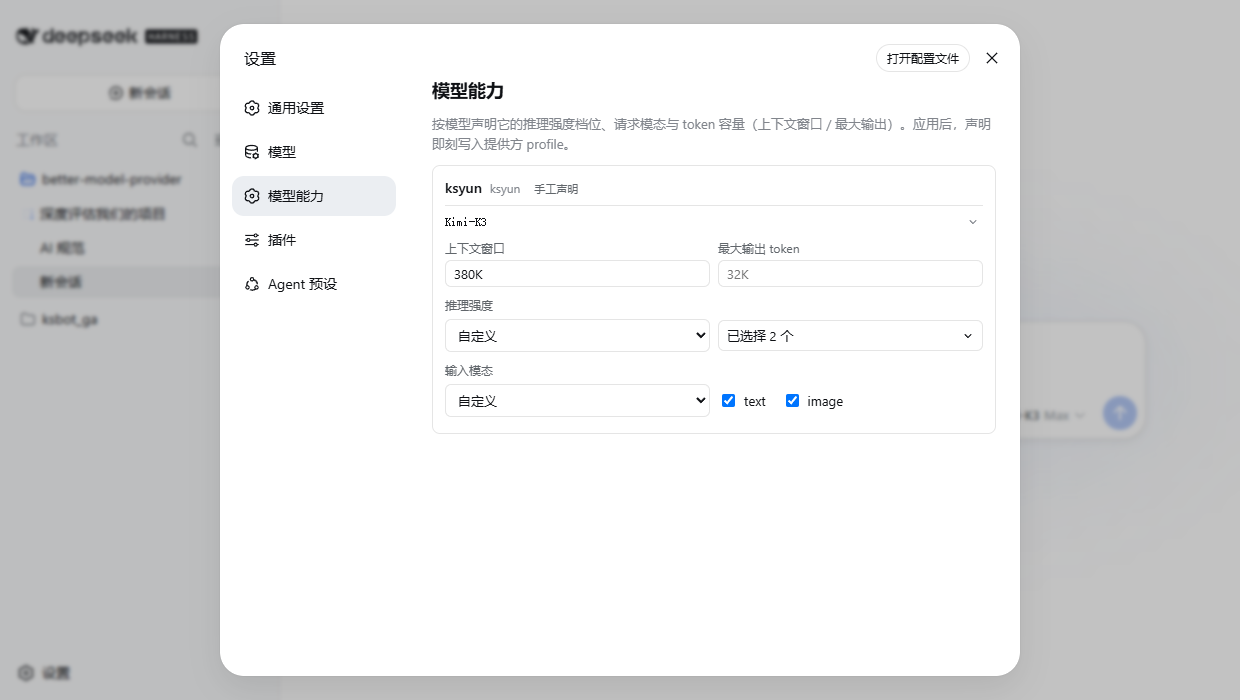
The official Models page edits a model's input types and token capacities, but it does so by rewriting that route's whole models array: one field touched, and every other model on the route stops following the catalog — and sparse modelOverrides becomes illegal there. It also has no control for per-model reasoning effort.
This page is the other seam. On an official-catalog route it writes only the difference for the model you touched — including reasoningEfforts levels and their wire spellings — and leaves the rest of the catalog following upstream. On your own declared routes it edits the declarations directly.
dsh plugin --profile web add better-model-providerThe npm package ships ready-built, so this path never builds locally. Alternates: github:sanshanya/better-model-provider#master (CI republishes ready-built artifacts to the master branch on every green main push), or the default branch (github:sanshanya/better-model-provider), which builds from source and prints one pnpm allowBuilds key to add, then rerun add; a local link: install must npm install && npm run build first. Restart dsh web, and the Settings sidebar gains Model capabilities.
dsh plugin --profile web rm better-model-provider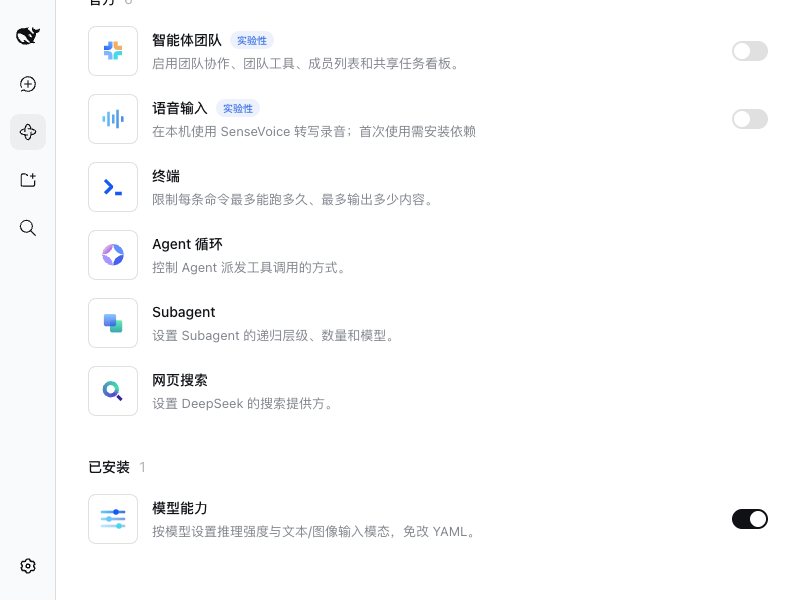
off (its wire value may stay blank).image under input modalities — otherwise sending an image to this model gets refused.380K, 1M). Tap Apply and the change takes effect at once.The official Models page can also edit input types and capacities — but only by replacing a route's whole model list, which stops that route following the catalog and rules out overrides. Use this page when you want one model changed and the other thirty-seven still following it. Once a route's list has been replaced on the official page, this page edits that list like any declared route.
Dedicated-adapter apps (built-in DeepSeek / OpenAI Codex) declare their capabilities on their own settings pages and never appear here.
| Harness line | Status |
|---|---|
dsh 0.2.0-rc.1 (npm next) |
verified end-to-end |
dsh 0.1.7-alpha.2 (npm alpha) |
verified end-to-end |
dsh 0.1.7-rc.2 (npm latest) |
verified end-to-end |
dsh 0.1.5-rc.3 |
verified end-to-end |
0.1.2-alpha.1 … 0.1.6-alpha.2 |
not verified — admitted by the peer ranges, no lane has run on them |
0.1.0-rc.7 … 0.1.1-rc.2 |
refused: no connection.api generation here any more |
Verified means both lanes on a real harness: integration boots a checkout and serves the plugin's client module, functional drives a real browser through a capability write and its revert. They are opt-in — BMP_DSH_DIR=/path/to/deepseek-harness npm run test:live (see CONTRIBUTING.md for the functional lane) — and skip without it.
The peers are a single interval, >=0.1.2-alpha.1 <0.3.0: the floor keeps the retired connection.api generation out (the 0.1.0-rc.7 line stays refused), the ceiling admits the dsh 0.2 line. What actually rules on them at install time is dsh's admission gate — it reads prereleases with includePrerelease: true, and that is the path every install of this plugin takes; npm's own peer rule reads the tuple more strictly and disagrees on some versions, but it never governs that path. (Through 0.0.6 the range was enumerated per published line — a residue of npm's stricter reading; 0.0.7 converged it on dsh's semantics.) The nightly canary re-proves the latest, next and alpha channels, and a leg whose channel resolved but whose lane skipped fails the run instead of passing quietly; when a leg turns green again it closes that channel's accumulated red-tracking issues itself.
Field overlap: this page edits per-model reasoningEfforts (levels and their wire spellings) and sparse modelOverrides — the official Models page has no control for either. It also edits input, contextWindow and maxTokens, which the official page edits natively, so those are a convenience here rather than a unique capability. Recovery: if the official page rewrote a route's whole model list while overrides saved here linger beside it, write validation rejects the route — the card offers Remove leftover overrides, one explicit click, never automatic.
MIT
CLASSIFICATION EVIDENCE
系统优先读取 GitHub Topics,再与站内分类词典和词根规则比对。当前命中: 无有效分类标签。
deepseek-ai
DeepSeek Harness: Everything is a Plugin.

anywhere-labs
为 DeepSeek Harness (DSH) 插件生态打造的现代化桌面端解决方案。万物皆「插件」,桌面本身也是「插件」。

walkinglabs
Harness engineering beginner tutorial, from 0 to 1