
模型与 MCP
待识别

rea
morluto
Reverse engineer anything with agents, from app behavior down to native binaries.
PROJECT TOPICS
INSTALL REFERENCE
dsh plugin --profile web add github:safroigor/dh_picker
该命令指向仓库当前默认分支;尚无绑定当前 commit 的完整验证结果。
PROJECT README
A Codex-style visual element picker for the DeepSeek Harness Desktop Browser.
Open any site in the Harness Browser, click an element, write a comment right next to it, press Enter — the comment lands in the chat composer as a compact chip. Collect as many comments as you need, then send one request. The agent receives your instruction plus a compact, structured description of every annotated element, so it can find and edit the matching source component.
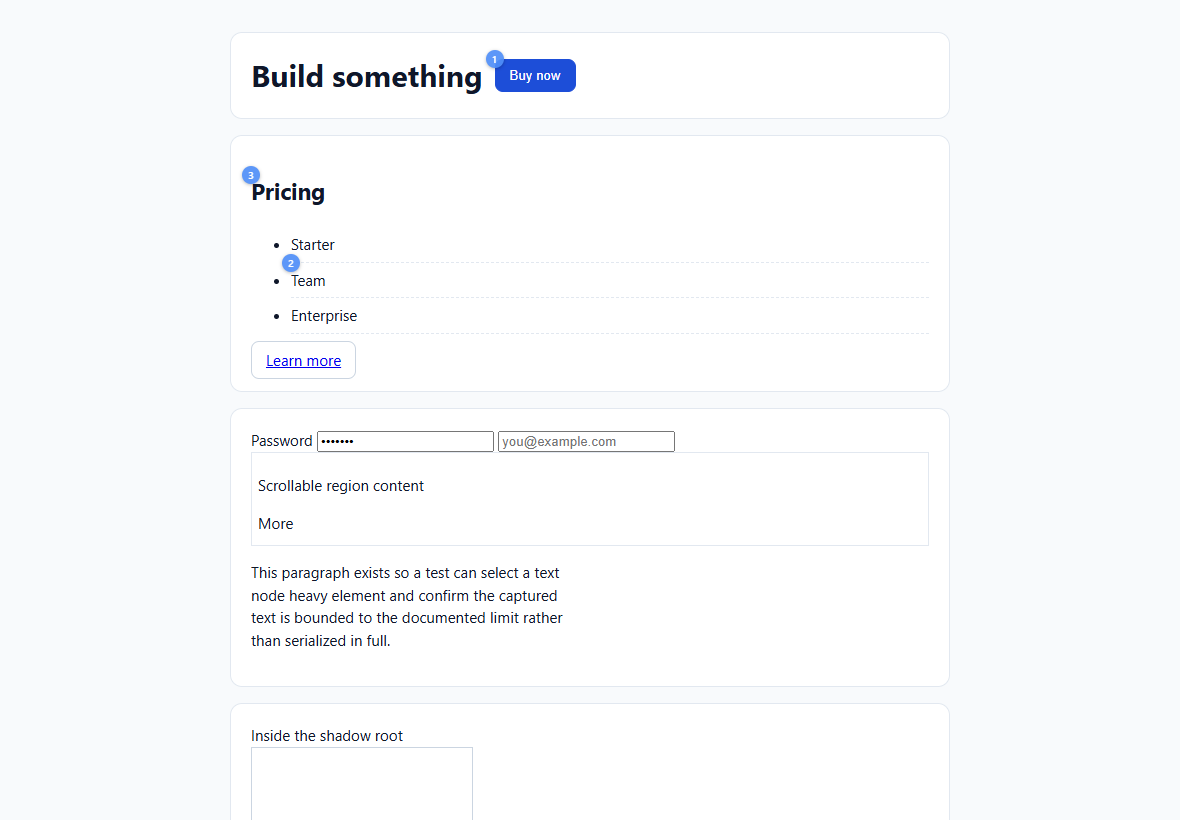
The picker is a Harness plugin bundle, not a script you paste into a website. It is installed once into a Harness profile and then works on any site the Browser can open — Next.js, React, Vue, Svelte, or plain HTML — without adding a single line to those projects.
Reviewing UI changes usually means describing elements in prose: “the button under the hero”, “that card on the right”. The picker replaces the description with the element itself:
Harness Web GUI (trusted renderer)                     Browser page (sandboxed guest)
┌──────────────────────────────────────┐               ┌───────────────────────────────┐
│ composer: "Select element" toggle    │ executeJava   │ injected picker (zero deps)   │
│ chips: Element 1 · …  Element 2 · …  │ ────────────► │ hover · click · inline editor │
│ (send stays user-controlled)         │ ◄──────────── │ small numbered markers        │
└──────────────────────────────────────┘  console msg  └───────────────────────────────┘
              │                            per comment
              ▼
one chat message: your text + each chip expanded to structured context → the agent<webview>. The trusted renderer calls
<webview>.executeJavaScript(...) — a documented Electron API. No Harness file is patched, no
security setting is relaxed, and the page still has no Node, IPC, or DSH-origin access.console-message event and is validated before use.codec.serialize, which is where the structured block is produced. The visible chat stays
compact; the model gets the detail.#1 comment ▾); clicking it expands the
exact block the model read.http(s) page in the same window as the chat.Not supported: the Web profile (its Browser is an iframe on the site's origin, so injection is
impossible without the site's cooperation), the external system browser, and file:/data: pages.
The installable bundle is packages/deepseek-harness-element-picker.
It is a normal Harness profile package: one row, one client module, no dependencies of its own.
git clone https://github.com/safroigor/dh_picker.git
cd dh_picker
node scripts/build.mjs          # regenerates packages/.../client.js from src/
Then install it into the desktop profile:
Windows (PowerShell)
& "$env:LOCALAPPDATA\Programs\DeepSeek Harness\resources\runtime\cli\bin\dsh.cmd" `
    plugin --profile desktop add ".\packages\deepseek-harness-element-picker"
macOS
"/Applications/DeepSeek Harness.app/Contents/Resources/runtime/cli/bin/dsh" \
    plugin --profile desktop add "$PWD/packages/deepseek-harness-element-picker"
Linux / dsh on PATH
dsh plugin --profile desktop add "$PWD/packages/deepseek-harness-element-picker"dsh plugin add runs pnpm for the profile, records the package in
$DSH_HOME/profiles/desktop/package.json, and adds it to dsh.profile.bundles.
Restart DeepSeek Harness once so the profile is composed with the new bundle. After the restart, Select element appears in the chat composer whenever a Browser page is open.
Verify the install without restarting:
& "…\dsh.cmd" plugin --profile desktop --dump-config | Select-String "element-picker"The profile records the bundle as a
link:to this checkout. Keep the directory where it is, or reinstall after moving it.
git pull
node scripts/build.mjs
dsh plugin --profile desktop add "$PWD/packages/deepseek-harness-element-picker"
If only client.js changed (the usual case), a window reload (Ctrl+R) is enough to pick up the
new client module; a full restart is needed only when the profile itself changes (install, bundle
list, row config).
dsh plugin --profile desktop remove deepseek-harness-element-pickerRemoves the row, the client module and the profile dependency. No Harness installation file, no website, and no session data are touched.
Open a page in the Browser tab (right Sidebar).
Click Select element in the chat composer. The composer status line confirms pick mode.
Hover the page: the element under the cursor gets an outline. Click it. The page cannot navigate or fire handlers while you are picking or writing.
Type a comment and press Enter. A chip appears in the message you are composing:
[Element 1 · Reduce the top padding to 24px…]Nothing is sent — exactly like attaching a file. Pick mode stays armed for the next element.
Repeat. Every comment is an independent chip.
Click a numbered marker on the page to reopen its comment; saving updates the annotation and relabels its chip in place.
Delete a chip to drop that annotation and its marker.
Press the composer's Send when ready, with or without your own text. One request goes out with your instruction and one structured block per chip. After sending (or clearing the message), pick mode resets by itself.
| Key | Where | Effect |
|---|---|---|
Enter |
comment editor | Save the comment and add its chip. Never sends the request. |
Shift+Enter |
comment editor | Newline. |
Escape |
comment editor | Discard the current draft, stay in pick mode. |
Escape |
pick mode | Leave pick mode; the page becomes usable again and markers stay. |
The page only ever shows three things, and none of them is a panel:
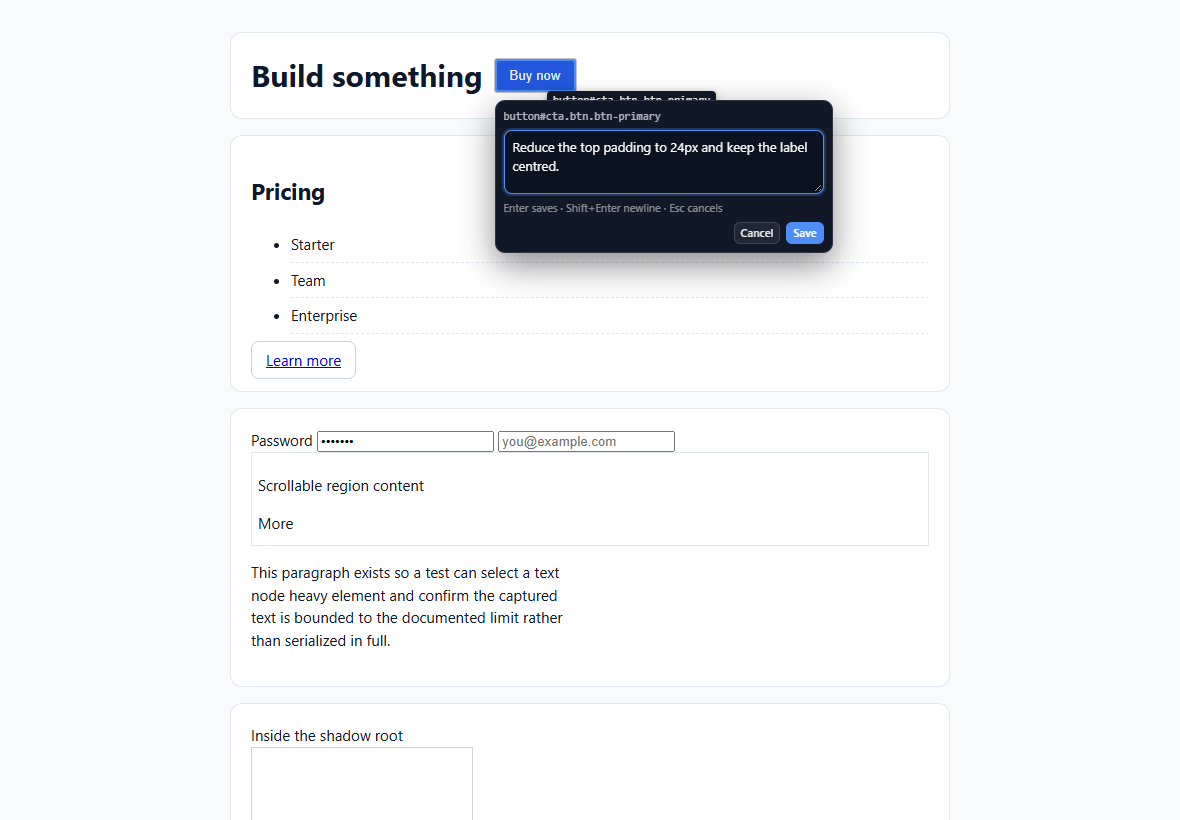
Review, editing and sending all happen in the composer and the transcript.
Each chip is replaced, in place, by a bounded block (at most ~8 lines, ~1.4 kB):
Element 1 — <button#cta> — comment: “Reduce the top padding to 24px.”
  selector: #cta
  classes: btn btn-primary · text: “Buy now” · box: 81×33 at (496,58)
  styles: padding: 8px 14px · font-size: 15px · color: rgb(255, 255, 255)
  html: <button id="cta" class="btn btn-primary">Buy now</button>
  react: PricingCard ← App (/src/Card.tsx:42:7)
  page: https://example.com/pricing — Pricing
selector is a temporary locator, never an identity. The text, classes, markup fragment, box
and framework hints are what let the agent map the comment to a source component. React hints
include the owner component stack and, in development builds, the _debugSource file:line; Vue
hints use __vueParentComponent.
One annotation crosses the page/embedder boundary per saved comment.
schema/annotation.schema.json (schemaVersion: 1)types/index.d.ts{
"schemaVersion": 1,
"kind": "dsh-visual-feedback/annotation",
"annotation": {
"ref": "element-1", "index": 1, "comment": "Reduce the top padding to 24px.",
"createdAt": "…", "pageUrl": "…", "pageTitle": "…",
"element": {
"tag": "button", "id": "cta", "classes": ["btn", "btn-primary"], "text": "Buy now",
"selector": "#cta", "alternativeSelectors": ["button.btn.btn-primary"], "xpath": "/html/body[1]/…",
"outerHTML": "<button id=\"cta\" class=\"btn btn-primary\">Buy now</button>",
"rect": { "x": 496, "y": 58, "width": 81, "height": 33, "docX": 496, "docY": 58 },
"styles": { "padding": "8px 14px", "font-size": "15px" },
"framework": [{ "framework": "react", "componentStack": ["PricingCard", "App"],
"source": "/src/Card.tsx:42:7" }],
"context": { "parent": { "tag": "div", "selector": "#hero" }, "parentHTML": "…" }
}
}
}Captured data is sanitized and bounded: password and hidden inputs are redacted, value,
checked, selected, srcdoc and on* attributes are dropped, data-* is allow-listed, URLs
with credential-like parameters are redacted, and text/HTML/styles are size-limited.
sandbox: true, contextIsolation: true,
nodeIntegration: false, no preload. The plugin does not weaken any of it.pointer-events: none except for its own controls,
and blocks page clicks only in pick/edit mode.See SECURITY.md for the reporting policy.
<iframe> element.webview.capturePage(rect) exists, but the device-pixel mapping and a second
attachment flow are not shipped.| Symptom | Cause and fix |
|---|---|
| No Select element control in the composer | The bundle was installed but the app was not restarted: the profile is composed at boot. Restart DeepSeek Harness, then check dsh plugin --profile desktop --dump-config. |
| Control is greyed out | No usable Browser page: open a Browser tab on an http(s) URL and keep it visible. The tooltip states the reason. |
| Control works, but hovering the page does nothing | The guest refused the injection. Reload the page in the Browser (the toolbar refresh), then click the toggle again. |
| After a plugin update the page behaves like the old version | The page keeps the injected build until it navigates. Reload the Browser page or the Harness window. |
Sent message shows raw Element 1 — … text instead of a chip |
The message was sent before 0.2.0 block formatting, or a second block follows on the same line; update the plugin and send again. |
| Pick mode stays armed | Fixed in 0.2.0: the reset now watches the composer from the plugin, not from a slot component. Update and reload. |
node scripts/build.mjs                       # regenerate packages/…/client.js
node scripts/build.mjs --check               # fail when the committed bundle is stale
node --test "tests/unit/*.test.mjs" "tests/integration/*.test.mjs"
node scripts/docs-screenshot.mjs             # regenerate docs screenshots
node scripts/inspect-harness.mjs --list sidebar-browser   # inspect the installed app.asar
The test suite runs the picker in a real Chromium through playwright-core
(npm i -D playwright-core, or point PLAYWRIGHT_CORE at an existing install). It needs a
Chromium-family browser; the harness launches Chrome/Edge, or starts the browser itself over CDP
when the environment forbids piped stdio.
| Suite | What it covers |
|---|---|
tests/unit/selector.test.mjs |
selector generation, uniqueness, alternatives, XPath, shadow roots, iframes |
tests/unit/sanitize.test.mjs |
password/hidden redaction, attribute stripping, URL redaction, size bounds |
tests/unit/annotation.test.mjs |
emitted annotation vs. the published JSON Schema, renumbering |
tests/unit/client-adapter.test.mjs |
built bundle contract, slot/source registration, validation, chip text, transcript matcher (no browser needed) |
tests/integration/picker.test.mjs |
selection, editor, keyboard, markers, multi-annotation, marker editing, reset, viewport clamping |
Repository layout:
src/page/picker.js        framework-agnostic page bundle (the picker itself)
src/harness/client.js     Harness client adapter (inlined into the shipped bundle by the build)
packages/…/               installable bundle: client.js (generated), patch, locale, icon
schema/, types/           versioned payload contract
tests/                    fixtures, helpers, unit + integration suites
docs/                     architecture, migration, screenshots
scripts/                  build, harness inspector, docs screenshots
See CONTRIBUTING.md before opening a pull request.
schemaVersion and the page
bundle carries PICKER_VERSION (a page that survived an update replaces the stale injected
build instead of reusing it).CHANGELOG.md records user-visible changes.docs/MIGRATION.md lists exactly which Harness and Electron surfaces this
plugin depends on, how to re-check them after a Harness upgrade, and the smallest fallback for
each.TEGONG00/dsh-plugin-browser — a Playwright
driven screencast panel with an element→composer-chip picker. It ships its own browser surface;
this plugin annotates the page the built-in Browser is actually showing. Its picker script and
reference-chip design informed this work.pick / picked skills (Chrome extension + a picker MCP server) work in a separate Chrome
instance and cannot see the Harness Browser.MIT.
CLASSIFICATION EVIDENCE
系统优先读取 GitHub Topics,再与站内分类词典和词根规则比对。当前命中: deepseek-harness、deepseek-harness-desktop、deepseek-harness-picker、deepseek-harness-plugin、deepseek-harness-plugins。
morluto
Reverse engineer anything with agents, from app behavior down to native binaries.

deepseek-ai
DeepSeek Harness: Everything is a Plugin.

nexu-io
The 1st Collaborative AI Design Agent Workspace. Local-first and open source. Create motion, prototypes, websites, apps, dashboards, presentations, images, and videos with your team and AI agents. Share work, exchange feedback, and iterate together in one workspace.