
Agent 与会话
插件

OpenViking
volcengine
Self-evolving Context Database for AI Agents. Unify Agent Memory, Knowledge RAG and Skills.
PROJECT TOPICS
INSTALL REFERENCE
dsh plugin --profile web add github:sa998aaron/deepseek-harness-matt-plugin
该命令指向仓库当前默认分支;尚无绑定当前 commit 的完整验证结果。
PROJECT README
English | 简体中文
Matt Pocock's skill workflow pipeline for DeepSeek Harness (DSH).
The bundled skills come from Matt Pocock's mattpocock/skills repository — all credit for the skill content goes to him.
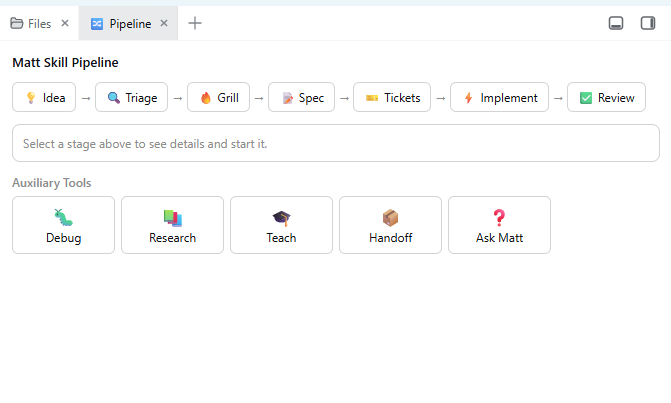
Server half: registers the bundled matt skill set (matt-triage, matt-grill-me, matt-to-spec, matt-to-tickets, matt-tdd, matt-code-review, matt-research, matt-diagnosing-bugs, …) as model- and user-invocable DSH skills.
Browser half: adds a 🔀 Pipeline tab to the dsh-better-sidebar showing the workflow
💡 Idea → 🔍 Triage → 🔥 Grill → 📝 Spec → 🎫 Tickets → ⚡ Implement → ✅ Review
plus auxiliary tools (🐛 Debug / 📚 Research / 🎓 Teach / 📦 Handoff / ❓ Ask Matt). Clicking Start dispatches the official /<skill> gesture straight into the active session (clipboard fallback if the connection API is unavailable).
dsh-better-sidebar installed (the pipeline panel registers into it; the skills work without it).dsh plugin --profile web add https://github.com/sa998aaron/deepseek-harness-matt-plugin.gitFor the DSH Desktop GUI use the desktop profile:
dsh plugin --profile desktop add https://github.com/sa998aaron/deepseek-harness-matt-plugin.gitThen restart DSH (or toggle the plugin off/on in Settings → Plugins) and hard-refresh the page (Ctrl+F5).
<profile>/node_modules/dsh-matt-pipeline (e.g. ~/.dsh/profiles/desktop/node_modules/).<profile>/package.json add the dependency and the bundle entry:"dependencies": { "dsh-matt-pipeline": "file:./node_modules/dsh-matt-pipeline" },
"dsh": { "profile": { "bundles": [ ..., "dsh-matt-pipeline" ] } }The built bundles (dist/) are committed, so no build step is needed on install.
/<skill> to the current session and the agent follows that skill's workflow.The bundled skills are also available directly: type / in the composer and look for the matt-* entries, or invoke them by name in chat.
pnpm install
pnpm build      # tsdown: server ESM (dist/index.mjs) + client CJS (dist/client.cjs)
pnpm dev        # watch mode
Layout:
src/index.ts     server half: registers bundled skills (ctx.skills)
src/skills.ts    SKILL.md frontmatter parsing + registration
src/stages.ts    pipeline stages & auxiliary tools (single source of truth)
client/index.tsx browser half: registers the Pipeline tab (ctx.betterSidebar)
assets/skills/   bundled matt SKILL.md files
cordis.patch.yml profile bundle patch (mounts the plugin row)
Note: ctx.betterSidebar only exists in the browser cordis context — UI must live in client/, never in the server half.
assets/skills/ are taken from his mattpocock/skills repository. This plugin only packages them for DSH and adds the visual pipeline panel; the workflows themselves are his work. Thank you, Matt!MIT
CLASSIFICATION EVIDENCE
系统优先读取 GitHub Topics,再与站内分类词典和词根规则比对。当前命中: skills、workflow。
volcengine
Self-evolving Context Database for AI Agents. Unify Agent Memory, Knowledge RAG and Skills.

EverMind-AI
One portable memory layer for every AI agent: local-first, Markdown-native, user-owned, and self-evolving across apps, tools, and workflows.

freestylefly
Prompt as Code | GPT-Image2 工业级提示词引擎与模板库,470+ 个案例逆向工程,20+ 套工业级模板,并提炼出Skills,持续更新中