
模型与 MCP
待识别

rea
morluto
Reverse engineer anything with agents, from app behavior down to native binaries.
PROJECT TOPICS
INSTALL REFERENCE
dsh plugin --profile web add github:rpegorov/agent-pet
该命令指向仓库当前默认分支;尚无绑定当前 commit 的完整验证结果。
PROJECT README
A floating desktop pet for coding agents. One character per active agent (Claude Code, Codex, DeepSeek Harness, or anything that can run a shell command); her mood follows the agent, and when an agent asks for permission the pet shows the prompt in a bubble you can answer without switching windows.
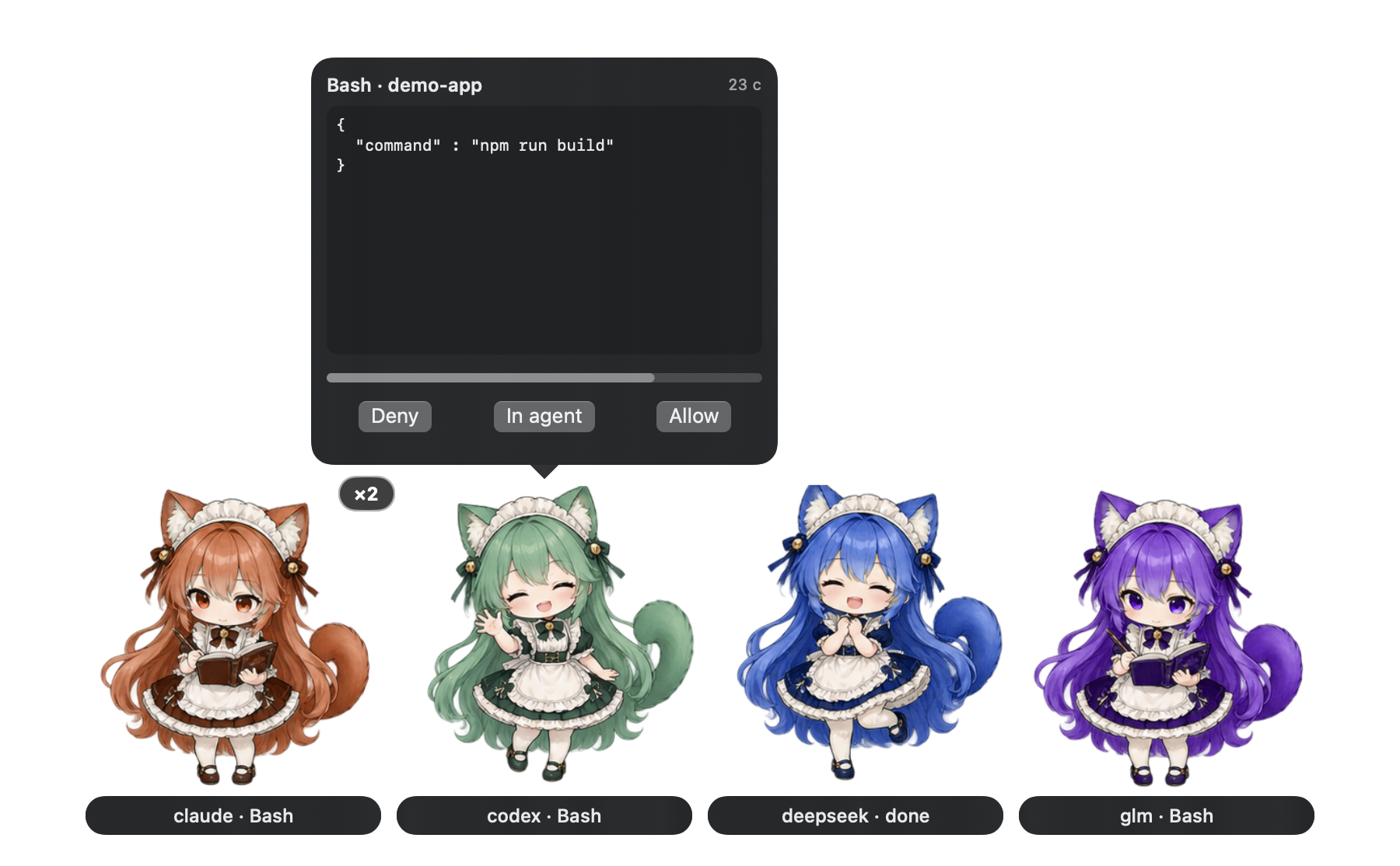
Pets appear only while a session is working, waiting for you, or just finished. Everything is local: agents append JSON lines to a file and the overlay tails it. Nothing is sent over the network and there are no accounts; the optional DSH plugin opens a loopback-only port (127.0.0.1) for the overlay's open-session commands.
ChatGPT (the chat app) has no local plugin API, so there is no integration with it. Codex running inside ChatGPT.app is covered by the Codex plugin below.
git clone https://github.com/rpegorov/agent-pet.git
cd agent-pet
scripts/install.sh                  # build, install to ~/.local/agent-pet, hook up Claude Code and Codex
scripts/install.sh --launch-agent   # also start the overlay at login
install.sh also accepts --no-claude-hooks and --no-codex-hooks (use these with the plugins below), and --uninstall.
Use either the plugin or the install.sh hooks for a given agent, not both. Both together would deliver every event twice and ask every permission twice; the emitter does not de-duplicate because it cannot tell which hook fired first. Plugins carry only the hook wiring, so run scripts/install.sh --no-claude-hooks --no-codex-hooks once for the binary and the overlay.
Claude Code. install.sh adds hooks to ~/.claude/settings.json. Or, as a plugin:
/plugin marketplace add rpegorov/agent-pet
/plugin install agent-pet@agent-pet
Codex. install.sh adds hooks to ~/.codex/hooks.json and trusts them in ~/.codex/config.toml. Or, as a plugin:
codex plugin marketplace add rpegorov/agent-pet
codex plugin add codex-agent-pet@agent-pet
Codex does not trust the plugin's hooks on a command-line install, so they stay silent until you approve them (see Troubleshooting). The install.sh route has no such step.
DeepSeek Harness (DSH). plugins/dsh-agent-pet is a standalone DSH plugin. In your profile's package.json add a dependency "dsh-agent-pet": "link:/path/to/agent-pet/plugins/dsh-agent-pet" and add "dsh-agent-pet" to dsh.profile.bundles, install, and restart DSH. It reports session state and lets the overlay open a session or start a chat in the Harness UI.
Anything else (scripts, task runners, other agents):
agent-pet-emit send --agent glm --session task-1 --label "refactor" --mood working
agent-pet-emit send --agent glm --session task-1 --mood completeagent-pet-emit appends one line per event to ~/.agent-pet/events.jsonl (override with AGENT_PET_LOG); the overlay tails the file. The file is rotated to events.jsonl.1 above 512 KiB.
{"v":1,"agent":"claude","session":"5e9d","mood":"working","label":"Bash","ts":1792276251.42}mood is idle, working, attention, complete or ended (removes the session). label is at most 40 characters. Optional fields, omitted when unknown: cwd, app (bundle id of the hosting app), tty, detail (permission summary, at most 200 characters), permission (id of a pending request).
Decay: working with no event for 120 s is hidden, complete is hidden after 10 s, attention after 10 min, a session silent for 30 min is dropped. An agent's pet shows the highest-priority mood of its live sessions: attention, working, complete.
With the overlay running, agent-pet-emit permit (the PermissionRequest hook) shows the pending tool call in a bubble with Deny, In agent and Allow, and a countdown.
AGENT_PET_PERMIT_WAIT seconds, default 30), or the overlay stops running, the native dialog appears as usual. The pet never auto-allows.AskUserQuestion, ExitPlanMode) are never turned into a bubble.~/.agent-pet/permissions/ (owner-only) and are removed when answered, expired or when the hook is killed.PermissionRequest command from permit to hook in the agent's hook config.agent-pet keeps everything on your Mac and sends nothing over the network.
~/.agent-pet/events.jsonl holds one line per hook event: agent name, session id, mood, a short label (tool name, session title or notification text), the working directory, the hosting app's bundle id, the terminal tty and, for permission requests, a summary of the tool call (at most 200 characters). Prompts, tool output and file contents are not recorded.~/.agent-pet/permissions/ holds its full tool input (at most 8 KiB). The file is deleted when the request is answered, expires or the hook is killed; leftovers older than 2 minutes are cleaned up.~/Library/Application Support/Claude/claude-code-sessions (read only). Selecting a Terminal or iTerm2 tab uses AppleScript and asks macOS for Automation permission once.agent-pet with agent, session id, app and the opened URL; no tool input or paths.127.0.0.1.Delete ~/.agent-pet to remove all recorded data.
scripts/install.sh --uninstallRemoves the binaries, hooks, trust entries and LaunchAgent. A no-op agent-pet-emit stub stays behind so sessions that are still open do not report a missing command; restart them and delete the stub. Plugins are removed with /plugin uninstall, codex plugin remove or by editing the DSH profile.
pgrep -x AgentPet)? Does ~/.agent-pet/events.jsonl grow when an agent works? If not, the hooks are not installed or the agent was started before they were; restart the agent.codex plugin add; they ran only with --dangerously-bypass-hook-trust. Approve them in Codex (/hooks) or use scripts/install.sh, which writes the trust entries itself. Re-run install.sh after changing a hook command: the trust is tied to its text.http://127.0.0.1:50306) and local processes; a UI served from another origin cannot read its queue.MIT. The sprite art in Sources/AgentPet/Resources is included under the same license.
TEST_BASE=<base> python3 scripts/test-policy.py <component>.--plan; see .test-policy.json for component names.TEST_MODE=release python3 scripts/test-policy.py all.TEST_MODE=manual plus the usual build/package
command. Tests are not run; the artifact is not a verified release.CI defaults to targeted tests; select test_mode=release or manual when
dispatching a workflow that offers these inputs. A source/dependency change can
affect several components. Full browser/app-hosted suites require release mode;
run explicit scenario tests separately for task acceptance. Existing deployment
permissions and data guards still apply.
CLASSIFICATION EVIDENCE
系统优先读取 GitHub Topics,再与站内分类词典和词根规则比对。当前命中: deepseek。
morluto
Reverse engineer anything with agents, from app behavior down to native binaries.

deepseek-ai
DeepSeek Harness: Everything is a Plugin.

nexu-io
The 1st Collaborative AI Design Agent Workspace. Local-first and open source. Create motion, prototypes, websites, apps, dashboards, presentations, images, and videos with your team and AI agents. Share work, exchange feedback, and iterate together in one workspace.