模型与 MCP
待识别

rea
morluto
Reverse engineer anything with agents, from app behavior down to native binaries.

riverzhou/dsh-gitbash-new
Windows bash tool for DeepSeek Harness: replaces the preset's pwsh with Git for Windows or MSYS2 bash while keeping the official terminal contract (cwd, background jobs, timeout promotion, result markers, terminal cards).
PROJECT TOPICS
INSTALL REFERENCE
dsh plugin --profile web add github:riverzhou/dsh-gitbash-new
该命令指向仓库当前默认分支;尚无绑定当前 commit 的完整验证结果。
PROJECT README
English | 简体中文
A Windows terminal bridge for DeepSeek Harness (DSH). It replaces the
model-facing pwsh tool with a real bash tool, with selectable Git for
Windows and MSYS2 profiles, while keeping the official terminal-tool
behaviour: working directory, background jobs, timeout promotion, permission
escalation, terminal cards, PTC and meta.cwd.
This is the complete user manual and reference. It covers installation, daily usage, the security model, settings, troubleshooting and development.
Minimum DSH: 0.2.2-rc.3. Windows 10/11 only. The replacement applies to new sessions; existing sessions keep the tools they were created with.
bash, no pwsh in the model tool catalogue: tools.restrict hides
pwsh, the tool:pwsh prompt section is shadowed, and tool:bash is added.
The replacement applies to new sessions; existing ones are not retrofitted.UCRT64, MINGW64, CLANG64, CLANGARM64, MINGW32, MSYS).
Discovery reads the registry, where.exe, PATH and the usual install roots,
validates the candidate with bash --version, and never proposes WSL's
bash.exe.description, command, timeoutMs, workdir,
run_in_background, sandbox_permissions / justification, POSIX and
Windows-form workdirs, the same [exit code: N], [stderr] and truncation
spill markers, and meta.cwd for the terminal card.run_in_background returns a job id; collect with
job_output, stop with job_kill, and a foreground call past its deadline is
promoted to a job instead of being killed.MSYSTEM matches the selected profile, and Git's
bin\bash.exe launcher is canonicalized to usr\bin\bash.exe, so the
environment the plugin composes is the one that actually runs.signalNumber << 8 exit encoding
becomes [killed by signal: SIGTERM], and inherited Windows PWD /
OLDPWD are tombstoned so pwd stays POSIX.1 background task /
1 subagent header badges, job cards and subagent cards are rendered by DSH
itself — the plugin registers a bash tool with meta.cwd, it does not draw
its own chat UI.workspace-write
runs bash unconfined and labels the result with [compat: ...], read-only
refuses, and strict allows only danger-full-access. See
Security model.0.2.2-rc.3 (MSYS2: settings route and real settings row, 40-tool catalog,
direct/promoted/background calls, invalid arguments: text) and the earlier
DSH 0.2.2-rc.1 runs for Git/MSYS2 (direct, promoted, background, subagent
calls; 0.2.4 audit 31/31 + 15/15 settings-page checks; 0.2.5 manual-path UI
13/13; 0.2.6 read-only refusal, approval allow/deny, hostile BASH_ENV
clearing, large-output spill, job kill). 0.2.8 is the full audit round with
fresh light/dark screenshots.| Item | Requirement |
|---|---|
| DSH | >= 0.2.2-rc.3 (tested on desktop runtime 0.2.2-rc.3) |
| Windows | Windows 10/11, x64; MSYS2 arm64 environments are also supported |
| bash provider | Git for Windows and/or MSYS2 |
| Node.js | >= 24.9, development/build only (the DSH 0.2.2-rc.3 floor) |
| Optional | Cygwin, best-effort and not recommended |
bash.exe is intentionally excluded. WSL is not Git Bash and does not
fit this profile/environment model.Do not use an old global npm dsh (for example 0.1.7); it does not know
the 0.2.2-rc.3 plugin/profile contract. Use the CLI under the desktop install:
set "DSH_CLI=%LOCALAPPDATA%\Programs\DeepSeek Harness\resources\runtime\cli\bin\dsh.cmd"
%DSH_CLI% --version
:: expect 0.2.2-rc.3 or newer
Fully quit DSH Desktop before changing a profile.
%DSH_CLI% plugin --profile desktop add link:D:/GitHub/dsh-gitbash-newReopen DSH, then hard-refresh the Web UI (Ctrl+Shift+R).
%DSH_CLI% plugin --profile desktop add github:riverzhou/dsh-gitbash-new%DSH_CLI% plugin --profile desktop add @riverzh/dsh-gitbash@0.2.8Use @riverzh/dsh-gitbash@latest for the newest release.
Use the same CLI, restart DSH, hard-refresh:
%DSH_CLI% plugin --profile desktop remove @riverzh/dsh-gitbash
%DSH_CLI% plugin --profile desktop add link:D:/GitHub/dsh-gitbash-new
For a released version, replace link:... with @riverzh/dsh-gitbash@<version>.
%DSH_CLI% plugin --profile desktop remove @riverzh/dsh-gitbashRestart DSH. The settings row disappears with the plugin. A dsh-gitbash
entry left in the profile's cordis.patch.yml is inert and can be deleted
manually.
dsh-tweaks' git-bash-terminal-tool also hides pwsh and registers bash.
If it is already installed, remove or disable it first:
%DSH_CLI% plugin --profile desktop remove dsh-tweaks-git-bash-terminal-toolWhen both are present, the first one to replace wins; the later one usually
skips because pwsh is no longer restrictable. The log contains
skipped ... pwsh is not restrictable.
bash (not pwsh) and the result carries the
expected cwd.The settings row looks like this (DSH 0.2.2-rc.3, 2026-11-14):
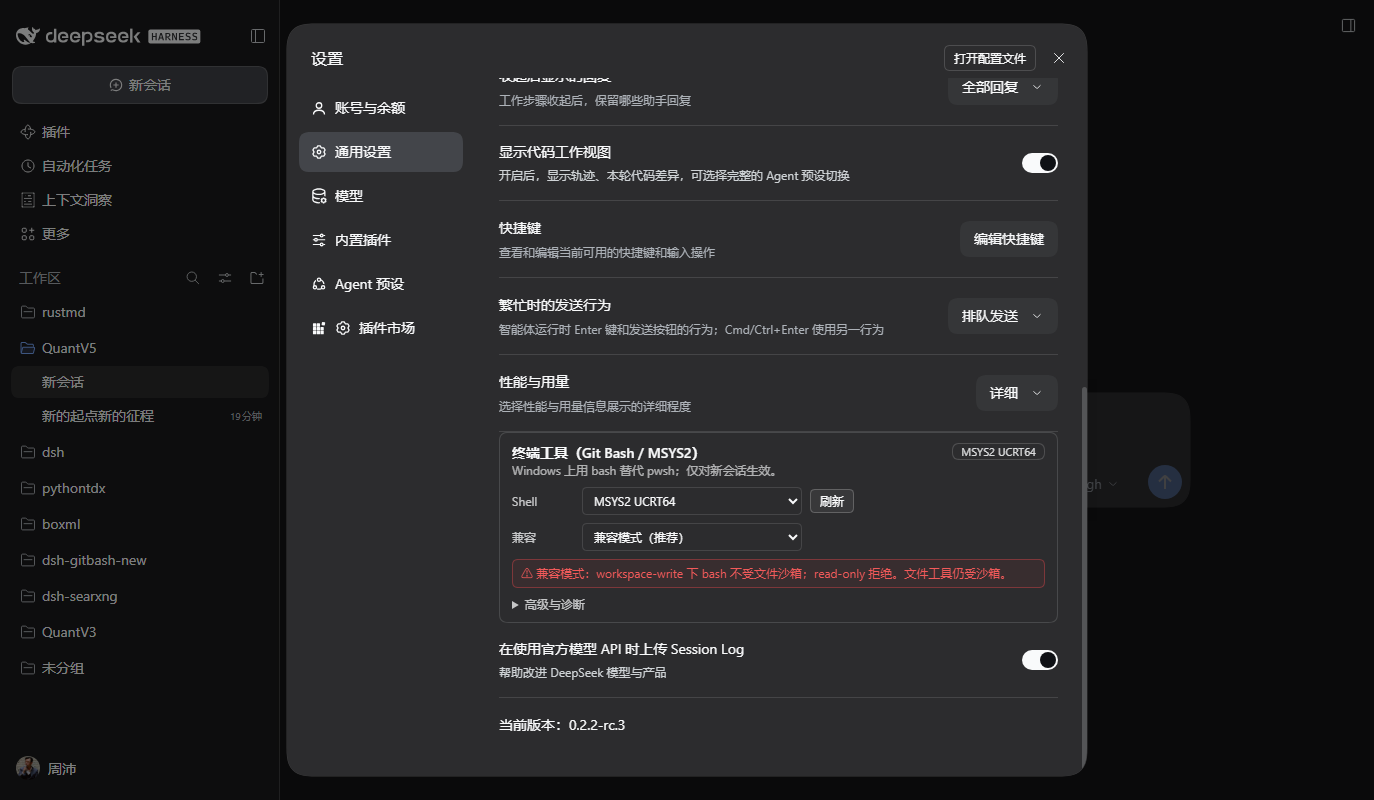
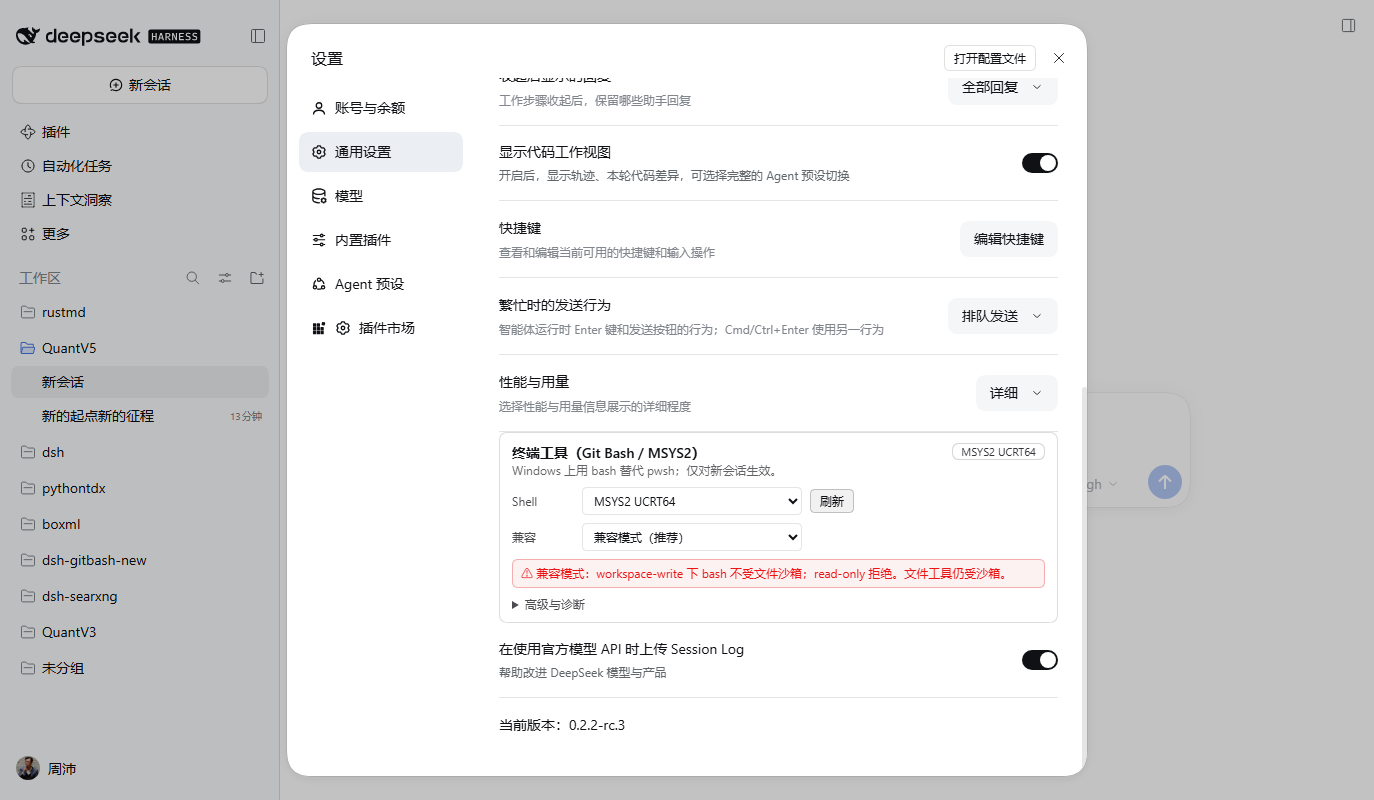
The Shell, Compatibility and MSYS2-environment controls use the DSH light/dark
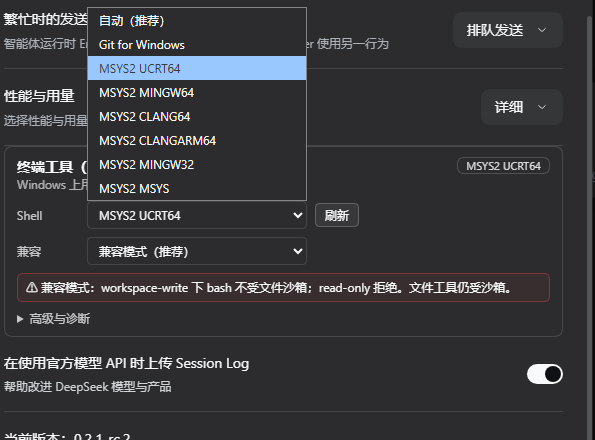
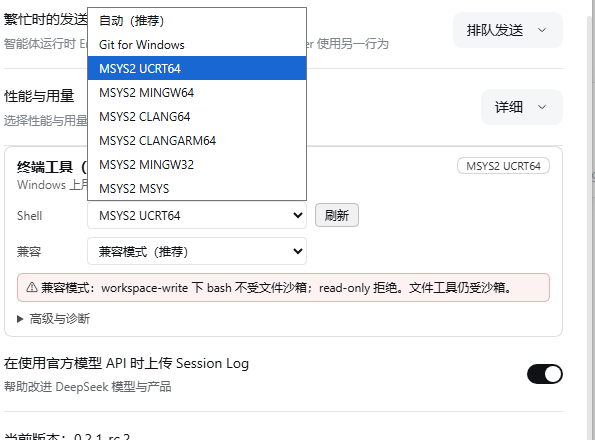
surface tokens, so the closed control and the open native list stay readable.
The open-list captures below are from the original theme fix (DSH 0.2.1); the
same tokens and controls are used by 0.2.8:
The MSYS2 runtime cannot start under DSH's Windows ACL sandbox: restricted
tokens break its named shared memory, signal pipe and BaseNamedObjects. Adding
the user SID defeats write confinement; lowering to Low integrity breaks
BaseNamedObjects again. There is no configuration in which Git Bash both runs
and stays inside that sandbox.
The plugin therefore makes the trade-off explicit:
| Session permission | compat: auto (default) |
compat: strict |
|---|---|---|
danger-full-access |
bash runs normally | bash runs normally |
workspace-write |
bash runs outside the file sandbox, result carries [compat: ...] |
refused |
read-only |
refused | refused |
workspace-write + auto, bash can write outside the workspace. Treat
paths outside the workspace as read-only unless the user explicitly asks
otherwise.[compat: ...] note.read-only deliberately refuses rather than breaking the read-only promise.strict is for security-sensitive users: bash is available only under
danger-full-access.sandbox_permissions plus a one-sentence
justification; DSH asks the user for approval, and the wider mode applies to
that call only.| Parameter | Type | Required | Notes |
|---|---|---|---|
description |
string | yes | Clear 5–10 word description shown in the UI |
command |
string | yes | Executed as bash -c '<command>'; use POSIX syntax |
timeoutMs |
number | no | Positive; default 120000, capped at 600000 |
workdir |
string | no | Working directory; relative paths resolve against the session cwd |
run_in_background |
boolean | no | Return a job id immediately; no timeout applies |
sandbox_permissions |
workspace-write | danger-full-access |
no | Request a wider mode when the session policy blocks the command |
justification |
string | with escalation | One sentence for the user explaining why this command needs wider access |
run_in_background and sandbox_permissions are feature-detected. The standard
web preset composes the job service and sandboxing executor, so both are
available; a minimal composition may expose only the basic parameters.
The tool runs a fresh shell for every call; it is bash -c, not a persistent
PTY. Use workdir rather than cd.
[stderr] header.(no output).[exit code: N] as the last line; a signal adds
[killed by signal: X]. A successful foreground result usually has no exit
marker; the terminal card shows the exit status pill.[timed out after Nms].[still running after Nms; moved to background job <id>].[output truncated; full output: <file>]; the full output is spilled to
a file (up to 64 MiB).[compat: bash runs outside the DSH file sandbox (session mode workspace-write)].
It is a deployment notice, not command stderr.started background job <id> and no stdout; read
it later with job_output.tool/result.meta.cwd is the Windows absolute path actually used. Inside
bash, pwd is the MSYS POSIX form (for example /d/project).
workdir: uses DSH's current session working directory.workdir: resolved against the session cwd.C:\...) and POSIX drive paths (/c/..., /d/...)
are accepted; /tmp maps to the Windows temp directory./home/...) are refused rather than
guessed, because the Windows mapping is ambiguous. Drive-relative forms such
as C:foo or C: are refused too; use C:\... or a relative path.$VAR and ${VAR:?} instead of
PowerShell syntax.run_in_background: true returns a job id and continues the turn.job_output (with wait: true to block) and job_kill to collect or
stop it. These are DSH's built-in job tools; the plugin registers the job as
kind bash.timeoutMs (default 120 s, cap 10 min).If the session policy blocks a command, retry with the narrowest wider mode and a justification:
sandbox_permissions: "workspace-write"   (or "danger-full-access")
justification: "Need to write the build cache under <path> because ..."
DSH asks the user. Approval applies to that one call. In compat: strict,
workspace-write is refused, so escalation must target danger-full-access.
pwsh in the parent, a new child has bash and no pwsh; this was verified
for Git and MSYS2.1 subagent. Use View subagent
to inspect the child conversation.run_code) sees the same bash tool; the plugin supplies presenters and
presentationMeta.cwd. The Web UI derives terminal cards from the tool name,
arguments, result markers and meta.cwd.A profile is more than a bash.exe path; it carries the flavour, install root,
MSYS2 environment and PATH rules.
| Flavour | Selector label | MSYSTEM |
bash path |
|---|---|---|---|
| Git for Windows | Git for Windows |
always MINGW64 |
<root>\usr\bin\bash.exe |
| MSYS2 | MSYS2 UCRT64, MSYS2 MINGW64, … |
the selected environment | <root>\usr\bin\bash.exe |
| Cygwin | Cygwin (experimental) |
unset | <root>\bin\bash.exe |
UCRT64 first, then MINGW64, CLANG64, CLANGARM64,
MINGW32, MSYS).usr\bin\bash.exe, so
bashPath alone cannot distinguish them — msystem is persisted too.MSYS2 environments must exist (<root>\ucrt64\bin, etc.). A missing
environment makes that profile invalid rather than silently falling back.bin\bash.exe is canonicalizedGit for Windows ships two entry points:
bin\bash.exe is a launcher. It resets MSYSTEM and PATH from the
installation (Git 2.56 uses UCRT64), overriding the requested environment.usr\bin\bash.exe is the runtime and honours the environment we compose.If you enter <root>\bin\bash.exe, the plugin normalizes the profile to
<root>\usr\bin\bash.exe. The effective path is shown in the settings row.
This was a real-machine bug: before normalization, a Git profile reported
MSYSTEM=UCRT64; after it, MSYSTEM=MINGW64.
| Profile | MSYSTEM |
PATH prefix (before inherited PATH) |
|---|---|---|
| Git | MINGW64 |
<root>\bin, <root>\usr\bin, existing <root>\ucrt64\bin / mingw64\bin / mingw32\bin |
| MSYS2 | selected | <environmentRoot>\bin, <root>\usr\bin, <root>\usr\local\bin |
| Cygwin | unset | <root>\bin |
NO_COLOR=1, TERM=dumb, PAGER=cat, GIT_PAGER=cat,
CHERE_INVOKING=1.MSYS2_PATH_TYPE=inherit.C:\msys64\usr\bin; an MSYS2 session does not inherit Git's usr\bin.BASH_ENV, ENV,
BASH_FUNC_*, SHELLOPTS, BASHOPTS, CDPATH, GLOBIGNORE,
POSIXLY_CORRECT, PS4, IFS, …). A host shell cannot inject a startup
script or exported function into every bash -c.bin\bash.exe path (for example
<root>\mingw64\bin\bash.exe) infers MINGW64 when msystem=auto; with an
explicit mismatching msystem it is rejected instead of mixing the binary
with another environment's MSYSTEM/PATH.DSH_* facts are merged last, so they win. HOME, TMP, TEMP and LANG
are not overridden.bashPath + msystem (highest priority; invalid means a
clear error, not a silent fallback).InstallPath (HKLM / HKCU).C:\Git, D:\Git), MSYS2
(C:\msys64, D:\msys64, LocalAppData, C:\msys32), Cygwin
(C:\cygwin64, C:\cygwin).where git (derive the root from git.exe) and where bash.bash.exe / git.exe on PATH.WSL is excluded: System32\bash.exe, Sysnative, WindowsApps, \\wsl$
and wsl.exe are never candidates. Version probing runs only on Refresh or
Test, not when the settings page opens; the selector uses cached profiles.
Open Settings → General → Terminal tool (Git Bash / MSYS2). The default view is intentionally small:
Auto (recommended), Git for Windows, or a specific MSYS2
environment. Selecting an entry writes both the path and msystem.bash --version for versions/badges.msystem to auto
in the same write, so a Git path is never validated against a stale MSYS2
environment (and vice versa); the MSYS2 environment control is disabled while
the effective profile is Git.The badge at the top right shows the effective profile (which may differ from a manually entered path after Git canonicalization).
Configuration is stored in the profile's cordis.patch.yml:
- id: dsh-gitbash
  config:
    bashPath: 'C:\Program Files\Git\usr\bin\bash.exe'
    msystem: MINGW64
    compat: auto
bashPath: '' means auto.msystem is auto or a concrete MSYS2 environment. A Git profile accepts
only auto / MINGW64; any other value is reported as an invalid profile
instead of being silently ignored.compat is auto or strict.Ask:
Use bash to print
$MSYSTEM,command -v bash,bash --version,pwdandgit status.
Expected: MSYSTEM=MINGW64 for Git, or the selected environment for MSYS2;
bash resolves under the chosen install; pwd is POSIX and the terminal card
shows the Windows cwd.
Ask the model to start it with run_in_background: true, then collect logs
with job_output and stop it with job_kill. The session header shows the
background-task badge.
pacman -S --needed mingw-w64-ucrt-x86_64-gcc).command -v gcc; it should resolve under
C:\msys64\ucrt64\bin.Ask the parent to use subagent with a child prompt that runs a bash command.
The child has its own bash; the parent receives the child report and the
session shows a subagent card. Use View subagent to inspect the child.
Set Shell back to Auto (or pick Git for Windows) and refresh. A manually
entered bin\bash.exe is canonicalized to usr\bin\bash.exe; if you still see
UCRT64, you are probably running an older plugin build or a stale session.
| Symptom | What to do |
|---|---|
| Settings says no bash found | Install Git for Windows or MSYS2; click Refresh; or enter <root>\usr\bin\bash.exe manually (no quotes) |
New session still has pwsh |
Confirm DSH >= 0.2.2-rc.3, the plugin is in the profile bundles, and DSH was restarted; inspect %TEMP%\dsh-gitbash.log for replace: |
| Only old sessions have no bash | Replacement is per-agent; start a new session. Subagents inherit from their parent |
Git session reports MSYSTEM=UCRT64 |
Old bin\bash.exe path/build; use Auto/Refresh; current builds canonicalize to usr\bin\bash.exe |
| MSYS2 environment not installed | Install it in MSYS2; the profile only lists environments whose bin directory exists |
CreateFileMapping ... Win32 error 5 / couldn't create signal pipe |
The process was started inside the Windows ACL sandbox. This plugin runs bash unconfined in compat: auto; remove custom confinement or use a supported preset |
read-only refuses bash |
By design; switch the session to workspace-write or danger-full-access (or escalate) |
Strict mode refuses workspace-write |
Set compatibility to auto, switch the session to danger-full-access, or escalate to danger-full-access |
| Both pwsh and bash are gone after installing another plugin | Two plugins are competing; keep only one bash replacement (see Install) |
| Background jobs are unavailable | The preset did not compose ctx.jobs; use the standard web preset or run in the foreground with a timeout |
job_kill / job_output missing |
They are separate DSH tools, not part of bash; ensure the jobs tool group is in the preset |
| Settings row is missing | DSH too old, plugin not loaded, or the Web client was not rebuilt/refreshed; restart DSH and hard-refresh |
| Cannot find the Git/MSYS2 selector, or changing it does not affect this session | The selector is only in Settings → General → Terminal tool (Git Bash / MSYS2); the built-in Terminal card is the separate UI-terminal plugin. Changes persist immediately but apply to new sessions only |
| Path has spaces | Enter the absolute path; surrounding single/double quotes are tolerated and stripped |
| WSL bash is not listed | Intentional; WSL cannot be driven through this profile/environment model |
| Output seems cut off | Long output is tail-truncated; use the reported spill path for the full file |
%TEMP%\dsh-gitbash.log (typically
C:\Users\<you>\AppData\Local\Temp\dsh-gitbash.log). One line per event:
apply, capability probing, replace: applied ... or
skipped ... pwsh is not restrictable./api/dsh-gitbash/state (authenticated), used by the
row; /discover and /validate are also available to the client. They are
not a public unauthenticated API.pnpm compatcheck reads the installed runtime
version, enforces the plugin's engines.dsh floor, and compares the deployed
official Host and Client bundles with the strings this plugin depends on,
including the 0.2.2-rc.3 ToolArgsError / ToolContextUnavailableError /
SandboxEscalationError / WorkingDirectoryError / ShellEnvError messages
and the official JobError / SubprocessError code lists. Use
node scripts/compatcheck.mjs --require as a release gate (a missing
app.asar otherwise skips with exit 0).For a full real-machine transcript, see docs/SMOKE.md.
ctx.subprocess, ctx.jobs, ctx.sandboxPolicy, ctx.shellEnv,
ctx.workingDirectory, ctx.approval, ctx.configForms, etc.) and does not
import private DSH packages.ctx.subprocess.spawn and ctx.sandboxPolicy.resolve:
bash is spawned outside DSH's confinement, so the policy service is the only
source of the session mode. If either is missing, the plugin keeps the
preset's pwsh and the settings row shows the missing capability.agent/created, tools.restrict, tool:bash / tool:pwsh section names,
result markers and meta.cwd are the critical integration points. A wrong
event name would be a silent no-op, so the test suite asserts the strings.pnpm compatcheckpnpm testpnpm build) if src/ changed; the committed lib/ must match
src/package.json declares
dsh.bundle.platforms: ["win32"] (DSH 0.2.2 Host admission) and
cordis.patch.yml disables the entry when process.platform !== 'win32'.Verified on 2026-11-14: DSH 0.2.2-rc.3 (desktop runtime) with the
gitbash-uitest profile: the settings route and its real light/dark settings
row, the 40-tool catalog (bash present, pwsh absent), a real MSYS2 UCRT64
bash call with the compat note and meta.cwd, a background job, timeout
promotion, and the Error: invalid arguments: ... text were exercised; the
0.2.8 audit added the client/host regression tests and the hardening listed in
CHANGELOG. The previous rounds on
DSH 0.2.2-rc.1 remain evidence for Git, subagents, SIGTERM normalization,
relative workdir, strict refusal and the real settings row (31/31 scenario
checks and 15/15 UI checks); 0.2.5 added a 13/13 manual path flow (MSYS2 → Git)
through the real UI; 0.2.6 added read-only refusal, approval allow/deny,
workspace-write escalation labeling, a 108 KB tail/spill result, a live
job_kill, /tmp workdir, end-to-end clearing of a hostile
BASH_ENV/exported function, and a clean final settings row. Raw events:
docs/SMOKE.md.
pnpm install
pnpm build        # lib/index.js + lib/client.js
pnpm check        # tsc --noEmit
pnpm test         # node:test; 136 tests, including real Git/MSYS2 when present
pnpm selftest     # pure-logic checks, no DSH needed
pnpm compatcheck  # contract-string check against the installed DSH
These commands require a checkout: the published npm tarball ships the runtime
files and docs, not tests/ or scripts/. For a release gate use
node scripts/compatcheck.mjs --require so a missing app.asar fails instead
of skipping.
Real integration tests discover local Git/MSYS2 installations and skip when
absent. They exercise MSYSTEM, PATH isolation, exit codes, stderr, real child
bash, timeout, real SIGTERM/SIGKILL encoding, the optional MSYS2 toolchain
and the expected unconfined write outside the workspace. A drive-relative
workdir (C:foo) is rejected; use C:\... or a path relative to the cwd.
src/index.ts            host entry: apply, Config, routes, replacement
src/shared/protocol.ts  host/client wire types and route constants
src/host/               discovery, env, executor, jobs, rendering, tool, routes
src/client/             settings row, store, API, locales
tests/                  unit + real integration tests
scripts/                selftest, compatcheck
docs/                   design, real-machine record, screenshots
lib/                    built output committed for link: installs
src/ and lib/ must stay in sync; dsh plugin add link: loads lib/.
docs/ is indexed by docs/README.md; unregistered docs are
treated as nonexistent.
pnpm build
pnpm check
pnpm test
pnpm pack
The npm package is @riverzh/dsh-gitbash (the DSH entry id stays dsh-gitbash) with engines.dsh = ">=0.2.2-rc.3" and
engines.node = ">=24.9.0". It ships the host entry, client bundle, lib/, src/,
cordis.patch.yml, docs and both READMEs. dsh.bundle.platforms restricts the
bundle to Windows, so a non-Windows DSH skips it before the patch is read.
bash -c, not a persistent shell/PTY. The
minimal preset's persistent shell is not preserved.GNU General Public License v3.0 only (GPL-3.0-only). See LICENSE.
CLASSIFICATION EVIDENCE
系统优先读取 GitHub Topics,再与站内分类词典和词根规则比对。当前命中: deepseek-harness。
morluto
Reverse engineer anything with agents, from app behavior down to native binaries.

deepseek-ai
DeepSeek Harness: Everything is a Plugin.

nexu-io
The 1st Collaborative AI Design Agent Workspace. Local-first and open source. Create motion, prototypes, websites, apps, dashboards, presentations, images, and videos with your team and AI agents. Share work, exchange feedback, and iterate together in one workspace.