

模型与 MCP
待识别

rea
morluto
Reverse engineer anything with agents, from app behavior down to native binaries.
PROJECT TOPICS
INSTALL REFERENCE
dsh plugin --profile web add github:rivenshanghai/dsh-toomuch-plugins
该命令指向仓库当前默认分支;尚无绑定当前 commit 的完整验证结果。
PROJECT README
Makes room in the DSH Web sidebar. · Too many plugins, too little room.



A small plugin set that gives the DeepSeek Harness (DSH) Web sidebar some breathing room.
It ships one plugin today:
| Plugin | What it does |
|---|---|
| Sidebar panel collapse | Collapses the "global panels" column above the workspace into one toggle in the sidebar footer, plus a display settings page |
| Workspace favorites and filters | Star projects from their context menu (a yellow star in the sidebar) and filter the project list by favorites / recency |
The DSH Web sidebar stacks, from top to bottom: brand row → new session → global panel entries → workspace → settings.
Every plugin that adds a sidebar entry adds a row to that column: plugins, plugin market, schedules, MCP studio, context, skill manager, system monitor… Seven rows are roughly 280px, which squeezes the workspace region down to a few sessions.
This plugin does exactly one thing: collapse that column of global panel entries, and bring it back when you need it.
localStorage; survives reloads and restarts.--dsw-alias-* tokens only, so it follows the DSH theme.data-dsh-*-entry
convention, e.g. 今日值得读 / 全局搜索 / 容器) are adopted into the grid too, and
put back in place when the grid turns off.order
overrides). Capped at 20, duplicates dropped on save. The dropdown also
lists slot-skipping sidebar entries (今日值得读 / 全局搜索 / 容器 and other
data-dsh-*-entry followers); listed ones are adopted into the list so the
order really applies, and released when the order is cleared.~/.dsh/plugins/dsh-toomuch-plugins/click-counts.json, (silently skipped when the remote is unavailable).~/.dsh/plugins/dsh-toomuch-plugins/plugin-history.json. Records are built
by comparing the profile manifest with the state the log recorded last time, not by listening for
change events: plugins are installed and removed from the settings panel, from the plugin market
and from the dsh CLI, and only the first of those announces what it did. Upgrades are left
out: DSH upgrades by removing the package and installing it again, so a package that reappears
with another version retracts the removal it started with. Each row shows the action as a 16px
stroke icon rather than text, coloured by state — install and enable are green (the power
symbol), remove and disable are red (the power symbol with a bar through it) — and the
plugin name and the time are set larger than the body text. Both tabs are returned newest first.~/.dsh/plugins/dsh-toomuch-plugins/favorites.json), keyed by the project's
absolute path: deleting a workspace and adding the same directory back keeps
the star, and the stars survive a browser change or a machine change.localStorage
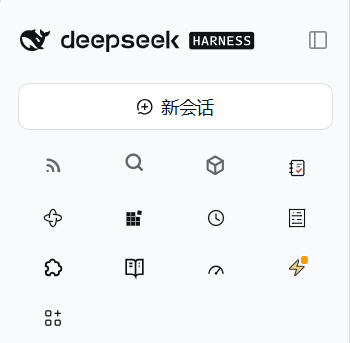
alongside the collapse state and survives reloads.Grid display — icons only, panel names as hover tooltips, 2–4 icons per row:
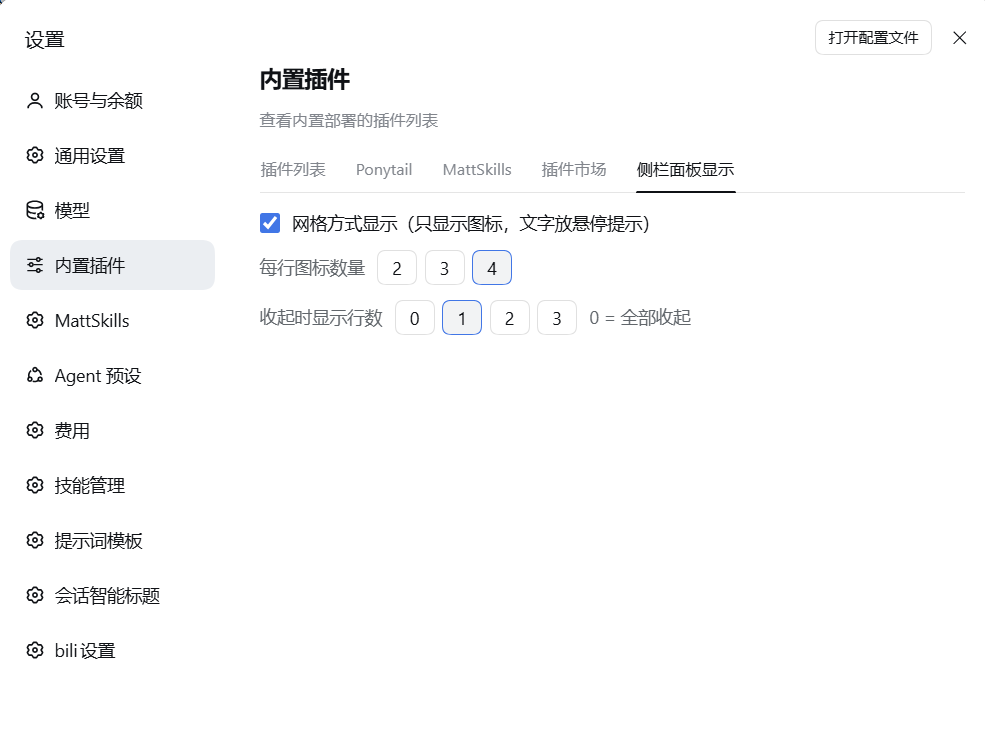
The "Sidebar panel display" settings page (Settings → Built-in plugins) — grid mode, icons per row, and how many rows stay visible while collapsed:
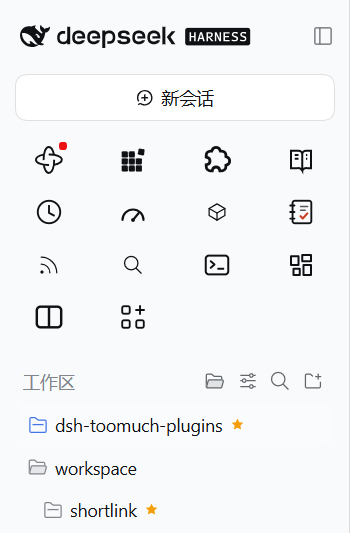
New in 0.4.0 — a starred project in the sidebar (the yellow star after its name):
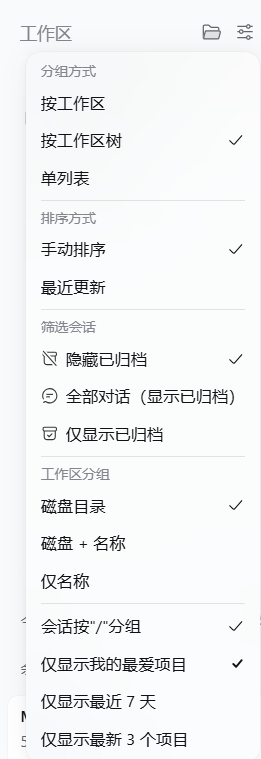
The three filter switches at the end of the view-options menu:
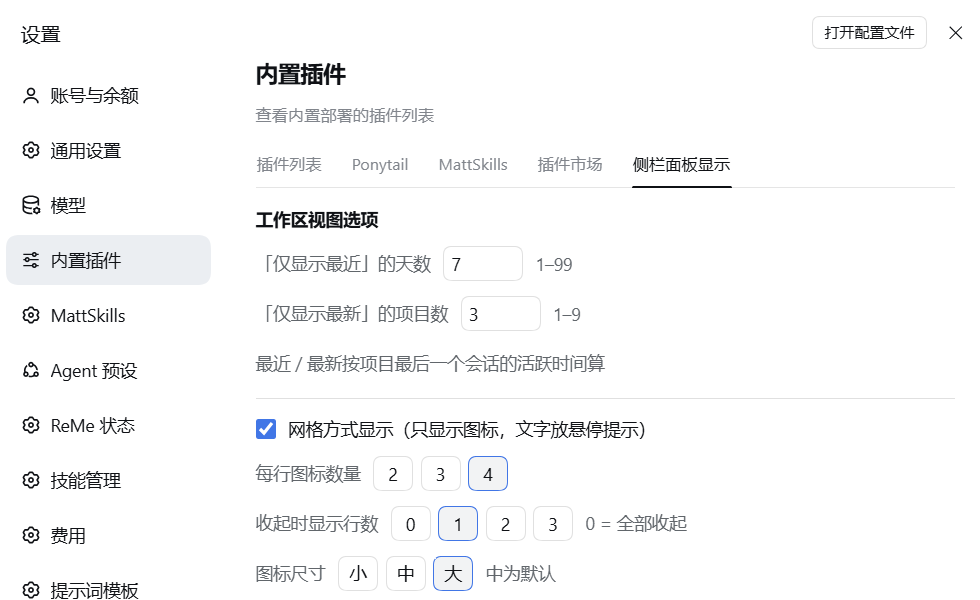
The 「工作区视图选项」 group at the top of the settings page:
The plugin is a repository-root package: it declares the dsh.bundle manifest, so
DSH can install it straight from npm or GitHub.
# from npm (prebuilt — no build approval step)
dsh plugin --profile web add dsh-toomuch-plugins

# from GitHub
dsh plugin --profile web add github:rivenshanghai/dsh-toomuch-plugins

# or from a local clone
git clone https://github.com/rivenshanghai/dsh-toomuch-plugins.git
dsh plugin --profile web add /path/to/dsh-toomuch-plugins
dsh plugin forwards to pnpm inside the profile. After the install, enable the
plugin in DSH's plugin settings (it is written into the profile's
dsh.profile.bundles), then refresh the page.
From the plugin market, once listed: open Settings → Plugin Market in DSH and
search for dsh-toomuch-plugins.
Verify: the sidebar footer gains a "Collapse global panels / Expand global panels" row above "settings", and the global panel column is gone. Settings → Built-in plugins gains a "Sidebar panel display" page for grid mode, icons-per-row, how many entries (list) or rows (grid) stay visible while collapsed, the custom plugin display order (up to 20 entries), and the icon size (small / medium / large).
For 0.4.0: right-click a project — the first line of the menu is 「我的最爱」, and clicking it puts a yellow star after the project name. The view-options icon in the workspace region gains three switches at the end of its 「筛选会话」 group, and the settings page opens with a 「工作区视图选项」 group.
Requirements: DSH (DeepSeek Harness) with a web profile; Node.js ≥ 20.
src/client.js does the following:
sidebar.footer.action (the
row next to "settings");<nav> child —
the global panel list — and toggles its display;localStorage;settings.plugins.tab slot (Settings →
Built-in plugins) where grid mode, the 2–4 icons-per-row choice and the
three icon sizes (small / medium / large) live;<nav>: a marker class plus a columns CSS
variable, the label span hidden, and each entry's aria-label mirrored into
the native title as the hover tooltip (DSH's own tooltip is disabled in the
wide sidebar, and the label is not rendered there either);order overrides on the <nav>'s
direct children (lossless — React's DOM reconciliation is never fought), and
makes the collapsed limit keep the first N entries visually;click-counts.json ;shell.overlay slot, so it floats over the app
instead of being clipped by the sidebar) with an 「安装/删除」 and an
「启用/禁用」 tab, fed by the host half's spcHistory.list;ctx.contextMenus contribution (target: 'workspace', order 50,
ahead of the host's 重命名) so 「我的最爱」 is the first line of the project
context menu, and draws a yellow star next to the name of a starred project;The host half (src/index.js) provides three services:
spcClicks — the click counts described above;spcHistory — the plugin activity log. src/history.js compares the profile
manifest with the state it recorded last time and writes the differences down:
the plugin name, the time and the action. It recognises an upgrade by the
version that disappears and comes back, so an upgrade leaves no record. The
log lives in plugin-history.json next to click-counts.json;spcFavorites — the workspace favorites. src/favorites.js reads and writes
favorites.json (keyed by the project's absolute path, written atomically);
the client only asks the host to toggle a path and gets the full list back.The workspace rows are matched by id, not by key prefix (the host has changed it before): the row key ends with the id, so the tail is matched instead. The element holding the project name is recognised by shape — the first element with text of its own and no child elements.
The basis is DSH's own @deepseek-ai/dsh-client-ui-sidebar: nav.panelList is a
direct child of the sidebar root, so walking up from the footer button always
reaches it. Styling uses only --dsw-alias-* theme variables, and the stylesheet
rides inside the component, so unmounting removes it.
No DSH internal package is imported, and no DSH file is modified. The full contract is written down in docs/design.md.
.
├── package.json            plugin manifest: dsh.bundle.patch + dsh.client
├── cordis.patch.yml        inserts the loader row into the profile
├── src/
│   ├── index.js            Host half: spcClicks / spcHistory / spcFavorites remote services
│   ├── history.js          Host half: the activity recorder → plugin-history.json
│   ├── favorites.js        Host half: the workspace favorites → favorites.json (atomic write)
│   └── client.js           Client half: footer toggle + collapse/expand + grid + display order + click reporting + activity window + favorites and filters
├── test/smoke.js           zero-dependency smoke check (node test/smoke.js)
├── test/star-layout.mjs    browser regression: star placement and recovery after a host re-render
├── test/filter-menu.mjs    browser regression: the three filter switches
├── test/filter-rows.mjs    browser regression: hiding project and session rows
├── locale/{en,zh}.json     title and description in the plugin list
├── docs/                   design notes, market submission, pre-submit checklist
├── icon.svg                icon
├── CHANGELOG.md
└── LICENSE<nav> and the
toggle is a harmless no-op.DSH plugins are listed in the
awesome-dsh-plugin
catalog, which aggregates the repositories carrying the dsh-plugin GitHub
topic. Add that topic to this repository, then open a one-file pull request
against that catalog: the entry file is data/plugins/<owner>__<repo>.yml,
with a category, a one-line description.en and an optional description.zh
(the catalog's contributing guide has the exact rules).
Bug reports and pull requests are welcome. Please include your DSH version, the browser, and whether the toggle appeared in the sidebar footer. Keep the change focused: this plugin does one thing, and the DOM contract it relies on is documented in docs/design.md.
MIT © rivenshanghai — see LICENSE.
CLASSIFICATION EVIDENCE
系统优先读取 GitHub Topics,再与站内分类词典和词根规则比对。当前命中: deepseek-harness。
morluto
Reverse engineer anything with agents, from app behavior down to native binaries.

deepseek-ai
DeepSeek Harness: Everything is a Plugin.

nexu-io
The 1st Collaborative AI Design Agent Workspace. Local-first and open source. Create motion, prototypes, websites, apps, dashboards, presentations, images, and videos with your team and AI agents. Share work, exchange feedback, and iterate together in one workspace.