
模型与 MCP
待识别

rea
morluto
Reverse engineer anything with agents, from app behavior down to native binaries.
PROJECT TOPICS
INSTALL REFERENCE
dsh plugin --profile web add github:rirtue/dsh-breeze-speak
该命令指向仓库当前默认分支;尚无绑定当前 commit 的完整验证结果。
PROJECT README
Read each reply aloud with BreezeBlue / Breeze TTS 2 — starting from the first sentence, roughly 0.6 s after that sentence appears.
一个 DeepSeek Harness 插件:把每轮回复念出来,用 BreezeBlue(Breeze TTS 2)。第一句一出现就开始念,约 0.6 秒后出声。
llm/stream onion middleware, accumulating text as the model emits it.
挂住宿主 llm/stream 洋葱钩子,把模型吐出的文字攒起来。{} / [] / 【】 markers before sending, so they aren't read out as "left brace".
送给 Breeze 前剥掉代码块 / 花括号 / 方括号标记,免得被逐字念成「左花括号…」。/stream endpoint and drains it into the browser half, which schedules it on a Web Audio timeline — no waiting for a complete mp3 to be encoded.
走 Breeze 的 /stream 端点拿 PCM 裸流,边收边推给网页半边,用 Web Audio 排时间轴连续播(不是等整段 mp3 编完再播)。The settings page exposes the key and the voice picker. Everything else (enabled, firstSentenceOnly, maxChars, instructions) lives in ~/.dsh/breeze-speak.json and needs a real app restart to take effect.
设置页只放 key 和 音色选择器;其余字段(enabled、firstSentenceOnly、maxChars、instructions)在 ~/.dsh/breeze-speak.json 里改,需真正重启应用生效。
| File | Role |
|---|---|
package.json |
declares dsh.bundle.patch, dsh.client, entry points |
cordis.patch.yml |
inserts the plugin into the profile config tree (id: breeze-speak) |
index.js |
host half: apply(ctx), registers routes, hooks llm/stream |
client.js |
web half: window.__ModuleLoader__.load + settings slot + playback |
brz_...). Any one of three places works:
一个 BreezeBlue 的 API key(形如 brz_...),三种给法任选其一:BREEZE_API_KEY;
环境变量 BREEZE_API_KEY;refs.BREEZE_API_KEY in ~/.dsh/.credentials.yaml.voc_u3nxkd5578wc (an example voice). Pick one from your own account:
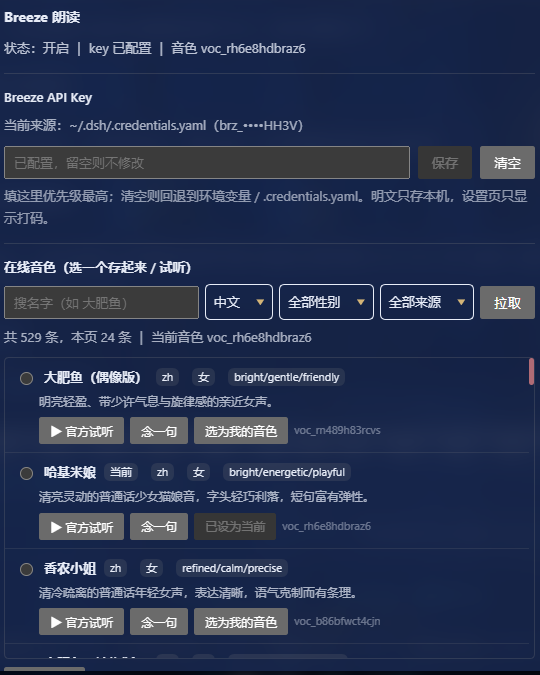
open the voice browser → type a name → "拉取" → preview → "选为我的音色".
音色默认是 voc_u3nxkd5578wc(示例音色)。建议在设置页「在线音色」里挑一个自己账号里可用的:
输入名字(比如「大肥鱼」)→ 点「拉取」→ 试听 → 点「选为我的音色」即可。Priority: settings page > env var >
.credentials.yaml. Clicking "清空" in the settings page falls back to the latter two. The key is resolved on every synthesis / voice fetch, so saving it needs no restart. 优先级:设置页填写 > 环境变量 >.credentials.yaml。 设置页里点「清空」就会回退到后两者。key 每次合成 / 拉音色时动态解析,所以保存后不用重启应用。
Voice browsing and synthesis both talk to Breeze's cloud API, so they send text and a key to api.breeze.blue — nothing else leaves the machine. The key never reaches the browser: the web half only receives PCM frames and a masked tail.
拉音色和合成都要访问 Breeze 云端,也就是把文本和 key 发给 api.breeze.blue,此外不发任何东西。key 不下发到浏览器,网页半边只收 PCM 帧和打码后的尾号。
~/.dsh/breeze-speak.json (absent → defaults; the settings page also writes here when you save a key or voice):
~/.dsh/breeze-speak.json(不存在就用默认;设置页保存 key 或音色时也会写这个文件):
{
  "enabled": true,
  "firstSentenceOnly": true,
  "maxChars": 120,
  "voiceId": "voc_u3nxkd5578wc",
  "instructions": "用傲娇又有点心虚、软软的语气念,句尾轻轻上扬再收回去。",
  "apiKey": ""
}
Changing maxChars / instructions / firstSentenceOnly needs a real app restart (plugin main code isn't hot-reloaded); changing the key or voice does not.
改字数/语气等要真正退出桌面应用再重开(插件主代码不热重载);但改 key、改音色不用。
/dsh-breeze-speak/) / HTTP 路由GET /stream —— SSE, pushes pcm frames {audio(base64), rate, bits, channels}, then a pcm-end frame and error framesGET /state —— {ok, enabled, voiceId, maxChars, keyed, keySource, keyMasked} (the key is only echoed as a masked tail)POST /config —— {apiKey}, saves/clears the Breeze key (writes breeze-speak.json, effective immediately)GET /voices —— ?page=1&page_size=24&search=&language_code=&gender=&origin=, proxies Breeze's voice library;
returns trimmed voices[] + has_more/total/page/page_size/next_page_token.
Measured: Breeze's page starts at 1 (0 returns 422), page_size accepts at least 100; the only filters that actually apply are
search / language_code / gender / origin (query / q / name / favorites / mine are ignored).GET /preview-url?url=... —— proxies Breeze's official preview mp3 same-origin (only https://r.breeze.blue/ links are allowed, SSRF guard)POST /voice —— {voiceId}, saves the selected voice (effective immediately)POST /preview —— {text, voiceId?}, synthesizes one line right away (voiceId previews a candidate without changing the saved choice)Every handler runs an admission fence first: ctx.connection.requestRejection(req) applies DSH's Host/Origin fence and requires an authenticated live Peer, returning 401/403 otherwise. This is needed because routes registered through ctx.webServer.register do not pass through the Connection fence on their own — only the /api gateway and exact ctx.connection.fetch.register routes do. Without it, /stream is an open SSE feed anyone can connect to and read the spoken audio, and /voices would spend the user's Breeze key on their behalf.
The fence can be bypassed by nothing on a normal browser, but note it also means a plain curl from a shell has no authenticated Peer and gets 401; use the settings page, or an API token, to reach these routes.
每个 handler 入口先过一道准入围栏:ctx.connection.requestRejection(req) 会做 DSH 的 Host/Origin 围栏并要求一个已认证的存活 Peer,否则返回 401/403。之所以必须自己补这一层:走 ctx.webServer.register 挂的路由不经过 Connection 围栏——只有 /api 网关和 ctx.connection.fetch.register 的精确路由才过。缺了它,/stream 就是谁连上谁都能读的公开 SSE 音频流,/voices 也会被拿去花用户的 Breeze Key。
副作用:从 shell 直接 curl 拿不到已认证 Peer,会收到 401;要访问这些路由请用设置页(或带 API token)。
Writes additionally check sec-fetch-site / Origin against cross-site requests. The plaintext key stays on the host; the web half only gets audio and a masked string.
写操作另外校验 sec-fetch-site / Origin 挡跨站请求。明文 key 只在宿主,网页半边只收音频和打码串。
/stream (latency, measured) / 为什么用 /stream(延迟实测)Before: the whole reply streams → call the ordinary TTS endpoint (a complete mp3, waiting 2.1–2.8 s) → play with <audio>.
The user waited full-text generation + 2 s before hearing the first syllable.
现在两处一起改:
llm/stream, check again; as soon as the first sentence (first 。!?;… or newline) is complete, fire synthesis instead of waiting for finally./stream endpoint + PCM streaming — first packet arrives in 0.55–1.3 s (vs 2.1–2.8 s from the whole-mp3 endpoint); push as it arrives and let Web Audio schedule it on a continuous timeline.Measured (breeze-tts-2, 13 Chinese characters):
实测(breeze-tts-2、13 字中文):
| Method | First sound |
|---|---|
| Whole-mp3 endpoint (old) | ~2100–2800 ms |
/stream PCM (new) |
~550–1350 ms |
The PCM stream carries no WAV header; the format was reverse-engineered: the same sentence's mp3 is 3.648 s and the PCM is 172800 bytes
⇒ 47368 B/s ⇒ 24000 Hz / 16 bit / mono (see PCM_RATE/PCM_BITS/PCM_CHANNELS in index.js).
注意:/stream 端点返回 content-type: audio/pcm,别加 stream/speed/output_format/optimize_latency
这些 body 字段(会 422 Extra inputs are not permitted);guidance_scale 越大首包越快(4.0 约 570 ms,
1.0 约 1270 ms),所以维持 4.0。
16-bit PCM is 2 bytes per sample, so every frame's byte count has to be even. The upstream slices at arbitrary sizes (18 of 36 frames measured were odd).
Decoding each slice independently with new Int16Array shifts any frame that lands on an odd byte boundary by one byte (high/low bytes swapped) —
which sounds like a sheet of hissing white noise. Measured: aligned frames jump by ~2600 between samples, misaligned ones by 60000+ (23×).
两边都做了防护:
flush in index.js): keep the tail for the next frame — const n = pending.length - (pending.length % 2) — so every frame that leaves sits on a sample boundary.
宿主(index.js 的 flush):切帧时把尾巴留到下一帧,保证送出去的每一帧都落在样本边界上。takeFrame in client.js): keep a carry buffer, prepend last frame's leftover bytes and slice by 2 — no matter how the host cuts it; stopAll() clears carry.
网页半边(client.js 的 takeFrame):维护一个 carry 缓冲,每帧先拼上次剩下的半字节再按 2 字节切,不管宿主怎么切都不会错位;stopAll() 时清空 carry。From npm (prebuilt, no build step): 从 npm 装(预构建,无构建步骤):
dsh plugin --profile <profile> add dsh-breeze-speakOr from the release tarball: 或者从 Release 的 tarball:
dsh plugin --profile <profile> add https://github.com/rirtue/dsh-breeze-speak/releases/download/v1.0.0/dsh-breeze-speak-1.0.0.tgzOr from a local checkout (don't add the directory directly — pnpm may symlink it):
或者从本地源码装(别直接 add 目录 —— pnpm 可能把它当软链):
cd dsh-breeze-speak
npm pack                              # → dsh-breeze-speak-1.0.0.tgz
dsh plugin --profile <profile> add ./dsh-breeze-speak-1.0.0.tgz
Replace <profile> with your profile name (e.g. desktop). On Windows the CLI is dsh.cmd, usually under the DSH install directory's resources/runtime/cli/bin/; use the full path when dsh isn't on PATH.
<profile> 换成你的 profile 名(例如 desktop)。Windows 上 CLI 是 dsh.cmd,一般在 DSH 安装目录的 resources/runtime/cli/bin/ 下;dsh 不在 PATH 时就用它的完整路径调用。
The CLI does two things: adds the package name to the profile package.json's dsh.profile.bundles, and lays the files into node_modules/.
You don't need to edit the profile's cordis.patch.yml — the bundle's own cordis.patch.yml (the - insert: entry) is layered in automatically as a bundle layer; the profile layer is only a user override.
CLI 会做两件事:把包名加进 package.json 的 dsh.profile.bundles、把文件铺到 node_modules/。
不用手改 profile 的 cordis.patch.yml —— bundle 自带的 cordis.patch.yml(- insert: 那条)会作为 bundle 层自动叠加注册,profile 层只是用户覆盖层。
Measured on dsh 0.2.2-rc.1: this takes effect hot — routes are reachable right after install, no restart.
But the "Breeze 朗读" settings section needs a page refresh to load the new client bundle.
Changing index.js main code still requires fully quitting and reopening the app.
实测在 dsh 0.2.2-rc.1 上是热生效的:装完路由立刻可访问,不用重启;
但网页半边的「Breeze 朗读」设置页要刷新一下页面才会加载新的 client bundle。
改 index.js 主代码仍需真正退出应用再重开。
You can also use the in-app "插件 → 添加插件" with a local path / tarball. 也可以在应用内「插件 → 添加插件」里填本地路径 / tarball,效果一样。
yield 原文,只在 finally 里取开头一句去念。node_modules doesn't have it, and declaring Config makes the plugin fail to load; all config goes through breeze-speak.json.
不引 schemastery:profile 的 node_modules 里没有那个包,写 Config 会让插件加载失败;配置全走自己的 breeze-speak.json。MIT
CLASSIFICATION EVIDENCE
系统优先读取 GitHub Topics,再与站内分类词典和词根规则比对。当前命中: deepseek-harness。
morluto
Reverse engineer anything with agents, from app behavior down to native binaries.

deepseek-ai
DeepSeek Harness: Everything is a Plugin.

nexu-io
The 1st Collaborative AI Design Agent Workspace. Local-first and open source. Create motion, prototypes, websites, apps, dashboards, presentations, images, and videos with your team and AI agents. Share work, exchange feedback, and iterate together in one workspace.