

Agent 与会话
插件

nuwa-skill
alchaincyf
你想蒸馏的下一个员工,何必是同事。蒸馏任何人的思维方式——心智模型、决策启发式、表达DNA。Distill how anyone thinks.
PROJECT TOPICS
INSTALL REFERENCE
dsh plugin --profile web add github:revive123456/dsh-project-console
该命令指向仓库当前默认分支;尚无绑定当前 commit 的完整验证结果。
PROJECT README
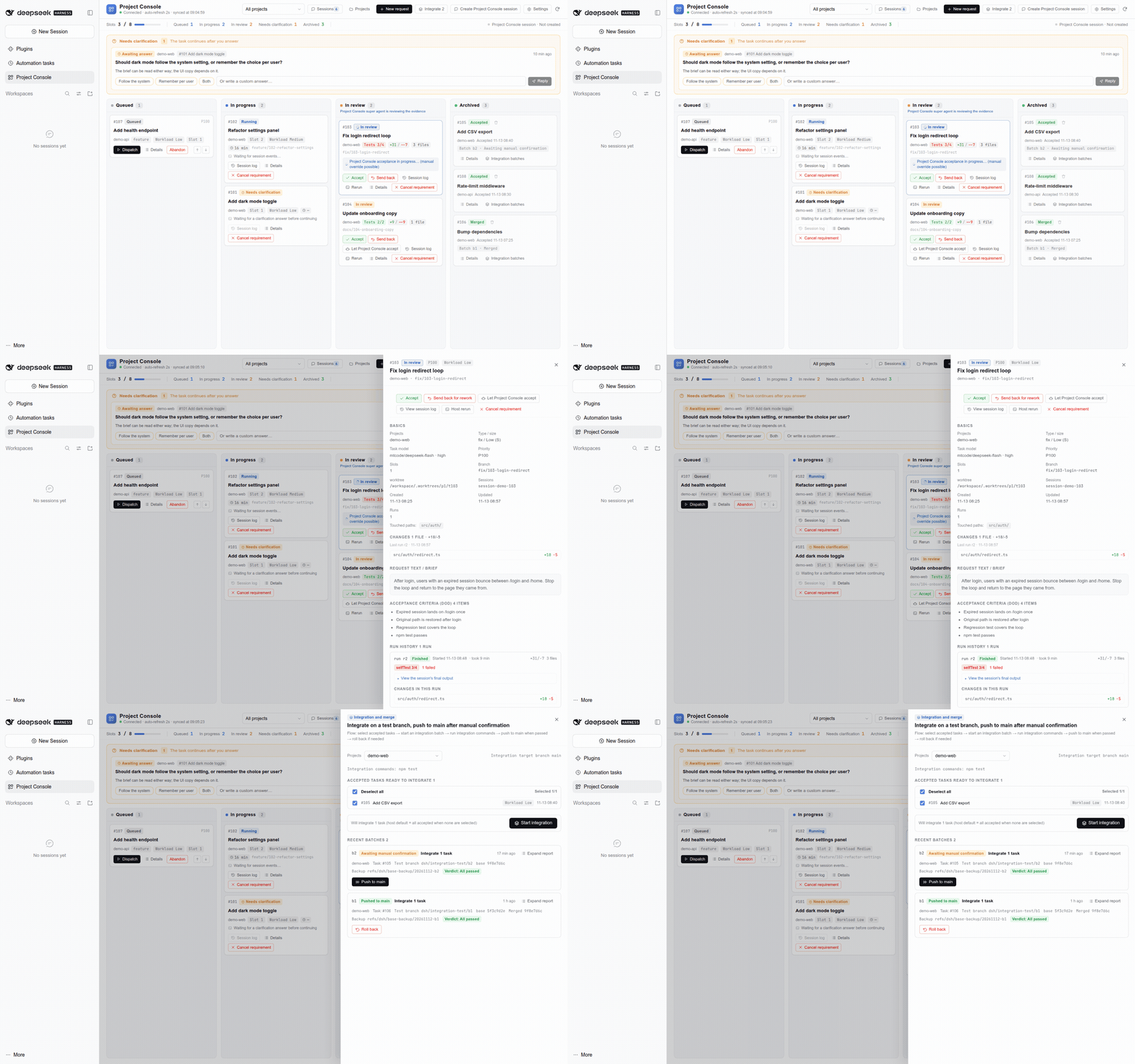
A multi-task workbench for the DeepSeek Harness web UI. Write a requirement, and the console gives it an isolated git worktree and an agent session that edits, tests, and collects evidence on its own. Accepted tasks go into an integration batch; the local base branch is only advanced after you confirm it.


English | 中文
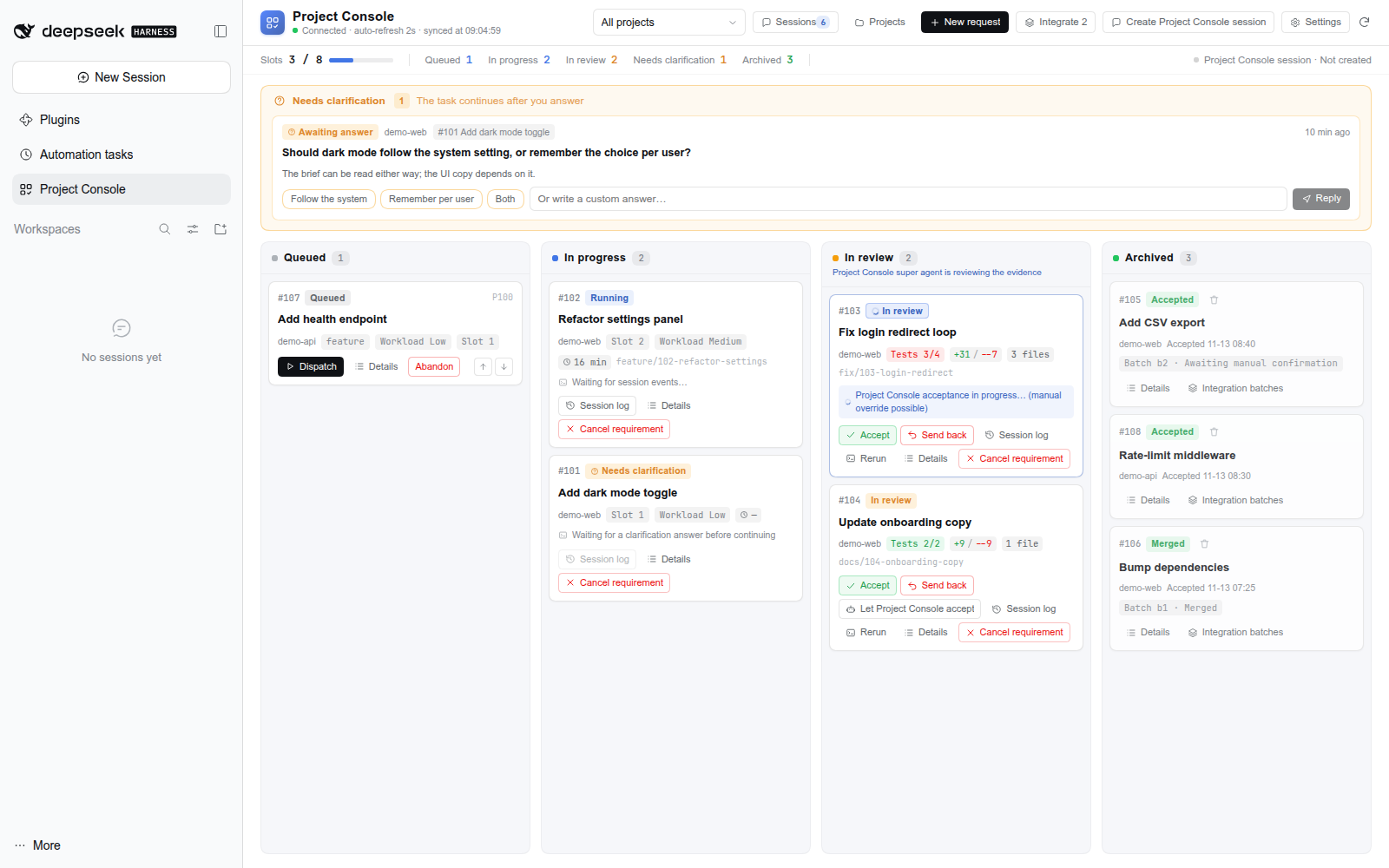
Project Console is a persistent workbench inside DSH Web. You spend your time on three things: writing requirements, checking results, and confirming what reaches the base branch.
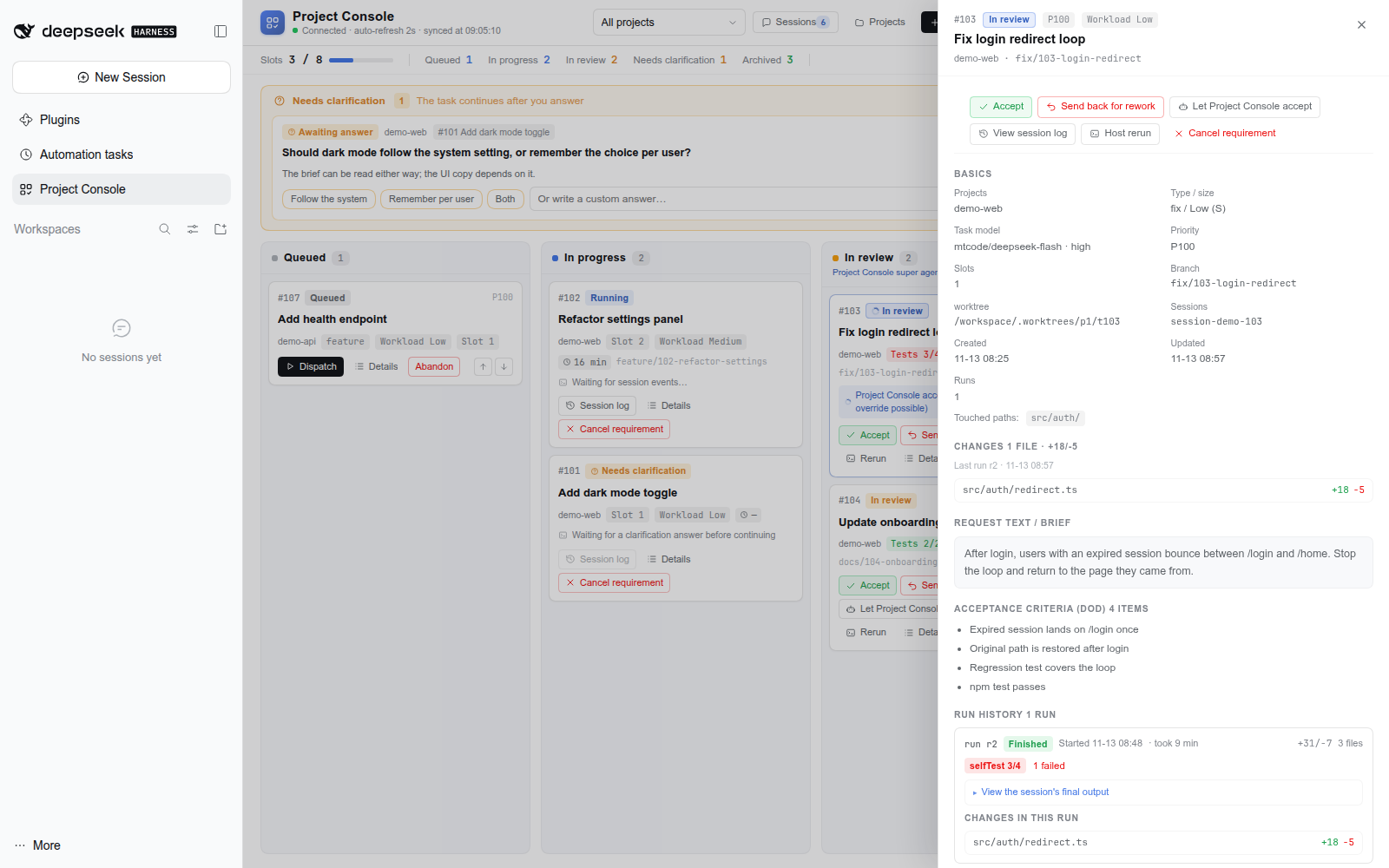
Each requirement becomes a task. The console creates a worktree outside the repository and starts an agent session there. When the task finishes, the console checks the diff, the commands it ran, and the project's verification commands. You can also inspect everything and accept or send it back yourself.
| Task board | Task detail and evidence |
|---|---|
 |
 |
Requirements: DeepSeek Harness 0.2.1 or newer (web UI or desktop app), a Node.js ^22.19 || >=24 runtime, and pnpm for CLI installs (npm i -g pnpm, or corepack enable).
A plugin with a bundle layer is composed when the host starts, so restart DSH after installing (desktop: quit and reopen). Refreshing the page is not enough.
dsh-project-console and install it.dsh plugin --profile web add dsh-project-console
# restart the host
dsh webUse the profile your host actually runs; web is the common CLI profile, while the desktop app manages its own.
git clone https://github.com/revive123456/dsh-project-console.git
cd dsh-project-console
npm test                         # builds host/client and runs the regression probes
dsh plugin --profile web add "$(pwd)"   # PowerShell: "$PWD"
# restart the host
The repository ships prebuilt lib/ files, so installing from source does not need a separate build.
Upgrade: reinstall the package (or git pull and restart the host).
Uninstall: dsh plugin --profile web remove dsh-project-console, then restart.
Open Projects → Add and fill in the repository path, base branch, worktree root, verification commands, and the other fields described under Project configuration.
Click New requirement, write the title and the requirement, and optionally attach screenshots. The work size (xs/s/m/l/xl) is chosen automatically; you can re-estimate it from the task detail.
A task moves through: todo → running → reviewing → accepted → merged, plus needs input, failed, and abandoned.
When a task finishes, the console reviews the diff, the commands it ran, and the evidence. Before accepting, it reruns the project's verification commands in the worktree; a failure sends the task back.
You can also inspect the diff and evidence and accept the task yourself. An accepted task can produce an acceptance report: a single-file HTML document with inline screenshots, readable offline and printable to PDF.
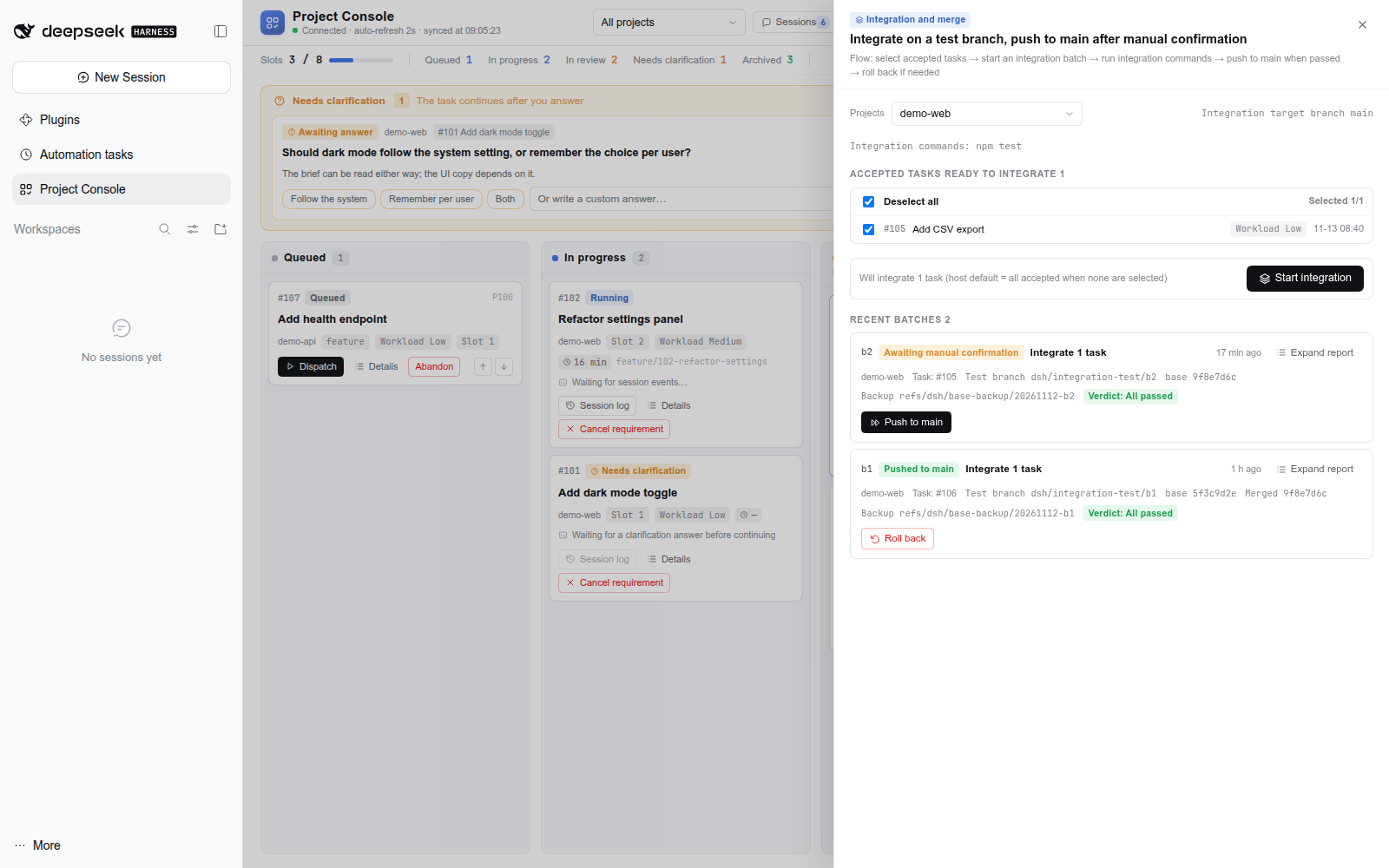
Select accepted tasks and click Integrate. The console creates a test branch, merges the tasks one by one, and runs the project's integration commands.
When the batch is green, confirm Push to main. This is a local fast-forward, not a push to a remote. If something is wrong, roll the batch back; the tasks return to accepted and can be integrated again.
{
  "name": "my-project",
  "repoPath": "/abs/path/to/repo",
  "baseBranch": "main",
  "worktreeRoot": "/abs/worktree/root",
  "slotBudget": 8,                       // concurrent tasks for this project
  "workerFilePolicy": "workspace-write", // write only inside the worktree; danger-full-access is trust mode
  "workerModel": {"provider": "mtcode", "model": "deepseek-flash", "reasoningEffort": "max"},
  "setup": {"copy": [], "commands": ["cp -a /repo/node_modules ./node_modules"]},
  "verify": {"commands": ["npm run typecheck", "npx vitest run --silent"]},
  "integrationTests": {"commands": ["npm run typecheck", "npx vitest run --silent"]}
}repoPath, baseBranch, and worktreeRoot are required. verify.commands are rerun before accepting a task and are recommended; integrationTests.commands run inside an integration batch and are skipped when empty. setup.commands run in the worktree before dispatch, usually to copy dependencies. workerModel is the fallback when no model is configured for a work-size tier.
workspace-write limits what task sessions can write, not what they can read. Do not put credentials where an agent can read them. danger-full-access is a full trust mode.npm test # build host/client, then run the regression probes
npm run build # build the client only
npm run build:hostThe probes under probe/ cover rollback, acceptance gates, state transitions, path guards, and HTTP body handling.
src/index.js      host entry
src/core.js       state, paths, shell
src/git.js        worktrees, branches, integration batches, base-branch push
src/service.js    projects, tasks, dispatch, evidence, review, scheduling
src/report.js     acceptance report (single-file HTML)
src/http.js       /project-console-api routes
src/tools.js      project_* model tools
src/mount.js      assembly
src/client/       the web UI
lib/engine.mjs    built host bundle
lib/client.js     built client bundle
build-host.mjs    host build script
build.mjs         client build script
probe/ regression probesCLASSIFICATION EVIDENCE
系统优先读取 GitHub Topics,再与站内分类词典和词根规则比对。当前命中: agent、session、sessions。
alchaincyf
你想蒸馏的下一个员工,何必是同事。蒸馏任何人的思维方式——心智模型、决策启发式、表达DNA。Distill how anyone thinks.

freestylefly
Prompt as Code | GPT Image 2 / 2.5 提示词与案例库,530+ 个案例、20+ 套工业级模板与可复用 Skills,新增 2.5 同提示词对比专区,附完整提示词与生成记录,持续更新。

titanwings
Distilly — Distill how they think into reusable Skills for any Agent or Bot. Formerly Colleague Skill(原同事 Skill).