
模型与 MCP
待识别

rea
morluto
Reverse engineer anything with agents, from app behavior down to native binaries.
PROJECT TOPICS
INSTALL REFERENCE
dsh plugin --profile web add github:reshdh/dsh-remote-hub
该命令指向仓库当前默认分支;尚无绑定当前 commit 的完整验证结果。
PROJECT README
Multi-host remote workspace hub for DeepSeek Harness — extended from KyoMio/dsh-zen-remote (v2.4.2, MIT). Combines the mobile PWA gateway & multi-host session relay with a desktop Local / Remote / All workspace scope switcher, remote folder browser & workspace creation, model & API credential sync, and bidirectional cross-host @ session reference bridging.






Coexistence Note & Attribution:
dsh-remote-hubbuilds uponKyoMio/dsh-zen-remote(v2.4.2, MIT) and preserves full wire & state compatibility (~/.dsh/zen-remote*) so existing paired hosts and shared sessions work without re-pairing. Disable or uninstalldsh-zen-remotebefore enablingdsh-remote-hub(only onezenRemoteprovider can run per DSH profile).
dsh-zen-remoteLocal, individual paired remote hosts (with live online/connecting/offline status dots), and All unified view; scopes the top New Session button to the active host and keeps 0-session workspaces visible immediately.Ctrl+O) to browse remote host directories, toggle hidden folders, create subdirectories (mkdir), and open/rename/delete remote workspaces directly from the desktop client.@ Session References: Query and @-mention sessions across your local machine and paired remote hosts (dsh-session: URI surface staging), with automatic host-tag labeling and plain-text UUID mention upgrading.| Session list home | Session page | Session info card |
|---|---|---|
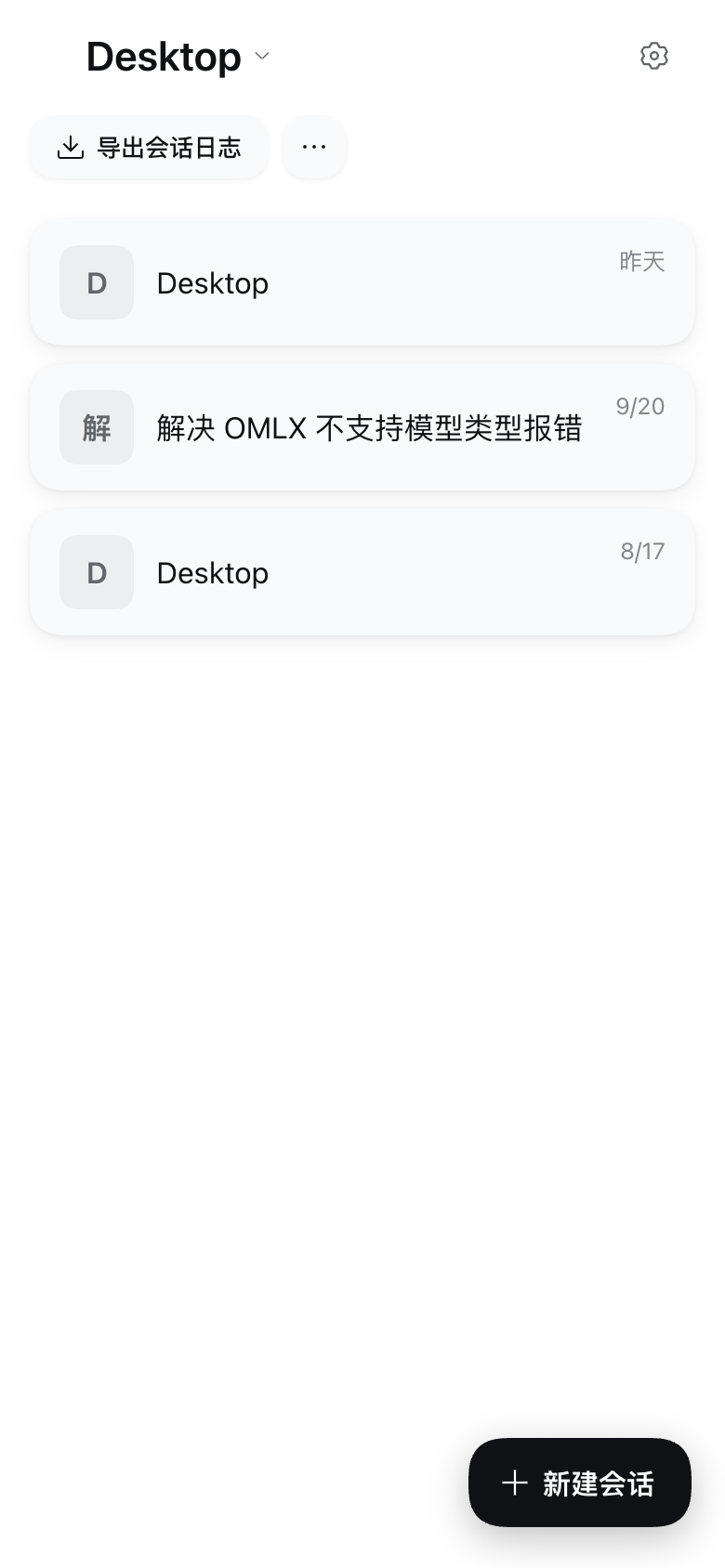 |
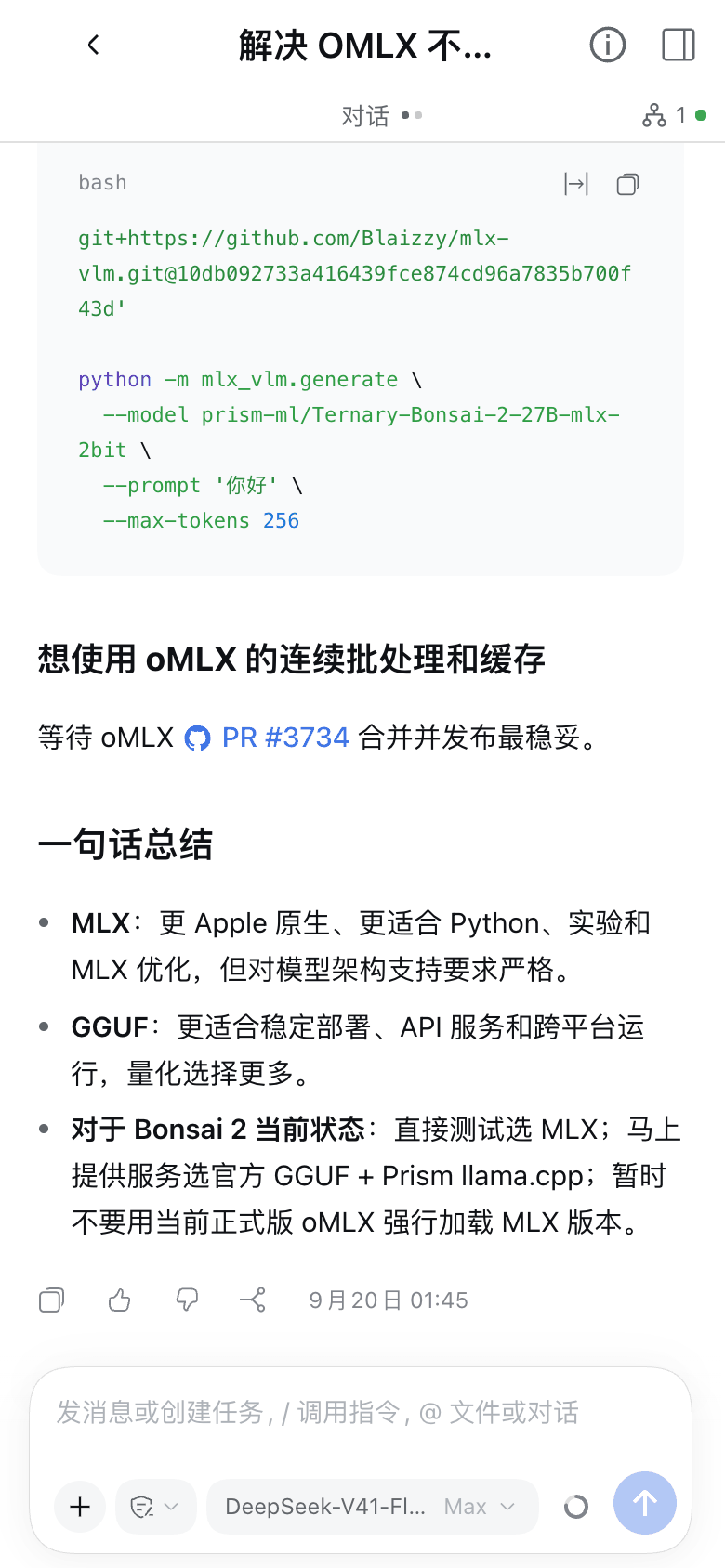 |
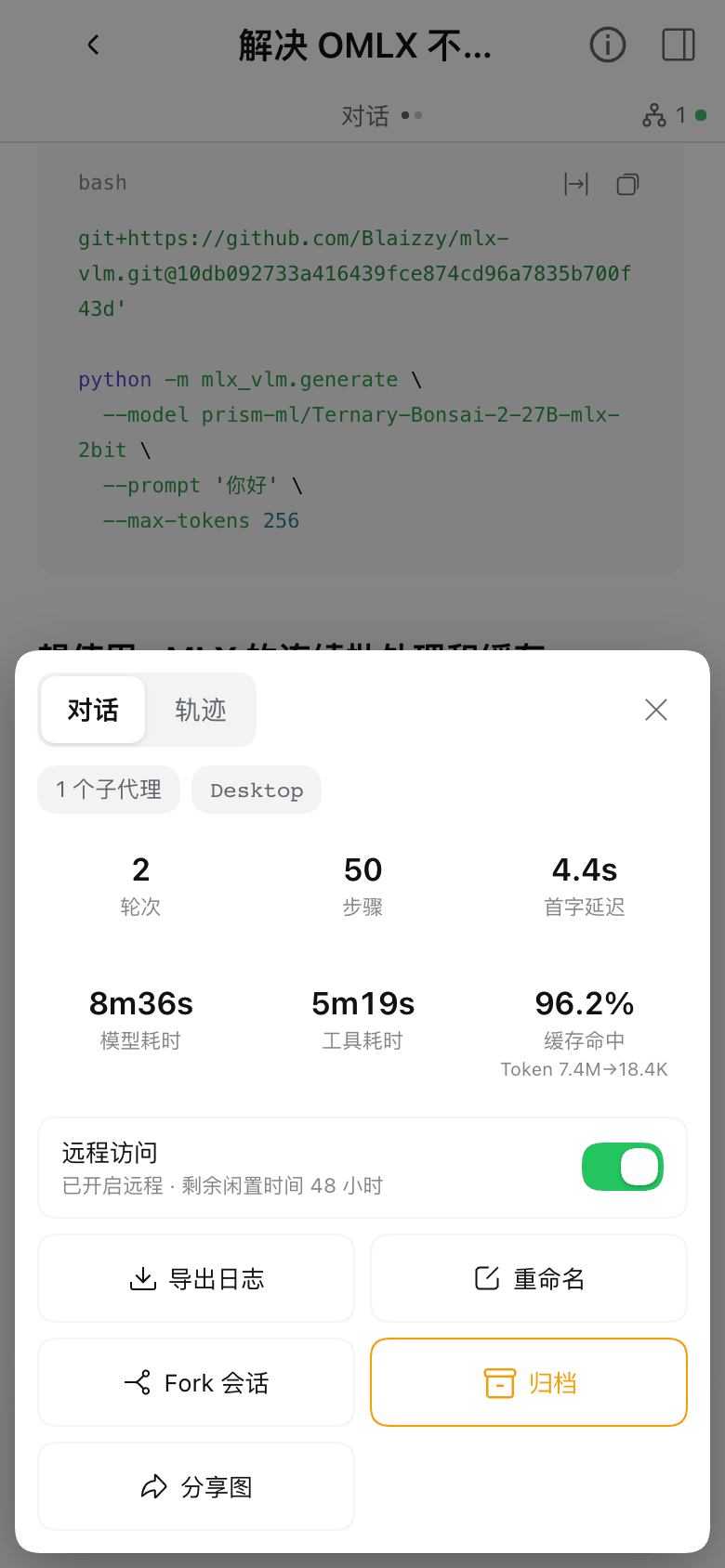 |
| Composer permission sheet | Pairing page a public visitor sees |
|---|---|
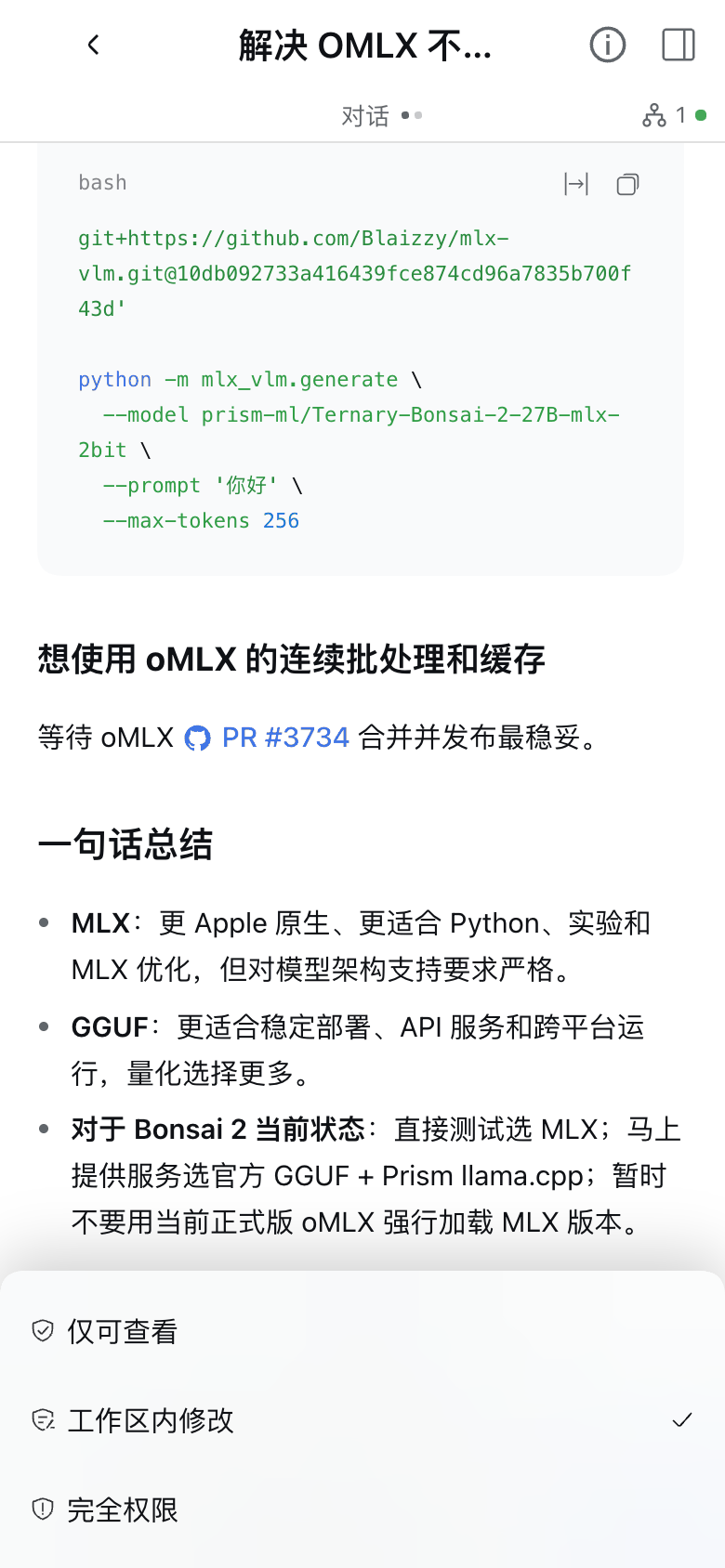 |
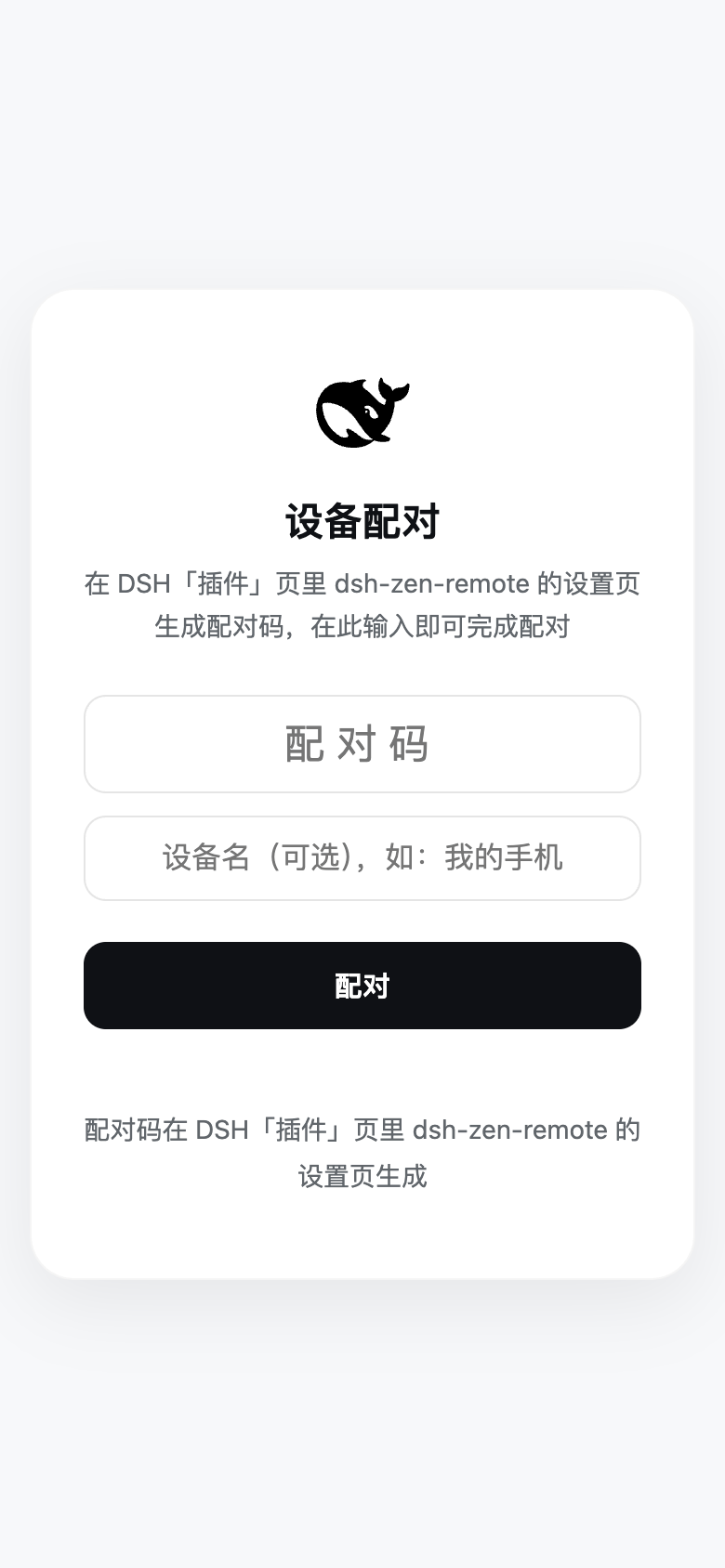 |
Screenshots are a 390×844 phone viewport in the light theme; both themes are supported. The pairing page is drawn by the gateway in DSH's official style, following the system light / dark appearance.
If you previously installed
dsh-zen-remote, disable or uninstall it first —dsh-remote-hubreuses your existing~/.dsh/zen-remote*state and pairings automatically.
Open the Plugins page in the DSH sidebar → search dsh-remote-hub in the Plugin Market (or click Add plugin and paste the GitHub Release tarball URL https://github.com/reshdh/dsh-remote-hub/releases/download/v1.0.0/dsh-remote-hub-1.0.0.tgz) → click Enable now, then restart DSH.
dsh web server)dsh plugin --profile web add https://github.com/reshdh/dsh-remote-hub/releases/download/v1.0.0/dsh-remote-hub-1.0.0.tgz
# then restart dsh web (or run `dsh-remote-hub setup` to configure and pair)
dsh pluginrequires--profileto name the target profile. The desktop app'sdesktopprofile is managed exclusively by the app (--profile desktopis refused on the CLI), so use the UI install above on the desktop app.
dsh-remote-hub)The plugin ships a bundled CLI tool so remote VPS / headless servers (dsh web) can complete the entire setup, ingress configuration, three-light verification, and QR / desktop pairing flow in a terminal without opening a browser:
dsh-remote-hub setup            # 3-step interactive wizard: role → ingress → verify + terminal QR & desktop pairing
dsh-remote-hub status # current role, gateway & connection state (--json; --debug exports redacted diagnostics)host / client / non-interactive flags)# Host commands (when role is host)
dsh-remote-hub host device pair --device-role web # mint a phone/browser pairing code + terminal QR (or desktop-client)
dsh-remote-hub host device list # list paired devices (--json supported)
dsh-remote-hub host device revoke <id|--all> [--yes] # revoke one or all paired devices
dsh-remote-hub host ingress start --mode lan # configure & start ingress (caddy | cloudflared | external | lan)
dsh-remote-hub host ingress stop [--yes] # stop managed Caddy / Cloudflare Tunnel processes
dsh-remote-hub host ingress verify [--no-wait] # three-light check + mint web QR & desktop pairing codes
dsh-remote-hub host ingress snippet [--proxy nginx|caddy|lucky] # print reverse-proxy config snippets
# Client commands (when role is client, up to 8 paired hosts)
dsh-remote-hub client pair http://192.168.1.2:3088 --code 12345678 [--name My-Mac]
dsh-remote-hub client list # list all paired hosts (up to 8) and connection states
dsh-remote-hub client unpair <hostUrl|entryId|--all> [--yes] # remove one or all paired hostssetup automatically scans candidate profiles for multi-select plugin installation (desktop is skipped) and launches the DSH daemon / app before starting the wizard. Pass --yes with the required flags (e.g. setup --role host --ingress lan --no-wait --yes) for unattended scripts.0600 local IPC socket (~/.dsh/zen-remote-cli.sock); Caddy and cloudflared stay managed by the plugin process. Use --lang zh|en to switch output language.link:), Upgrading & UninstallEditing the profile by hand (local development, link: installs): add the dependency to the profile's package.json (~/.dsh/profiles/desktop for the desktop app, ~/.dsh/profiles/web for the web service) and append "dsh-remote-hub" to the dsh.profile.bundles array:
// ~/.dsh/profiles/desktop/package.json
{
  "dependencies": {
    "dsh-remote-hub": "^1.0.0"        // for local development: "link:/path/to/dsh-remote-hub"
  }
}
cd ~/.dsh/profiles/desktop && pnpm install
# For a link: checkout, also run `npm install --omit=dev` inside the repository so the gateway subprocess can resolve `web-push`.Upgrading & migration notes:
dsh-zen-remote first, then install the new version (dsh plugin --profile <name> remove dsh-zen-remote → add dsh-zen-remote, or Uninstall → Add in the Plugins page).dsh --profile <name> --from-default-profile <template> replaces an existing custom profile with a fresh copy; back up ~/.dsh/profiles/<name> first.dsh-zen-remote). Remove any legacy dsh-zen-remote-gateway, dsh-zen-remote-push, or manual dsh-push.mjs lines from cordis.patch.yml. Existing ~/.dsh/lan-gate.config.json settings and paired devices carry over automatically.dsh-zen-remote plugin page and restart. To also wipe pairing and share state, delete ~/.dsh/lan-gate-state.json, ~/.dsh/lan-gate.config.json, and ~/.dsh/zen-remote-state.json (older versions also kept ~/.dsh/zen-remote-shares.json and ~/.dsh/zen-remote-server.json — they migrate into the state file automatically on first start and are then deleted).The same plugin supports two roles:
role: host, default): runs your sessions, spawns the local security gateway and Web Push service, and lets your phone (PWA) or another computer connect.role: client): runs inside another computer's DSH desktop app, connects to up to 8 hosts simultaneously, and mounts their shared sessions directly into its own sidebar (without spawning a local gateway or fighting for port 3088).Open Plugins → dsh-zen-remote in DSH. The Remote Access & Device Pairing card sits right at the top of the page (or run npx dsh-zen-remote setup on a headless server):
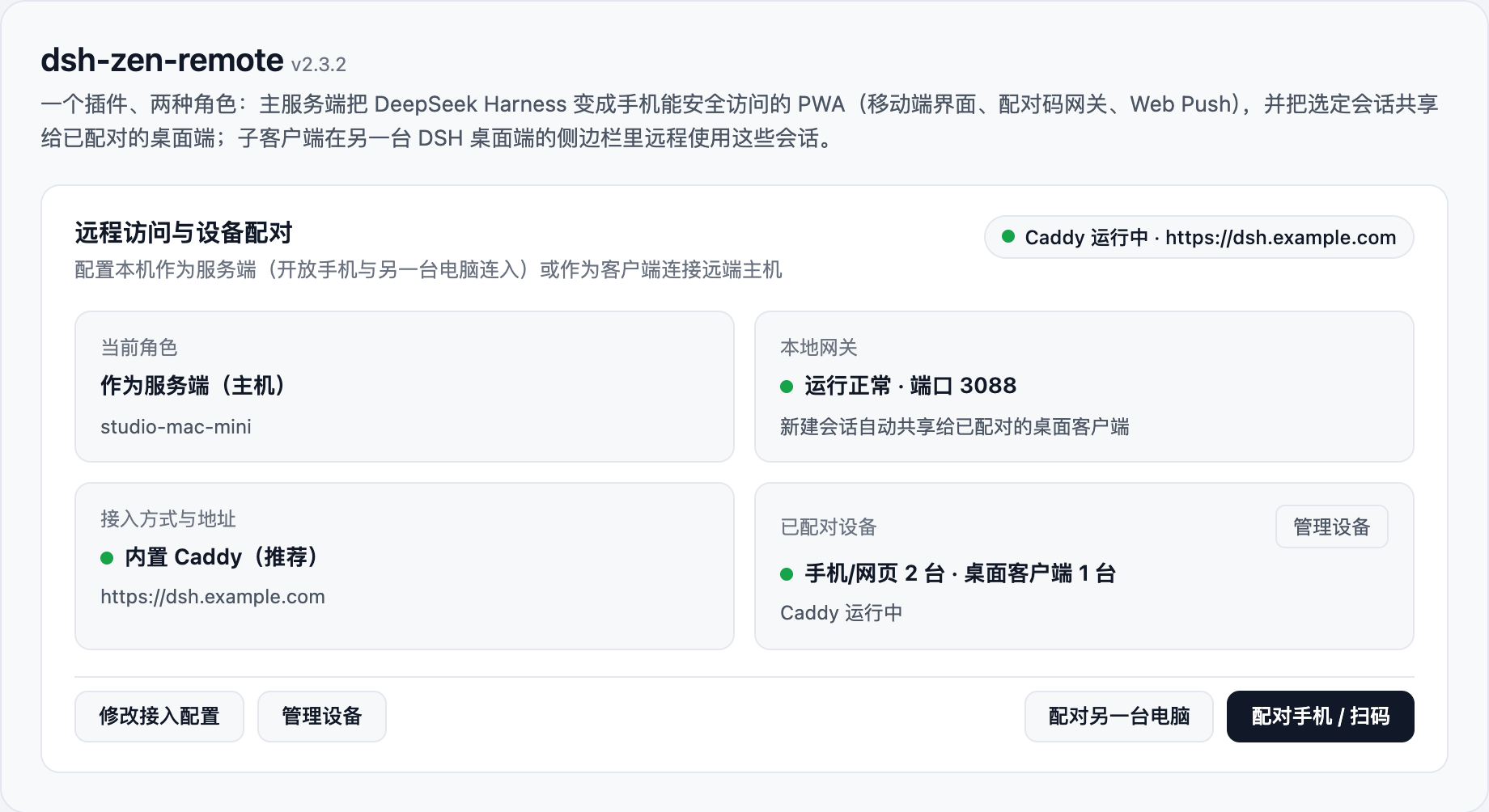
Click Start Setup Wizard (or Reconfigure Wizard) to complete setup in three guided steps:
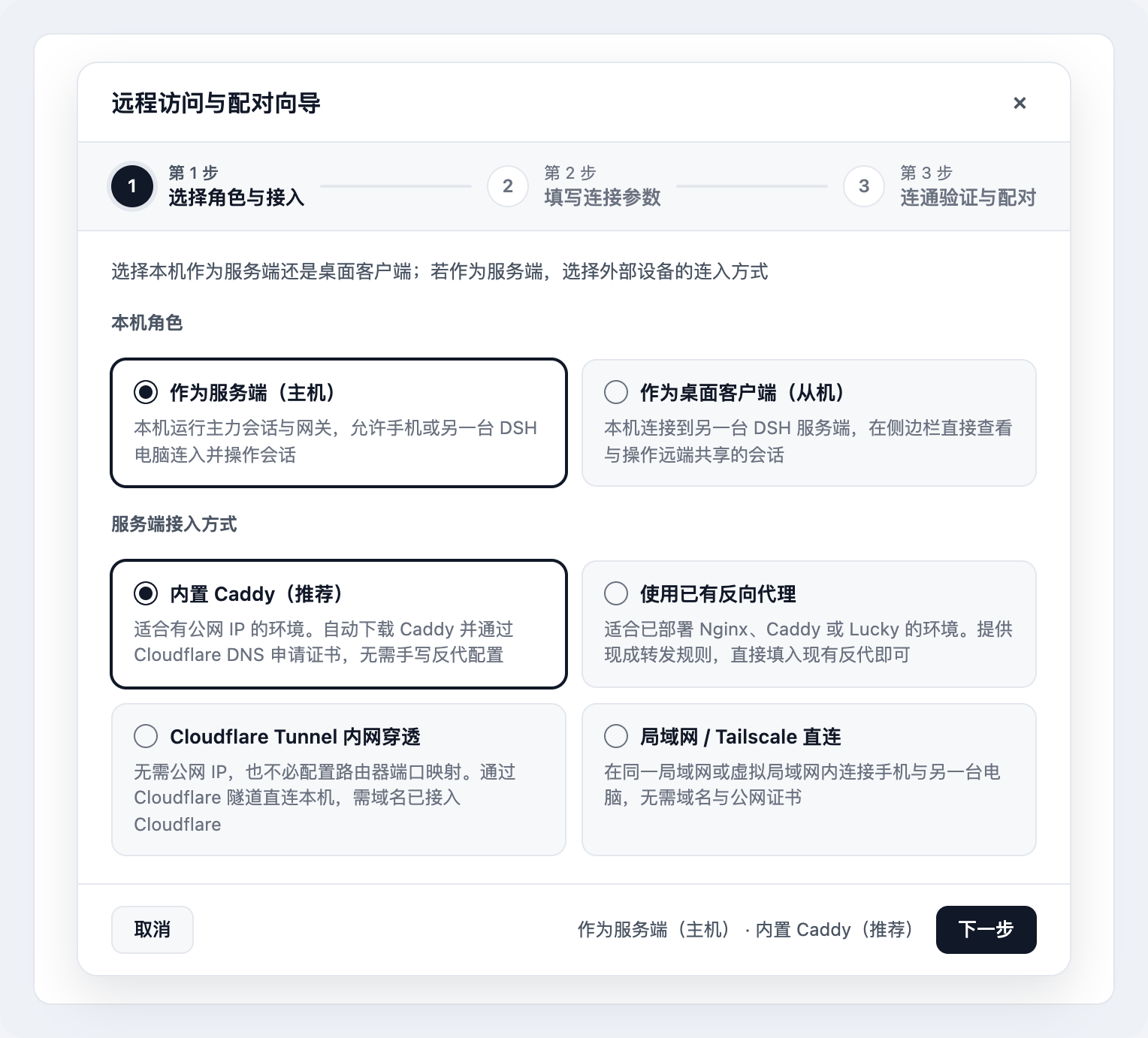
| Access method | Best for | What the wizard automates |
|---|---|---|
| Managed Caddy (Recommended) | Public IP (or router port forwarding) + domain on Cloudflare | Downloads prebuilt Caddy + caddy-dns/cloudflare and issues/renews TLS certificates via DNS-01 (127.0.0.1:3088) |
| Existing Reverse Proxy | Already running Nginx, Caddy, or Lucky | Generates ready-to-paste proxy snippets + one-click trustedProxies registration (manual guide) |
| Cloudflare Tunnel | No public IP / no port forwarding + domain on Cloudflare | Downloads cloudflared, creates/reuses a tunnel, configures CNAME, and starts the tunnel (127.0.0.1:3088) |
| LAN / Tailscale Direct | Same Wi-Fi / LAN or shared Tailscale network | Auto-detects LAN / Tailscale IPv4 and binds 0.0.0.0:3088 behind the built-in private-IP wall (403 public-direct-forbidden) |
dsh.example.com) and paste your Cloudflare API Token.https:// URL and copy the generated Nginx / Caddy / Lucky configuration snippet.http://<your-LAN-or-Tailscale-IP>:3088 address.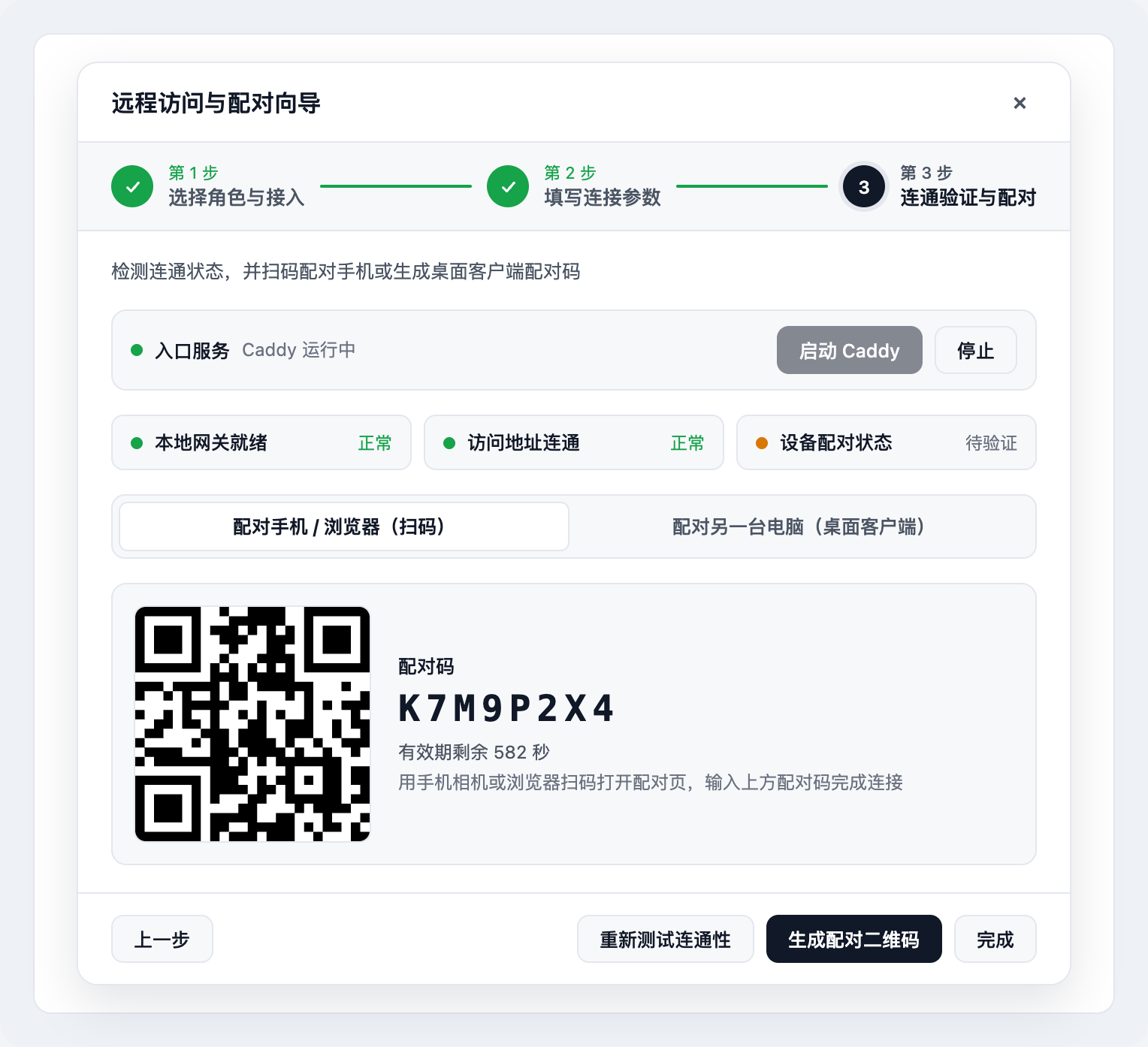
Quick actions after setup: once configured, you can directly click Pair Phone (QR), Pair Desktop Client, or Manage Devices right from the overview card footer without re-running the wizard.
On another computer running the DSH desktop app (or via dsh-zen-remote client pair <hostUrl> --code <8-char-code> on the CLI):
dsh-zen-remote and click Start Setup Wizard (or + Add Server if already in client mode).Living-Room-Mac), the host's gateway URL (https:// for public URLs, or http://192.168.x.x:3088 / http://100.x.x.x:3088 for LAN / Tailscale), and the 8-character desktop pairing code from the host, then click Pair & Connect.8 / 8 slots are full, a red limit notice appears; re-pairing an existing URL still overwrites in place).Name-1, Name-2; model pickers, connection status icons, read-only banners, plugin bridges, and file uploads are strictly isolated per host serverId.| Web App Device (Phone / Tablet / Browser) | Desktop Client (Another DSH Desktop App) | |
|---|---|---|
| Visible sessions | All sessions on the host | Only sessions with remote access enabled on the host (enforced server-side) |
| Credential | Long-lived HttpOnly cookie | Secret device token stored in ~/.dsh/zen-remote-state.json (Bearer token) |
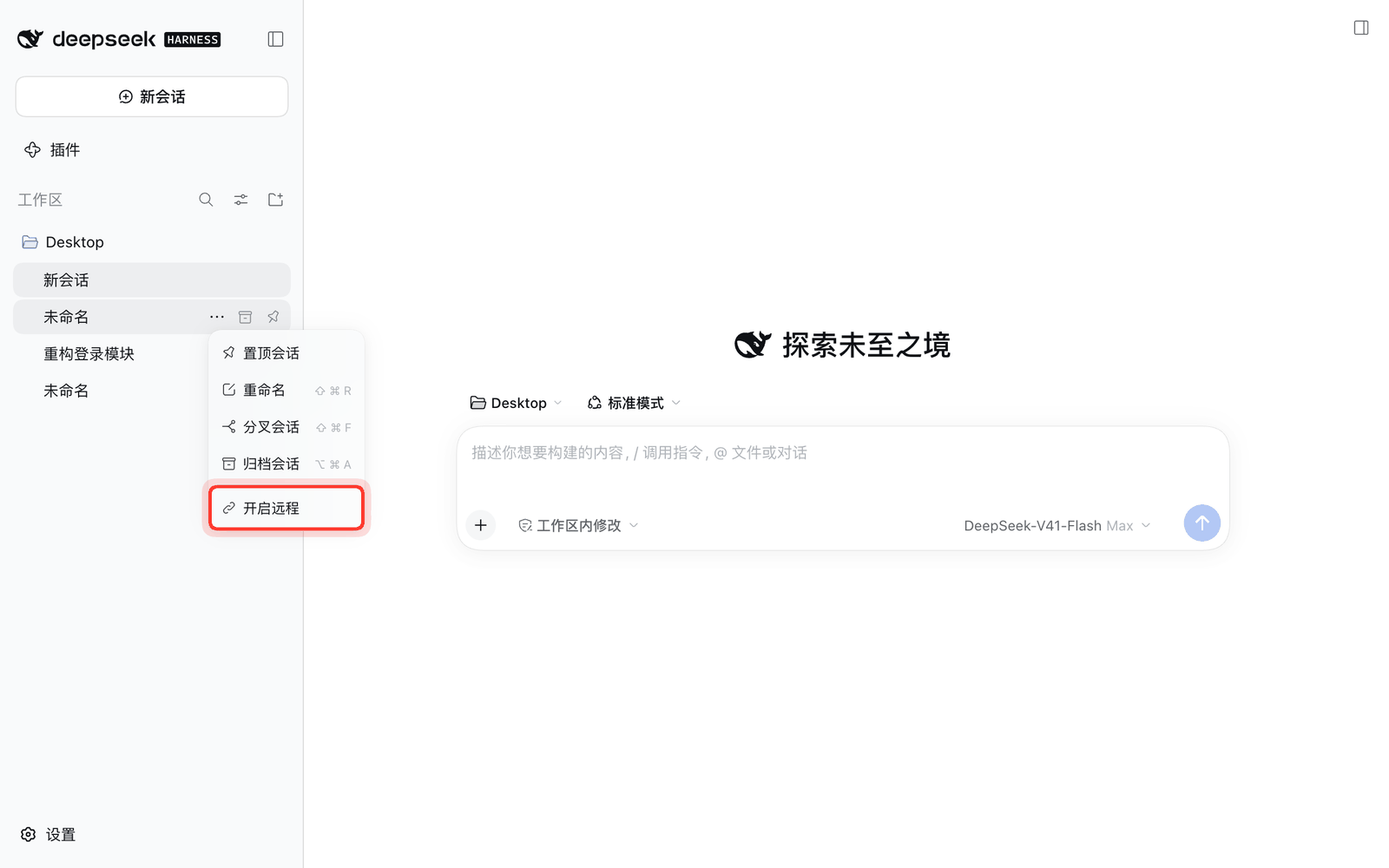
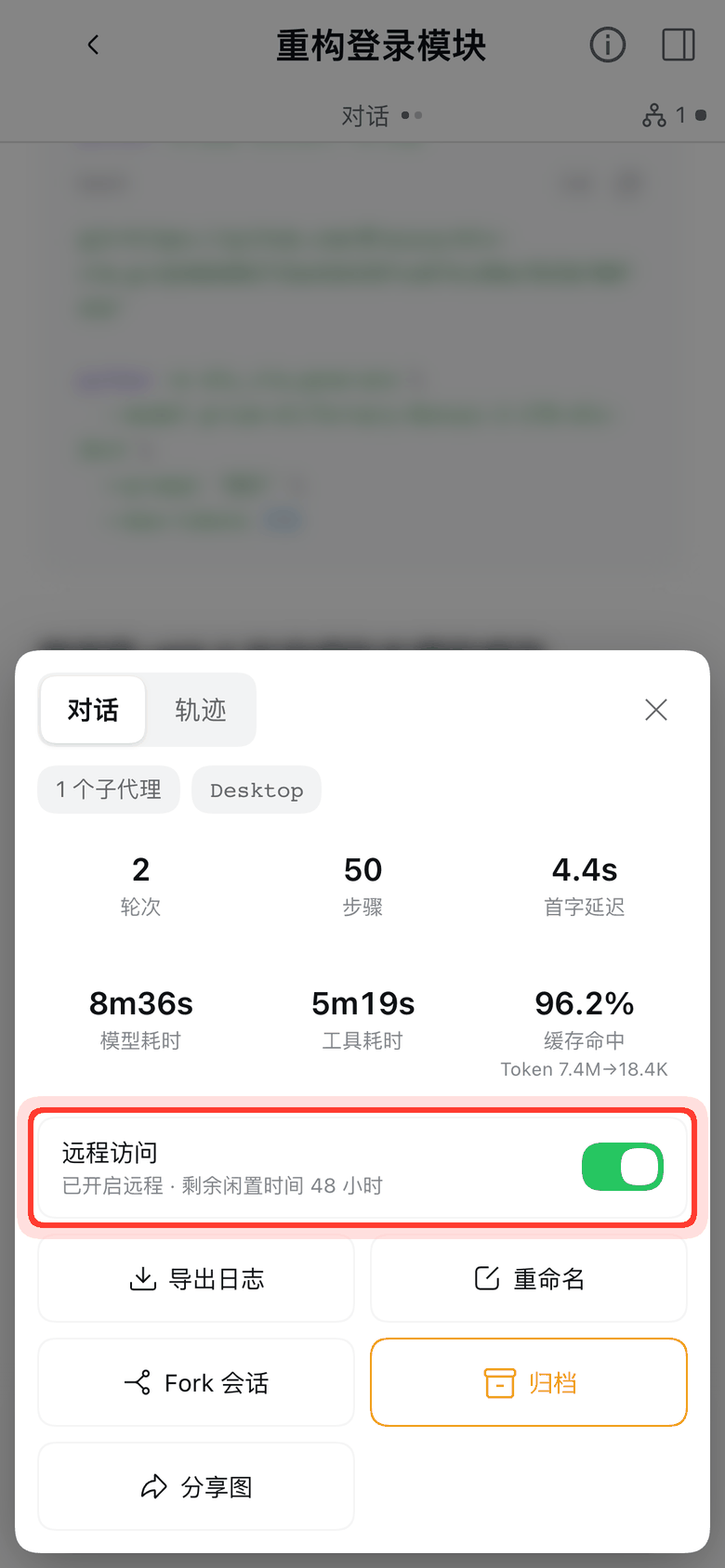
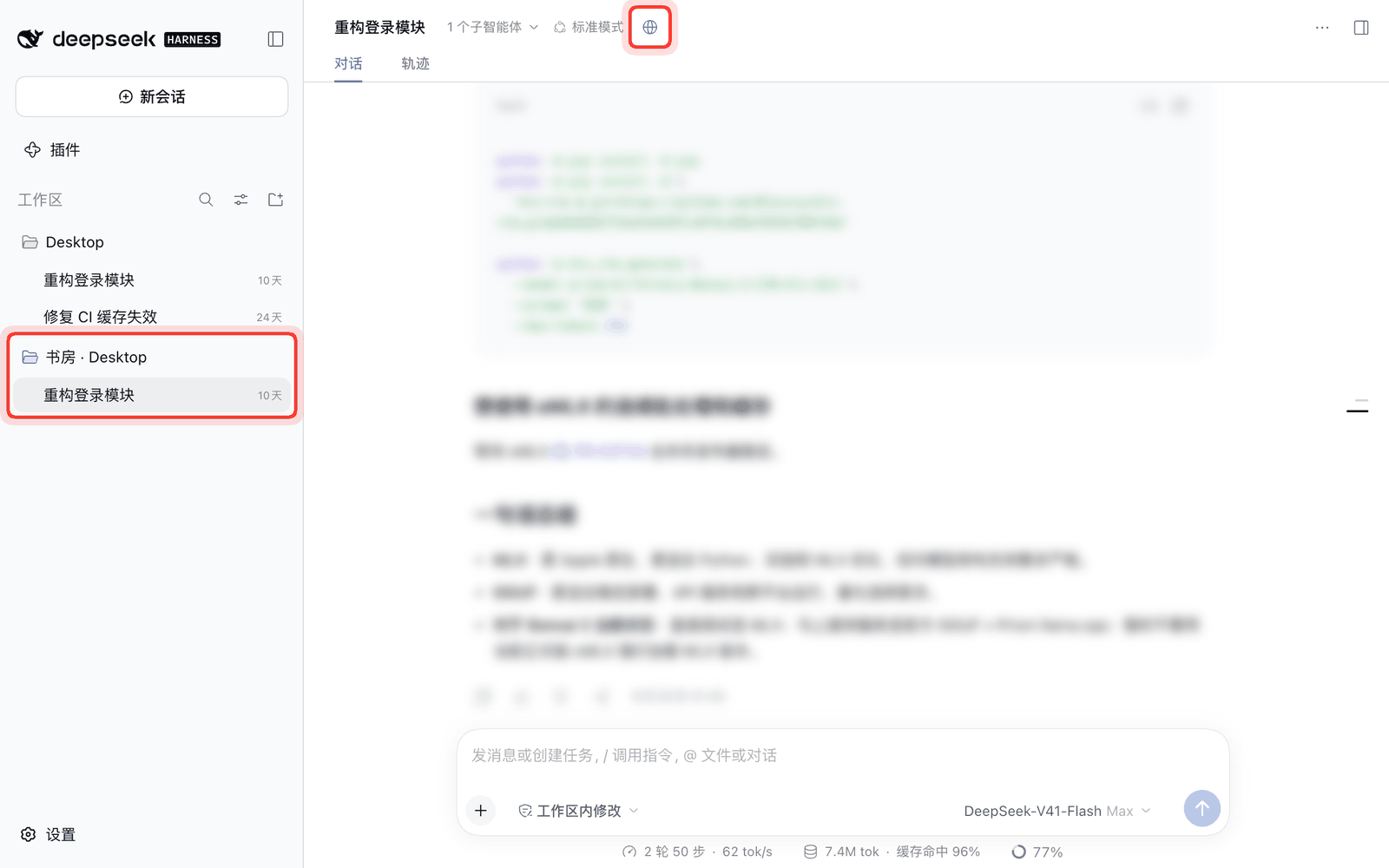
Remote access is controlled per session (or automatically enabled for new sessions if you turn on Auto-share new sessions). You can toggle it from four places:
Host sidebar: open a session's "…" menu and click 开启远程 / 关闭远程 (Enable / Disable remote);
Host session header: click the globe icon in the session title row (hover to see remaining idle time; a green dot indicates a desktop client is currently viewing it);
Phone (Web App) session info card: open the ⓘ info card at the top right of a session and toggle 远程访问 (Remote access);
Host settings page: view and close shared sessions individually or all at once under the shared sessions list.
Sidebar groups: once a host workspace has at least one remote-enabled session, a "Server Name · Workspace Name" group appears in the client's sidebar (up to 8 paired hosts, stacked in pairing order). Click any session to view full history, stream responses, approve tools, use the server terminal, browse files and diffs, preview inline images, download deliverables, or drag/paste/pick files to upload.
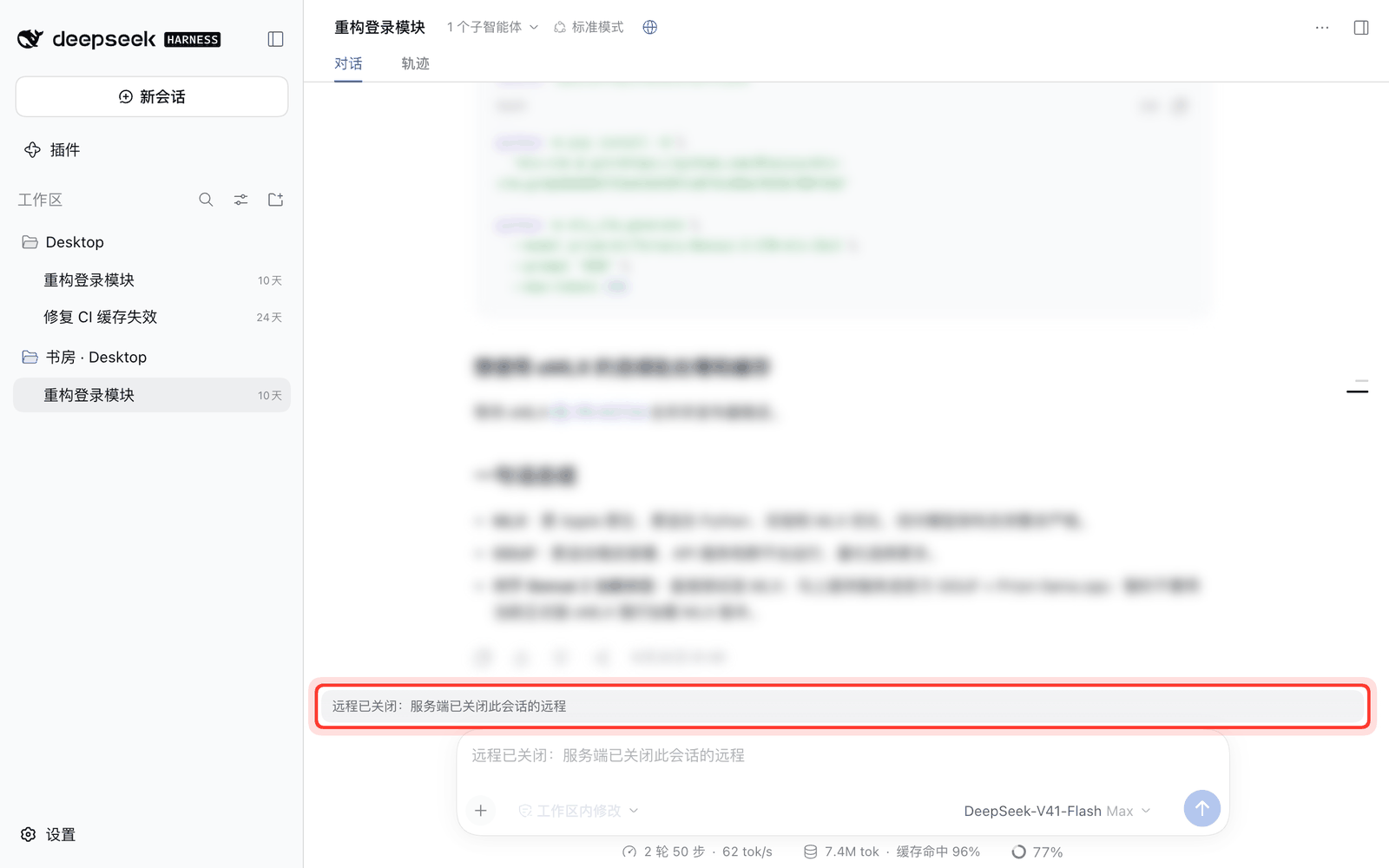
Closing & idle sleep: a shared session automatically closes remote access after 48 hours (idleHours) of inactivity (running or waiting sessions never sleep). Closed or unpaired sessions are automatically archived/hidden from the sidebar; an actively open session displays a "remote closed" banner and recovers automatically if re-shared.
Notifications fire only when you are actually needed, along two independent paths (all payloads are end-to-end encrypted with aes128gcm; toggle pushEnabled to disable all notifications and unregister push_notify, or enable pushSessionName to show Session: <name> on the first line of the notification body):
pushEnabled is on, never suppressed by debounce):DSH_PUSH_APPROVAL_GRACE_MS (default 5s, so fast auto-approvers can answer first without buzzing your phone).ask_user_question waiting for your answer: pushes "DSH is waiting for your answer".push_notify tool):pushTurnEnd if wanted; enable pushSummary to include up to 120 characters of the final reply).tok/s output speed, log export, rename, fork, archive, one-tap full-conversation PNG share image, and remote access switch).dsh-zen-remote): top-of-page 2×2 live overview card, 3-step modal wizard, and a full-featured terminal CLI (setup / status / host / client) covering all four host ingress modes (Managed Caddy, Existing Reverse Proxy, Cloudflare Tunnel, LAN / Tailscale Direct with private-IP wall) and client pairing.terminal/attach), inline Markdown image & media forwarding, windowed artifact downloads, server-side LibreOffice PDF preview, up to 500 MiB file uploads (drag-and-drop, paperclip picker, and paste), and one-click redacted diagnostics export.dsh-better-sidebar 0.25.0–0.30.1) route their panel HTTP and WebSocket requests in remote sessions to the host machine (with explicit owner consent for whole-machine data). See Plugin Bridge Guide.In depth: Interface Design · Public Access & Relay Protocol
Day-to-day setup and device management are handled entirely by the Remote Access & Device Pairing Wizard (or npx dsh-zen-remote setup). To fine-tune individual low-level fields, click dsh-zen-remote a second time under Included components on the plugin detail page.
| Host Role & Pairing Cards | Shared Sessions List | Client Settings & Diagnostics |
|---|---|---|
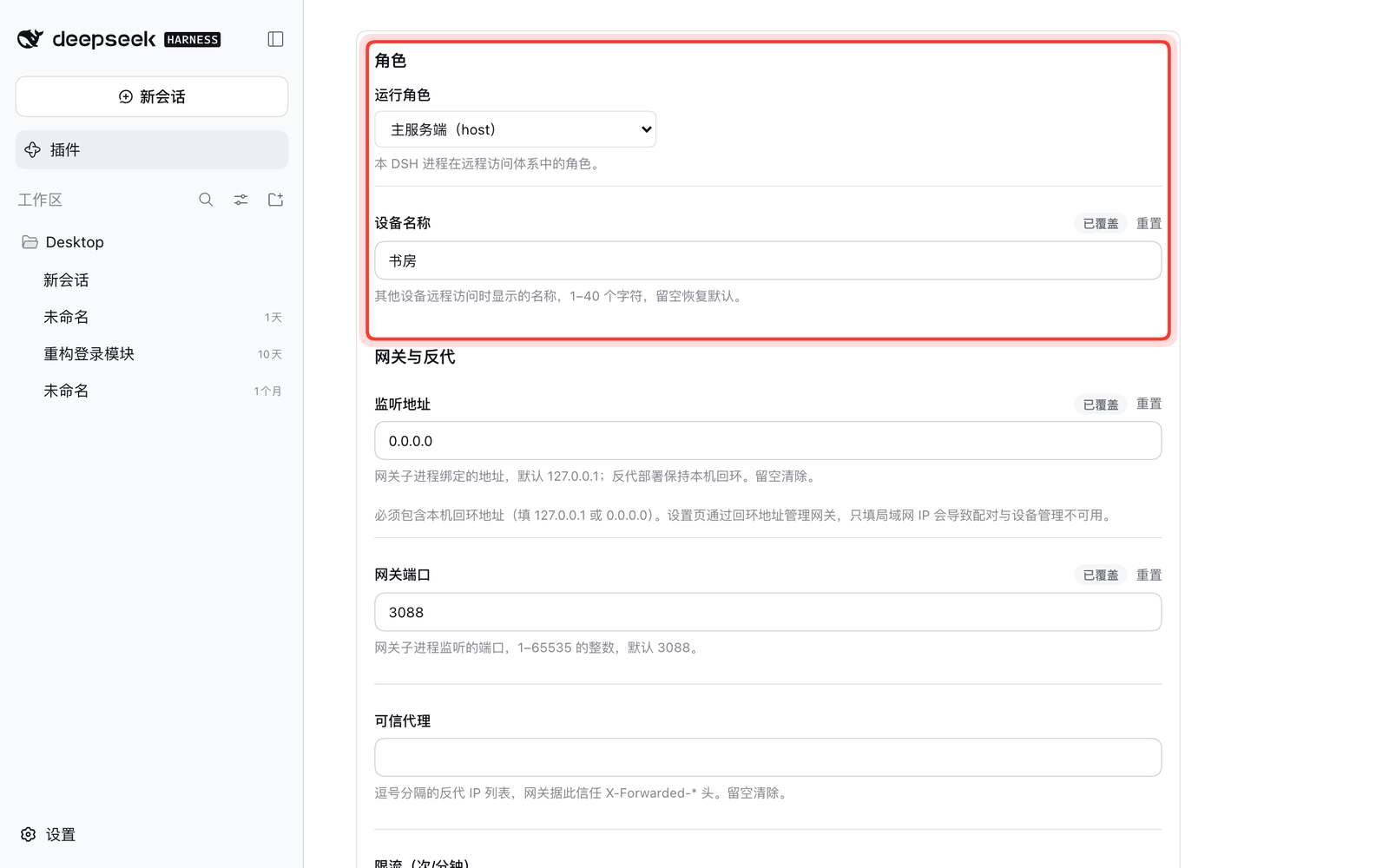 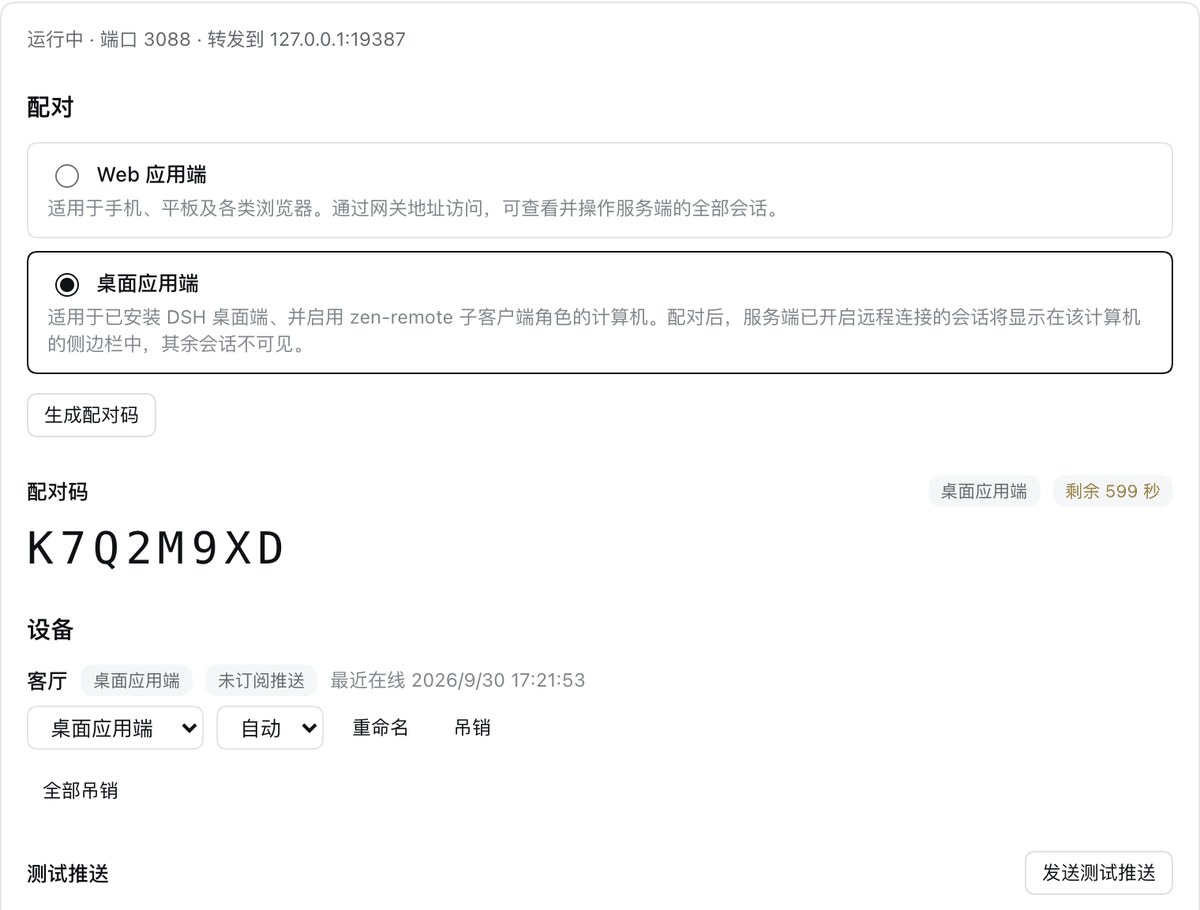 |
 |
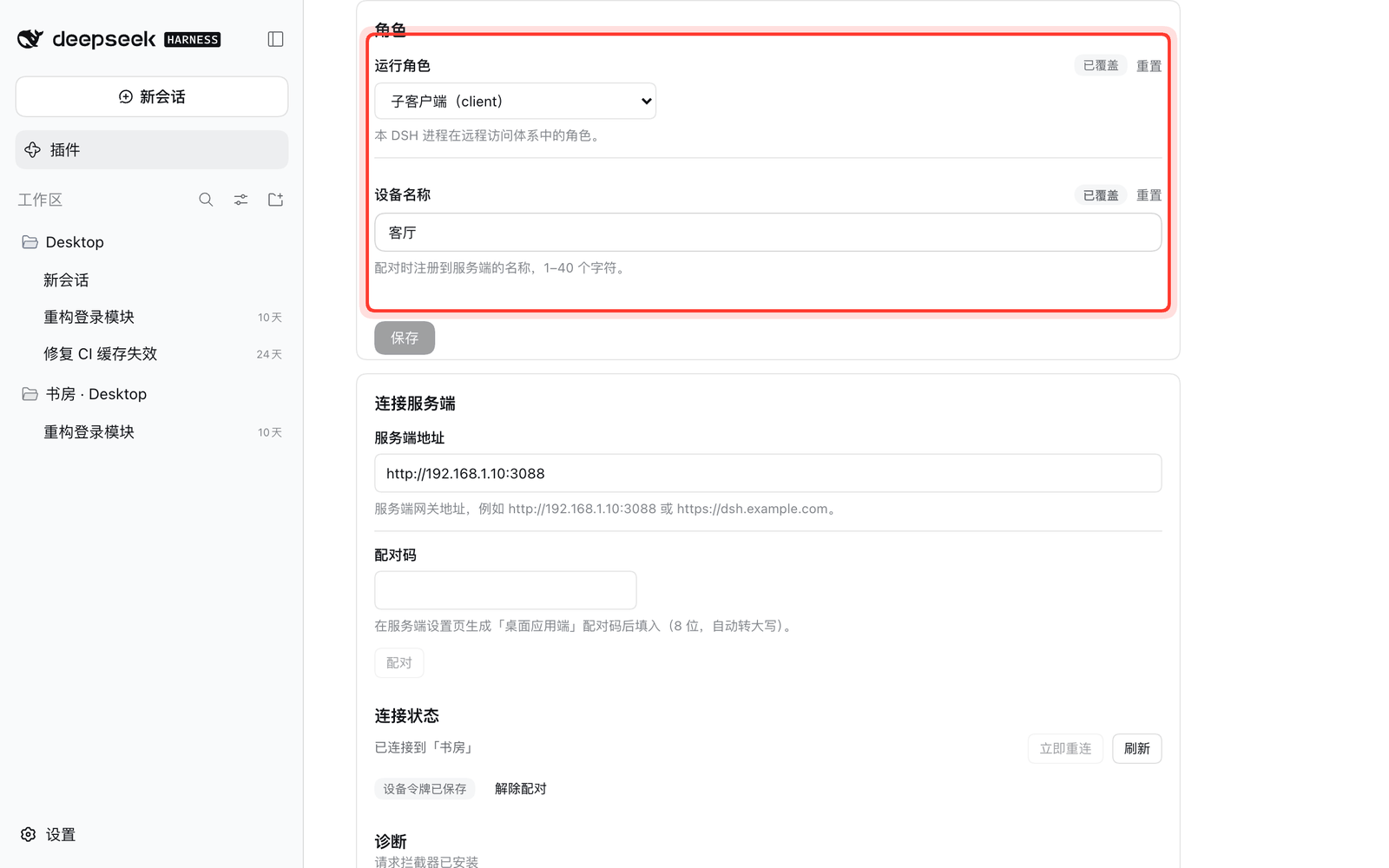 |
Each field resolves in order: environment variable > plugin row settings > ~/.dsh/lan-gate.config.json > default. Saving a field that requires a gateway/push restart reloads the plugin row automatically without restarting the app.
| Field | Default | What it does |
|---|---|---|
role |
host |
host runs gateway + push + sharing; client connects to a remote host |
serverName |
computer name | Device name (≤ 40 chars): sidebar group title on a host, registered device name on a client; renaming on a client broadcasts the new name to all its paired servers (one-way — the server never rewrites it) |
port |
3088 |
Gateway port; retries upward (up to +20) if occupied |
host |
127.0.0.1 |
Gateway bind address (127.0.0.1 for local proxy/tunnel, 0.0.0.0 for LAN/Tailscale direct) |
targetPort |
(auto) | Local DSH Web UI port; leave empty to auto-discover the host's listening port |
rateLimit |
120 |
Per-minute cap on unpaired requests per client IP |
trustedProxies |
empty | Comma-separated trusted proxy IPs when the reverse proxy runs on another machine |
vapidSubject |
mailto:admin@localhost |
Web Push contact (must be a real mailto: or https:// URL for iOS delivery) |
lang |
auto |
Gateway & notification language: auto (browser Accept-Language), zh, or en |
pushEnabled |
on | Master switch for session notifications; off stops every automatic push and unregisters the push_notify tool and its system-prompt hint |
pushSessionName |
off | Open the notification body with Session: <name> (the source session's name; the title keeps the fixed event heading) |
pushTurnEnd |
off | Also send a push when an ordinary turn finishes (approvals/questions always push) |
pushEvents |
agent/turn-stopping |
Comma-separated events that count as turn end when pushTurnEnd is on |
pushDebounceMs |
15000 |
Minimum interval (ms) between automatic pushes |
pushSummary |
off | Include up to 120 chars of the final reply in notification bodies |
pushTool |
on | Register the model-callable push_notify tool |
idleHours |
48 |
Idle-sleep window in hours for shared sessions; range (0, 8760] |
autoShareNewSessions |
off | Automatically enable remote access on new sessions created on the host |
pluginBridgeConsent |
{} |
Whole-machine data consent map (pluginName -> boolean) for the plugin bridge |
serverUrl (client) |
empty | Remote server gateway URL (https:// required for public hosts; http:// allowed on private LAN/Tailscale ranges). Legacy single-server field: the paired list now lives in ~/.dsh/zen-remote-state.json (up to 8 servers) and these row credentials migrate into it automatically on first start |
deviceToken (client) |
empty | Paired client token (secret field, redacted everywhere). Legacy single-server field, migrated into ~/.dsh/zen-remote-state.json like serverUrl; new pairings go through the settings card / wizard and never echo the token back to the browser |
turnFoldDesktop |
off | Enable turn-process folding on desktop widths as well as mobile |
keyboardLiftRatio / keyboardLiftMaxPx / keyboardSafetyPadPx |
0.42 / 400 / 15 |
Soft-keyboard lift calibration fallback for environments where the OS hides keyboard height |
maxUploadBytes |
20 MB | Mobile attachment upload cap |
Legacy environment variables (outrank row settings): LAN_GATE_PORT, LAN_GATE_HOST, LAN_GATE_TARGET_PORT, LAN_GATE_RATE_LIMIT, LAN_GATE_TRUSTED_PROXIES, LAN_GATE_VAPID_SUBJECT, LAN_GATE_LANG, DSH_PUSH_ENABLED, DSH_PUSH_SESSION_NAME, DSH_PUSH_TURN_END, DSH_PUSH_EVENTS, DSH_PUSH_DEBOUNCE_MS, DSH_PUSH_SUMMARY, DSH_PUSH_TOOL, DSH_PUSH_LANG, DSH_PUSH_APPROVAL_GRACE_MS.
0.0.0.0 for LAN/Tailscale, the gateway's private-IP wall rejects any unproxied public internet IP (403 public-direct-forbidden), and all admin/wizard mutations are restricted to the host machine itself.dsh-zen-remote version; DSH host versions may differ (interface fingerprints are compared at handshake and degrade only mismatched panels).Data & state files
~/.dsh/lan-gate-state.json; the unified state file ~/.dsh/zen-remote-state.json (0600) carries the local serverId, the shared-session table sessions, and the client's paired servers list servers (up to 8 servers, tokens included); Cloudflare tokens live in 0600 files under ~/.dsh/zen-remote-ingress/.Known limitations
iOS standalone PWA notes
WKScrollPocket blur across the top ~95px; entering any session and navigating back to the list clears it.Third-party plugins with mobile & bridge adaptations
| Plugin | Adaptation summary | Version tested |
|---|---|---|
| dsh-better-sidebar | Full-screen mobile right-sidebar drawer with notch safe-area padding and swipe-back; Plugin Bridge built-in adapter for 0.25.0 through 0.30.1 (nine versions) (reads/writes host file/Git/task panels in remote sessions with host owner consent) |
0.19.1 / adapter 0.25–0.30.1 |
| @nanmicoder/dsh-agent-teams | Repositions AgentTeams floating pill below session header and preserves parent session back-link | 0.1.9 |
| @ychris12138/dsh-usage-stats | Moves usage & balance entry into the mobile home chips bar | 0.2.9 |
| @opendsh/dsh-plugin-scheduled-tasks | Moves scheduled tasks entry into the mobile home chips bar | 0.2.3 |
| dsh-at-file | Deduplicates .dsh-uploads/ attachment rows on mobile |
0.6.7 |
| @ace-zone/dsh-market | Compacts marketplace modal header on mobile so the close button stays reachable | 0.1.66 |
| dsh-vision-toolkit | Works with mobile attachment uploads for image Q&A/OCR | — |
| dsh-web-ui bundle | Mobile width-constrained centered overlays for file tree / preview | — |
This plugin's interface layer derives from mexiaosqwq/dsh-web-mobile, and its channel layer from zylzyqzz/dsh-mobile-pwa (itself derived from Bernardxu123/dsh-mobile-gate), both MIT. The original copyright lines are preserved in LICENSE.
CLASSIFICATION EVIDENCE
系统优先读取 GitHub Topics,再与站内分类词典和词根规则比对。当前命中: deepseek-harness。
morluto
Reverse engineer anything with agents, from app behavior down to native binaries.

deepseek-ai
DeepSeek Harness: Everything is a Plugin.

nexu-io
The 1st Collaborative AI Design Agent Workspace. Local-first and open source. Create motion, prototypes, websites, apps, dashboards, presentations, images, and videos with your team and AI agents. Share work, exchange feedback, and iterate together in one workspace.