
模型与 MCP
待识别

rea
morluto
Reverse engineer anything with agents, from app behavior down to native binaries.
PROJECT TOPICS
INSTALL REFERENCE
dsh plugin --profile web add github:reg4916/dsh-doc-reader
该命令指向仓库当前默认分支;尚无绑定当前 commit 的完整验证结果。
PROJECT README


Read PDF, DOCX, XLSX, PPTX and text documents as agent tools for DeepSeek Harness (dsh).
The built-in read tool returns file text, and web_fetch rejects application/pdf — so a PDF, a spreadsheet or a slide deck currently ends up as curl + pip install pypdf inside the session. This plugin closes that gap with five typed tools that return page-, sheet- and slide-aware text, including local OCR for scans and screenshots.
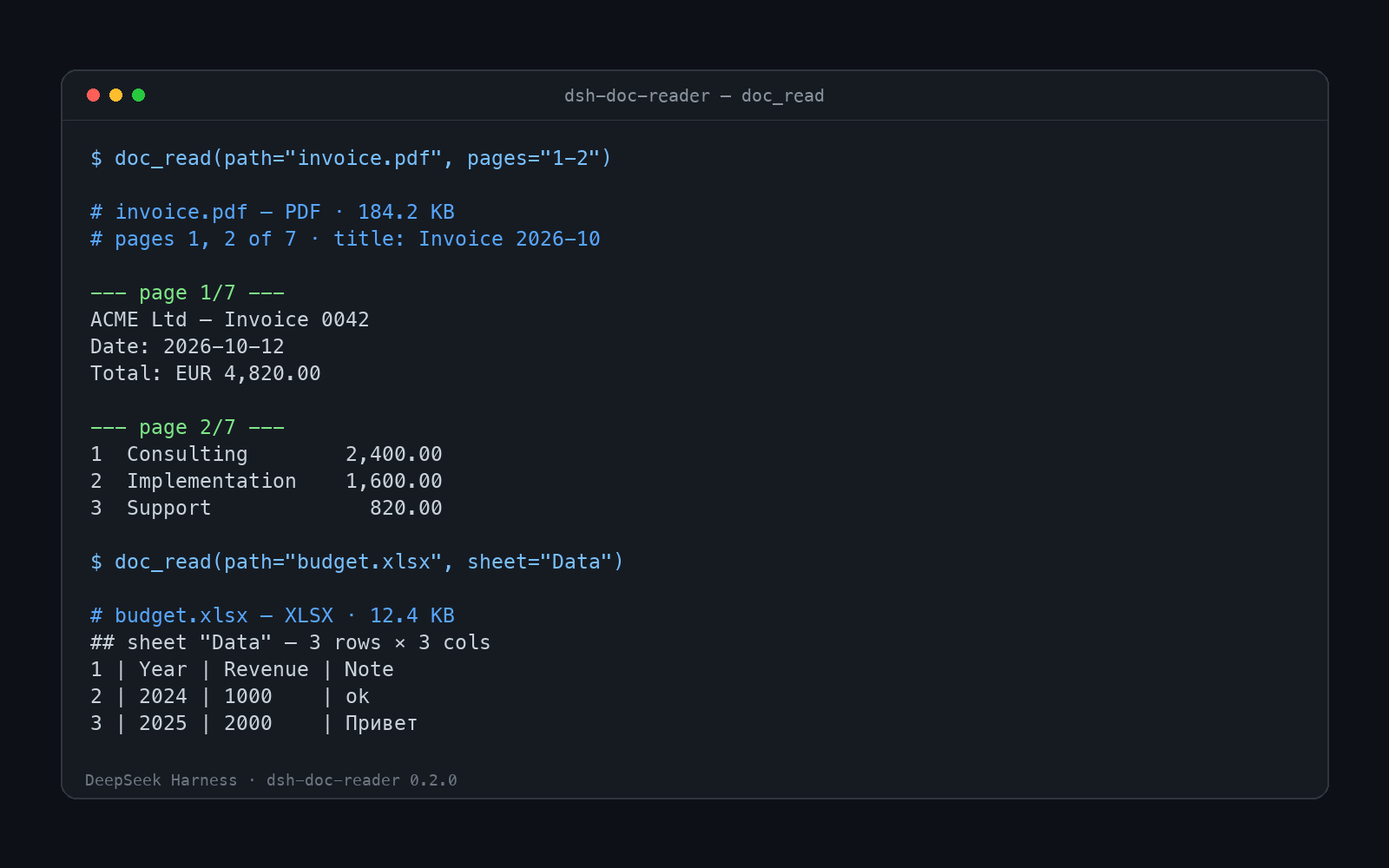
doc_read — page-aware PDF text and spreadsheet rows:
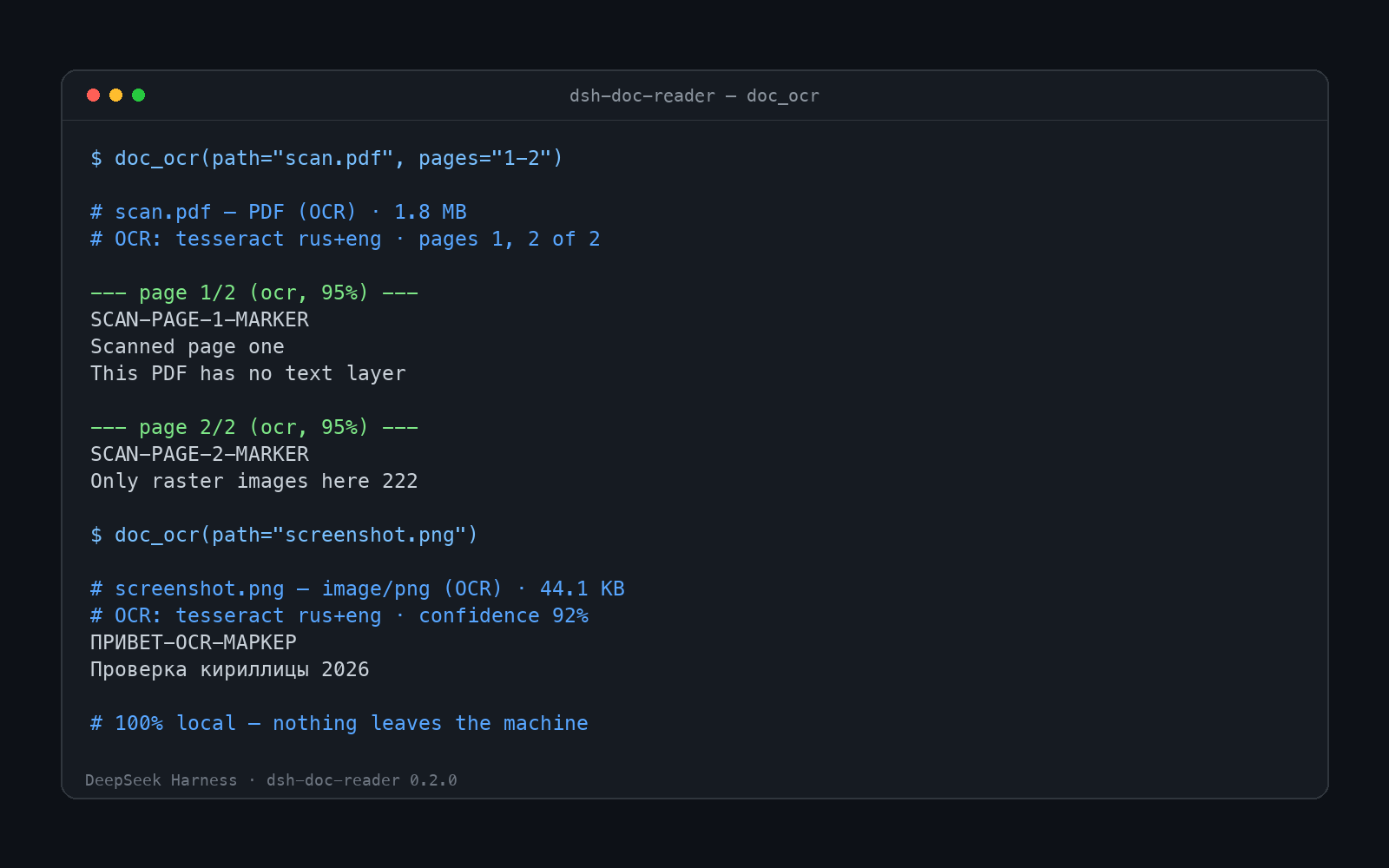
doc_ocr — local OCR for scans and images, with per-page confidence:
| Tool | What it does | Key parameters |
|---|---|---|
doc_read |
Universal reader: PDF, DOCX, XLSX, PPTX, TXT/MD/CSV/HTML; auto-detects format by magic bytes | path | url, format, pages, sheet, maxRows, maxChars |
pdf_read |
PDF page by page with --- page N/M --- markers, title/author metadata |
path | url, pages (e.g. "1-3,7"), maxChars |
xlsx_read |
One block per sheet, tab-separated rows, sheet by name or 1-based index | path | url, sheet, maxRows, maxChars |
doc_meta |
Metadata only: format, size, PDF page count/title, DOCX props, XLSX sheets, PPTX slide count | path | url, format |
doc_ocr |
OCR for scanned PDFs and images (PNG/JPEG/WebP/BMP/TIFF/GIF), per-page confidence | path | url, pages, langs, scale, maxChars |
Every tool accepts a local path or an http(s) URL. Prefer doc_meta first for large files, then read the pages/sheets you need — output is capped by maxChars (default 60000, hard cap 400000).
# invoice.pdf — PDF · 184.2 KB
# source: /work/invoice.pdf
# pages 1, 2 of 7 · title: Invoice 2026-10

--- page 1/7 ---
ACME Ltd — Invoice 0042
...
# budget.xlsx — XLSX · 12.4 KB
# source: https://example.com/budget.xlsx
# sheets: Data, Second
## sheet "Data" — 3 rows × 3 cols
1 | Year | Revenue | Note
2 | 2024 | 1000 | ok
3 | 2025 | 2000 | Приветdoc_ocr handles what pure text extraction cannot: scanned PDFs, photos and screenshots.
pdf-to-img (pdf.js + @napi-rs/canvas) at scale 2 (~200 DPI), then recognized with one shared worker.wasmUrl is wired to the installed pdfjs-dist/wasm), so two-tone scans rasterize instead of returning blank pages.rus+eng (langs overrides, e.g. "deu", "eng"). Order matters: with eng+rus tesseract reads uppercase Cyrillic as Latin lookalikes (ПРИВЕТ → NMPUBET); Cyrillic-first keeps Latin accuracy identical (measured 94–95% on both fixture sets).~/.dsh/cache/dsh-doc-reader/tesseract; later calls are fast (a page takes ~0.3–1 s). For offline machines set DSH_DOC_READER_OCR_LANG_PATH to a directory containing <lang>.traineddata (optionally .gz), and/or DSH_DOC_READER_OCR_CACHE for the cache location.pages. Use scale: 1 for speed, scale: 3 for small print.# scan.pdf — PDF (OCR) · 1.8 MB
# source: /work/scan.pdf
# OCR: tesseract rus+eng · pages 1, 2 of 12
--- page 1/12 (ocr, 91.4%) ---
INVOICE 2026-042
...localhost, 127.0.0.1, RFC1918, .local, .internal) so the tool cannot become an SSRF primitive. Download the file and pass a path instead.http(s) URLs.(no extractable text on this page) — use doc_ocr for those.mammoth; charts, comments and tracked changes are not materialized as text.maxRows.Published on npm as dsh-doc-reader. Install from the built-in plugin market, or manually into a profile:
cd ~/.dsh/profiles/desktop
npx pnpm add dsh-doc-reader
Then add the bundle to the profile's package.json:
"dsh": { "profile": { "bundles": ["dsh-doc-reader", "..."] } }Restart DSH (the plugin loads on boot; DSH composition is all-or-nothing). The five tools appear in the next session.
For local development, install the working copy instead: npx pnpm add link:~/dsh-plugins/dsh-doc-reader.
pnpm 12 may report an ignored build script for
tesseract.js. That postinstall is only the OpenCollective banner — approve it withpnpm approve-buildsor ignore it; OCR works either way.
npm install
npm test          # node --test, runs against test/fixtures
node --check index.js
The readers live in lib/ and have no host dependency, so they can be exercised directly:
import { readDocument, documentMeta } from "./lib/read.js";
await readDocument({ path: "report.pdf", pages: "1-3" });
index.js imports @deepseek-ai/dsh-tools for defineTool; outside a DSH host the import falls back to an identity definition (the registry consumes the plain object).
.doc, .rtf, .odt, .epub readers.presentResult image parts).MIT
CLASSIFICATION EVIDENCE
系统优先读取 GitHub Topics,再与站内分类词典和词根规则比对。当前命中: deepseek-harness。
morluto
Reverse engineer anything with agents, from app behavior down to native binaries.

deepseek-ai
DeepSeek Harness: Everything is a Plugin.

nexu-io
The 1st Collaborative AI Design Agent Workspace. Local-first and open source. Create motion, prototypes, websites, apps, dashboards, presentations, images, and videos with your team and AI agents. Share work, exchange feedback, and iterate together in one workspace.