
模型与 MCP
待识别

rea
morluto
Reverse engineer anything with agents, from app behavior down to native binaries.
PROJECT TOPICS
INSTALL REFERENCE
dsh plugin --profile web add github:recyvan/dsh-model-proxy
该命令指向仓库当前默认分支;尚无绑定当前 commit 的完整验证结果。
PROJECT README
English | 中文
Route DeepSeek Harness model API requests through a proxy so third-party overseas model providers work from mainland China, while requests outside the domains you list stay direct — web search, page fetching, MCP servers and tool calls are not proxied unless you add their domains.
http / https / socks4 / socks4a / socks5 / socks5h), or env-baseddsh plugin --profile <your-profile> add github:recyvan/dsh-model-proxyRestart DSH afterwards — the host half loads inside the harness process.
Requires DSH 0.2.1-rc.2 or newer and Node 22.19+ (the floor the harness itself
declares in engines). The settings page is generated by the host from the
plugin's Config schema (0.2.x removed the settings service and the client-side
settingsScope service), so older harnesses are rejected at install time.
Nothing to do by hand: on first start after the upgrade the plugin converts old settings
in memory and says so on the settings page. Two conversions matter — enabled: false
becomes mode: 'off' (so a proxy you had turned off does not silently come back), and a
comma-separated domain list becomes a proper list. Press Save once when the page asks;
otherwise the conversion is redone, visibly, on every start.
Open Settings — Model Proxy (its own page in the settings sidebar).
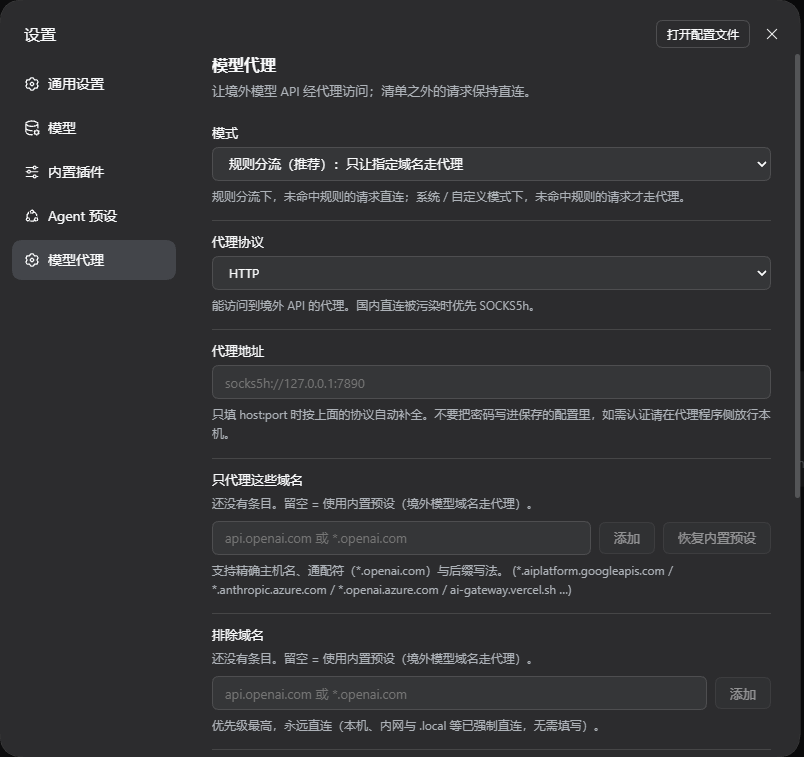
| Field | Meaning |
|---|---|
| Mode | rule (recommended) / system / custom / off |
| Proxy protocol | http / https / socks5 / socks5h / socks4 |
| Proxy address | socks5h://127.0.0.1:7890, or just 127.0.0.1:7890 (scheme filled in from the protocol field) |
| Proxy only these domains | empty = built-in preset; otherwise one entry per chip (*.openai.com, .aiplatform.googleapis.com), added with Enter or Add |
| Exclude domains | always direct, highest priority (same chip editor) |
Changes take effect on the next request — no restart.
A. Clash / V2Ray on 127.0.0.1:7890, overseas APIs only
Mode = rule, protocol = http, address = 127.0.0.1:7890, leave the domain list empty.
The preset sends OpenAI / Anthropic / Gemini / xAI / Groq / OpenRouter and similar through
the proxy, and keeps DeepSeek, DashScope, Zhipu, Kimi and other mainland providers direct.
B. Follow the Windows system proxy
Mode = system. The plugin re-reads
HKCU\Software\Microsoft\Windows\CurrentVersion\Internet Settings every 30 s and follows
changes made in Windows.
C. Everything through the proxy, a few exceptions
Mode = custom, fill the address, list the exceptions under "Exclude domains".
socks5h (DNS resolved by the proxy), or let your proxy client
take over DNS.http is refused by default — an API key must not travel over a proxy in
clear text. Tick the option on the settings page if you really need it.path A · exit route · N rules · proxied x / direct y.http://127.0.0.1:<port>/dsh-model-proxy/status returns the same snapshot as JSON
(loopback / same-origin only).npm test (= node test/run-all.mjs). The suite ships with the
repository, not with the npm package, and needs no install — it resolves the host's own
undici and @deepseek-ai/schemastery from your DSH profile (or DSH_HOME).These hold regardless of configuration, and are what the rules engine checks first:
10/8, 172.16/12, 192.168/16,
169.254/16, fc00::/7 — localhost and .local/.lan/.internal style names never go
through a proxy. User rules can add entries but cannot remove these.https is rejected before any socket is
opened, unless the option is explicitly enabled (the page then shows a standing warning).Authorization or any
provider API key. Default logging records the exit id and error class only — no hostnames,
no paths, no bodies.A failed exit falls back to direct, never to another exit: silently moving traffic to a different exit would change the outbound identity without the user noticing. The fallback is logged and shown on the settings page, so a degraded state is visible rather than silent.
lib/index.js       Cordis host entry — the only file that touches the harness API
lib/client.js      settings page (`__ModuleLoader__` browser entry)
lib/core/*         pure logic, no harness dependency, independently testable
test/run-all.mjs   test suite: pure-logic groups, then entry-file smoke tests
undici and @deepseek-ai/schemastery are both peers — the harness already ships them,
and installing a second copy would mean two dispatcher/Schema instances. The devDependencies
entries exist only so npm test can run outside DSH; the suite itself prefers the host's copies.
The same suite runs on GitHub Actions for every push (.github/workflows/test.yml, Node 22 and 24):
install the two dev dependencies, node --check each file under lib/, then npm test.
fetch — in practice every model request, plus any
other fetch traffic whose domain you add to the proxy list. transport: websocket streaming
and provider native-SDK channels (e.g. Amazon Bedrock) do not pass through fetch and cannot be
proxied here — use the harness's built-in environment-variable proxy for those. Web page
fetching is in the same category: the harness's fetch tool builds its own undici agent, so
domain rules never see it.http://user:pass@host:port),
which stores them in plain text in settings. Prefer letting the proxy accept loopback
connections without authentication.The settings page has a Test proxy button. It sends one real request through the currently configured exit and reports latency, HTTP status and a failure class — never the hostname or the response body. This answers the question the diagnostics page cannot: is it the proxy, or something else?
dsh plugin --profile <your-profile> remove dsh-model-proxy
dsh --profile <your-profile>
After removal DSH is fully direct again — no configuration residue, no listening port.
MIT
CLASSIFICATION EVIDENCE
系统优先读取 GitHub Topics,再与站内分类词典和词根规则比对。当前命中: model、deepseek。
morluto
Reverse engineer anything with agents, from app behavior down to native binaries.

deepseek-ai
DeepSeek Harness: Everything is a Plugin.

nexu-io
The 1st Collaborative AI Design Agent Workspace. Local-first and open source. Create motion, prototypes, websites, apps, dashboards, presentations, images, and videos with your team and AI agents. Share work, exchange feedback, and iterate together in one workspace.