

模型与 MCP
待识别

rea
morluto
Reverse engineer anything with agents, from app behavior down to native binaries.
PROJECT TOPICS
INSTALL REFERENCE
dsh plugin --profile web add github:realhenrylan/dsh-token-plugin
该命令指向仓库当前默认分支;尚无绑定当前 commit 的完整验证结果。
PROJECT README
Published on npm as
dsh-token-plugin.
This project is a fork of feiyang-dev/dsh-usage-plugin and continues development under the MIT License. The upstream copyright and license notice is retained in LICENSE.
English · 简体中文
GitHub · MIT License
A community plugin for DeepSeek Harness — records token usage and cost for every model call, with peak/off-peak billing, a calendar heatmap, and CSV / JSON / PNG export.


dsh-usage-plugin is a usage & cost tracker plugin in the DeepSeek Harness ecosystem (a DSH plugin shipped as a Host + Client two-in-one package). After installation, the "Usage & Cost" tab appear in the Web UI, right after "Conversation" and "Trace":
Supports Windows / macOS / Linux: paths are handled per platform (
node:path), and the folder picker / "reveal in file manager" use each OS's native mechanism (macOS:osascript/open; Linux:zenity/xdg-open). Export does not depend on Windows-only commands.
deepseek-flash off-peak cache hit 0.02 / input 1 / output 4 CNY, peak at twice that). Model names come from the actual request parameters, so non-DeepSeek models are shown truthfully instead of "unknown model"; models without an official price are counted as 0. The overview shows a by-model table plus a by-API-provider × model drill-down (each provider grouped with every model's calls and peak/off-peak cost split) and a grand total row. The overview also supports date filtering (Today / Last 7 days / Last 30 days / All, plus a custom start–end range), so the aggregate stats can be scoped to any single day or date range.— cost. The official console still counts these as API requests and bills their actual tokens, but the harness does not report their usage to the plugin — so the plugin records them at 0 tokens, keeping the call count aligned with the official console while costs are unaffected. The Overview's "Calls" card adds a · interrupted N (not billed) hint.deepseek-flash = DeepSeek-V4.1-Flash and deepseek-v4-pro; the legacy ids deepseek-v4-flash / deepseek-v4-flash-vision-exp stay callable and fold into the Flash tier) — base and peak/valley unit prices shown side by side (peak vs off-peak). The peak/off-peak tables are date-split: the first version applies from 2026-08-17, and the post-V4.1-Flash version applies from 2026-09-10 12:00 Beijing time (deepseek-flash off-peak lowered to cache hit 0.02 / input 1 / output 4 CNY, peak at twice that; deepseek-v4-pro unchanged) — past calls are always billed with the version in force at their own time. Editable in-panel and persisted to pricing.json, with a reset-to-default option.<session workspace>/dsh-usage/usage-records.json and restored on restart (cap 100000 records).max-content + overflow-x) and fit the screen width on mobile (≤900px, no horizontal scrollbar); popup cards adapt to the viewport.localStorage override. The bilingual dictionary covers the whole panel, the peak/off-peak billing-period hints, and the PNG report; host-level Conversation/Settings tab labels are re-read per render, so they follow the language switch live.dsh2shell-* with model fake) are excluded from the model cost breakdown and collected in a collapsible "Tool calls (internal)" group below the breakdown, so only real model calls count in the cost tables.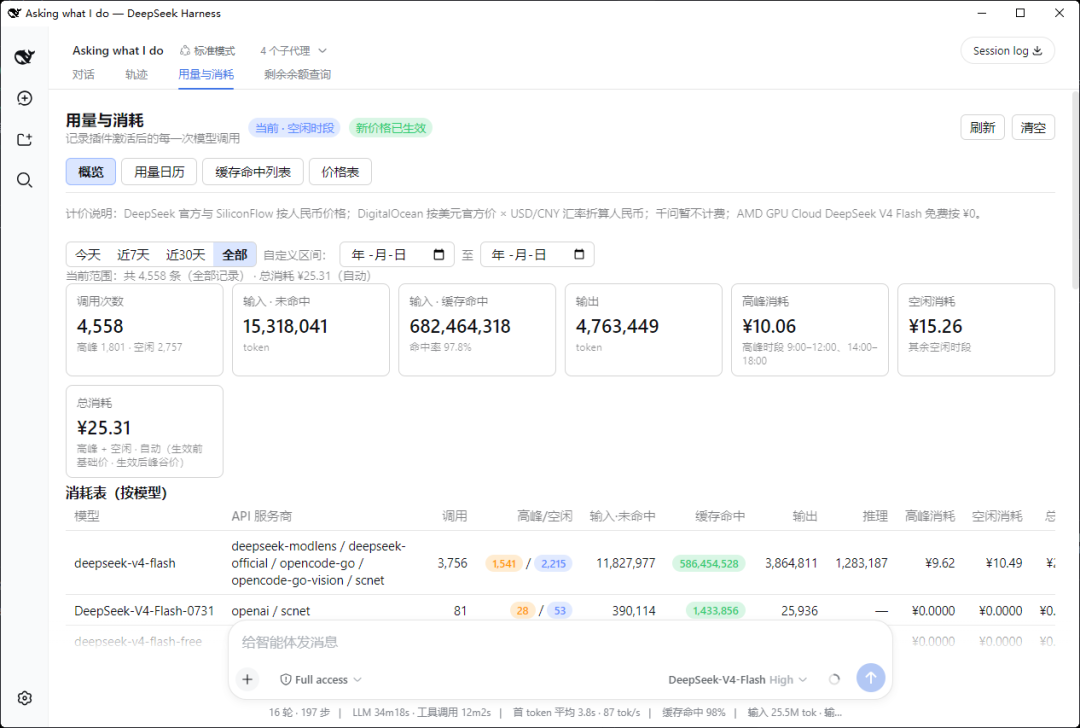
Install directly from the GitHub repository:
dsh plugin --profile web add github:realhenrylan/dsh-token-pluginThe GitHub shorthand refers to https://github.com/realhenrylan/dsh-token-plugin.
Alternatively, install a locally packed checkout:
Clone the GitHub repository, then build a local package and install it through DSH:
git clone https://github.com/realhenrylan/dsh-token-plugin.git
cd dsh-token-plugin
npm pack
dsh plugin --profile web add ./dsh-token-plugin-2.1.0.tgz
If you already have a checkout, run the last two commands from its directory. Use the package filename printed by npm pack if the version differs.
Restart the DSH service after installation. To install the published package, run dsh plugin --profile web add dsh-token-plugin. Desktop recommended listings are maintained separately.
One npm package = a host half (Node-side Cordis plugin: recording, billing, export — see lib/index.js) + a client half (browser-side panel — see lib/client.js, which talks to the host via /usage/api).
The package integrates with DSH through two declarations:
| Declaration | Purpose |
|---|---|
dsh.bundle.patch (cordis.patch.yml) |
Lets DSH recognize it as a standard bundle plugin package: dsh plugin --profile <name> add <package> installs and wires it in one command, no manual config editing |
dsh.client + exports["./client"] |
Lets the web client auto-load the browser panel at /plugins/<package>/client.js |
So for users, installation is one command — no YAML editing, no manual file copying.
To update, pack the current checkout again and install the resulting tarball using the command above. To uninstall, run dsh plugin --profile web remove dsh-token-plugin and restart DSH.
One command handles "bump version + test + pack":
npm run release -- patch # 2.1.0 → 2.1.1; also minor / major / 2.2.0The script runs the full test suite first, then writes the new version, syncs the install examples in both READMEs, turns the CHANGELOG "## 未发布 (Unreleased)" heading into the new version heading, runs the plugin contract check, and produces dsh-token-plugin-<version>.tgz. Add --dry-run to rehearse; --no-changelog skips the CHANGELOG heading update. It never commits, pushes, or publishes — it prints the next commands when done.
npm run release:github creates the GitHub Release and uploads the tarball from the existing tag and CHANGELOG section (requires a token in git credentials).
Local publish credentials can live in .npmrc.local at the repo root (gitignored, never packed); publish with npm publish --userconfig .npmrc.local.
Since v1.9.2, records are stored in a fixed, dedicated data directory (fixes #4). The path no longer follows the session workspace /
~/.dsh/ desktop-app install dir, so your history never "disappears" (counted as 0) when the workspace changes, and the path shown in the UI equals the on-disk path.
<data root>/dsh-usage/usage-records.jsonDSH_USAGE_DATA_DIR (if set) — overrides everything;%LOCALAPPDATA%\dsh-usage-plugin (falls back to %APPDATA% if LOCALAPPDATA is unset);~/dsh-usage-data (Windows %USERPROFILE%\dsh-usage-data, macOS/Linux ~/dsh-usage-data);<workspace>/dsh-usage — only used when all system/user dirs above are unwritable, and the panel will show a "persistence disabled" warning.workspace-write sandbox, so the fixed directory is always writable and data is not lost when switching workspaces.%LOCALAPPDATA%\dsh-usage-plugin\dsh-usage\usage-records.json%USERPROFILE%\dsh-usage, ~/.dsh/dsh-usage, and each workspace's dsh-usage (or .dsh-usage-records.json) are merged into the fixed root, deduplicated by record identity — the recordId of new records, or a composite fingerprint (session + timestamp + model + purpose + four token buckets + finish reason) for legacy ones. This is no longer a millisecond-only comparison, so two different requests inside the same millisecond no longer overwrite each other. Records written by older versions stay fully readable: missing recordId / pricingTime / unit and friends are all optional.usage-records.json.corrupt-<timestamp>.json and keeps starting, so the data can be recovered by hand.<data root>/dsh-usage/pricing.json<data root>/dsh-usage/pricing-history.jsonholidays: ["2027-01-01", ...] in pricing.json.<data root>/dsh-usage/plans.json<data root>/dsh-usage/{csv,json,images}/dsh-usage-boot.log next to the data rootUsage and cost here are recorded call by call from DeepSeek Harness llm/stream events, plus a session/event listener for search-backend requests. Read the boundaries below before relying on the numbers.
| Source | Notes |
|---|---|
| Main agent conversation | Four token buckets, cache-hit counts and finish reason per call |
| Session-title generation | purpose: session-title |
| Context compaction | purpose: compaction |
| In-process subagents | They share the main agent's ctx.llm, so they are intercepted too |
The billing formula matches the official one: uncached input × miss price + cache hit × hit price + output × output price. There is no separate cache-write price (DeepSeek never reports that field; writing to cache is charged at the miss price), and reasoning is already included in output, so it is never billed twice.
| Source | Why it is unreachable | What the plugin does |
|---|---|---|
DeepSeek search backend calls from web_search |
web-search-deepseek issues a native fetch straight to api.deepseek.com/anthropic/v1/messages inside the Harness, deliberately bypassing ctx.llm; upstream only persists the request (web/deepseek-search-llm-request) and discards the response usage entirely (its response type does not even declare a usage field). No data source exposes this spend. |
Records the exact call count and derives a lower bound for the input side from the request body, all flagged estimated. The output side is never guessed. The overview shows "estimated cost ≥ ¥X (N calls)". |
| External CLI subagents (claude-code / codex) | Separate child processes, fully outside ctx.llm, emitting no events |
Not counted |
| Output produced before an aborted request | The adapter emits no usage chunk on abort | Recorded as a zero-token "interrupted call" so the call count still matches the console |
| Official billing counts HTTP requests; the plugin counts streams | Harness-level retries do not open a new stream | Call counts may differ from the official request_count |
web_search use the plugin's total is materially lower than the official bill — the gap is the search backend, and the panel says so explicitly;Each record freezes the three unit prices in effect when it was written (its unit field). Therefore:
pricing.json) only affects future records; past costs are not recomputed;{"action":"repriceAll"}). That is the only entry point that rewrites historical cost.| Symptom | Cause / Fix |
|---|---|
Panel reports Unexpected end of JSON input |
The plugin row is missing the inject list, so the route isn't registered. Add the inject list per Method B3 and restart |
| Panel blank / no top tab | Plugin not activated. Check dsh-usage-boot.log; confirm the cordis.patch.yml row exists with the correct name |
dsh plugin reports pnpm not found |
Install pnpm: npm install -g pnpm |
| Install can't reach the npm registry | Set a mirror: npm config set registry https://registry.npmmirror.com (or pnpm config set registry ...) and retry |
After uninstall, still reports Cannot find package '@feiyang666/...' |
A package reference remains in the profile. Remove the corresponding row from cordis.patch.yml and the package name from dsh.profile.bundles, then restart |
| On Desktop 0.2.x every cost is ¥0 and the price page reports that all records lack a frozen unit price | 1.18.0 and earlier only recognised the provider ids deepseek-official / deepseek, while the desktop app's official-account provider id is deepseek-account. Since 1.19.0 every deepseek-* id is matched by prefix, new records freeze their unit prices, and historical records are priced correctly too — issue #19 |
| Project | Description | Installation |
|---|---|---|
| Data Vault (dsh-vault) | Auto backup / wipe detection / one-click restore — protects chat history and workspace data | One-click from the desktop app, or dsh plugin add @feiyang666/dsh-vault |
| DeepSeek-Harness | Official CLI / Web service | Quick start below |
Quick start (via npm)
Install Node.js, then run:
npx @deepseek-ai/dsh webThis command starts the Web UI at the default address http://127.0.0.1:3080. See the Web UI Guide for details.
Run from source
To run from the repository source:
git clone https://github.com/deepseek-ai/deepseek-harness.git
cd deepseek-harness
pnpm install
pnpm run build
pnpm dsh webcacheWriteTokens fallback double-counting the four buckets, millisecond-only dedup overwriting records, and non-atomic writes silently zeroing a corrupt file — became the basis for the v1.18.0 metering fixes (see CHANGELOG).MIT © dsh-usage-plugin
CLASSIFICATION EVIDENCE
系统优先读取 GitHub Topics,再与站内分类词典和词根规则比对。当前命中: deepseek、deepseek-harness。
morluto
Reverse engineer anything with agents, from app behavior down to native binaries.

deepseek-ai
DeepSeek Harness: Everything is a Plugin.

nexu-io
The 1st Collaborative AI Design Agent Workspace. Local-first and open source. Create motion, prototypes, websites, apps, dashboards, presentations, images, and videos with your team and AI agents. Share work, exchange feedback, and iterate together in one workspace.