
模型与 MCP
待识别

rea
morluto
Reverse engineer anything with agents, from app behavior down to native binaries.
PROJECT TOPICS
INSTALL REFERENCE
dsh plugin --profile web add github:rakibulrocky14/dsh-cli
该命令指向仓库当前默认分支;尚无绑定当前 commit 的完整验证结果。
PROJECT README
DeepSeek Harness in the terminal — A Web-GUI-parity Cordis surface over
dsh-base. Your agents, presets, tools, sessions, approval, settings, and plugins directly in your terminal. Nothing extra, nothing less.



[!IMPORTANT] Disclaimer: This is an independent, community-driven open-source project and is not affiliated with, endorsed by, or sponsored by DeepSeek AI or the official DeepSeek team. "DeepSeek" and "DeepSeek Harness" are trademarks of their respective holders.
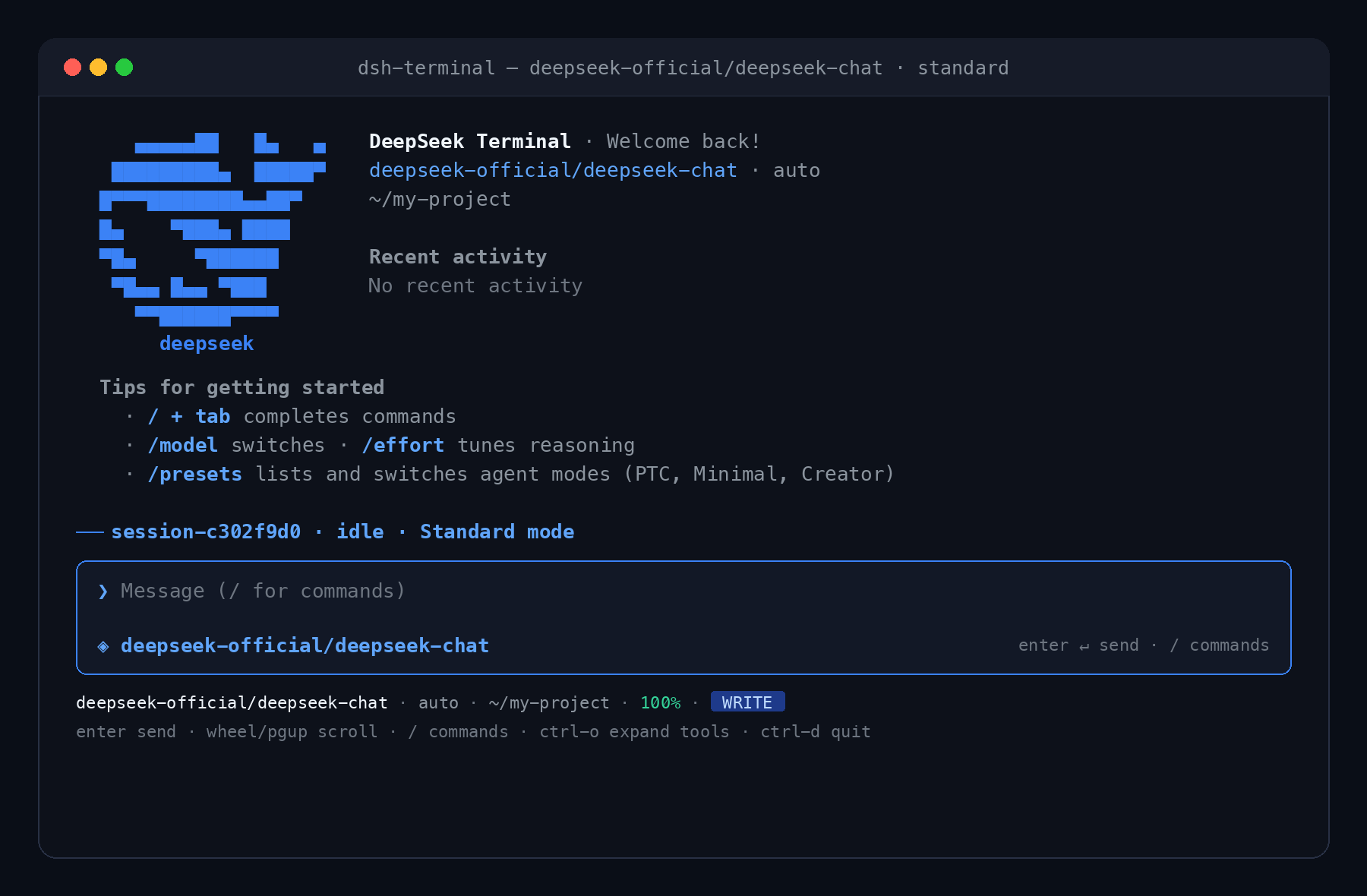
/presets.--line.--print "<task>" and output the response.^22.19 || >=24dsh) CLI installed on your system.Add this plugin directly to your DSH configuration using dsh plugin add:
# Add to a dedicated 'terminal' profile
dsh plugin --profile terminal add github:rakibulrocky14/dsh-cli# 1. Clone the repository
git clone https://github.com/rakibulrocky14/dsh-cli.git
cd dsh-cli
# 2. Install dependencies & build
npm install
npm run build
# 3. Add to DSH profile as a local plugin
dsh plugin --profile terminal add .Launch the full-screen terminal interface:
dsh --profile terminal# Run with a specific model
dsh --profile terminal --model deepseek-reasoner
# Resume an existing session
dsh --profile terminal --resume session-c302f9d0
# Force standard line REPL (non-TUI)
dsh --profile terminal --line
# One-shot execution (executes task, prints result, and exits)
dsh --profile terminal --print "Explain how to set up a git repository"Stack additional DSH plugins into your terminal profile:
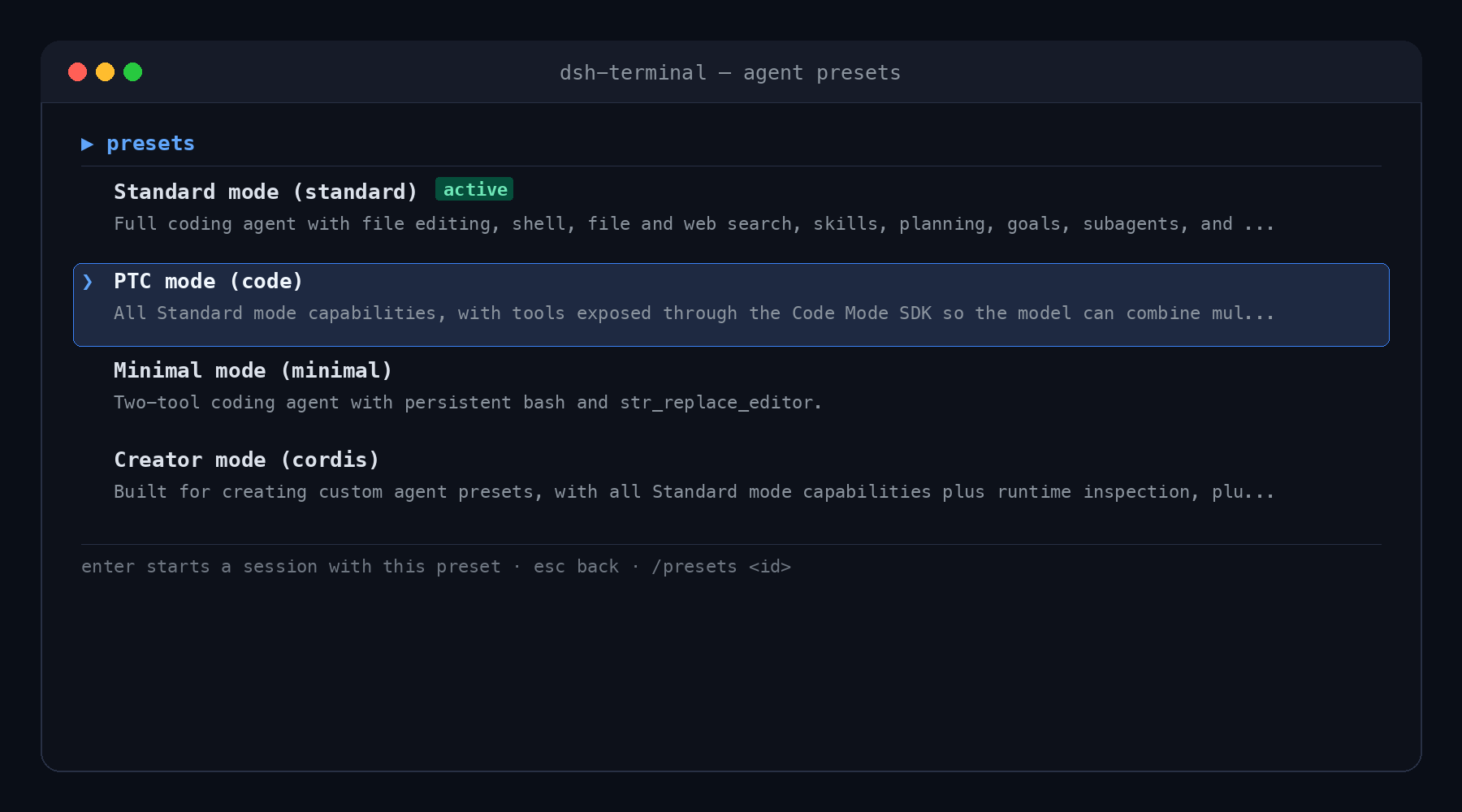
dsh plugin --profile terminal add <npm-pkg | github:owner/repo | ./path | ./pkg.tgz>Open the interactive presets menu anytime with /presets or switch directly via /presets <id>:
| Preset | ID | Description |
|---|---|---|
| Standard mode | standard |
Full coding agent with file editing, shell execution, search, skills, planning, subagents, and workflows. |
| PTC mode | code |
All Standard mode capabilities with tools exposed via the Code Mode SDK for multi-step TypeScript execution. |
| Minimal mode | minimal |
Ultra-fast two-tool coding agent with persistent bash and str_replace_editor. |
| Creator mode | cordis |
Built for authoring and testing custom agent presets with live runtime inspection and plugin tools. |
| Key | Action |
|---|---|
Enter |
Send message / confirm selection |
Esc |
Close active dialog / return to transcript |
Tab |
Autocomplete slash commands |
↑ / ↓ |
Cycle command history or navigate menus |
PageUp / PageDown |
Scroll transcript up / down |
Mouse Wheel |
Smoothly scroll through history and code outputs |
Ctrl + O |
Expand / collapse tool output cards |
Ctrl + C |
Cancel current turn (or clear prompt when idle) |
Ctrl + D |
Exit / quit session |
Type / followed by Tab to see all available commands:
/sessions (interactive session browser), /resume <id>, /new, /fork/presets (agent modes), /model (provider & model picker), /effort (reasoning effort levels), /settings, /permissions/tools (active tool definitions), /commands (all registered slash commands), /skills, /agents, /plugins, /jobs, /usage, /doctor/terminals, /todos, /title, /clear, /stop, /quitdsh --profile terminal
└── dsh-terminal (Cordis bundle)
├── cordis.patch.yml base rows + code-runtime + cordis-host + ask-user + startup + runner
├── dsh-terminal/startup command-line flags → terminalStartup
└── dsh-terminal runner → TUI | REPL | --print
├── core/dsh.ts service facade & runtime feature detection
├── core/transcript.ts durable-log projection & live streaming overlay
├── core/messages.ts deep-frozen message factories
├── core/lineinput.ts single-reader TTY/pipe input
├── repl.ts line REPL surface
├── print.ts one-shot execution surface
└── tui/ behavioral engine & Ink React widget tree# Typecheck
npm run typecheck
# Build TypeScript to lib/
npm run build
# Run comprehensive test suite (61 tests)
npm test#deepseek #deepseek-harness #dsh #dsh-cli #dsh-terminal #terminal #tui #cli #ai-agent #llm #cordis #coding-assistant
Contributions, bug reports, and pull requests are warmly welcomed! Anyone is welcome to contribute to dsh-cli.
dsh-cli is an independent, unofficial community project built for the DeepSeek Harness ecosystem. It is not affiliated with, maintained by, sponsored by, or endorsed by DeepSeek AI or Hangzhou DeepSeek Artificial Intelligence Co., Ltd.
All product names, logos, brands, and trademarks are property of their respective owners.
CLASSIFICATION EVIDENCE
系统优先读取 GitHub Topics,再与站内分类词典和词根规则比对。当前命中: llm、deepseek、deepseek-harness。
morluto
Reverse engineer anything with agents, from app behavior down to native binaries.

deepseek-ai
DeepSeek Harness: Everything is a Plugin.

nexu-io
The 1st Collaborative AI Design Agent Workspace. Local-first and open source. Create motion, prototypes, websites, apps, dashboards, presentations, images, and videos with your team and AI agents. Share work, exchange feedback, and iterate together in one workspace.