





模型与 MCP
待识别

rea
morluto
Reverse engineer anything with agents, from app behavior down to native binaries.
PROJECT TOPICS
INSTALL REFERENCE
dsh plugin --profile web add github:rainfishs/dsh-vscode
该命令指向仓库当前默认分支;尚无绑定当前 commit 的完整验证结果。
PROJECT README
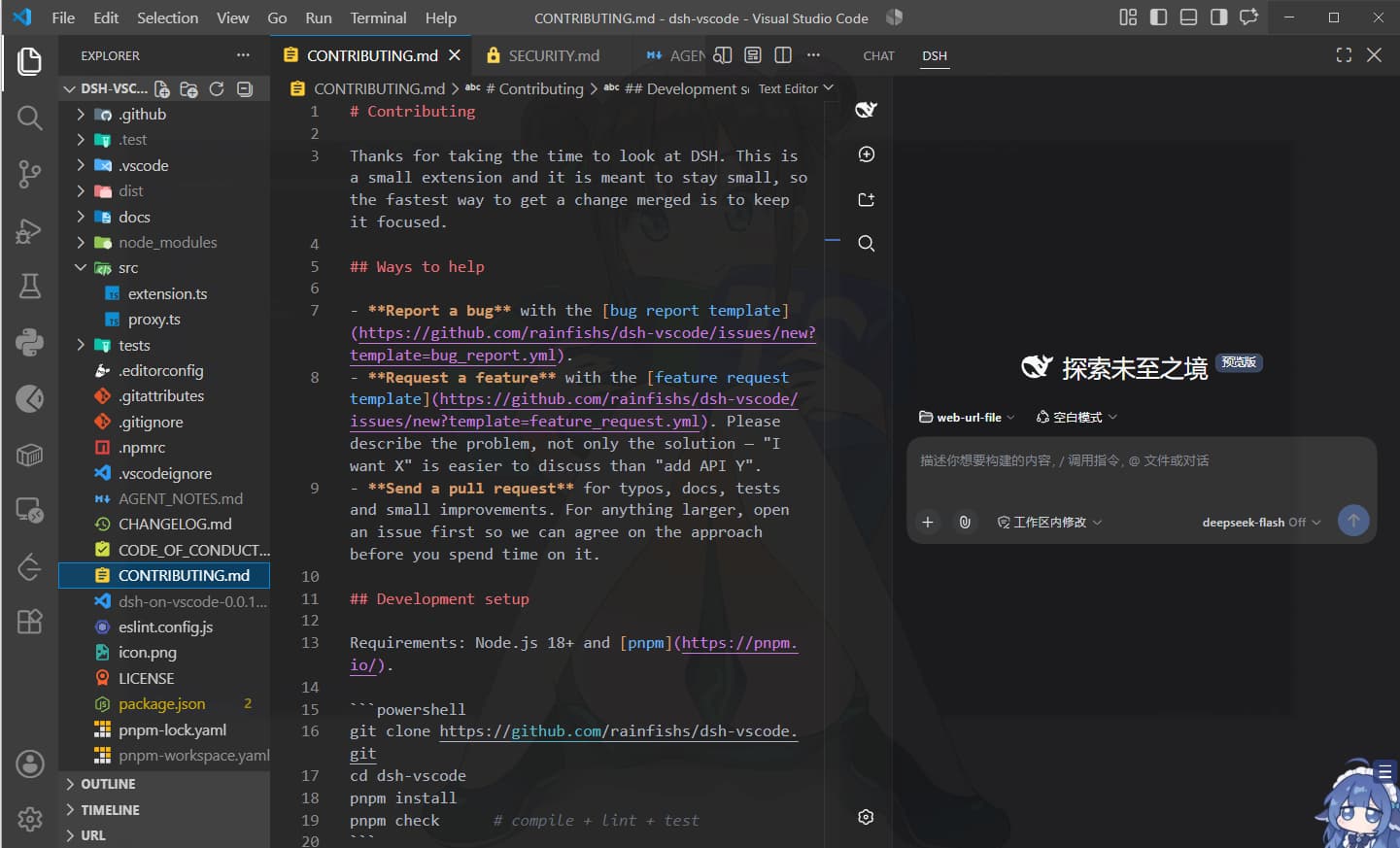
DSH on VS Code brings the DeepSeek Harness (DSH) web interface directly into your editor's chat panel.
Built with a lightweight, decoupled architecture, it avoids process locking and fragile stdout scraping, providing a clean bidirectional bridge between DSH and your VS Code workspace.
Instead of rigid sub-process binding or fragile stdout scraping, DSH on VS Code uses a Rendezvous File Pattern with a high-performance Two-Hop IPC Bridge:
┌─────────────────────────────────────────────────────────────┐
│                        VS Code Host                         │
│  ┌───────────────────────┐       ┌───────────────────────┐  │
│  │   Secondary Sidebar   │       │  Loopback Proxy Core  │  │
│  │  (Webview Container)  │       │ (Per-Window Isolation)│  │
│  └───────────▲───────────┘       └───────────▲───────────┘  │
│              │ (postMessage IPC)             │              │
└──────────────┼───────────────────────────────┼──────────────┘
               │                               │
       [ Two-Hop Bridge ]            [ HTTP / WebSocket ]
       • System Clipboard Sync                 │
       • Native File Jump (Range)              │
               │                               ▼
┌──────────────▼──────────────────────────────────────────────┐
│                    DSH Runtime & Web GUI                    │
│    (Atomic Rendezvous URL File + SameSite Cookie Widening)   │
└─────────────────────────────────────────────────────────────┘localStorage and session collisions across multi-root workspaces.| Component | Required Version | Role |
|---|---|---|
| VS Code | ^1.104.0 |
Host Editor |
| DeepSeek Harness | latest (@deepseek-ai/dsh) |
AI Harness Core |
| dsh-vscode-bridge | 0.2.4+ |
DSH Cordis Runtime Bundle |
Add the bridge bundle to your DSH web profile:
dsh plugin --profile web add github:rainfishs/dsh-vscode-bridgeInstall directly from the VS Code Marketplace or via command line:
code --install-extension rainfishs.dsh-on-vscodeStart DeepSeek Harness:
dsh web(The bridge automatically writes the authenticated session URL to %USERPROFILE%\.dsh\profiles\web\web-url.txt)
Open the panel — either route works:
Ctrl+Alt+B (macOS: Cmd+Option+B) → click the DSH icon in the Secondary Side BarCtrl+Shift+P (macOS: Cmd+Shift+P) → run DSH: Open URL TabCustomize the integration via Settings (Ctrl+,) under the dsh namespace:
| Setting | Type | Default | Description |
|---|---|---|---|
dsh.urlFile |
string |
"" |
Path to the rendezvous URL file. Supports absolute paths, workspace-relative paths, and ~ home expansions. Empty means the file DSH itself writes: %DSH_HOME%\profiles\web\web-url.txt, or %USERPROFILE%\.dsh\profiles\web\web-url.txt when DSH_HOME is unset. |
dsh.zoom |
number |
1.0 |
Real-time viewport zoom factor (0.25 to 4.0). Applied without reloading. |
dsh.isolateStorage |
boolean |
true |
Enables per-window loopback proxy to isolate localStorage between multiple VS Code windows. |
VS Code Webviews impose strict cross-origin iframe security boundaries.
dsh-vscode-bridge hooks navigator.clipboard.writeText within the iframe and bubbles payloads upwards via postMessage. The extension host relays and writes them using native vscode.env.clipboard.writeText.dsh-resource://file/...) are intercepted and sent directly to the extension host, opening the target file in vscode.window.showTextDocument with the exact line in focus.Chromium shares localStorage across all windows accessing the same origin (http://127.0.0.1:3080). DSH on VS Code runs a lightweight in-memory reverse proxy per window. The port is deterministically hashed from the active workspace path, ensuring independent storage scopes while preserving session persistence across reloads.
All runtime decisions, proxy lifecycle events, and IPC relays are logged to the DSH Output Channel:
Ctrl+K Ctrl+H).| Symptom | Cause | Solution |
|---|---|---|
No URL configured |
The default DSH URL file is not there yet | Start dsh web with the bridge bundle, or set dsh.urlFile in Settings |
Cannot read that file |
File path invalid or permission denied | Verify file permissions and path syntax |
| Copy button has no effect | dsh-vscode-bridge missing in DSH |
Run dsh plugin --profile web add github:rainfishs/dsh-vscode-bridge |
| Multiple windows share session | dsh.isolateStorage disabled |
Ensure dsh.isolateStorage: true in settings |
127.0.0.1.Origin, Host, and Referer headers are sanitized to respect DSH's internal security fences.Distributed under the MIT License. See LICENSE for details.
CLASSIFICATION EVIDENCE
系统优先读取 GitHub Topics,再与站内分类词典和词根规则比对。当前命中: deepseek-harness。
morluto
Reverse engineer anything with agents, from app behavior down to native binaries.

deepseek-ai
DeepSeek Harness: Everything is a Plugin.

nexu-io
The 1st Collaborative AI Design Agent Workspace. Local-first and open source. Create motion, prototypes, websites, apps, dashboards, presentations, images, and videos with your team and AI agents. Share work, exchange feedback, and iterate together in one workspace.