
模型与 MCP
待识别

rea
morluto
Reverse engineer anything with agents, from app behavior down to native binaries.
PROJECT TOPICS
INSTALL REFERENCE
dsh plugin --profile web add github:raholly/dsh-temp-task
该命令指向仓库当前默认分支;尚无绑定当前 commit 的完整验证结果。
PROJECT README
English | 中文
A "Temporary tasks" area above Workspaces in the DeepSeek Harness sidebar: ask a quick question, try a snippet, and get a throwaway folder and conversation in one click — without polluting your workspace list.
DeepSeek Harness 0.2.2+ · Windows / macOS / Linux · English / 中文 / 日本語 / Español / Français / Deutsch / Русский / Português · MIT
DSH needs a workspace (a folder) before a conversation can start. For a quick question or a small experiment, that setup step gets in the way.
WorkBuddy's task area solves this: click New task and it creates a temporary folder, then drops you straight into the work.
dsh-temp-task adds a sibling area above Workspaces for exactly those throwaway tasks:
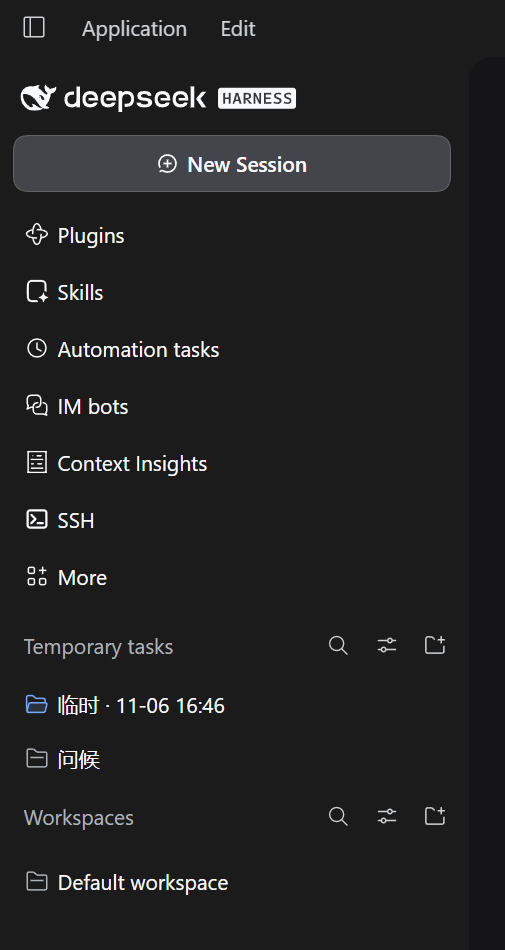
Each temporary task is one real workspace + one session + one folder on disk. Rename, archive, pin and move all reuse DSH's native capabilities, so state stays in sync with the official UI.
Temporary task "Explain this error"
├─ Workspace  临时 · 11-06 14:30     shown only in the plugin area
├─ Session    Explain this error     title summarized by DSH
└─ Folder ~/Documents/deepseek-harness/临时-20261106-143000/Temporary tasks.临时 · MM-DD HH:mm.Esc or the clear button collapses it.localStorage.Ordered like the official session menu:
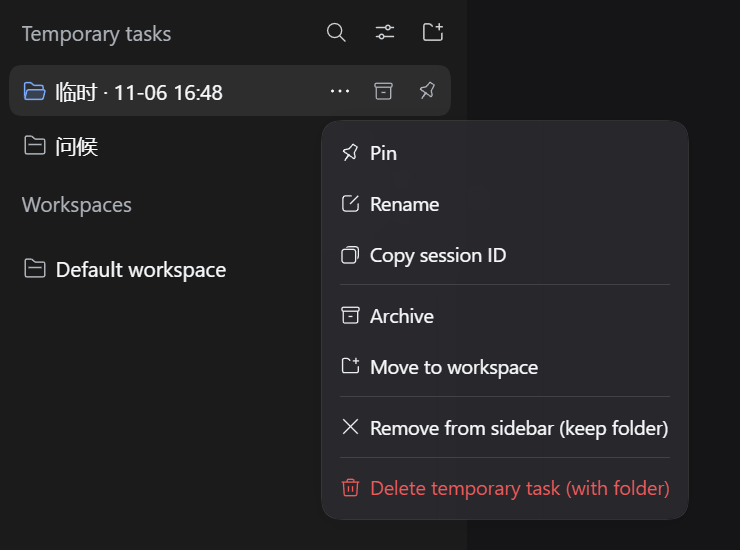
| Item | Behavior |
|---|---|
| Pin / Unpin | Uses the official session pin; pinned tasks move to the top of the area |
| Rename | Inline edit of the session title; once set, auto-summarizing stops overwriting it |
| Copy session ID | Copies the session ID to the clipboard |
| Archive / Unarchive | Uses the official session archive; archived tasks are hidden by the filter by default |
| Move to workspace | Promotes the task in place: the folder stays put; the temporary workspace is unregistered and the same path is registered as a regular workspace |
| Remove from sidebar (keep folder) | Archives the session, unregisters the workspace and deletes the record; folder and files stay |
| Delete temporary task (with folder) | Archives the session, moves the folder to the recycle bin, then unregisters the workspace |
A switch in the plugin settings controls this behavior.
On by default: clicking New session at the top creates and opens a temporary task immediately — no workspace picker. The workspace dropdown on the new-session page also gains a New temporary task row.
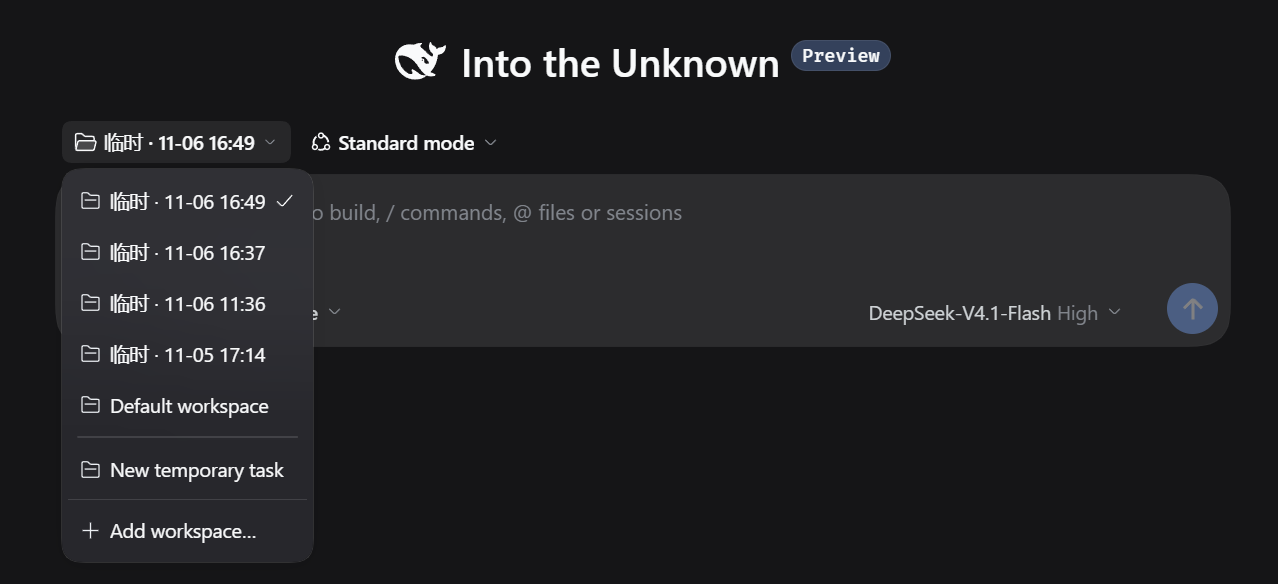
Turn the switch off and both the top button and the dropdown return to DSH's native behavior.
Create a task and switch to another session without sending a message and the task is deleted immediately: workspace unregistered, record removed, empty folder deleted (if the folder already holds other files it goes to the recycle bin instead). This matches DSH's own "blank session disappears when you switch away" behavior.
Tasks that have sent messages are never reclaimed.
When a title is clipped, hovering the row scrolls it to reveal the rest, just like workspace sessions; moving away snaps back to the start. It scrolls only when more than 8px is hidden, and jumps straight to the end when the system's reduced-motion setting is on.
Settings → Temporary tasks (or Settings → Plugins → dsh-temp-task) lets you change:
~/Documents/deepseek-harness.临时; used in folder names and fallback titles.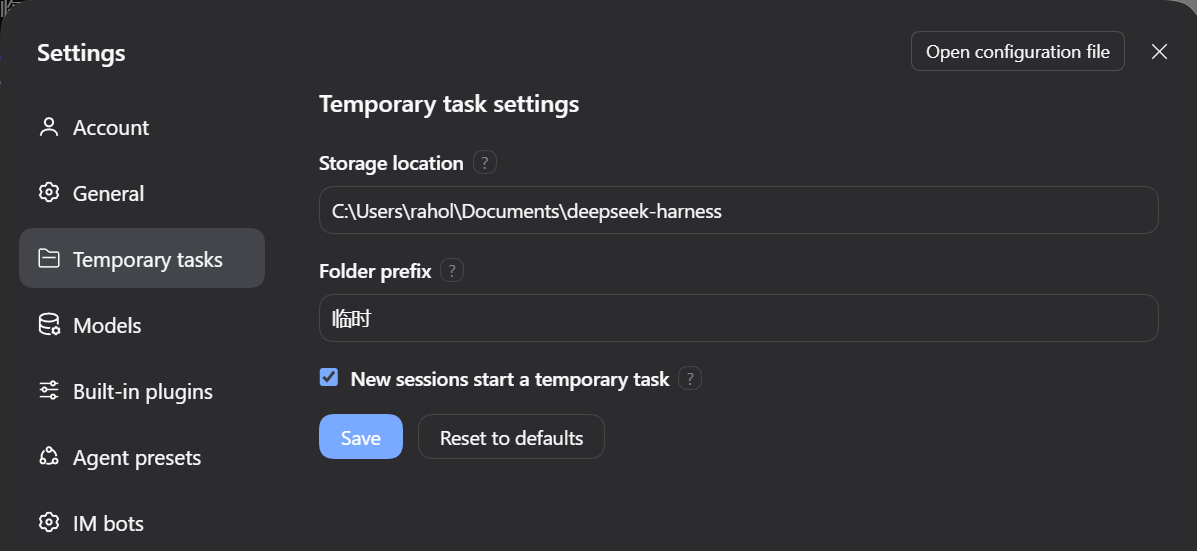
Every setting has a "?" that shows its help on hover. Changes apply to newly created tasks only: existing folders don't move or get renamed, and can still be opened, archived and deleted as before.
Follows DSH's language setting; all 8 built-in languages are translated in full, error messages included: zh, en, ja, es, fr, de, ru, pt. Switching languages updates the sidebar, menus, settings page and tooltips live — no restart.
All UI strings live in locale/<lang>.json and load for the active language.
Requires DeepSeek Harness 0.2.2+ and Node.js 22+.
git clone works).target:plugin_manager install_bundle target = <absolute path to this folder>Or use Settings → Plugins → install a local bundle.
Ctrl+R). If the update includes host-side code (index.js / service.js / store.js), fully quit and restart DSH.Local folders are linked, not copied: after editing client JS, just refresh. Don't hand-edit the profile's package.json / cordis.patch.yml, and don't run pnpm inside the profile folder.
| I want to… | How |
|---|---|
| Create a task | Click ⊕ next to the area header, or New session at the top (with the switch on) |
| Open its conversation | Left-click the row |
| Read a clipped title | Hover the row; the title scrolls and snaps back on leave |
| Rename | Hover ⋯ → Rename, or right-click → Rename |
| Pin | Hover the pin button, or right-click → Pin |
| Archive | Hover the archive button, or right-click → Archive; control visibility from the view menu afterwards |
| Search | Click the magnifier in the header |
| Move to a workspace | Right-click → Move to workspace |
| Delete | Right-click → Delete temporary task (with folder) |
Values saved from the settings page live in <DSH_HOME>/dsh-temp-task/<profile-hash>/settings.json; the task list is tasks.json in the same folder.
When upgrading from an older version, data under <DSH_HOME>/temp-task-zone/<profile-hash>/ migrates automatically at DSH startup. If both folders exist, only missing files are copied — existing data is never overwritten.
apply(ctx, config) also accepts two optional fields, used as defaults when no settings have been saved:
| Field | Default | Description |
|---|---|---|
rootDirectory |
~/Documents/deepseek-harness |
Parent folder for temporary folders; supports ~/; must be absolute |
dirPrefix |
临时 |
Folder-name prefix and fallback-title prefix |
Precedence: saved settings > apply config > built-in defaults.
Path rules: the storage location must be absolute (the error example is platform-specific); the prefix can't be empty or . / .., can't contain path separators or control characters (Windows additionally forbids : * ? " < > |), and is limited to 40 characters. "Reset to defaults" only fills the form with defaults — you still need to save.
临时-YYYYMMDD-HHmmss; a collision within the same second appends -2, -3. Each folder contains an ownership marker, .dsh-temp-task-owner.json.Microsoft.VisualBasic.FileIO's SendToRecycleBin, on macOS to ~/.Trash (with a Finder fallback across volumes), on Linux through gio trash. If the recycle bin is unavailable the whole operation fails — it never degrades to permanent deletion.primitives.Menu. If the runtime can't provide react / react-dom/client, that button disappears; search, folding, ⊕ and the other pure-DOM features keep working.gio; deletes then report an error and ask you to move the folder to the recycle bin manually. On macOS the Finder fallback may ask for Automation permission once. Neither platform ever deletes by mistake.42vh and scrolls internally when you have many tasks.index.js Host entry: config, RPC channel, startup logging
service.js Task service: create/open/delete/move/reclaim/reconcile
store.js State and folders: naming, ownership marker, settings.json, tasks.json
errors.js Stable error codes (thrown by the host, translated on the client)
trash.js Cross-platform recycle bin
client.js Client: sidebar injection, task rows, menus, search, settings page
locale/*.json 8 languages
tests/ node:test suites (38 tests)node --test tests/store.test.js tests/index.test.jsClient changes apply on window refresh (Ctrl+R); host-side changes (index.js, service.js, store.js, trash.js) need a full DSH restart.
Remove this bundle in plugin management and restart. Existing temporary folders are not deleted; to clean up, right-click → Delete temporary task (with folder) one by one, or move the folders to the recycle bin yourself.
MIT — see LICENSE.
CLASSIFICATION EVIDENCE
系统优先读取 GitHub Topics,再与站内分类词典和词根规则比对。当前命中: deepseek-harness。
morluto
Reverse engineer anything with agents, from app behavior down to native binaries.

deepseek-ai
DeepSeek Harness: Everything is a Plugin.

nexu-io
The 1st Collaborative AI Design Agent Workspace. Local-first and open source. Create motion, prototypes, websites, apps, dashboards, presentations, images, and videos with your team and AI agents. Share work, exchange feedback, and iterate together in one workspace.