
模型与 MCP
待识别

rea
morluto
Reverse engineer anything with agents, from app behavior down to native binaries.
PROJECT TOPICS
INSTALL REFERENCE
dsh plugin --profile web add github:qpwlkq/dsh-token-heatmap
该命令指向仓库当前默认分支;尚无绑定当前 commit 的完整验证结果。
PROJECT README
English | 中文
GitHub-style heatmap of your DeepSeek Harness token usage, written as a standalone SVG you can commit to your GitHub profile README.
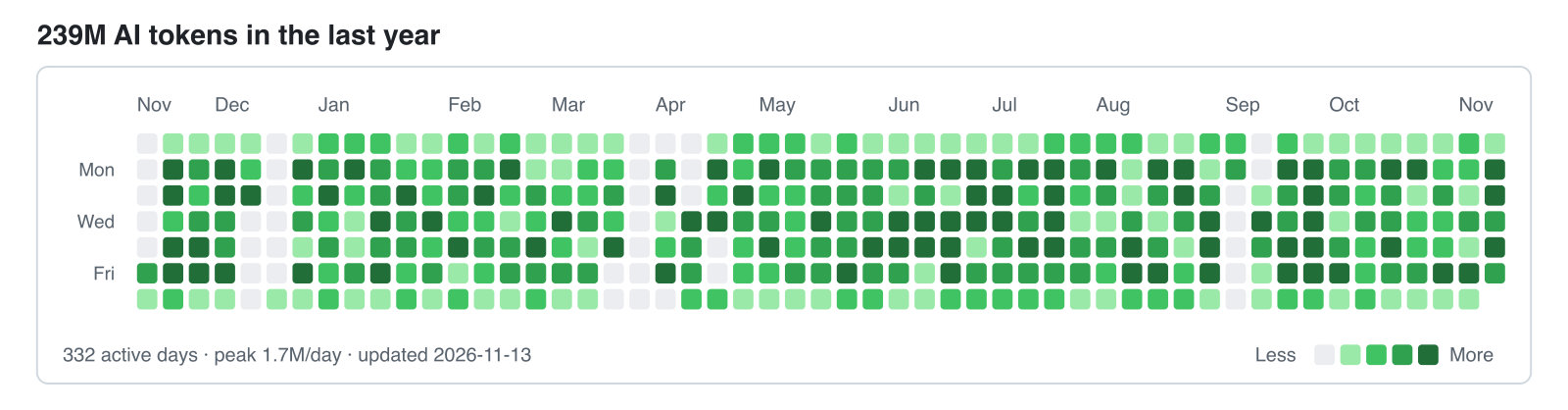
Most usage plugins draw the heatmap inside DSH. This one writes the SVG and a JSON ledger to disk, so a scheduled job can publish them to GitHub — your profile keeps updating while the app is closed.
DSH 0.2.1-rc.2 or newer (tested on 0.2.1-rc.2) and Node 22.19+.
From the market or npm:
dsh plugin --profile web add @qpwlkq/dsh-token-heatmapWithout a registry, mount the checkout directly. Add this to $DSH_HOME/profiles/<name>/cordis.patch.yml:
- insert:
    - id: token-heatmap
      name: '/absolute/path/to/token-heatmap/src/plugin.js'
Then run /token-heatmap in a conversation. It writes three files to the output directory (default $DSH_HOME/token-heatmap):
| File | Contents |
|---|---|
token-usage.json |
per-day token buckets, totals, window |
token-heatmap.svg |
light-theme heatmap |
token-heatmap-dark.svg |
dark-theme heatmap |
assistant/message, plus assistant/chunk usage blocks. A compaction call reports no usage and is not counted.(turn, step) count once; the later sample replaces the earlier one.The command reads through ctx.sessionQuery when the profile composes it, so any persistence backend works. Without that seam it falls back to the durable JSONL logs under $DSH_HOME/sessions.
node src/cli.js stats                        # totals only, writes nothing
node src/cli.js render --out docs            # scan sessions and write all three files
node src/cli.js render --from docs/token-usage.json --out docs   # re-render, no scan
Useful flags: --home <dir>, --tz <zone>, --end YYYY-MM-DD, --weeks <n>, --title <text>.
Create the profile repository <you>/<you>.
Copy this repository into it (src/, scripts/, package.json, cordis.patch.yml).
Render:
node src/cli.js render --out docsAdd the image to README.md at any position:
<picture>
  <source media="(prefers-color-scheme: dark)" srcset="./docs/token-heatmap-dark.svg">
  <img alt="AI token usage in the last year" src="./docs/token-heatmap.svg">
</picture>
Run scripts/sync.sh from cron or a launchd agent to render, commit, and push daily.
sync.sh only stages docs/token-heatmap*.svg and docs/token-usage.json. It never edits your README, so the block stays wherever you put it. GitHub caches README images through camo; add ?v=<date> to the URL if you need an immediate refresh.
- id: token-heatmap
  config:
    outputDir: /Users/you/token-heatmap
    timeZone: Asia/Shanghai
weeks: 53| Key | Default | Contract |
|---|---|---|
outputDir |
$DSH_HOME/token-heatmap |
Directory the three files are written to. Created when missing. |
timeZone |
system zone | IANA name used to assign a sample to a calendar day. Invalid names fail the command. |
weeks |
53 |
Week columns, 4–104. |
autoUpdate |
false |
Render five seconds after load and then on the interval below. Files whose bytes did not change are not rewritten. |
autoUpdateIntervalHours |
6 |
Hours between automatic renders, 1–168. |
The plugin reads only the event timestamp and the provider usage counters. It never reads prompt text, tool output, or attachments, and the ledger it writes contains dates, counts, and a time zone — no session ids, paths, or message content.
It makes no network requests and uses no credentials. The only write is outputDir.
$DSH_HOME. Merging several machines is manual.outputDir behind; remove it yourself.npm test # node:test, no dependencies
node scripts/demo.mjs # regenerate the storefront screenshot sourceMIT
CLASSIFICATION EVIDENCE
系统优先读取 GitHub Topics,再与站内分类词典和词根规则比对。当前命中: deepseek-harness。
morluto
Reverse engineer anything with agents, from app behavior down to native binaries.

deepseek-ai
DeepSeek Harness: Everything is a Plugin.

nexu-io
The 1st Collaborative AI Design Agent Workspace. Local-first and open source. Create motion, prototypes, websites, apps, dashboards, presentations, images, and videos with your team and AI agents. Share work, exchange feedback, and iterate together in one workspace.