

模型与 MCP
待识别

rea
morluto
Reverse engineer anything with agents, from app behavior down to native binaries.
PROJECT TOPICS
INSTALL REFERENCE
dsh plugin --profile web add github:qomob/dsh-madrank
该命令指向仓库当前默认分支;尚无绑定当前 commit 的完整验证结果。
PROJECT README
Track your AI usage. See how you rank.


English | 简体中文
MADRank is an AI Usage & Ranking plugin for DeepSeek Harness (DSH). It turns your DSH activity into a private local dashboard — Today / 7-Day history / Top models / Streak — and, if you explicitly opt in, an anonymous global 7-Day Token Race based on real usage.
The core principle is simple: local tracking runs by default, global ranking is an explicit opt-in, uploads only happen for finished UTC days, and only aggregated usage is ever sent.
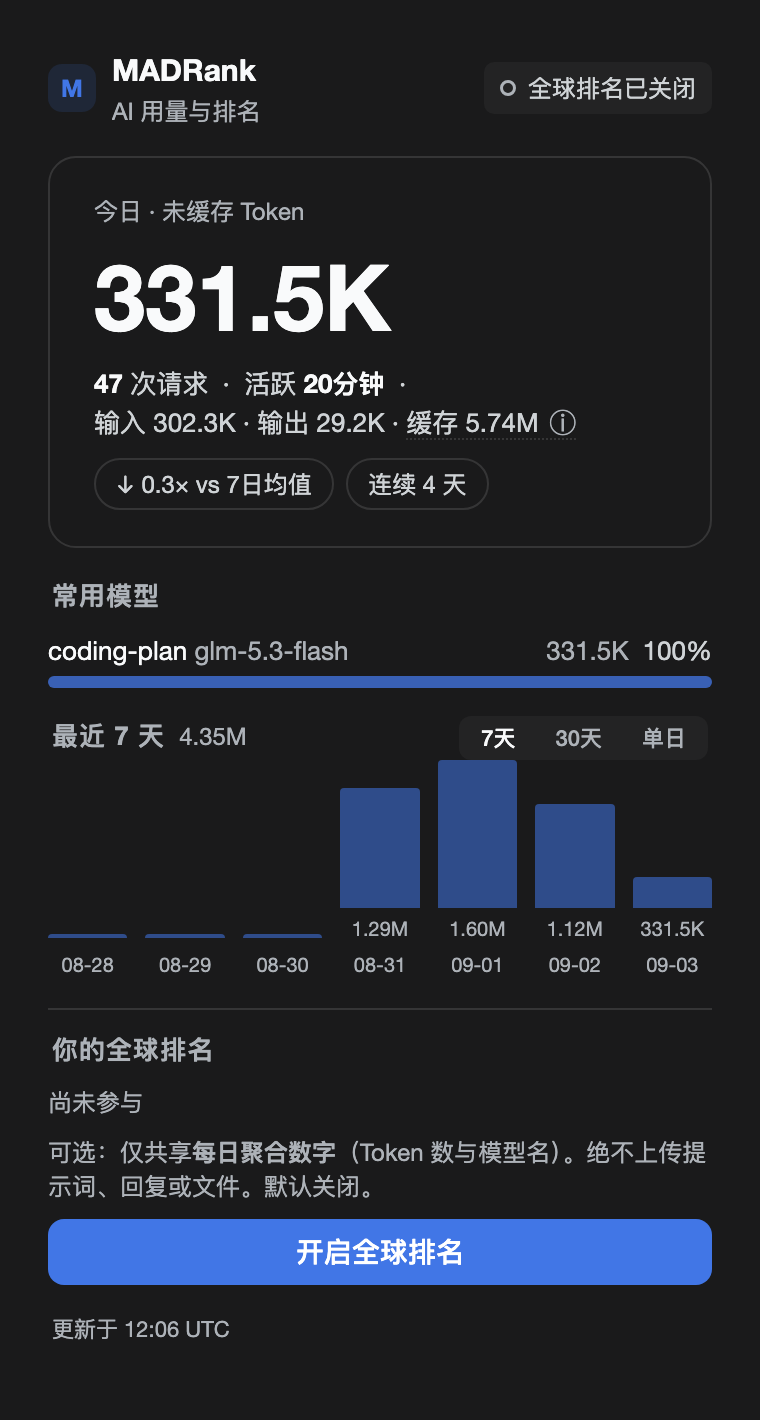
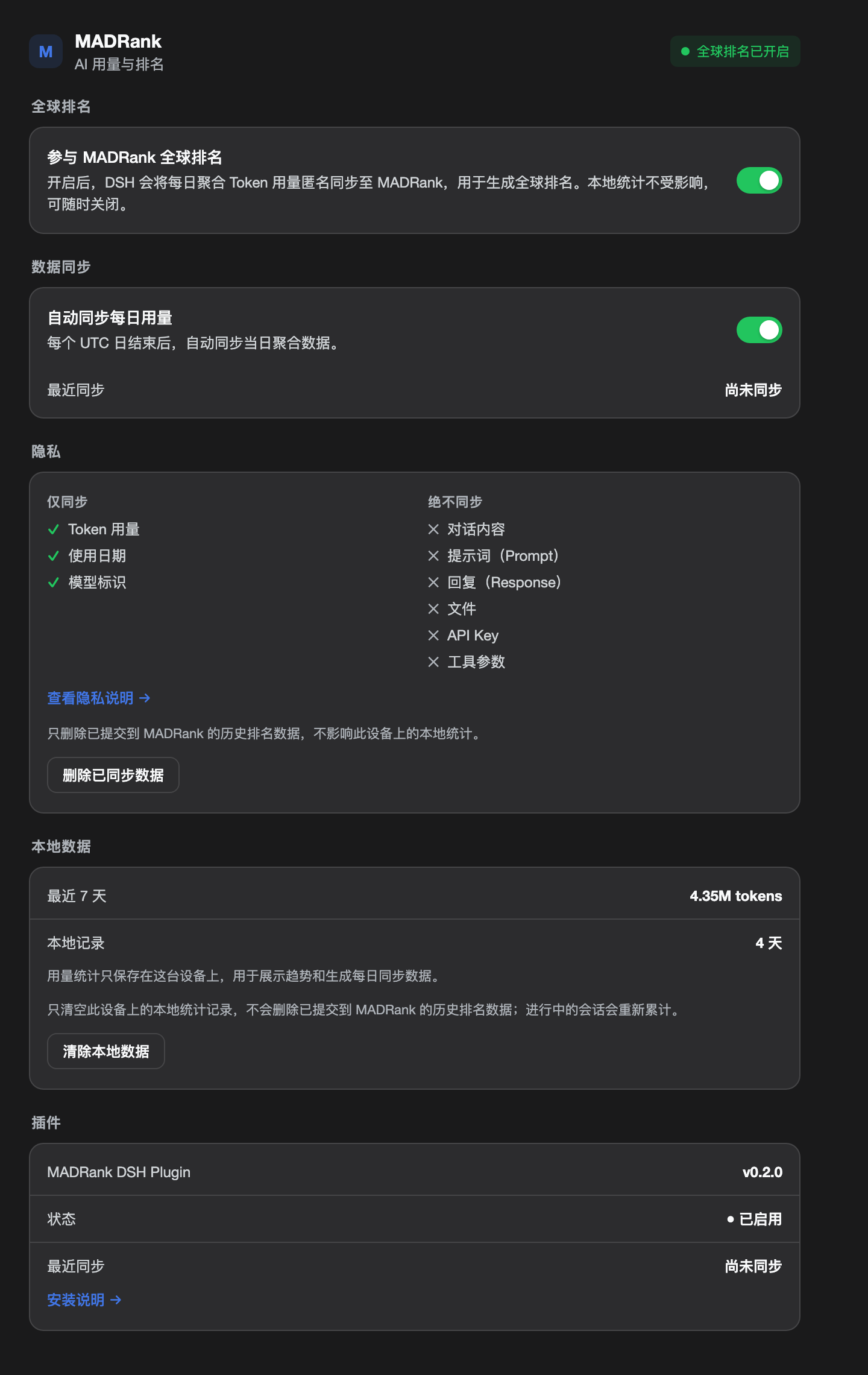
Left: sidebar MADRank card (real local data) · Right: the Settings tab inside the same card
1. Local AI Usage Dashboard (works fully offline, no ranking required)
Data comes from the DSH session projection feed — the plugin never reads DSH's internal database directly.
2. 7-Day Token Race (the core competitive metric)
7-Day Total — your primary tokens over the last 7 UTC days.
Primary Tokens = uncached input tokens + output tokens
Cached Tokens  = cache read + cache write
A note on honesty: the race figure is the full input+output as uploaded (uncached input + cache write + output); cache reads are reported separately and never counted toward the race. "Uncached" on the local dashboard refers to your local primary (uncached input + output) — the two numbers answer different questions, and the card labels both: local figures are marked LOCAL · LIVE, race figures carry the server sync time. This keeps read-cache differences from distorting comparisons while staying truthful about what is counted.
3. Opt-in Global Ranking
Nothing is uploaded by default. Sync only starts after you explicitly enable join the global ranking:
4. One-click Share Card
The share button on the Quick View card turns your rank into a postable card:
https://madrank.ai/share/<shareToken>, viewable from any device by anyone/api/usage/me) right before sharing, so stale local caches never leak stale numbers into your postsSharing uploads no new private data: the share token only addresses your anonymous node on a public leaderboard, and the leaderboard itself is public.
Local tracking and global sync are separated at the architecture level.
Default (offline-capable):
DSH → Local Projection → Local Usage Store → Local Dashboard

After joining the race:
Local Usage Store → Finished UTC Day → Aggregated Usage → MADRank Ingest
Never uploaded: prompts, responses, tool arguments, individual request payloads, same-day usage. Uploaded: daily, per-model aggregated usage only.
Two deletion controls live in the card's Settings tab (both require confirmation):
The anonymous share token is kept in the DSH credential store when the profile provides one, so ~/.madrank/usage/global-rank.json no longer contains it in plaintext (files fall back to the old behavior only when the credential service is absent).
MADRank does not invent a second token-accounting logic. It uses DSH's session projection as the data source and reconciles aggregation against an independent reference token-meter. A real-session reconciliation run:
input        745,120  =  745,120
output       186,324  =  186,324
cache read 26,352,384 = 26,352,384

MATCH ✓
The suite covers streaming replacement, waterfall tool traffic, cross-midnight bucketing and (turn, step) replacement semantics. Goal: stay consistent with DSH's own token meter.
A DSH plugin is mounted from a profile. Two things must both be true, or the plugin silently does nothing:
- the package is declared/installed in the profile (
package.json+node_modules, viadsh plugin … add);- the profile mounts it — a
cordis.patch.ymlinsert entry.The published package ships the Host half compiled to JavaScript (
dist/host/) and the browser half prebuilt (dist/client.js) — consumers need no build step. (Node refuses to type-strip TypeScript insidenode_modules, which is why installed packages must not pointmainat a.tsfile.)
Open the sidebar Plugins page (the plugin manager; Settings → Plugins is a read-only list) and install from one of:
qomob/dsh-madrank@qomob/dsh-madrankThen fully quit and reopen the app (the profile composition is loaded at startup; reloading the page is not enough). If the manager leaves the plugin un-mounted, add the mount entry below, then restart.
desktop, web, …)# GitHub (always the latest `main`)
dsh plugin --profile desktop add github:qomob/dsh-madrank
# …or the published npm package
dsh plugin --profile desktop add @qomob/dsh-madrankdsh plugin forwards to pnpm inside ~/.dsh/profiles/<profile>/, which declares the dependency properly (an undeclared package gets pruned on the next pnpm install).
Then add the mount entry to ~/.dsh/profiles/<profile>/cordis.patch.yml:
- insert:
    - id: madrank
      name: '@qomob/dsh-madrank'
And restart DSH.
git clone https://github.com/qomob/dsh-madrank.git
cd dsh-madrank && npm install && npm run build
dsh plugin --profile desktop add 'link:/absolute/path/to/dsh-madrank'
Use link: not file: (file: copies the package and breaks source sync). With link: the profile loads the built dist/ — run npm run build after source edits, then restart. Add the mount entry and restart as above.
madrankUsage projection registered and settings ns registered: madrank-usage.| Symptom | Check |
|---|---|
| No MADRank entry, no log lines | Mount entry missing from cordis.patch.yml |
| Plugin gone after an unrelated install | Dependency not declared in the profile package.json (re-run dsh plugin … add) |
| "settings ns registered" missing | Profile never restarted, or the app was only reloaded |
| Older UI/copy than this README | npm install of an older version — use the GitHub spec, or upgrade (dsh plugin --profile desktop add @qomob/dsh-madrank@latest) |
| Installed, enabled, but runtime says not running (v0.3.6 or earlier) | That release pointed main at src/index.ts; Node cannot type-strip TS under node_modules. Upgrade to v0.4.0+, which ships compiled dist/host/ JS |
Sidebar → Quick View = VIEW
MADRank card → Settings = CONFIGURE
The MADRank card shows your usage, 7-day trend, model mix and rank (tab 1: AI usage & rank), and its Settings tab controls the join switch, auto-sync, privacy, local/remote deletion and plugin status. The share button opens the share sheet. The card is opened from the sidebar entry between Plugins and Media Desk.
Scan the QR code to join the DSH plugin community — discuss DSH usage, plugin development and best practices:

The WeChat group QR code expires periodically. If it stops working, leave a message in Issues and we will refresh it.
┌──────────────────────┐
│   DSH Session Logs   │
│    Source of Truth   │
└──────────┬───────────┘
           ▼
┌──────────────────────┐
│  sessionProjections  │
│     madrankUsage     │
└──────────┬───────────┘
           ▼
┌──────────────────────┐
│      UsageStore      │
│  local usage cache   │
└──────────┬───────────┘
      ┌────┴─────┐
      ▼          ▼
   Local UI    Daily Sync
                   │
                   ▼
            MADRank Ingest
                   │
                   ▼
           7-Day Token Race
DSH session logs are the source of truth; the plugin reads sessionProjections (never SQLite directly), keeps a rebuildable local cache, and keeps daily sync fully isolated from local statistics. All DSH coupling lives in src/compat.ts — verifiable via npm run verify:dsh.
Integration follows the current official plugin model (cordis-plugin-development references): the bundle declares dsh.bundle.patch; the Host exports apply(ctx, config) with inject plus a schemastery Config, awaits the 0.2.x sessionProjections.register() handle and disposes it on unload, and prefers the official timer service. The Client is a lazy window.__ModuleLoader__ factory that registers two additive slots — settings.section (the configuration page) and sidebar.footer.action (the Quick View entry) — and reads session data through the slot's standard useSessions props.
Non-negotiables: never fork DSH · never read internal SQLite directly · never duplicate token-meter semantics · never create an independent session event pipeline · never upload same-day usage · never upload prompts/responses/tool arguments · never let global sync block local statistics.
Default directory ~/.madrank/usage/ (override with MADRANK_USAGE_DIR): installation-id, usage-store.json, card-snapshot.json, global-rank.json, debug.log. The anonymous identity is a locally generated installation UUID; a new machine means a new identity by default.
npm install
npm test
npm run typecheck
npm run build:client
npm run reconcile -- <events.jsonl>
npm run reconcile:fixture
npm run verify:dsh
npm run preview
TypeScript · React · Zod · Vitest.
Local usage projection, 7/30-day history, top models, streak, Quick View, Settings and the daily aggregated sync protocol are implemented; golden-case and real-traffic reconciliation and DSH compatibility verification pass.
v0.6.0 targets DSH 0.2.2-rc.1 (engines.dsh: >=0.2.2-rc.1 <0.3.0; plugin model: Config + configForms + slot-prop session data). On older DSH builds the browser half waits for activation — upgrade DSH first. The Host syncs daily aggregates to MADRank and publishes the accepted race record through a dedicated client-visible projection (madrankRank).
The MADRank ecosystem goes beyond the DSH plugin:
This project is a community-driven, unofficial project and is not affiliated with DeepSeek AI. "DeepSeek", "dsh", "DeepSeek Harness" and related names and trademarks belong to their respective owners.
MIT © 2026 qomob / MADRank
CLASSIFICATION EVIDENCE
系统优先读取 GitHub Topics,再与站内分类词典和词根规则比对。当前命中: deepseek、deepseek-harness。
morluto
Reverse engineer anything with agents, from app behavior down to native binaries.

deepseek-ai
DeepSeek Harness: Everything is a Plugin.

nexu-io
The 1st Collaborative AI Design Agent Workspace. Local-first and open source. Create motion, prototypes, websites, apps, dashboards, presentations, images, and videos with your team and AI agents. Share work, exchange feedback, and iterate together in one workspace.