模型与 MCP
待识别

rea
morluto
Reverse engineer anything with agents, from app behavior down to native binaries.

qifenglun1/dsh-plugin-rss
Folo-inspired RSS and Atom reader plugin for DeepSeek Harness: subscriptions, categories, tags, full text, search, OPML, feed discovery, and DeepSeek AI summaries, translation, classification, and article Q&A.
PROJECT TOPICS
INSTALL REFERENCE
dsh plugin --profile web add github:qifenglun1/dsh-plugin-rss
该命令指向仓库当前默认分支;尚无绑定当前 commit 的完整验证结果。
PROJECT README

A Folo-inspired RSS and Atom information hub that runs natively inside DeepSeek Harness (DSH). It adds a full three-pane reading panel to the DSH Web GUI, stores everything locally, and uses the Harness model route for DeepSeek-powered summaries, translation, auto-classification, topic-based feed discovery, recommendations, and article Q&A.
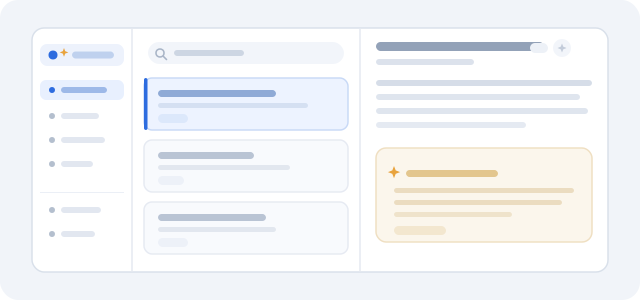
content:encoded, XHTML content, enclosures, media thumbnails, and relative-link resolution.rss_ai agent tool; the panel itself has no brief button.0.2.x with the Web GUI (Desktop or dsh web).See INSTALL.md for the full guide. In short, install it one of three ways:
plugin_manager action=install_bundle target=dsh-plugin-rssplugin_manager install_bundle with the absolute pathWhen the page reloads, click the RSS icon in the sidebar panel rail.
Open Settings → Keyboard shortcuts in the RSS sidebar, or press ?. Single-key shortcuts are ignored while you type in a field or while a dialog is open; ⌘/Ctrl+K still focuses search.
| Key | Action |
|---|---|
j / ↓ |
Next article |
k / ↑ |
Previous article |
Enter |
Open the focused article card |
o |
Open original |
s |
Star / unstar |
b |
Read later / remove |
m |
Mark read / unread |
r |
Refresh all |
/ or ⌘/Ctrl+K |
Focus search |
? |
Show the shortcut help |
Esc |
Close the drawer or clear search; also closes the reader in a narrow window |
index.js                 Host plugin: config, store, API routes, tools, refresh loop
client.js                Browser bundle: main panel + sidebar entry (no build step)
src/config.js            Defaults and configuration normalization
src/util.js              Ids, dates, entities, URL helpers
src/xml.js               Tolerant XML/HTML tree parser
src/feed.js              RSS / Atom / RDF / JSON Feed normalization
src/html.js              Sanitizer, text conversion, readability extractor
src/http.js              Conditional HTTP with timeouts and byte caps
src/store.js             Durable JSON store, ingestion, views, filters, OPML state
src/rank.js              Filters, search scoring, recommendation score
src/discover.js          Topic inference, curated feed catalog, candidate merging
src/ai.js                DeepSeek prompts and one-shot model calls
src/engine.js            Refresh, subscription validation, full text, OPML import
src/api.js               Single operation layer shared by UI and tools
src/tools.js             Eight agent tools
test/ 126 unit, integration, and regression testsThe Host registers three routes inside DSH's authenticated /api bridge:
POST /api/rss.rpc — the ctx.connection.rpc envelope used by the panel.GET /api/rss.state — subscriptions, categories, counts, filters, settings, AI route.POST /api/rss.call — { method, params } dispatched to the shared operation layer.Feed discovery uses the same operation route (discoverTopics, discoverFeeds, feedsAddBatch); it adds no new transport route.
The browser bundle registers into three client slots:
main (key rss) — the three-pane page.sidebar.panellist (id rss) — the RSS icon and label in the panel rail.rss locale namespace with English and Simplified Chinese dictionaries.Both the panel and the agent tools call the same src/api.js methods, so behavior and failures stay aligned.
State lives in $DSH_HOME/rss/data.json (for the desktop profile, ~/.dsh/rss/data.json). Writes are debounced and atomic (temporary file + rename, mode 0600). A corrupt file is moved aside to data.json.corrupt-<timestamp> and a fresh library is created.
Stored records include subscriptions, categories, articles with sanitized HTML, reading state, AI caches, filter rules, and interest weights. Articles above maxArticles are pruned oldest-first, except starred and read-later rows.
aiMaxInputChars) to the configured model route.javascript: URLs are removed, and links open with noopener noreferrer.Configuration belongs to the bundle row in the profile's cordis.patch.yml. The defaults work without configuration.
- insert:
    - id: rss
      name: 'dsh-plugin-rss'
      config:
        refreshMinutes: 30       # 0 disables the background refresh timer
        maxArticles: 3000
        pageSize: 40
        requestTimeoutMs: 25000
        maxFeedBytes: 8388608
        maxPageBytes: 6291456
        fullTextOnRefresh: false # fetch original pages for short entries
        allowPrivateHosts: false # allow loopback/LAN feeds (SSRF-sensitive)
        seedFeeds: true          # curated starter feeds on first run only; Restore default feeds is always available
        aiProvider: ''           # empty inherits the Harness default route
        aiModel: ''              # empty inherits the Harness default route
        aiMaxInputChars: 14000
        translateTo: ''          # empty picks English/Chinese from article language
        autoClassify: false
        autoSummarize: false     # summarize new and opened articles in the background
        refreshOnStart: true
SEED_FEEDS in src/config.js is the single source of truth for the default subscriptions: it seeds a fresh data.json and is exactly what Restore default feeds merges back (missing URLs only; existing rows keep their title, category, tags, and enabled state). The default set is 25 sources: AI (Google DeepMind, OpenAI News, Ahead of AI, Last Week in AI, Hugging Face Blog, Simon Willison’s Weblog, arXiv cs.AI, Google Research), Technology (Hacker News, The Verge, Ars Technica, The GitHub Blog, MacRumors, selfh.st, Hacker News Best, The Pragmatic Engineer, InfoQ, TechCrunch, MIT Technology Review), Science (Huberman Lab), and Recommended (Vox, Trump’s Truth, BBC 中文, NPR News, The Guardian World).
The Settings panel stores per-user overrides for the AI route, translation/answer language, refresh interval, page size, auto-summarization, and auto-classification in the data file. A non-empty aiProvider/aiModel in the bundle configuration wins over the panel.
refreshMinutes, pageSize, autoClassify, autoSummarize, and translateTo seed a fresh library. Once data.json exists, change them in the panel; editing the bundle configuration again does not override the stored values.
Requests to loopback, private, link-local, and cloud metadata hosts are rejected by default so a malicious OPML file or prompt-injected agent cannot make the plugin fetch internal services. Set allowPrivateHosts: true to subscribe to feeds on your own LAN.
| Tool | Purpose |
|---|---|
rss_feeds |
List, add, update, or remove subscriptions; restore defaults, prune invalid feeds, or clear all (confirm required) |
rss_discover |
List inferred topics, recommend verified feeds for topics, or add explicitly selected URLs |
rss_articles |
List or search articles by view, feed, category, tag, or text |
rss_article |
Read one article, optionally fetch full text and mark read |
rss_refresh |
Refresh one feed or all enabled feeds |
rss_mark |
Change read/star/read-later state, or mark a view read |
rss_ai |
Summarize, translate, classify, ask, brief, recommend, or list models |
rss_filters |
List, add, or remove content filters |
A system-prompt section warns that feed content is untrusted data.
node --test test/*.test.jsTests cover the XML parser, all four feed formats, sanitization and extraction, the store and persistence, ranking and filters, OPML, topic inference and the curated catalog, AI prompt parsing with a fake model, the shared operation layer with a mocked network, host route/tool wiring, bulk-mark undo, and client render/locale checks.
There is no build step: client.js is a plain window.__ModuleLoader__ bundle and the Host is ESM JavaScript.
http: or https:.link: install reports not-updatable and shows nothing. The notice is panel-scoped: it appears at the top of the article list when the RSS panel loads, so it is not visible from other DSH panels. A panel load rechecks at most every 10 minutes, and View update asks again when the panel returns, so an installed update clears the notice.CLASSIFICATION EVIDENCE
系统优先读取 GitHub Topics,再与站内分类词典和词根规则比对。当前命中: deepseek-harness。
morluto
Reverse engineer anything with agents, from app behavior down to native binaries.

deepseek-ai
DeepSeek Harness: Everything is a Plugin.

nexu-io
The 1st Collaborative AI Design Agent Workspace. Local-first and open source. Create motion, prototypes, websites, apps, dashboards, presentations, images, and videos with your team and AI agents. Share work, exchange feedback, and iterate together in one workspace.