

其他
完整应用

deepseek-harness
deepseek-ai
DeepSeek Harness: Everything is a Plugin.
PROJECT TOPICS
INSTALL REFERENCE
dsh plugin --profile web add github:qianTouchFish/dsh-deepseek-balance
该命令指向仓库当前默认分支;尚无绑定当前 commit 的完整验证结果。
PROJECT README

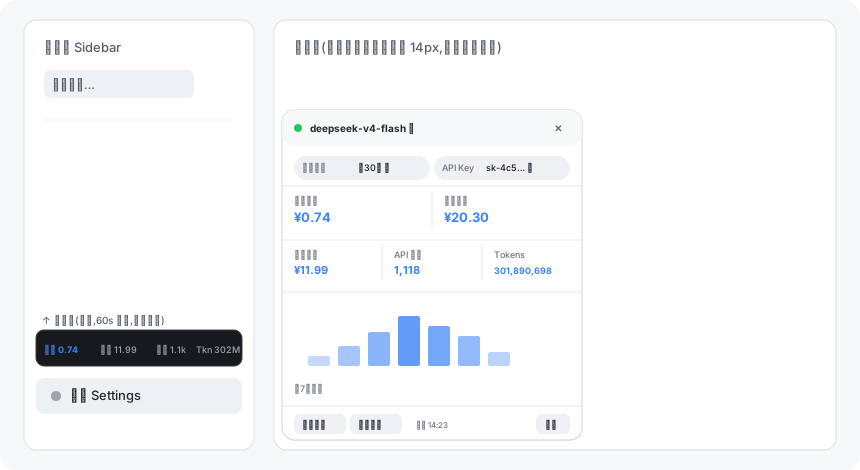
一个 DeepSeek Harness (DSH) Web 界面插件:在侧边栏"设置"按钮正上方常显 DeepSeek API 用量条(余额 / 消费金额 / API 请求 / Tokens),点击展开完整卡片——按模型、按时间维度查看消费,官方累计消费,模型选择器旁实时显示高峰/空闲计费时段徽标,支持浅色/深色主题,每分钟自动刷新。
A DeepSeek Harness (DSH) web GUI plugin: an always-visible DeepSeek API usage strip above the Settings button in the sidebar (balance / spent / requests / tokens), expanding into a full card — per-model and per-period usage, official cumulative spend, a live peak/off-peak pricing window badge beside the model selector, light/dark theme support, auto-refresh every minute.
DEEPSEEK_API_KEY,必需):在「设置 → 模型」页面填写;DEEPSEEK_PLATFORM_TOKEN,可选):解锁官方 Tokens / 请求次数 / 按模型分类 / 官方累计消费;可安装后在卡片内点【自动获取】一键提取;# 方式一:从 GitHub 安装(推荐)
dsh plugin --profile web add github:qianTouchFish/dsh-deepseek-balance
# 方式二:完整 git URL
dsh plugin --profile web add git+https://github.com/qianTouchFish/dsh-deepseek-balance.git
# 方式三:本地目录(开发调试)
cd dsh-deepseek-balance && dsh plugin --profile web add .安装后:
dsh web)并刷新页面;DEEPSEEK_API_KEY;需要官方用量数据时,打开卡片 → 底部【自动获取】提取平台令牌(凭据服务热加载,无需重启)。点击【自动获取】提示"未找到 userToken"怎么办?
请依次检查:① 本机安装的是 Chrome / Edge / Chromium 且已登录 https://platform.deepseek.com;② 未使用隐身 / 无痕模式;③ 登录所用的浏览器配置为默认配置(Default)或 Profile N。仍失败可手动获取:浏览器登录平台 → F12 → Console 执行 JSON.parse(localStorage.getItem('userToken')).value,把输出追加到 ~/.dsh/.credentials.yaml:
DEEPSEEK_PLATFORM_TOKEN: <那串令牌>CLASSIFICATION EVIDENCE
系统优先读取 GitHub Topics,再与站内分类词典和词根规则比对。当前命中: 无有效分类标签。
deepseek-ai
DeepSeek Harness: Everything is a Plugin.

anywhere-labs
为 DeepSeek Harness (DSH) 插件生态打造的现代化桌面端解决方案。万物皆「插件」,桌面本身也是「插件」。

walkinglabs
Harness engineering beginner tutorial, from 0 to 1