
模型与 MCP
待识别

rea
morluto
Reverse engineer anything with agents, from app behavior down to native binaries.
PROJECT TOPICS
INSTALL REFERENCE
dsh plugin --profile web add github:publicwww-com/doublekeys
该命令指向仓库当前默认分支;尚无绑定当前 commit 的完整验证结果。
PROJECT README
An on-screen keyboard for the DeepSeek Harness web composer — a full keyboard that lives inside the chat panel, built for phones and tablets. No predictions, no autocorrection, no T9, no automatic capitalisation: what you tap is what you get, and Shift is a manual sticky key.


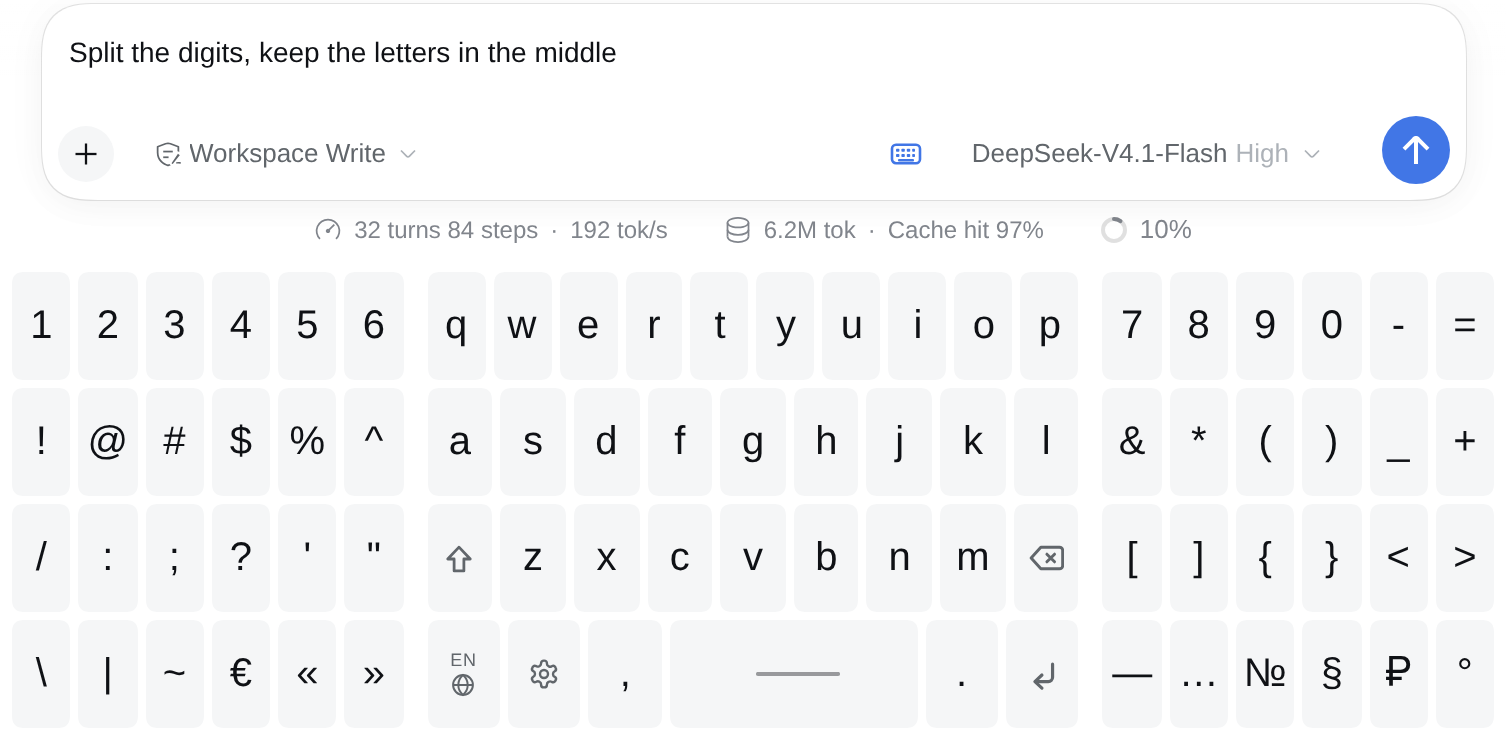
On a phone the system keyboard covers half the screen and keeps fighting the page: autocorrect rewrites words,
autocapitalisation turns i into I, and the composer loses the caret every other tap. doublekeys is a
plugin-side keyboard: it renders its own keys, types into the composer through the conversation plugin's
public editing API and suppresses the system keyboard while it is open.
It is also built for wide screens: on a tablet the keyboard can split into two halves with the digits on the sides, so both thumbs stay on the edges.
aaaa or a long delete take one gesture.doublekeys is a regular DSH client-plugin bundle: a package.json with a dsh.client block and a plain
browser module, no build step.
Through the in-app Plugin Manager (recommended): install the bundle from this directory, for example with
plugin_manager → install_bundle and the path to the clone. That adds the dependency to the profile and puts
doublekeys into dsh.profile.bundles, so the web client picks it up.
By hand, in a profile:
cd ~/.dsh/profiles/web
pnpm add /path/to/doublekeys          # or: npm link /path/to/doublekeys
then add the bundle name to the profile package.json:
{
  "dsh": {
    "profile": {
      "bundles": ["@deepseek-ai/dsh-base", "@deepseek-ai/dsh-web-app", "doublekeys"]
    }
  }
}
Reload the panel (or restart dsh web). The keyboard toggle appears in the composer's tools row.
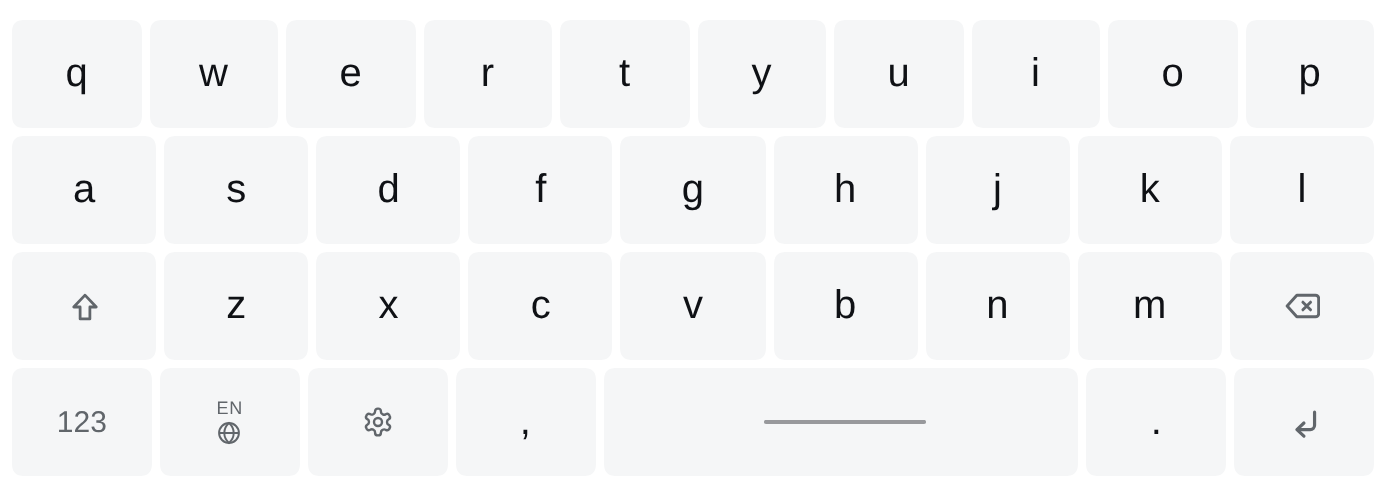
| Arrangement | What you get |
|---|---|
| Always one | one keyboard with two pages: letters, and digits + symbols. Never duplicates, ignores the width |
| Split the digits (default) | three blocks: the two halves of the numeric block on the edges, the letters in the centre |
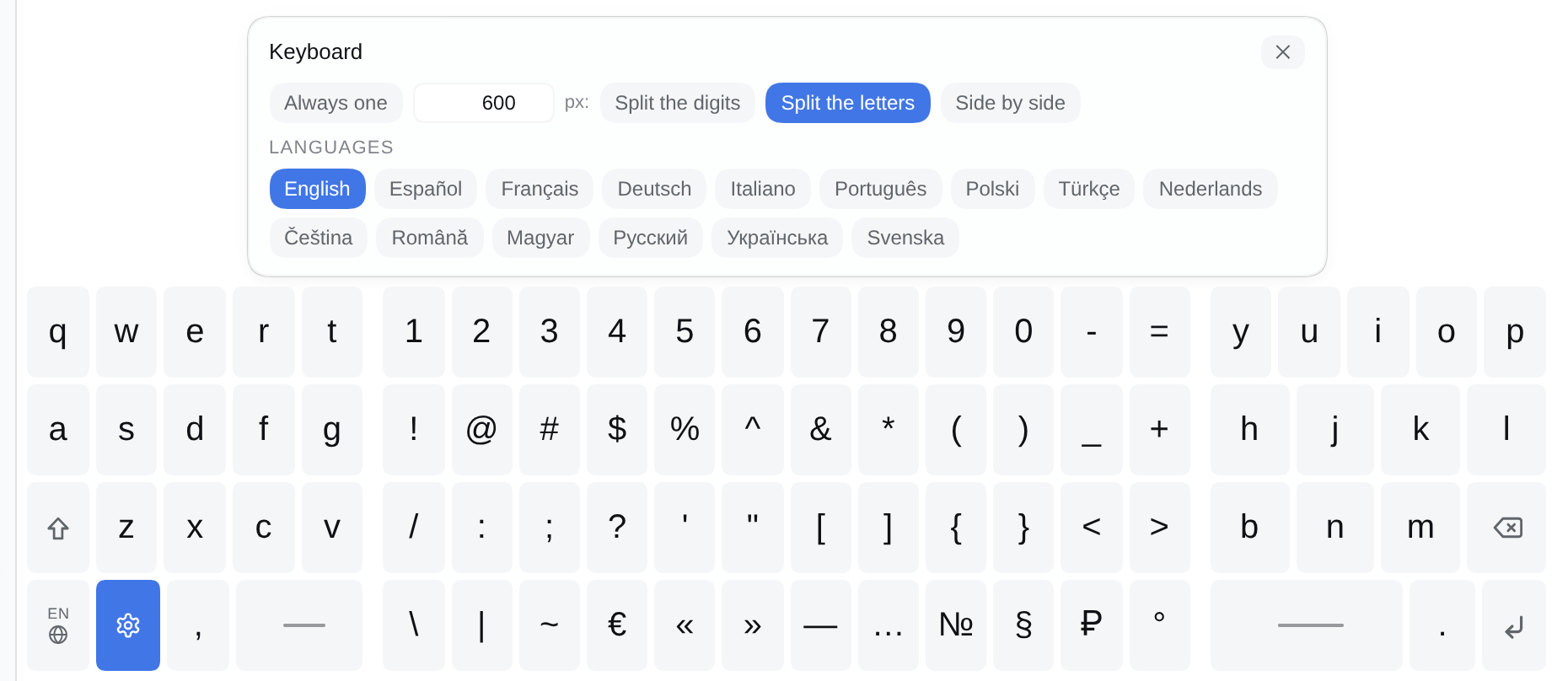
| Split the letters | three blocks: the left half of the letters, the numeric block in the centre, the right half. Shift stays left, Backspace right, and the space bar is on both sides |
| Side by side | two blocks: digits on the left, letters on the right |
The three split arrangements obey the split width setting (600 px by default, 320–1600): narrower than that, the panel falls back to one keyboard with pages.
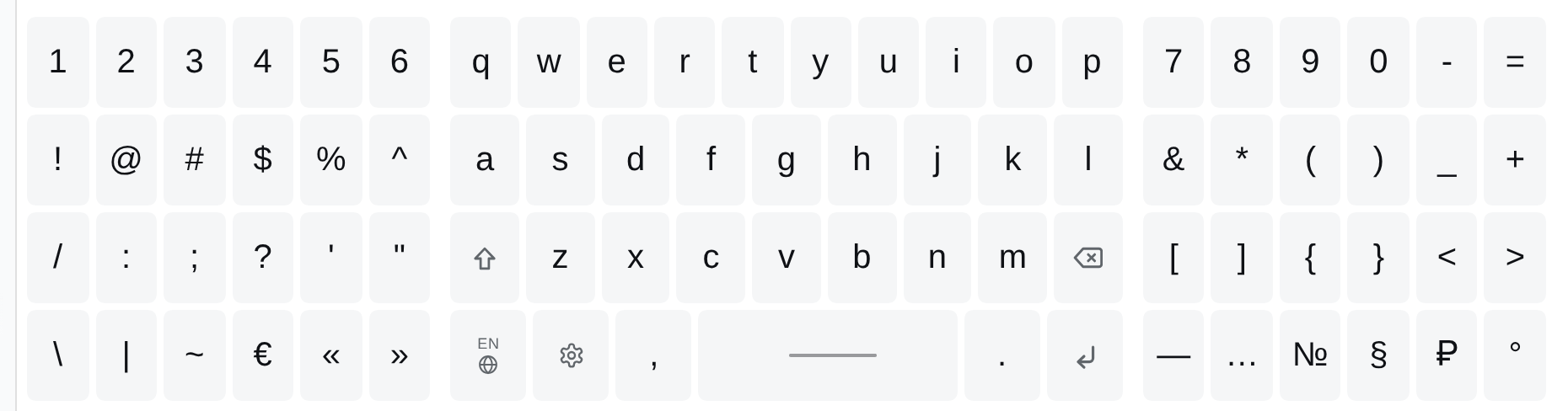
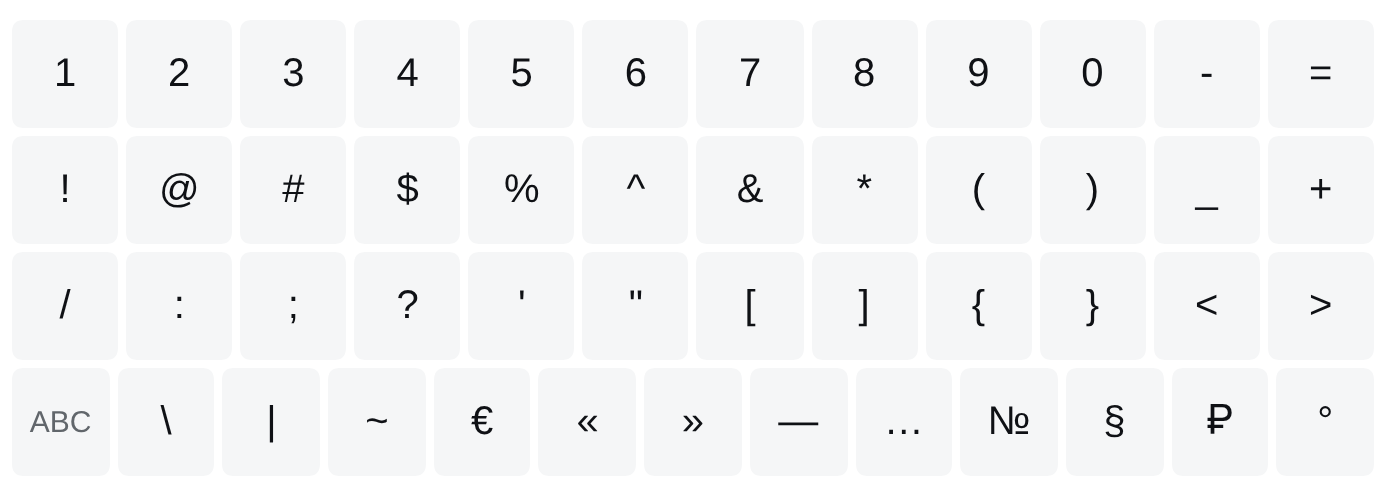
48 characters in four rows of twelve: the PC number row 1…0 - =, the same row with Shift
(! @ # $ % ^ & * ( ) _ +), then / : ; ? ' " [ ] { } < > and \ | ~ € « » — … № § ₽ °. Dot and comma live
on the letters layout, where they are typed far more often.
English is on by default; pick more in the settings. Layouts follow the national order of the letters (QWERTY, AZERTY, QWERTZ, ЙЦУКЕН) and every language stays at four rows — the national letters are real keys, appended to the spare places of the three letter rows, and whatever does not fit goes to the bottom row next to the comma (taking width from the space bar). On a phone the rows hold fewer characters and the rest are reachable from the bottom row.
| Code | Layout | Notes |
|---|---|---|
en |
English | QWERTY |
es |
Español | ñ on the letters, á é í ó ú ü as keys |
fr |
Français | AZERTY, é è ê ë à â ç î ï ô ù û ÿ as keys |
de |
Deutsch | QWERTZ, ä ö ü on the letters, ß as a key |
it |
Italiano | à è é ì ò ù |
pt |
Português | á à â ã é ê í ó ô õ ú ç |
pl |
Polski | ą ć ę ł ń ó ś ź ż |
tr |
Türkçe | ğ ü ş i ö ç, dotless ı; Shift gives İ |
nl |
Nederlands | é ë ï ö ü |
cs |
Čeština | QWERTZ, á č ď é ě í ň ó ř š ť ú ů ý ž |
ro |
Română | ă â î ș ț |
hu |
Magyar | QWERTZ, á é í ó ö ő ú ü ű |
ru |
Русский | ЙЦУКЕН |
uk |
Українська | ЙЦУКЕН with і ї є ґ |
sv |
Svenska | å ä ö on the letters, é ü as keys |
The settings panel is one row plus the language set:
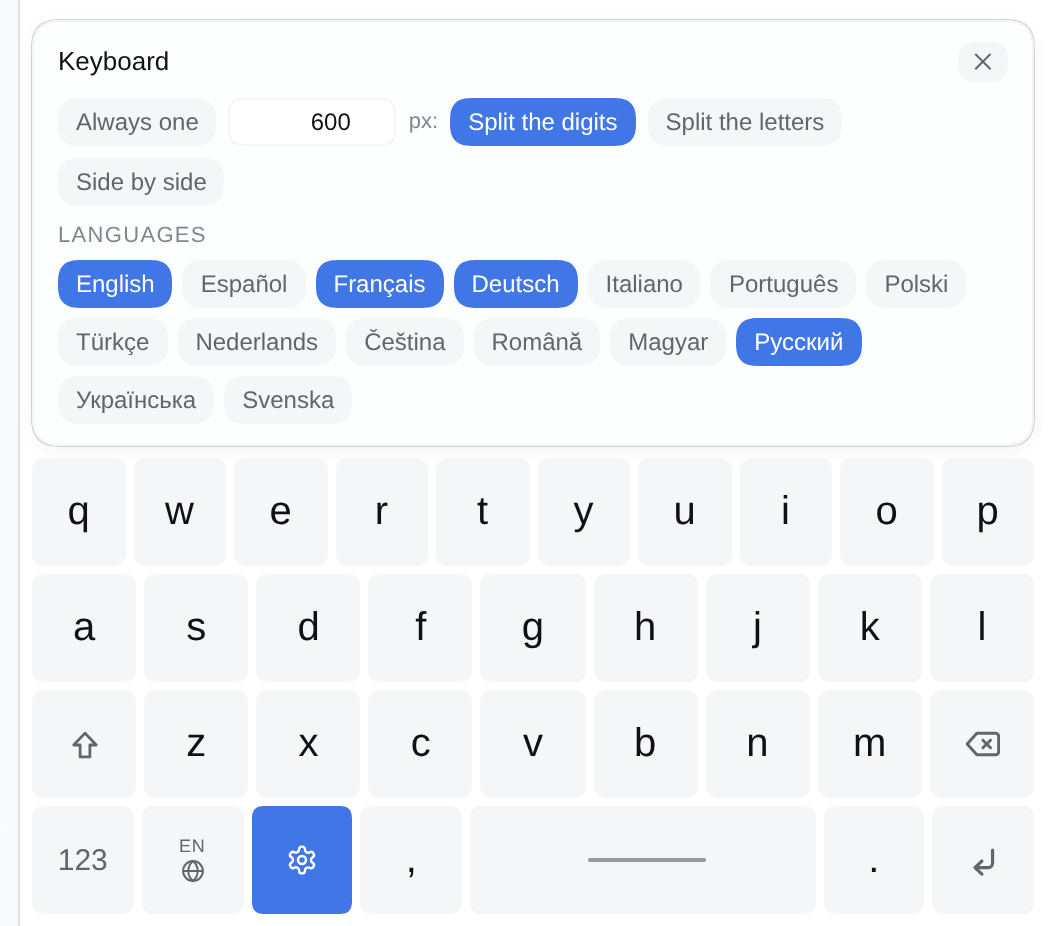
px: · Split the digits · Split the letters · Side by sideinputActions face, calls captureInsertion() and insertText(). Backspace is the same call with
an empty string over the previous character; the line-break key inserts \n, which the composer renders as a
real line. Sending stays the composer's own button — the keyboard never sends a message.inputmode="none" and autocomplete hints off. If a device still answers a focus by raising its own
keyboard (the visual viewport shrinks by more than a quarter within 400 ms), the plugin stops focusing and
keeps working without the caret — set doublekeys.noFocus to false in localStorage to re-enable it.root.focus() plus editor.focus(). A word is picked
with caretRangeFromPoint; on touch the composer's click can arrive after pointerup, so the range is
re-applied after the click too.ResizeObserver; slot anchors that are display: contents are skipped.| Key | Meaning |
|---|---|
doublekeys.open |
is the keyboard visible |
doublekeys.lang |
current layout |
doublekeys.langs |
enabled layouts (JSON array) |
doublekeys.mode |
arrangement |
doublekeys.breakWidth |
split width in px |
doublekeys.noFocus |
focus disabled after a device fought the plugin |
@deepseek-ai/dsh-web-app) with @deepseek-ai/dsh-client-ui-conversation, any recent
version that exposes the conversation.input.dock slot.client.js the whole keyboard: data, rendering, typing, selection, styles (plain ES module, no build)
index.js host half — intentionally empty
cordis.patch.yml puts the package into a profile so the client roster sees dsh.client
locale/*.json strings for the plugin manager and for the keyboard
icon.svg the plugin iconEditing client.js is picked up by the client HMR of a running panel without a restart or a reload. Turn the
feature off without uninstalling it:
- id: doublekeys
disabled: trueMIT © PublicWWW Team
CLASSIFICATION EVIDENCE
系统优先读取 GitHub Topics,再与站内分类词典和词根规则比对。当前命中: deepseek-harness。
morluto
Reverse engineer anything with agents, from app behavior down to native binaries.

deepseek-ai
DeepSeek Harness: Everything is a Plugin.

nexu-io
The 1st Collaborative AI Design Agent Workspace. Local-first and open source. Create motion, prototypes, websites, apps, dashboards, presentations, images, and videos with your team and AI agents. Share work, exchange feedback, and iterate together in one workspace.