
模型与 MCP
待识别

rea
morluto
Reverse engineer anything with agents, from app behavior down to native binaries.
PROJECT TOPICS
INSTALL REFERENCE
dsh plugin --profile web add github:po-et/dsh-har-triage
该命令指向仓库当前默认分支;尚无绑定当前 commit 的完整验证结果。
PROJECT README
Offline network evidence for DeepSeek Harness. Find failed and slow browser requests without handing the agent your URLs, cookies or response bodies.
浏览器网络排障插件:读取本地 HAR,生成可回查原始请求索引的离线诊断报告。默认不把网址、请求头、Cookie、参数值或正文带进报告和 AI 工具结果。
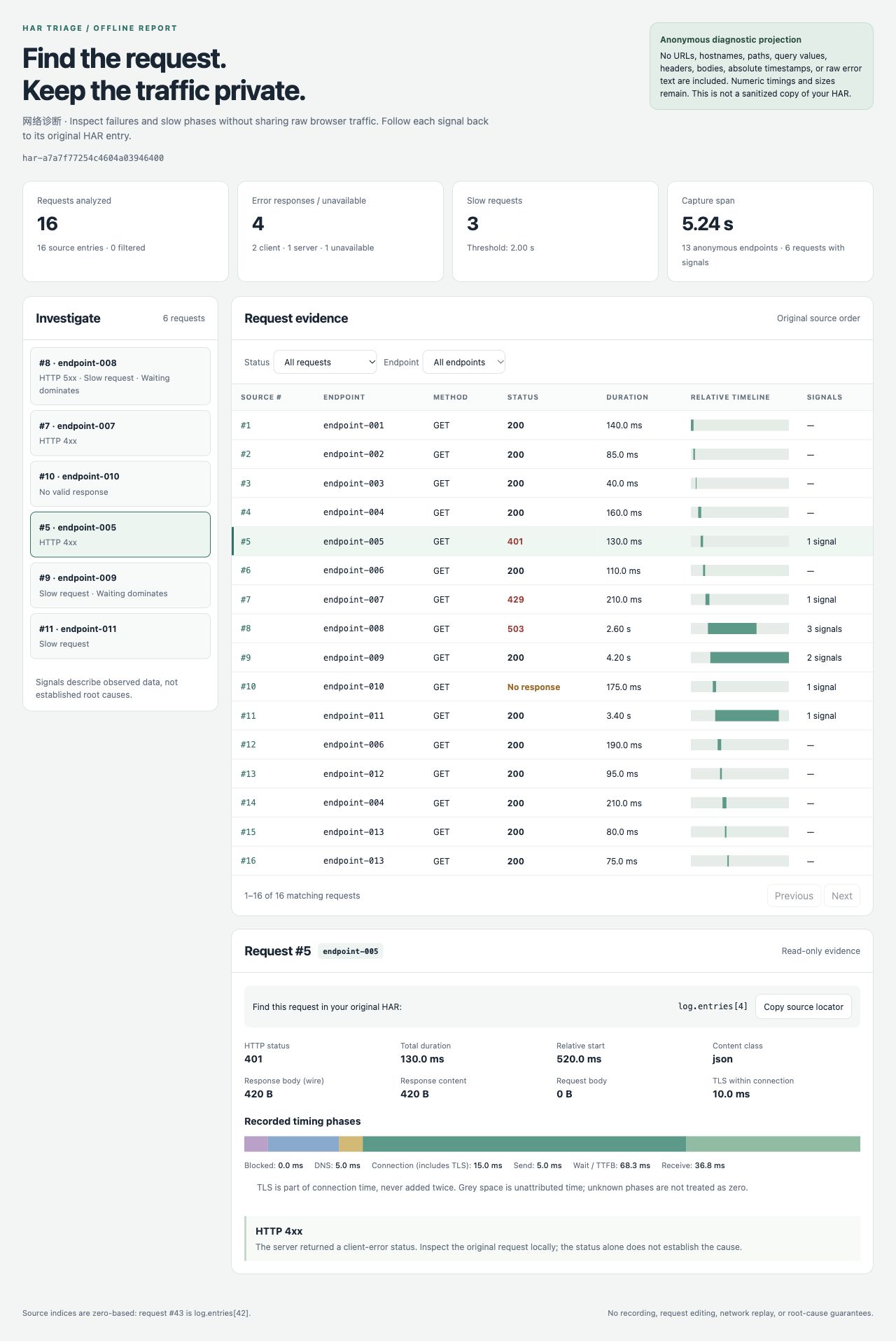
The screenshot uses the bundled synthetic scenario, not real browser traffic.
Request #43 corresponds to log.entries[42] in your original HAR. Endpoint aliases deliberately do not reveal names. Keep the original capture private and use its index to look up the actual request locally.
Node 24.9+ is required. Install the prebuilt bundle into your chosen profile:
dsh plugin --profile YOUR_PROFILE add https://github.com/po-et/dsh-har-triage/releases/download/v0.1.2/dsh-har-triage-0.1.2.tgz
dsh --profile YOUR_PROFILE --dump-config
Version 0.1.2 adds explicitly tested compatibility with Harness 0.2.1-rc.4 and 0.2.2-alpha.2, verified on October 28, 2026, while retaining 0.2.1-rc.2 and 0.2.1-rc.3. Older 0.2.0-rc.2 and 0.2.1-alpha.2 peers remain accepted based on the original release's tests; they are not part of the current CI matrix.
The configuration should contain the har-triage row. A configuration dump alone does not establish runtime compatibility. Start that profile, put your HAR inside its session workspace, and ask:
Inspect capture.har with har_triage. Save reports in a new har-review directory. Explain the measured evidence and cite the original HAR entry indexes. Do not guess root causes.
Tool arguments:
{"input":"capture.har","outputDir":"har-review","slowMs":2000}The tool uses Harness filesystem and sandbox services. It requires write permission to create the reports and refuses input/output paths outside the session workspace. Existing report files are never overwritten. Uninstall with dsh plugin --profile YOUR_PROFILE remove dsh-har-triage.
The CLI and analysis/report modules use Node built-ins only. From a source checkout:
node src/cli.js capture.har --out new-report-directory --slow-ms 2000Open new-report-directory/report.html. The output directory must not exist. The original capture is unchanged.
For a reproducible synthetic example:
npm run demoThis creates a new directory under artifacts/ with a deliberately synthetic capture and its report. It is not evidence of real browser traffic or real users.
503 means the capture records a server-error response. status: 0 means it did not record a valid HTTP response. Neither identifies a failing service, proves CORS, or proves an expired token. A high wait/TTFB share is an observation, not proof that the backend or database is slow.
Start offsets include submillisecond differences and are expressed in relative milliseconds. Absolute source timestamps are never included in the report.
Unknown phase timings and byte sizes remain -1, displayed as “Unknown.” TLS is part of the HAR connection timing and is not added a second time. Contradictory phase durations are flagged; the report hides misleading proportions.
Ollama's application/x-ndjson streaming responses are classified as JSON. This is a MIME-based content category, not validation of the response body; model output remains excluded from reports.
Retained: source entry index, sequential endpoint alias, controlled method/status/content classes, relative offsets, numeric durations/sizes, and fixed diagnostic codes. Aliases group the same method/origin/path within one capture; query strings and fragments do not affect grouping.
HTTP method identity is case-sensitive: GET and get receive separate aliases. Only the allowlisted uppercase methods receive named display values; all other method tokens appear as OTHER. Private method tokens are used only for grouping and are not included in reports, tool evidence or report ID hashes.
Removed: complete URLs including origins and paths, query values, headers, cookies, request/response bodies, page titles, initiator data, IP addresses, absolute timestamps, extension fields, raw error text, and the original file digest. The report ID hashes only the retained projection. Arbitrary source strings are not copied to reports or tool evidence.
This is a minimal diagnostic projection, not a scrubbed HAR, an anonymization guarantee, or a replacement for reviewing an artifact before sharing it. Status patterns, sizes, timing, request counts and grouping can still identify an application. See SECURITY.md.
1.2, UTF-8, at most 16 MiB and 10,000 entries. Invalid supported entries fail with fixed errors rather than silently truncating the evidence.npm ci --ignore-scripts
npm test
npm run smoke:host
npm run smoke:profile -- /absolute/path/to/node_modules/@deepseek-ai/dsh
npm pack --dry-runThe 60 tests cover actual CLI subprocesses, controlled output and failure text, input limits, phases, original-file preservation, and real Cordis tool dispatch/filesystem/sandbox/Loader integration. CI runs them on Node 24 and 26. smoke:host uses a real service composition; smoke:profile requires pnpm on PATH, packs this checkout, installs its tarball with the specified Harness CLI into a fresh temporary Profile, boots it with runProfile, and dispatches har_triage. Test files and Profiles are retained under the OS temporary directory for inspection.
The packed bundle was installed and exercised on Harness 0.2.1-rc.4 and 0.2.2-alpha.2, in addition to the prior rc.2/rc.3 acceptance. The alpha host uses its new batch tool-execution API; the plugin itself is unchanged. Source bytes were unchanged; output omitted the synthetic canary; overwrite and workspace-escape attempts were refused. HMR is disabled only in the temporary Profiles. CI and the release workflow repeat these checks on all four versions. No LLM or real credentials are used. These synthetic checks establish the tested runtime behavior; they are not evidence of real-user usefulness.
Browser checks covered status filtering, signal-to-request navigation, correct source locators, no console errors, and a 390-pixel layout without page-level overflow. The demo and regression captures are synthetic; real-user usefulness is not yet validated.
net-debug is an existing Harness HTTP client with history, replay and HAR export. harlite already offers extensive HAR analysis, SQL, waterfall and HTML reporting. This plugin does not replace those tools: its narrower purpose is a Harness-native, no-external-binary, allowlisted evidence path for agent-assisted debugging.
MIT licensed.
CLASSIFICATION EVIDENCE
系统优先读取 GitHub Topics,再与站内分类词典和词根规则比对。当前命中: deepseek。
morluto
Reverse engineer anything with agents, from app behavior down to native binaries.

deepseek-ai
DeepSeek Harness: Everything is a Plugin.

nexu-io
The 1st Collaborative AI Design Agent Workspace. Local-first and open source. Create motion, prototypes, websites, apps, dashboards, presentations, images, and videos with your team and AI agents. Share work, exchange feedback, and iterate together in one workspace.