
其他
完整应用

deepseek-harness
deepseek-ai
DeepSeek Harness: Everything is a Plugin.
PROJECT TOPICS
PROJECT README
English | 简体中文
Prerequisites: DSH (DeepSeek Harness) installed, with dsh, pnpm, and git available in your terminal. Copy this command to download and install 0.1.11 directly from GitHub Releases:
dsh plugin --profile web add https://github.com/pioneer666-user/dsh-archify-manage/releases/download/v0.1.11/specdev-dsh-archify-manage-0.1.11.tgzRestart DSH, then click 「流程图管理」 (diagram manager) → choose a workspace in the sidebar. The project opens in a new tab using your DSH login session. No project path to configure.
Download the 0.1.11 package · View Releases
The command requires the named package asset to be published in the
v0.1.11Release. Verified host environment: Windows · DSH 0.1.6-alpha.2 · web profile.
Stop the running DSH instance, run these commands in order, then start DSH again:
dsh plugin --profile web remove @specdev/dsh-archify-manage
dsh plugin --profile web add https://github.com/pioneer666-user/dsh-archify-manage/releases/download/v0.1.11/specdev-dsh-archify-manage-0.1.11.tgz
Removing and reinstalling ensures the old plugin files are replaced. Your diagrams and Git snapshots stay in your project repository.
When you join a project, you want to understand its business areas, follow a workflow, find out why a step behaves as it does, and locate the implementation behind it.
SpecDev connects the business directory, interactive diagrams, node explanations, and source evidence in one reading path:
Project → Business → Workflow → Node → Source
It is a DSH plugin, published as @specdev/dsh-archify-manage, that uses Archify to render workflow diagrams. Start with the overview, then open a node to read its explanation alongside the implementation. Switch to a saved design or implementation version to revisit the diagram and its evidence at that point.
This plugin grew out of an exploration of AI-assisted development: giving requirements discussions, implementation, and review an accessible reading surface with traceable sources. This repository contains the plugin's open-source code.
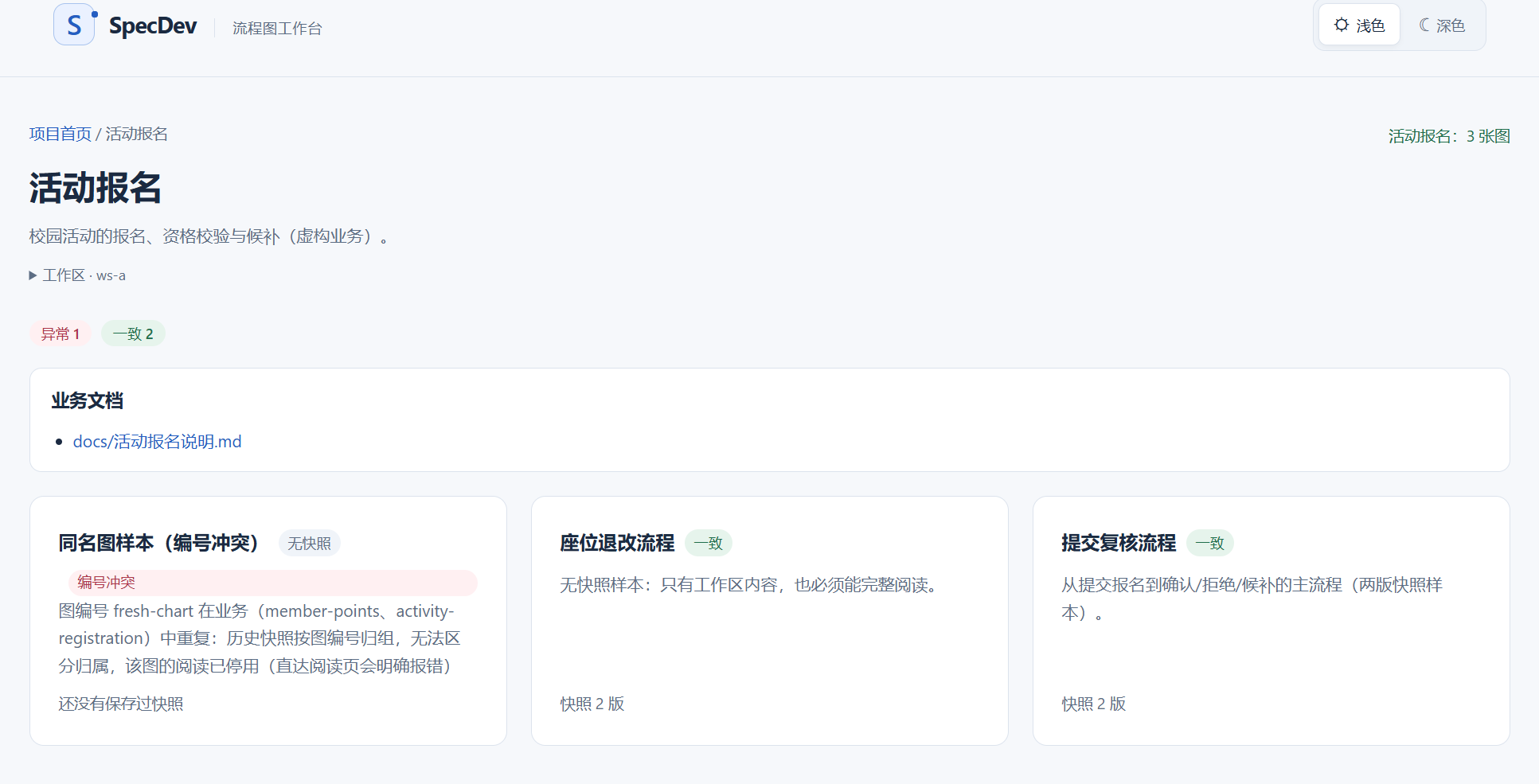
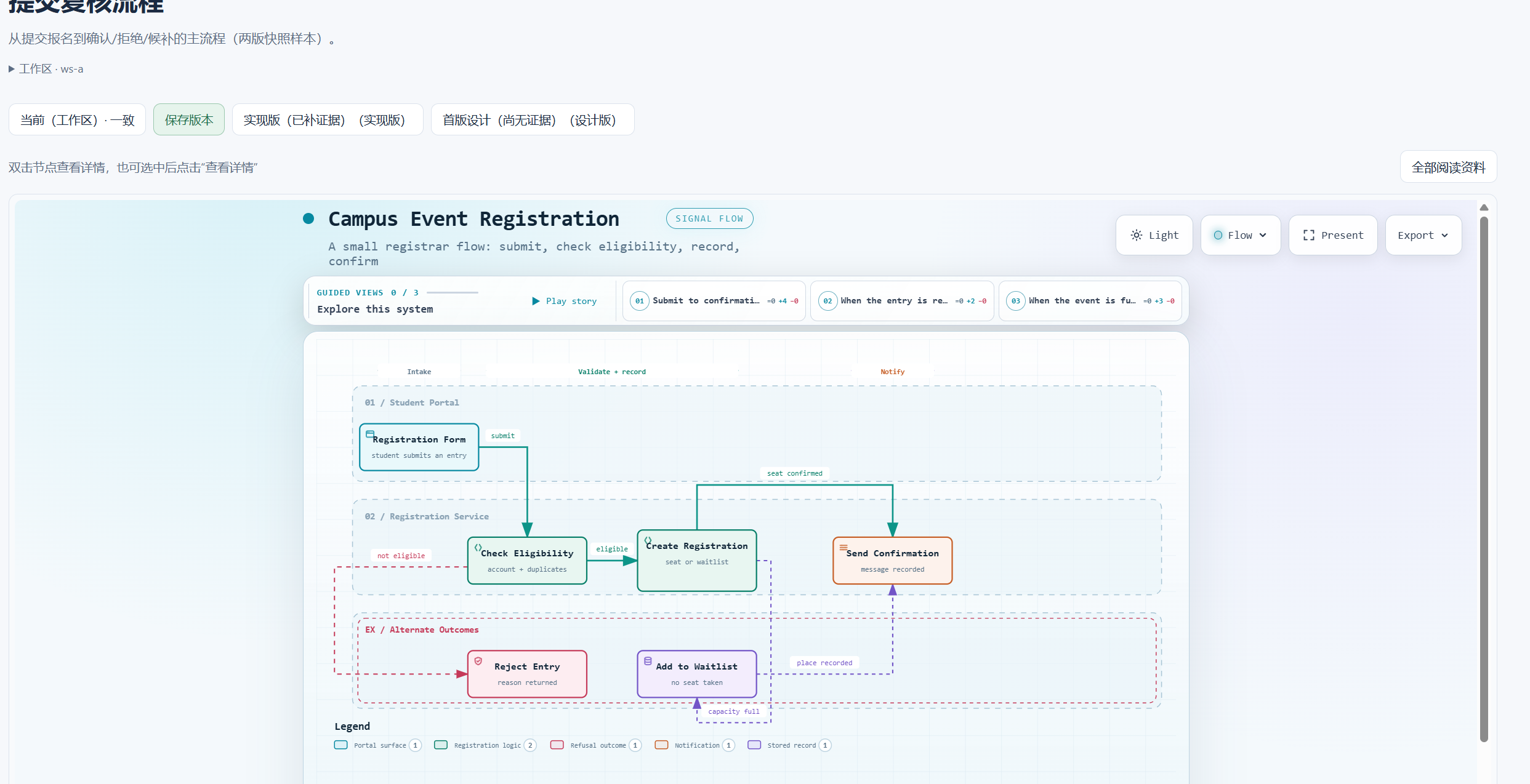
These screenshots show a fictional campus services project. The sample deliberately includes invalid data to demonstrate warnings for duplicate diagram IDs, missing material, and other problems. The current interface is in Chinese.
The project introduction, business count, and diagram count share one overview. Business entries take you further into the project. Management pages support light and dark themes and remember your preference.

Each business groups its introduction, document links, and diagrams. Diagram cards show snapshot counts and current status, with problems called out directly.
An interactive workflow diagram and a version bar share the reading page. Read the current working tree or return to a saved design or implementation version.
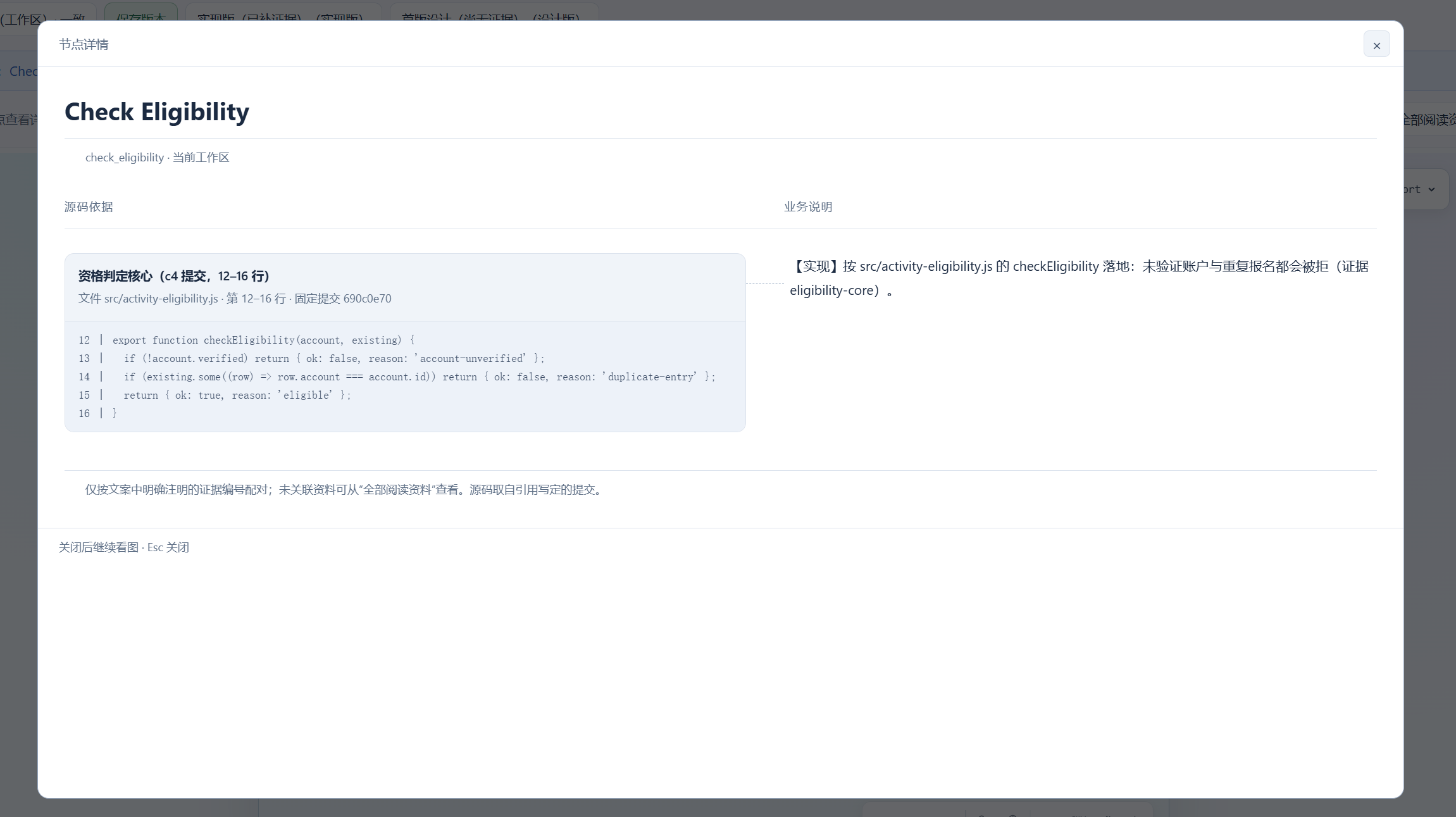
Double-click a node to open its details, or select it and use 「查看详情」 (view details) outside the diagram. Source excerpts align with their explanation groups. Close the dialog to continue with the same diagram. 「全部阅读资料」 (all reading material) keeps the full document and any unpaired references accessible.
| Capability | How it works |
|---|---|
| Multiple workspaces | Choose a workspace from the DSH sidebar; each page stays bound to that project |
| Business showcase | Open 「业务展示」 from the home page and switch between list, star-map, and sphere views |
| Historical reading | Use the version bar to read that version's diagram, node explanations, and evidence manifest |
| Named versions | Register a name, stage, and description for committed diagram content |
| Bundled AI skill | archify-maker provides guidance for design, implementation, evidence review, and later changes; it registers with DSH when the plugin loads |
The management UI's only write action is saving a version: it adds an annotated Git tag without changing your project's files, branches, or commits. The bundled skill guides an AI in creating or modifying project files within the scope you authorize.
docs/archify/ data are ready to browse. For a project without it, ask the AI in DSH to use the bundled archify-maker skill to create diagrams and explanations from your requirements.Zero configuration means you do not need to set the plugin's project path manually. The plugin reads existing diagram files; installation does not automatically turn an arbitrary code repository into diagrams.
In a DSH conversation for the target project, describe the business you want to work on. For example:
Use archify-maker to create the business specification, workflow diagram, and node explanations for this project's event registration flow, and register them under docs/archify. Confirm the business rules with me first. Mark unimplemented behavior as design, and leave source evidence empty until verified.
The skill separates design, implementation facts, and unverified information. You still review and accept the resulting diagrams. See archify-maker for the guide.
To explore a fictional sample instead, clone this repository and run the following from its root. Node.js and Git are required, and the destination must not already exist:
node sample/generate.mjs ./local-artifacts/demo-projectOpen the generated local-artifacts/demo-project as a DSH workspace. It includes both valid and invalid examples; see the sample project.
All reading data lives in your business repository:
docs/archify/
  project.json                           # project name and introduction
  <business-id>/business.json             # business introduction and document links
  <business-id>/<chart-id>/chart.json     # diagram name and summary
  <business-id>/<chart-id>/workflow.json  # Archify workflow source
  <business-id>/<chart-id>/details.md     # explanations grouped by node
  <business-id>/<chart-id>/evidence.json  # source references pinned to commits
Business IDs and diagram IDs match their directory names. Diagram IDs must be unique across the entire project. You can read diagrams without node explanations or source evidence; missing or invalid material is reported explicitly.
See the file contract for fields and examples.
In details.md, use a level-two heading for the node ID and explicitly name the evidence reference in the body:
## check_eligibility
### Check registration eligibility
[Implemented] Unverified accounts and duplicate registrations are rejected.(证据 eligibility-core)
Keep the literal 证据 marker shown above; it is the reference syntax the reader recognizes. eligibility-core must exactly match a refs[].id in the same version's evidence.json. Each source reference records a repository-relative file path, a full 40-character commit hash, and a line range. The reader fetches code from that pinned commit.
、. Examples inside code fences are not used for pairing.The dialog displays declared relationships. Having a source reference does not by itself prove that a business rule is correct.
Saving creates an annotated Git tag named archify/<chart-id>/<version-id>. Versioned reading covers workflow.json, details.md, and evidence.json. Source excerpts always come from the commit pinned by each evidence reference.
Before saving, the plugin checks that these three diagram files match the current commit. Uncommitted diagram changes, stale page content, or a changed commit block the save with an explanation. Saving the same content at the same stage returns the existing version.
Diagram names and summaries, business introductions, document links, and business-document content still come from the current working tree. To inspect historical business documents, use Git at the snapshot's actual commit.
Invalid snapshot tags are counted and ignored. Deleting or renaming versions, cross-repository evidence, and pushing to a remote are not currently supported.
Log in through the address DSH prints at startup, then use its sidebar entry. Pages and APIs share DSH's login session and origin checks. Requests are rejected when authentication is unavailable.
Workspace mode requires a Git repository root. Subdirectories, invalid workspace IDs, and an unavailable workspace service produce explicit errors.
If the host has no workspace registry, or you need to pin the plugin to one repository, override the entry by ID in the web profile's cordis.patch.yml:
- id: specdev-archify-manage
  config:
    repoRoot: 'D:/your/business-project-repo'
Do not use - insert:, which creates a duplicate entry. Restart DSH and open /archify-manage/ on the same DSH address without a workspace parameter. When the workspace list is unavailable or empty, the sidebar also offers a direct link. Configuration precedence is bundle → profile → home → --patch overlay, with later layers overriding earlier ones.
If you install a manually downloaded .tgz, its local path must not contain spaces due to a DSH limitation. The Release URL command above avoids handling a local package path.
Requires Node.js ≥ 22. Run from the plugin repository root:
npm install
npm run typecheck
npm run build
npm pack --pack-destination .
This produces specdev-dsh-archify-manage-0.1.11.tgz. The renderer and validation tools are included in the source tree; a separate Archify checkout is not needed.
For behavioral checks, run node scripts/smoke.mjs and node scripts/check-save.mjs sequentially as needed. They create temporary sample repositories and do not operate on your business project.
All paths below are prefixed with /archify-manage. Workspace links automatically carry ?workspace=<id>. Both pages and APIs require an authenticated DSH session.
| Path | Purpose |
|---|---|
/ |
Project home |
/showcase |
Project-level business showcase: list, star map, and sphere |
/business/<business-id> |
Business introduction, documents, and diagrams |
/read/<business-id>/<chart-id> |
Diagram and node details; v=current or a tag name selects the version |
GET /api/workspaces |
DSH workspace list |
GET /api/inventory, /api/chart, /api/doc |
Directory, diagram, and business document data |
GET /api/evidence |
Source excerpts for script callers |
POST /api/evidence |
Read source using the page's already-loaded manifest to keep evidence aligned with the diagram; does not write to the repository |
GET /api/snapshots |
Pre-save checks |
POST /api/snapshots |
Save a version, checking the commit and content with head and fingerprint |
Verification has covered Windows on one machine with DSH 0.1.6-alpha.2's web profile. Other machines, other host versions, and a complete real DSH AI session from skill invocation through artifact generation have not yet been verified end to end.
This project uses the MIT license. Thanks to DSH for the plugin host and Archify for workflow rendering and validation. The bundled Archify copy is also MIT; its license and third-party notices remain included.
CLASSIFICATION EVIDENCE
系统优先读取 GitHub Topics,再与站内分类词典和词根规则比对。当前命中: 无有效分类标签。
deepseek-ai
DeepSeek Harness: Everything is a Plugin.

anywhere-labs
为 DeepSeek Harness (DSH) 插件生态打造的现代化桌面端解决方案。万物皆「插件」,桌面本身也是「插件」。

awesome-dsh-plugin
A curated list of plugins for DeepSeek Harness (dsh) · DeepSeek Harness 插件精选列表