

模型与 MCP
待识别

rea
morluto
Reverse engineer anything with agents, from app behavior down to native binaries.
PROJECT TOPICS
PROJECT README



Mermaid diagrams for DeepSeek Harness — rendered automatically as diagrams appear by default, with an on-demand mode for when a layout pass per diagram is not worth it.
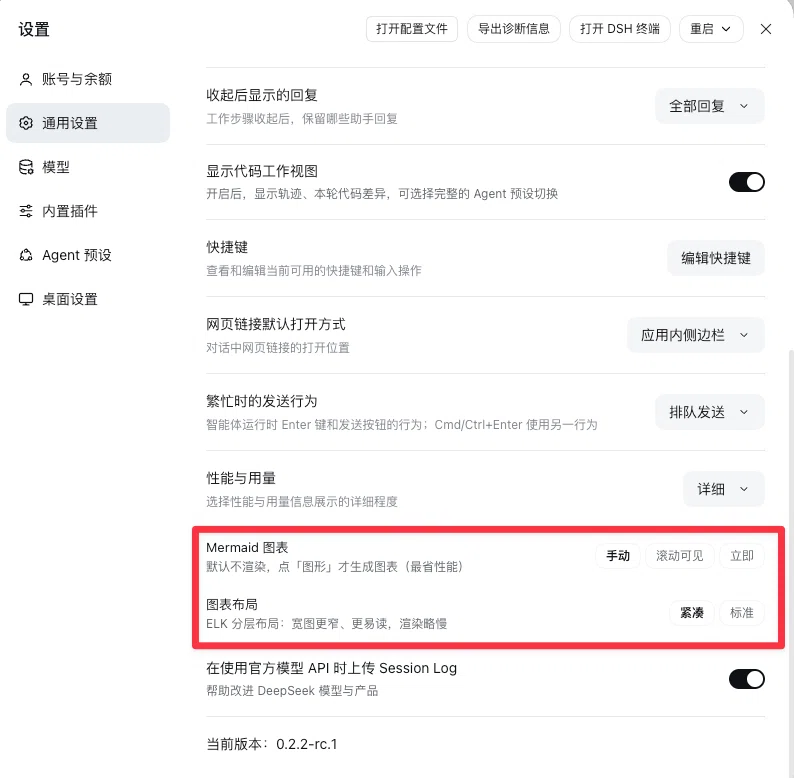
Configure it in Settings → General. Two rows belong to this plugin: Mermaid diagrams picks when a diagram renders (on demand · when visible · always) and Diagram layout picks the engine (compact ELK · standard dagre). Defaults: always, compact.
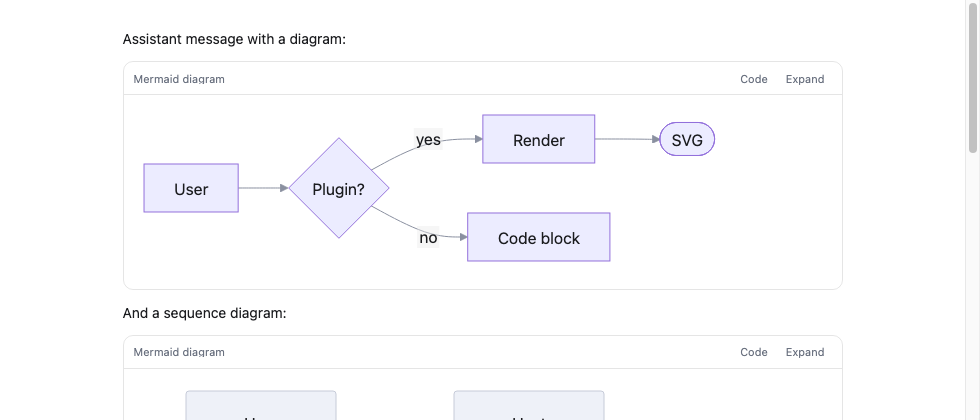
A rendered diagram in its card. The header switches to the source, copies it, or opens the diagram fullscreen:
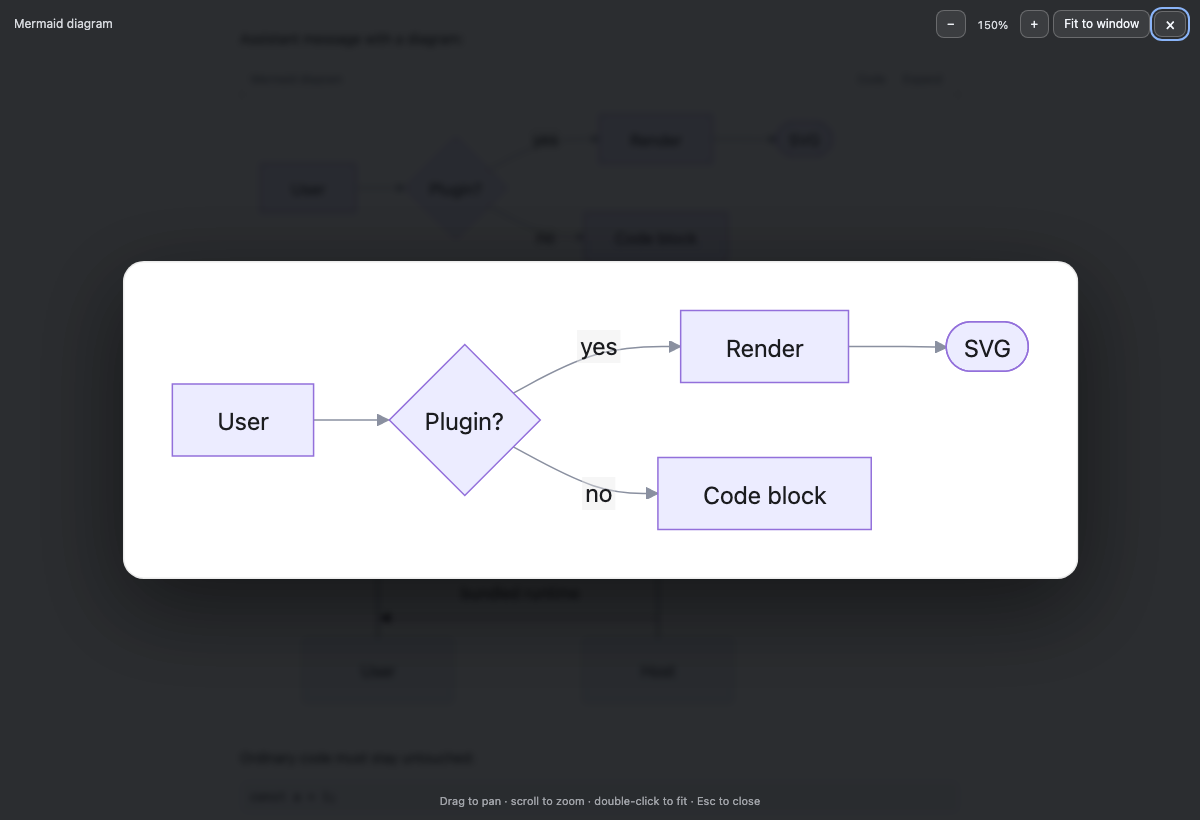
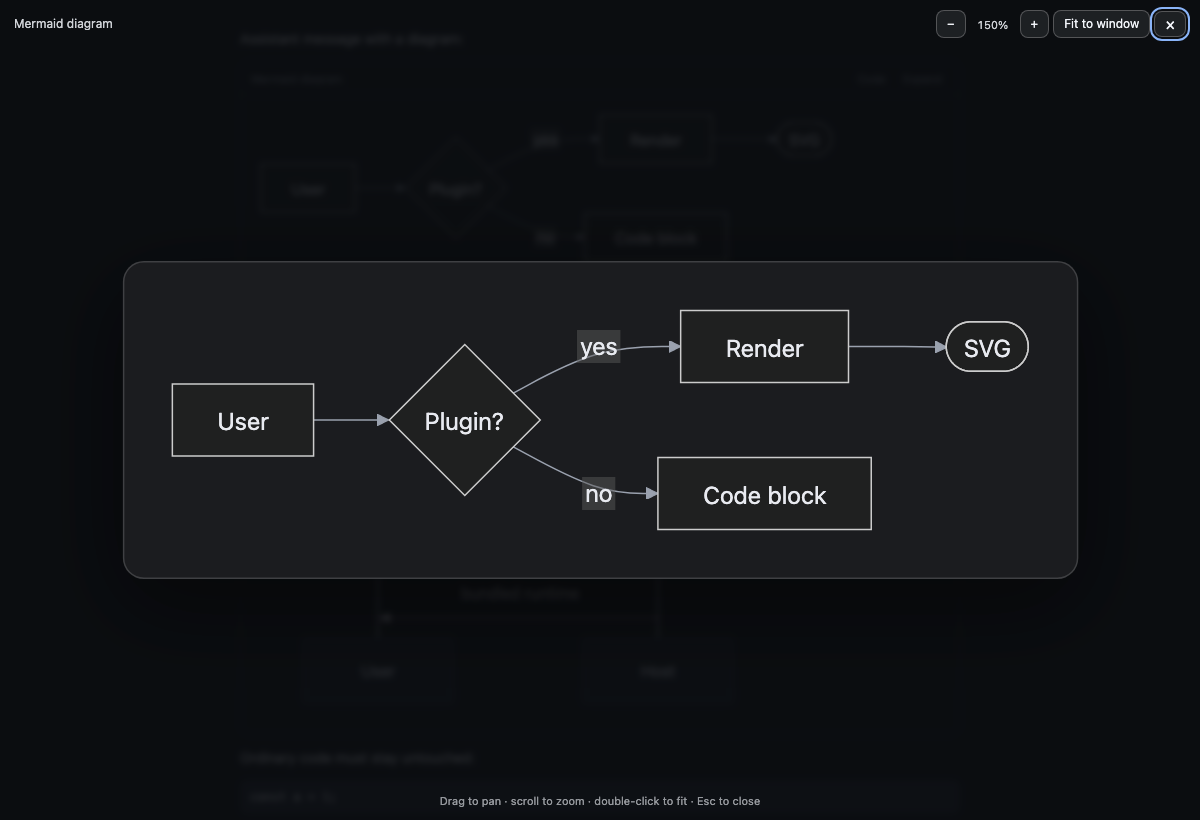
Fullscreen viewer, light and dark. The sheet is painted with the palette the diagram was rendered for, so labels stay readable in both themes — the bug that started this viewer was black text on a dark backdrop:
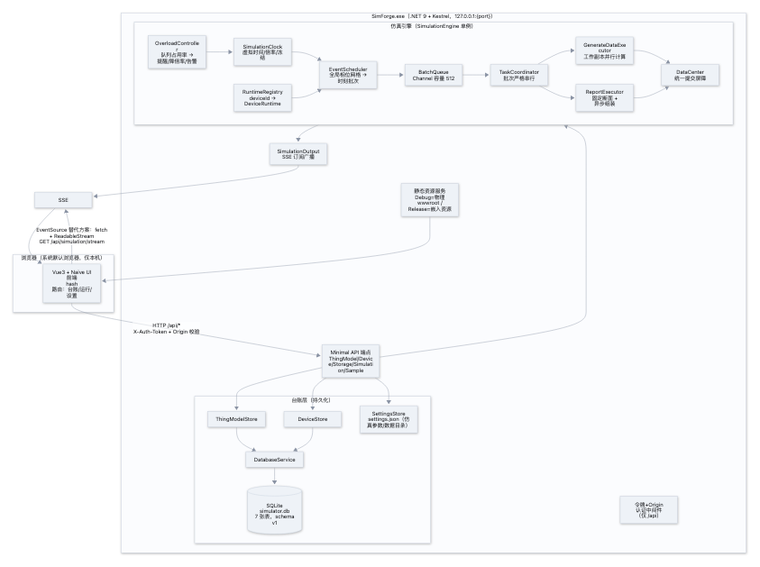
In a conversation column, width is what breaks a diagram: a wide graph has to be panned, a narrow one just scrolls with the page. ELK is the default; Settings → General → Diagram layout switches to dagre.
| dagre (standard) | ELK (compact, default) |
|---|---|
 |
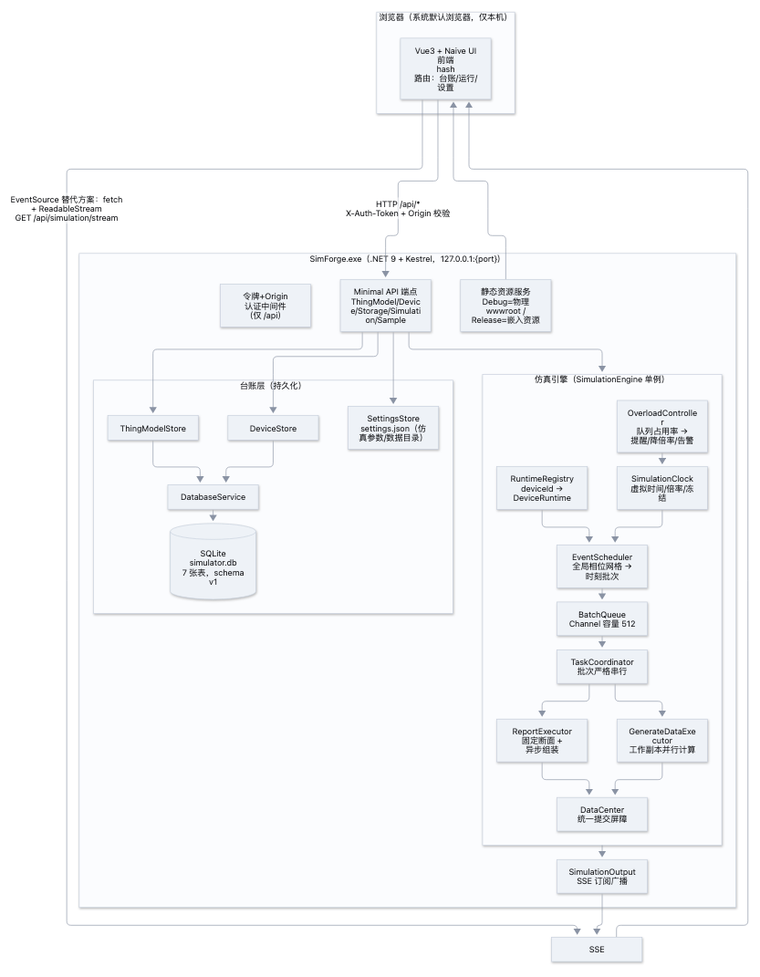 |
| 1956 × 1624 px | 1249 × 1833 px (−36% width) |
Measured on the corpus in test/bench/: ELK costs 5–20 ms per diagram
(and is faster on the 150-node case) while cutting the width of wide diagrams by
31–79%. See test/bench/results.md.
A fenced ```mermaid block in the conversation (or in a Markdown file preview) becomes a card:
Diagram button waits in the card header; nothing is downloaded or laid out until you press it.Every rendered diagram can be zoomed in place — Ctrl/⌘ + wheel zooms around the pointer (10%–800%), drag pans, and a bare wheel still scrolls the page — or opened fullscreen, which is the point: a wide flowchart squeezed into the message column is unreadable, while the same diagram at natural size is fine.
mermaid, mermaidjs, mmd and unlabelled blocks that start with a diagram keyword.flowchart/graph, sequenceDiagram, classDiagram, stateDiagram, erDiagram, gantt, pie, mindmap, journey, timeline, quadrantChart, xychart, gitGraph, requirementDiagram, C4, block-beta, packet-beta, sankey-beta, kanban, architecture-beta, and more.Esc to close, focus-trapped dialog, restores focus and page scrolling.Settings → General has two rows owned by this plugin — the same rows shown at the top of this page:
| Row | Values | Default |
|---|---|---|
| Mermaid diagrams | On demand · When visible · Always | Always |
| Diagram layout | Compact (ELK) · Standard (dagre) | Compact |
test/bench/ is a reproducible benchmark (nine diagrams, real Chrome
over CDP with the real clock) used to choose the layout default and to re-check an
upgrade. Results: test/bench/results.md.
dsh plugin --profile <profile> add dsh-mermaid-plusOr install it from a catalog in Settings → Plugins → Marketplace (see the DSH 1024Store listing). Restart the app or reload the page afterwards.
The Mermaid runtime is bundled with the package (vendor/mermaid.esm.min.mjs, Mermaid 12.2.0) and served from the plugin's own Host route, so rendering works offline and no CDN is contacted. The fullscreen viewer and card never send diagram source anywhere.
Settings → General → Mermaid diagrams offers the three modes. The choice is stored per page origin and is namespaced by package name, so it never collides with another diagram plugin.
0.2.0-rc.2; last checked on Desktop 2.0.21-next (code-block DOM div.md-code-block > [data-code-block-content] > pre).<pre><code> output, which is the part most likely to shift; if a release breaks it, the cards simply stop appearing and the code blocks stay intact.IntersectionObserver (used only in "when visible" mode) and DOMParser.index.js) mounts one prefix route that serves the vendored Mermaid ES module. The route is derived from the package name (/x-dsh-mermaid-plus), so two diagram plugins can coexist.client.js) is a normal DSH client bundle: it registers a root-scoped occupant on shell.overlay (which exists before any session), plus a status row and the settings row. It never imports Harness client packages and never touches the model's context.<pre> into a card it owns, and puts it back on unmount. The original DOM node is preserved, so the transcript, copy, and select all keep working.The browser half reports lifecycle events to its Host half, which appends them to a bounded log:
<os tmp>/dsh-mermaid-plus/report.jsonIt records lifecycle events only — start, apply-ok, apply-throw, adopted, render-ok, render-error, blocks-unmatched — with counts, not document text: no diagram source, no file contents, no paths beyond the plugin's own. If diagrams stop appearing, that file plus the browser console (a failed import) usually identifies the cause.
The plugin has no build step for its own code: index.js and client.js run as they are. Only vendor/mermaid.esm.min.mjs is generated, and only when the bundled Mermaid version changes.
npm install                 # mermaid 12.2.0, esbuild, jsdom
node build.mjs              # rebuild vendor/mermaid.esm.min.mjs
node test/run.mjs           # host route, real cordis mount, jsdom browser-half behaviour
node test/serve-e2e.mjs     # then open http://127.0.0.1:8732/ for 35 real-browser cases
node tools/doctor.mjs       # activation, install mode, last browser events
node tools/dev-sync.mjs     # copy this checkout over an npm-installed copy
docs/development.md covers the debug loop, what each symptom means, and the release flow.
The plugin is intentionally small: two JavaScript files, no runtime dependencies, no build step for its own code. Bug reports with a minimal diagram source and contributions of any size are welcome.
CONTRIBUTING.md — setup, the test loop, where each change goes, PR expectations.docs/development.md — the debug loop, what each symptom means, release flow.CHANGELOG.md — what changed and why.SECURITY.md — private vulnerability reporting.Credits: Dunianggg (pull request #1 — coexistence, the code-block frame,
suppressErrorRendering) and Songyanglin-curious (the Mermaid 12 / ELK fork —
the ELK direction, render-validity guards, cache versioning, the Windows build fix)
are recorded in CREDITS.md.
Wanted, with a working prototype in a community fork:
See issue #2 for the invitation and the review notes.
MIT. The bundle also carries Mermaid (MIT) and its layout engine ELK (EPL-2.0);
see THIRD-PARTY-NOTICES.md and vendor/*.LICENSE.
把对话(以及 Markdown 预览)里的 ```mermaid 代码块渲染成图表卡片。
配置在 设置 → 通用。有本插件自己的两行:「Mermaid 图表」决定什么时候渲染(手动 · 滚动可见 · 立即),「图表布局」决定布局引擎(紧凑 ELK · 标准 dagre)。默认是「立即 + 紧凑」。
默认「立即」:发现图表后自动加载 Mermaid(约 5.4 MB),源码稳定后自动渲染。也可选择「滚动可见」(卡片进入视口才渲染)或「手动」(点击「图形」才渲染)。已保存的模式选择会继续保留。
默认使用 ELK 紧凑布局。同一张架构图,标准布局(dagre)宽 1956 px,ELK 宽 1249 px(−36%);在基准里宽图普遍收窄 31–79%,代价是每张图多 5–20 ms。设置里可以切回标准布局,切换会立刻重绘已经显示的图——数据见 test/bench/results.md。
渲染后的图表可以全屏放大:滚轮缩放、拖动平移、双击适应窗口、Esc 关闭;全屏只克隆已有 SVG,不会重新渲染。
其他特性:
--dsw-* 设计令牌,明暗主题各自适配;主题切换只重绘你正在看的图。Ctrl/⌘ + 滚轮以指针为中心缩放(10%–800%),拖拽平移;普通滚轮仍滚动页面,经过图表不会误触。两个设置在 设置 → 通用:
| 行 | 选项 | 默认 |
|---|---|---|
| Mermaid 图表 | 手动 · 滚动可见 · 立即 | 立即 |
| 图表布局 | 紧凑(ELK) · 标准(dagre) | 紧凑 |
Mermaid 运行时随包内置(12.2.0),由插件自己的 Host 路由提供,不访问 CDN、离线可用,图表源码不会发往任何地方。
其中 ELK 布局引擎以 EPL-2.0 随包分发(插件自身仍是 MIT),许可证与来源见 THIRD-PARTY-NOTICES.md。
兼容 DSH 0.2.0-rc.2(桌面版已在 2.0.21-next 上验证)。DSH 处于开发者预览阶段,客户端插件契约可能变化;本插件装饰渲染后的 <pre><code>,是最容易受影响的一层——若某次升级后卡片不再出现,代码块本身仍然完好。
排障:浏览器半侧会把生命周期事件报告给 Host,写入 <系统临时目录>/dsh-mermaid-plus/report.json(start / adopted / render-ok / render-error / apply-ok / apply-throw)。
CLASSIFICATION EVIDENCE
系统优先读取 GitHub Topics,再与站内分类词典和词根规则比对。当前命中: deepseek-harness。
morluto
Reverse engineer anything with agents, from app behavior down to native binaries.

deepseek-ai
DeepSeek Harness: Everything is a Plugin.

nexu-io
The 1st Collaborative AI Design Agent Workspace. Local-first and open source. Create motion, prototypes, websites, apps, dashboards, presentations, images, and videos with your team and AI agents. Share work, exchange feedback, and iterate together in one workspace.