
模型与 MCP
待识别

rea
morluto
Reverse engineer anything with agents, from app behavior down to native binaries.
PROJECT TOPICS
INSTALL REFERENCE
dsh plugin --profile web add github:p8054076283-del/dsh-ppt-studio
该命令指向仓库当前默认分支;尚无绑定当前 commit 的完整验证结果。
PROJECT README
A left-sidebar PPT workbench plugin for DeepSeek Harness:
it renders <workspace>/.ppt-studio/deck.json as real 16:9 thumbnails, lets you edit the deck
in place (click a slide's text, type, click away to save), imports existing .pptx files
as they are instead of re-flowing them into template layouts, and hosts a continuous AI chat
column that can rewrite the deck for you.
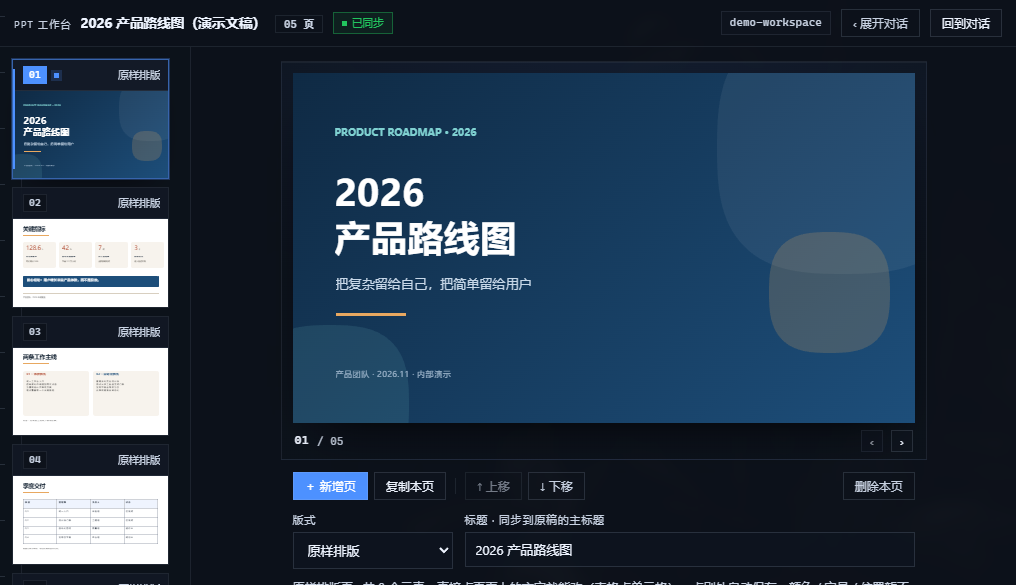
Everything you see above runs on the synthetic demo deck in examples/demo-deck.json
— no real presentation content is used in these screenshots. Copy it to <workspace>/.ppt-studio/deck.json
to try the panel without touching your own deck.
中文说明见 README.zh-CN.md。
deck.json
(absolute element positions in inches on a 13.333 × 7.5 canvas), not screenshots./import runs a python-pptx importer that copies
every page element by element: absolute geometry, font sizes, colours resolved from theme XML
(including lumMod/lumOff/tint/shade), gradients with per-stop transparency, rounded
corners and ellipses, pictures deduplicated by content hash, tables, group transforms, and the
decorations that live on the slide master / layout..ppt-studio/inbox, a live "process" tab
showing tool calls with durations, and one-click prompts.deck.json; external edits highlight the
changed page, but the panel's own saves are never flagged as "AI changed this".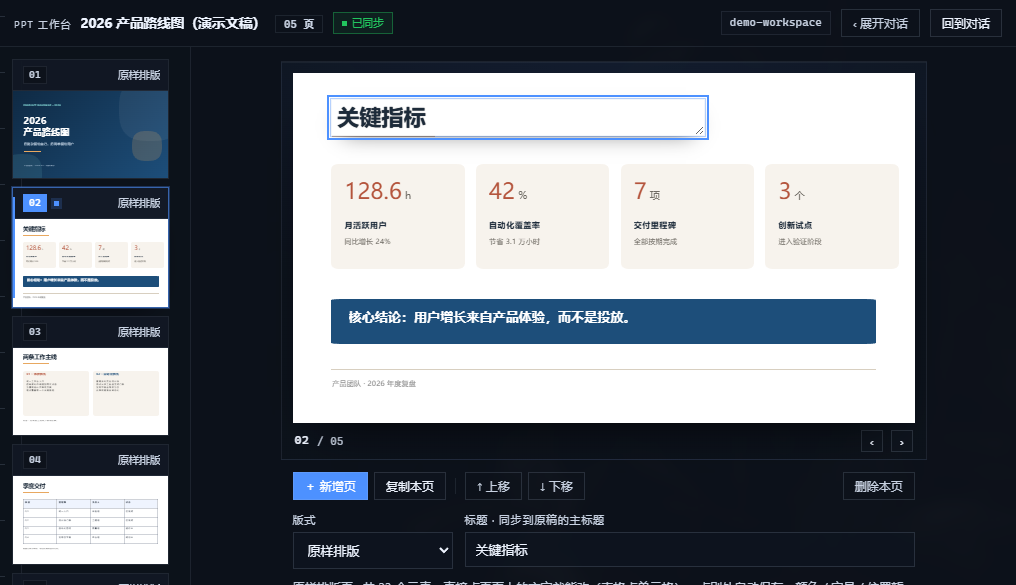 |
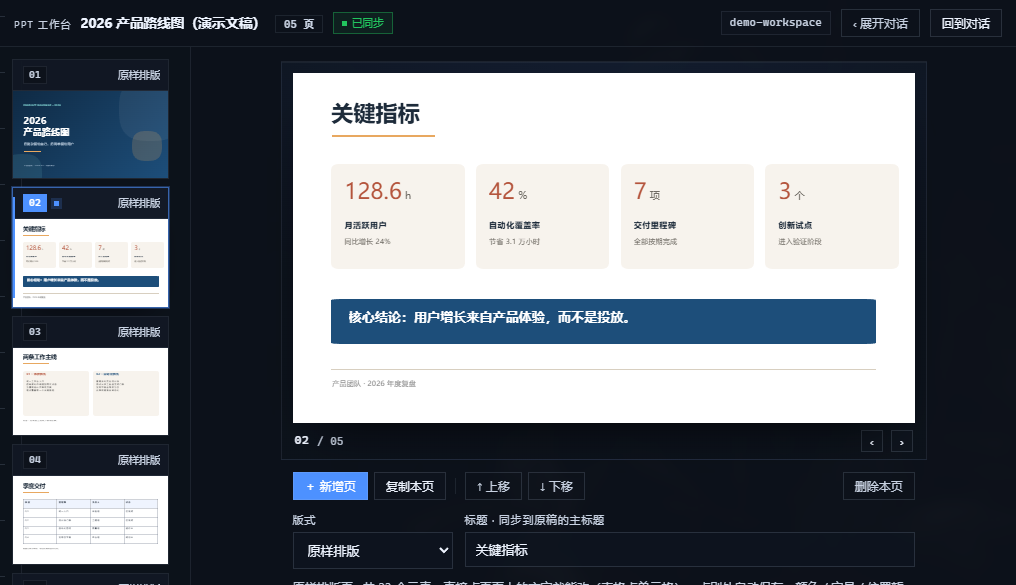 |
| Click any text block (or table cell) and type — click away to save. | Mixed run sizes (spans) and rounded shapes survive the PPTX import. |
 |
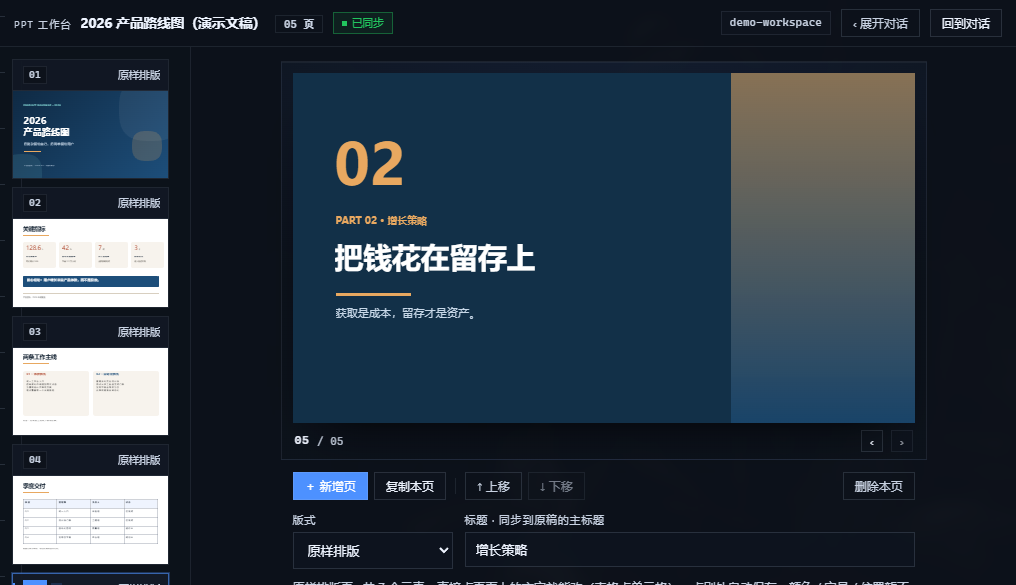 |
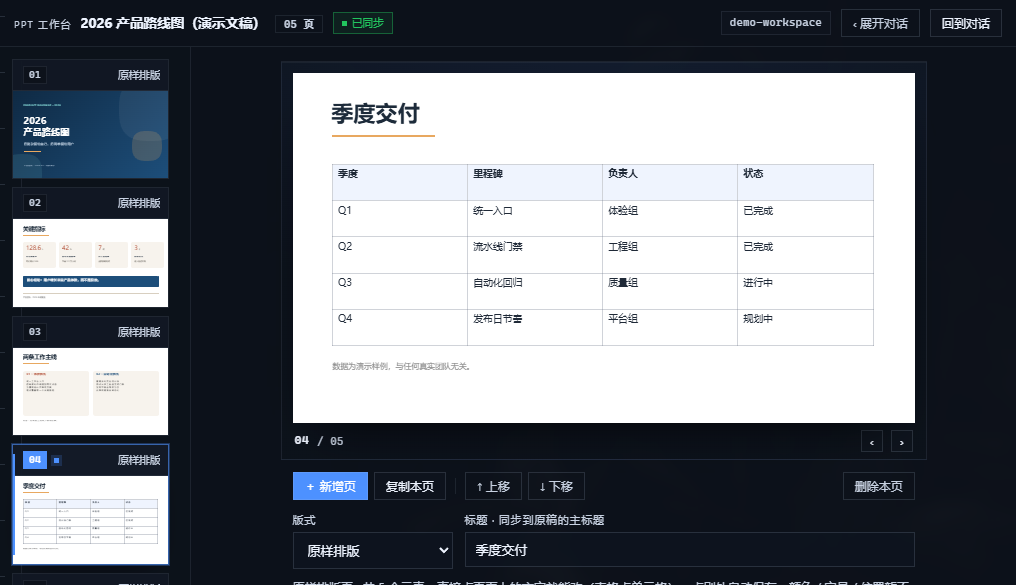
| Tables are first-class elements, editable cell by cell. | Section pages keep their gradients and typography. |
The plugin ships as a single tarball with no runtime npm dependencies (the importer needs
Python 3 with python-pptx, and optionally LibreOffice + poppler for chart pages).
dsh plugin --profile web add \
  https://github.com/p8054076283-del/dsh-ppt-studio/releases/latest/download/dsh-ppt-studio.tgz
Or install the tarball you built locally:
node build2.mjs && npm pack
dsh plugin --profile web add file:$(pwd)/dsh-ppt-studio-<version>.tgz
Restart the app once after the first install. The sidebar then shows PPT 工作台.
.pptx importpython-pptx and lxml are required; LibreOffice + pdftoppm (poppler) are optional and only
used to rasterize chart/SmartArt pages. The plugin looks for an interpreter in this order:
DSH_PPT_PYTHON env var → the runtime bundled with the desktop app → ~/.dsh/dsh-runtimes →
python / python3 / py on PATH.
.ppt-studio/deck.json), or click 新建示例文稿.Esc cancels, clicking elsewhere saves..pptx into the chat column and press 导入 on the attachment chip to replace the
deck with an element-faithful import.deck.json directly.deck.json){
"version": 1,
"theme": { "bg": "#FFFFFF", "fg": "#1F2328", "accent": "#2F6FED", "font": "Microsoft YaHei" },
"meta": { "title": "Quarterly review" },
"slides": [
{
"id": "s1",
"layout": "imported", // imported = keep absolute geometry (no re-layout)
"title": "Cover",
"elements": [
{ "type": "shape", "x": 0, "y": 0, "w": 13.333, "h": 7.5,
"fill": "linear-gradient(90deg, #5E1216 0%, #8F1D22 100%)", "radiusPct": 0 },
{ "type": "image", "x": 8.3, "y": 0, "w": 5, "h": 7.5, "src": "assets/imported/ab12cd34ef.png", "fit": "cover" },
{ "type": "text", "x": 0.8, "y": 2.6, "w": 6, "h": 1.6, "text": "Hello\nworld",
"size": 40, "color": "#FFFFFF", "bold": true, "align": "left", "valign": "top",
"nowrap": true, "spans": [{ "t": "24", "size": 40 }, { "t": " pts", "size": 16 }] },
{ "type": "table", "x": 1, "y": 4, "w": 6, "h": 2,
"columns": ["A", "B"], "rows": [["1", "2"]], "size": 14 }
]
}
]
}Coordinates are inches on a 13.333 × 7.5 canvas; the renderer converts them to percentage
positions and font sizes to cqw, so a slide scales exactly with its container.
lib/index.js         host half — HTTP routes under /ppt-studio (loopback only)
lib/client.js        client half — built artifact loaded by the Harness slot system
src/bundle/*.js      panel, chat, markdown, styles, registration (source of the client half)
src/client/render.js deck validation + slide renderer (shared by bundle and tests)
scripts/import-pptx.py      PPTX → deck.json importer (python-pptx + lxml)
scripts/selftest-*.mjs/.py  self-tests (no browser needed)
build2.mjs           builds lib/client.js from src/bundle + src/client
Host routes: /health, /state, /session, /sessions, /answer, /cancel, /report,
/diag, /upload, /import, /deck (PUT), /asset (GET). They refuse non-loopback peers and
resolve every workspace path through the same guard as the rest of the panel.
The client half registers two slots: a sidebar.panellist entry (id ppt-studio) and a main
page (key ppt-studio). It talks to the host half over the routes above and to the session
through the Harness session binding.
node build2.mjs                 # rebuild lib/client.js, then install the packed tarball
node scripts/selftest-client.mjs    # client bundle pre-flight (jsdom-free, structural)
node scripts/selftest-host.mjs      # host routes
node scripts/selftest-render.mjs    # deck validation + renderer
node scripts/selftest-markdown.mjs  # markdown renderer
python scripts/selftest-import.py   # importer (+ rasterization when LibreOffice/poppler exist)
dev-live-*.mjs scripts drive a running desktop app over the Chrome DevTools Protocol
(port 9222) for visual checks; they expect a Chinese Windows workspace and are development-only.
spans), but editing a box in place flattens it to the
base style..pptx overwrites in-panel edits, because the source of truth is the file.examples/demo-deck.json reproduces most panel bugs.npm test and python scripts/selftest-import.py first; the
repository also carries examples/demo-deck.json so screenshots and repros never need a real deck.MIT — see LICENSE.
CLASSIFICATION EVIDENCE
系统优先读取 GitHub Topics,再与站内分类词典和词根规则比对。当前命中: deepseek-harness。
morluto
Reverse engineer anything with agents, from app behavior down to native binaries.

deepseek-ai
DeepSeek Harness: Everything is a Plugin.

nexu-io
The 1st Collaborative AI Design Agent Workspace. Local-first and open source. Create motion, prototypes, websites, apps, dashboards, presentations, images, and videos with your team and AI agents. Share work, exchange feedback, and iterate together in one workspace.