
模型与 MCP
待识别

rea
morluto
Reverse engineer anything with agents, from app behavior down to native binaries.
PROJECT TOPICS
INSTALL REFERENCE
dsh plugin --profile web add github:oxomkbk/dsh-plugin-command-deck
该命令指向仓库当前默认分支;尚无绑定当前 commit 的完整验证结果。
PROJECT README
dsh-plugin-command-deck 是 DeepSeek Harness(DSH)的插件包(bundle)。它为 dsh web 加上四样东西:
| 模块 | 内容 |
|---|---|
| 启动动画 | 电影感开机序列:透视地面网格、旋转光环、解码 Logo、系统日志。注入 DSH 的 index.html,首帧即出现,DSH 就绪后退场,配色跟随所选设计语言。 |
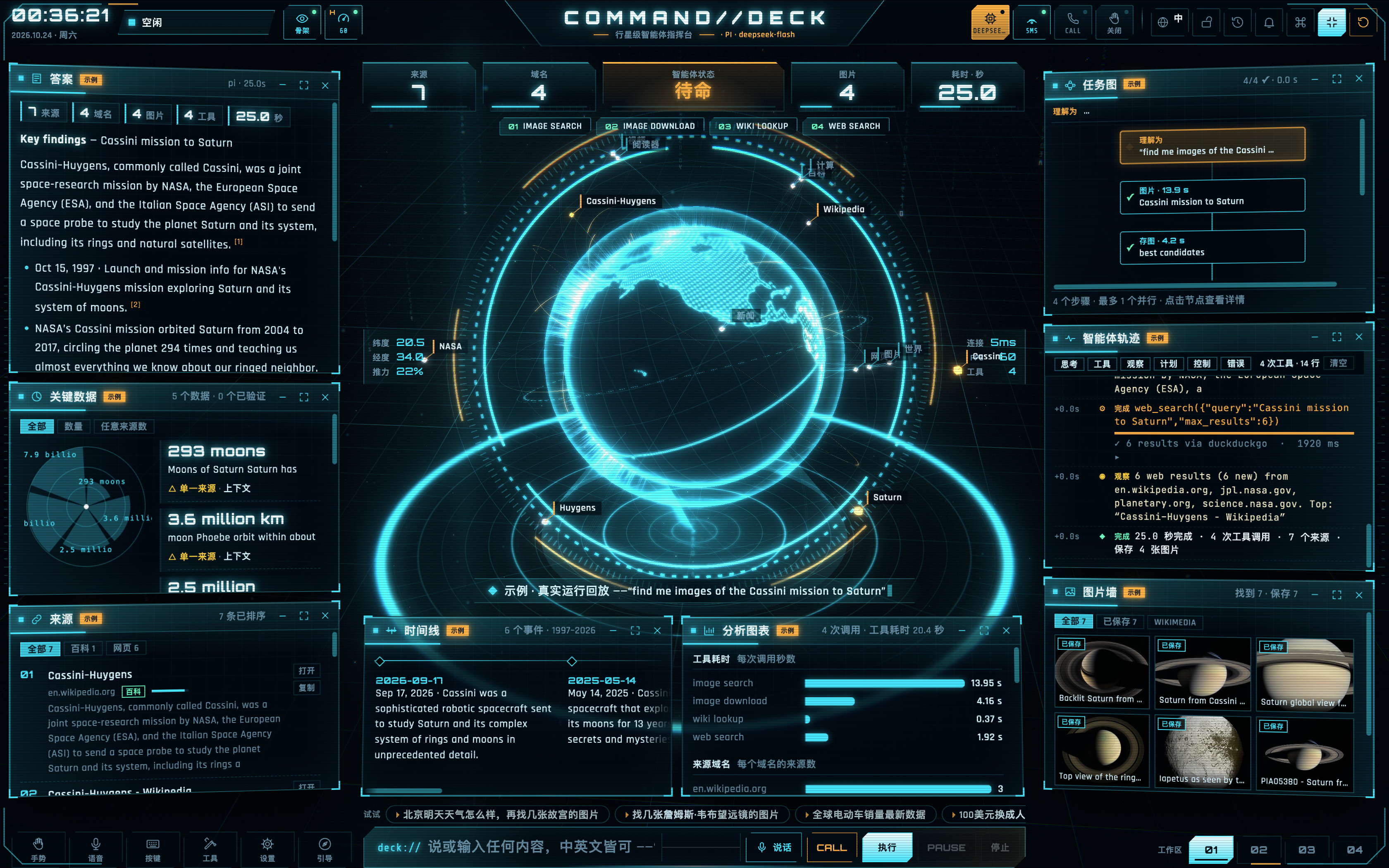
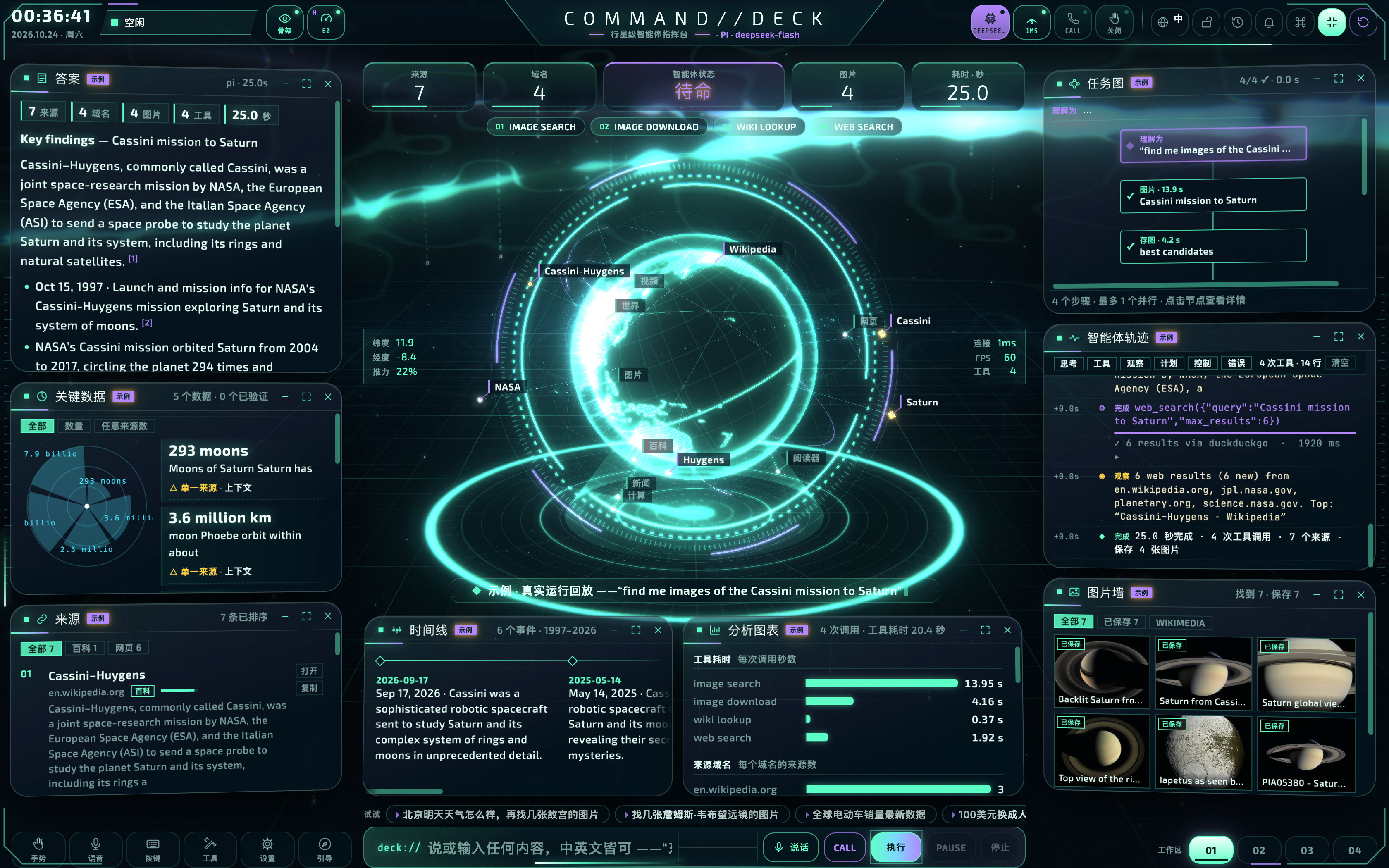
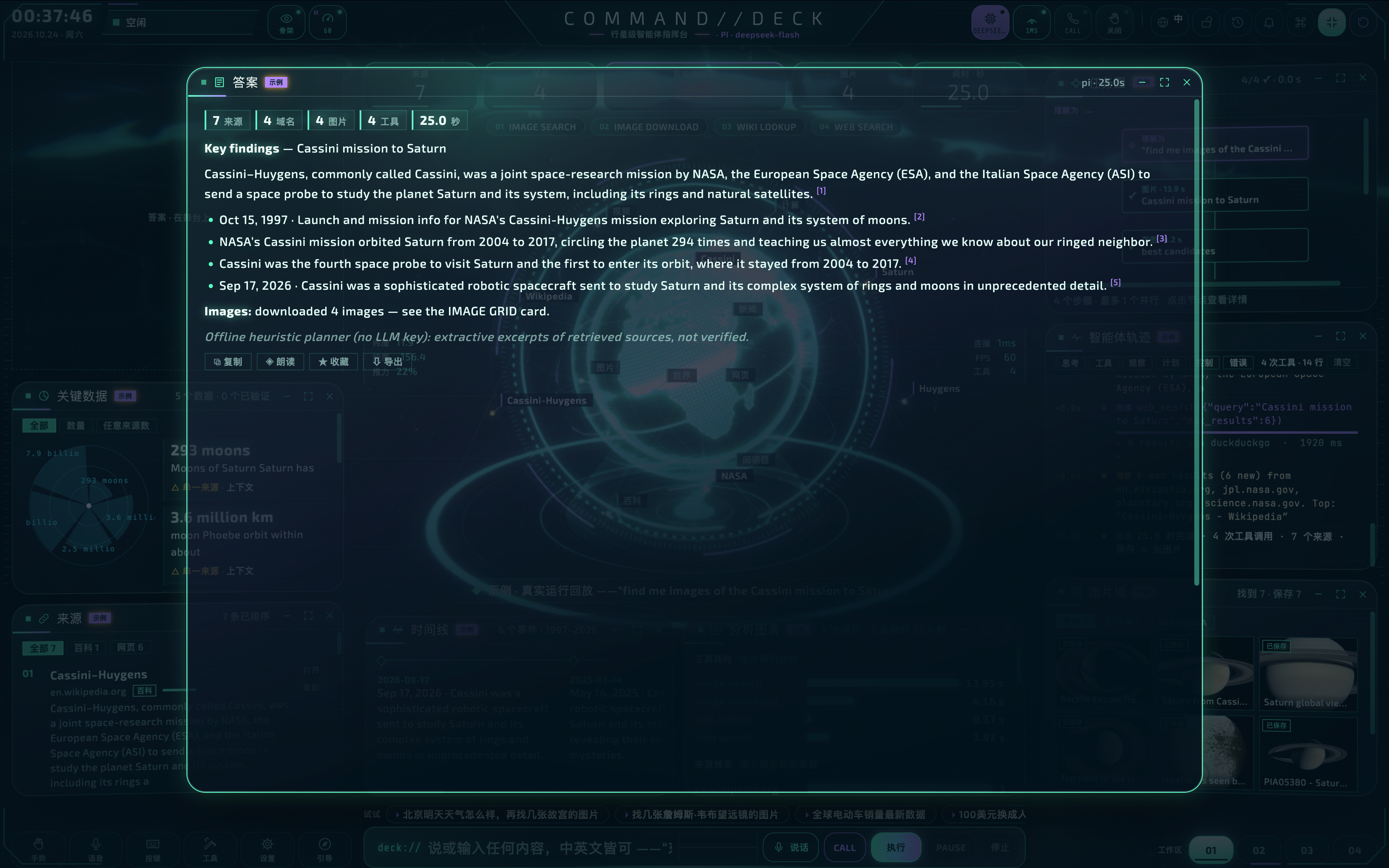
| 指挥台面板 | 侧边栏 指挥台 里是完整的 3D 任务控制台:在指挥台里输入或说出的指令会在真实的 DSH 会话中运行,每一轮、流式思考、工具调用、工具结果和最终答案实时驱动指挥台;每个对话标题栏还有 在指挥台中可视化 按钮,把指挥台挂到该会话上。 |
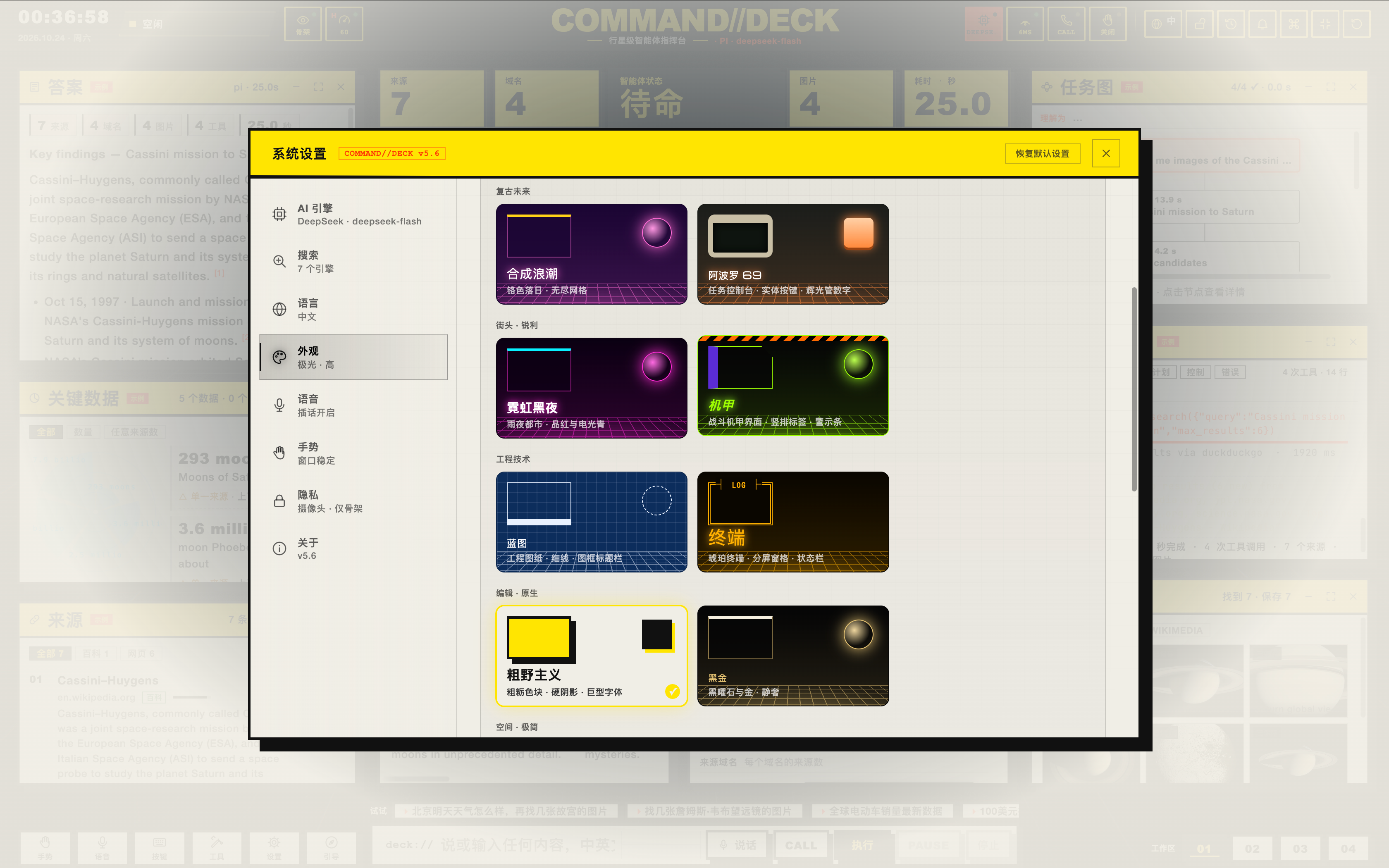
| DSH 皮肤 | 13 种设计语言重塑 DSH 自身(对话、侧边栏、输入框、菜单、对话框、设置):轨道、极光、合成波、阿波罗 69、霓虹黑色、机甲、蓝图、终端、粗野主义、黑曜石、玻璃、面罩、极地。改变的不只是颜色,还有字体、圆角几何和焦点效果。可选 HUD 叠层提供四角括号、缓慢扫描线和暗角。 |
| 可视化控制台 | 设置 → 指挥台 与 插件 页中本插件的页面:指挥台实时预览、按家族分组的主题画廊、启动控制、集成开关和动效控制。修改即时生效,保存在 DSH profile 里。 |
| 站点 Site | 链接 Link |
|---|---|
| 🤖 Ai 资源网 | https://human.rlybtd.com/ |
>= 0.2.0-rc.2 < 0.3(在 @deepseek-ai/dsh 0.2.0-rc.2 的 dsh web 上实测;桌面版共用同一运行时,标题栏安全区按 36px 模拟验证)>= 22.19.0(DSH 自身要求)# 安装到某个 profile(`dsh web` 用的通常是 web,桌面端是 desktop)
dsh plugin --profile web add /绝对路径/dsh-plugin-command-deck-1.0.1.tgz
# 然后照常启动
dsh webdsh plugin 会在 profile 目录里转交给 pnpm,所以 .tgz 请用绝对路径(或 file: 形式)。不需要额外的服务器、端口或 API Key:指挥台由 DSH 自己的 Web 服务挂在 /command-deck/ 下,受 DSH 登录保护。
add。dsh plugin --profile web remove dsh-plugin-command-deck,或在 插件 页点 卸载;也可以只关掉开关而不卸载。lib/*)在 DSH 启动时加载,改完源码必须重启一次 DSH。插件 → 已安装)里的名字是 DSH指挥台UI-泥嚎糕手;Command Deck)。点侧边栏 指挥台。在 DSH 里它直接进入面板:不再弹欢迎屏,也不会自动跑任何示例任务。首次打开会自动跟随 DSH 当前正在看的那个会话;如果你停在空白的新会话页,指挥台为空并列出全部会话。
左栏最上面的 会话 / SESSIONS 卡片就是 DSH 自己的会话目录(实时刷新,含运行中脉冲):
› 你、计划、工具调用与结果、答复;<system-reminder>、运行时上下文)不会显示成你说的话;命令栏(deck://)输入,或语音 / 通话模式。指令进入真实的 DSH 会话;运行中再输入会作为 steer(引导) 发给 DSH,STOP 取消本轮。
设置 → 指挥台(或 插件 → DSH指挥台UI-泥嚎糕手):画廊里选一种设计语言,DSH 界面、指挥台、启动动画和 HUD 一起切换;在指挥台自己的设置里换主题,也会同步更新 DSH 皮肤。
在 DSH 里运行时,指挥台自带的这些页签不再自己管配置,而是显示「由 DeepSeek Harness 托管」和一个 打开 DSH 设置 按钮(真能拉起 DSH 自己的设置面板):
| 页签 | 处理 |
|---|---|
| AI 引擎 | 模型与提供方归 DSH |
| 搜索 | 搜索提供方归 DSH |
| 语音 → 服务端转写 | 归 DSH;指挥台的通话仍用浏览器语音识别 |
| 关于 | 显示「智能体 DeepSeek Harness / AI 引擎 由 DSH 管理」,不再有框架切换开关 |
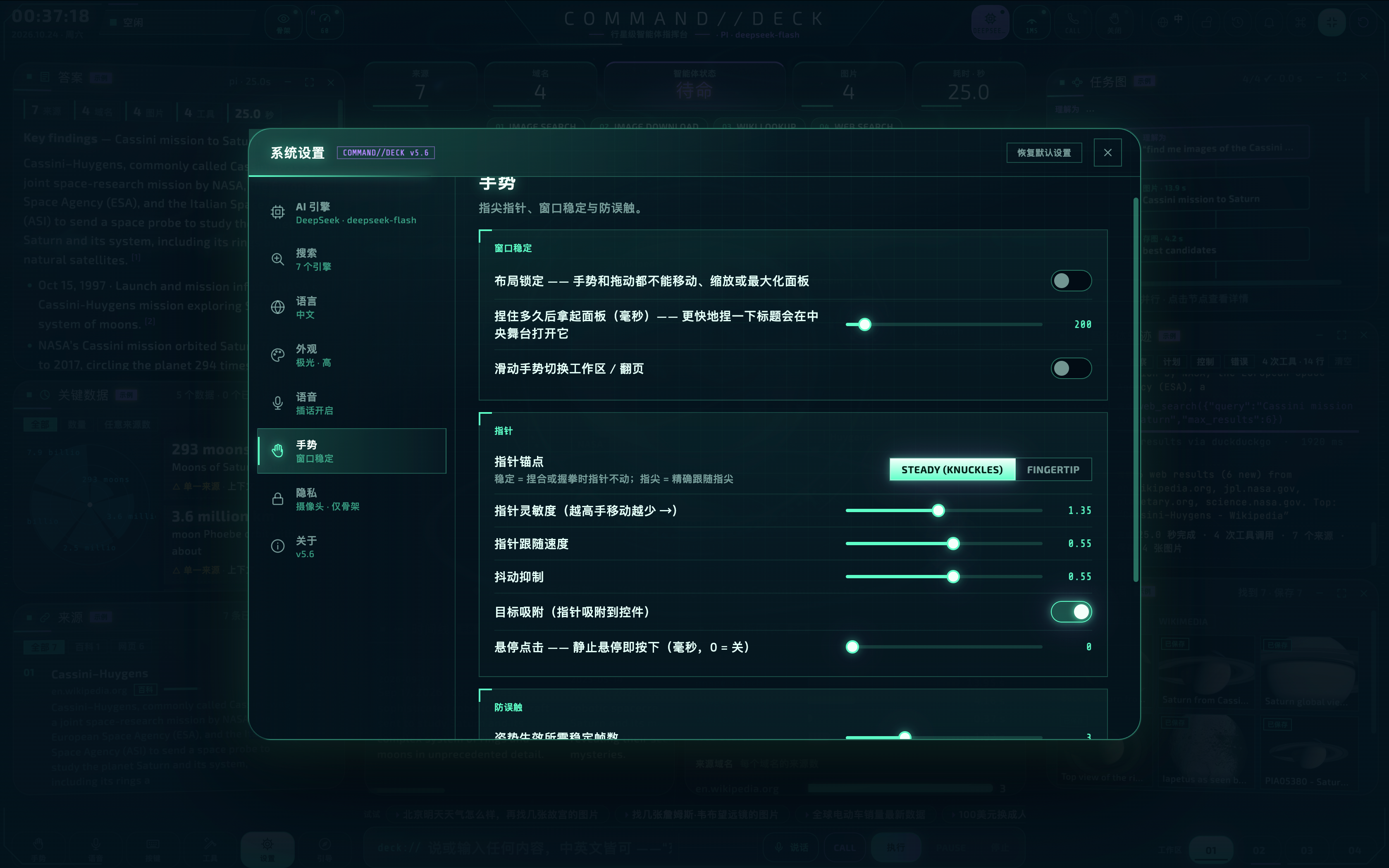
| 语言、外观、语音、手势、隐私 | 纯前端设置,照旧 |
DSH 内也不再向 /api/llm、/api/search、/api/asr 发探测请求(打开设置台时后端请求数为 0)。
皮肤与 HUD 只作用于 DSH 自身界面和指挥台。一旦中心区换成其他插件的面板,皮肤与 HUD 会立刻暂停(body[data-cdeck-skin-paused]),那个页面拿到的样式与 DSH 原版完全一致——这是为了避免和其他插件页面的排版/字体冲突。回到会话或指挥台会自动恢复。
/command-deck/skins.css(同源、需 DSH 登录 Cookie,no-cache),不再塞进 index.html 的内联行;所有设置即时生效,保存在 profile 的 cordis.patch.yml 的 command-deck 条目下,DSH 设置里点 打开配置文件 也能看到。
| 设置 | 默认 | 作用 |
|---|---|---|
theme |
jarvis(轨道) |
指挥台、DSH 皮肤、启动动画和 HUD 的设计语言 |
skin |
开 | 重塑 DSH 界面;关闭后保持 DSH 原有的浅色/深色主题 |
hud |
开 | HUD 叠层(从不拦截输入) |
boot |
session |
启动动画:every 每次启动、session 每个浏览器会话一次、off 关闭 |
bootStyle |
cinematic |
cinematic 电影感(约 2.6 秒)或 quick 快速(约 1 秒) |
motion |
100 | 动效强度 0–100(0 为静止) |
scanlines |
开 | 指挥台和 HUD 的 CRT 扫描线 |
sound |
开 | 指挥台音效(运行时合成,无音频文件) |
tilt |
开 | 3D 座舱:两侧停靠区向你弯曲 |
brand |
开 | 侧边栏中的 COMMAND//DECK 标识 |
系统开启「减少动态效果」时,启动动画和 HUD 停止动画。
Ctrl/⌘K 命令面板、Esc 关闭浮层/停止本轮、/ 聚焦命令栏、L 切语言、Shift+L 锁布局、H/G 手势、V/C/M 语音、1–4 切视图、T 切主题、Shift+F 全屏、R/Shift+R 重置。
不可用:S(运行示例任务)与 P(暂停/继续)——DSH 里没有示例任务,也没有「暂停中的轮次」,帮助面板里这两行也会隐藏。
下列各项均在真实的 dsh web 上验证过。会话 → 指挥台的事件翻译另有离线测试(源码中的 node test/bridge.test.mjs)。
| 范围 | 状态 |
|---|---|
| 首帧启动动画、就绪后交接、跳过、每次/每会话/关闭、电影感/快速 | ✅ |
| 侧边栏指挥台面板、全屏、键盘、鼠标、手势(摄像头)、语音与通话模式 | ✅ |
| 指挥台指令 → 新 DSH 会话 → 实时轮次(计划、流式正文与推理、工具调用/结果、耗时、最终答案、来源) | ✅ |
会话卡片:DSH 会话目录实时刷新、跟随、DSH 当前徽标、新建 |
✅ |
| 跟随已有会话 → 回放整段对话(用户消息、计划、工具、答复),过滤 DSH 注入的上下文 | ✅ |
| 退出键回 DSH;重进 / 切视图 / 切页 / 整页刷新后轨迹原样恢复,运行中继续直播 | ✅ |
| 切换会话先清空再回放;会话被归档/删除时提示并断开 | ✅ |
| DSH 工具(web_search、web_fetch、bash/pwsh、read/write/edit、grep/glob、run_code、todo_write、present、团队工具…)路由到对应卡片 | ✅ |
| 设置台 AI/搜索/转写/关于 → 由 DSH 托管 + 打开 DSH 设置;DSH 内零后端探测请求 | ✅ |
| 皮肤:对话、侧边栏、输入框、气泡、菜单、对话框、设置、滚动条、焦点环、圆角与字体;浅色设计切浅色,深色设计保深色 | ✅ |
| 皮肤作用域:其他插件面板上自动暂停,页面零样式注入 | ✅ |
| 设置页与插件页的控制台、实时预览、主题画廊、即时生效并持久化、恢复默认 | ✅ |
| 指挥台主题 ⇄ DSH 主题双向同步 | ✅ |
| 指挥台 暂停/继续 | ➖ DSH 没有「暂停中的轮次」,指挥台会说明;请用引导或停止 |
| 智能体框架切换(Pi / OpenAI Agents / Hermes) | ➖ 在 DSH 中智能体就是 DSH 自己 |
| 关键数据、实体、时间线组件 | ➖ 只有结果带相应结构时才填充;DSH 工具多返回文本,这些面板常为空 |
postMessage);/command-deck/ 下的所有请求都经过 DSH 自己的浏览器准入(没有登录 Cookie 返回 401),静态文件有路径穿越防护并设 frame-ancestors 'self'。/command-deck/。__CDECK_BRIDGE__ 是实时桥接对象(sessionId、log、lastError),__CDECK_BOOT__.play() 可重放启动动画。lib/index.js 宿主半边(Node):设置 schema、index.html 注入、/command-deck/ 静态路由与 skins.css
lib/client.js 浏览器半边(DSH 客户端模块):面板、标题栏按钮、会话桥、退出、控制台、标识
lib/boot.js 启动动画与 HUD(CSS、HTML 模板、早于插件的启动脚本)
lib/skins.js 13 种设计语言映射到 DSH 设计 token
deck/ 指挥台 Web 应用(嵌入式构建:?host=dsh)
deck/js/cards/sessions.js 会话卡片(DSH 会话目录 + 跟随)
deck/js/core/clipboard.js 剪贴板(iframe 内带 execCommand 兜底)
cordis.patch.yml 插件包补丁:挂载 `command-deck` 条目1.0.1
skins.css,移除全局字号缩放与标题字距;许可证:MIT(见 LICENSE)。第三方组件见 THIRD_PARTY.md。
dsh-plugin-command-deck is a DeepSeek Harness (DSH) plugin bundle. It adds four things to DSH:
| What you get | |
|---|---|
| Startup | A cinematic boot sequence: perspective floor grid, rotating rings, a decoding logo and a system log. Injected into DSH's index.html, so it is on screen from the first frame and leaves as soon as DSH is ready. It follows the selected design language. |
| Deck panel | A Command Deck panel in the sidebar holds the full 3D mission-control deck. Prompts typed or spoken there run in a real DSH Session, and every turn, streamed thought, tool call, tool result and final answer animate the deck live. Each conversation header gets a Visualise in Command Deck button that attaches the deck to that Session. |
| DSH skin | 13 design languages re-skin DSH itself (chat, sidebar, composer, menus, dialogs, settings): Orbital, Aurora, Outrun, Apollo '69, Neon Noir, Mecha, Blueprint, Terminal, Brutalist, Monolith, Glass, Visor and Arctic. The skin changes colour, type, corner geometry and focus treatment. An optional HUD overlay adds corner brackets, a slow scan line and a vignette. |
| Visual console | Settings → Command Deck and the bundle's page under Plugins show a control console: live preview of the deck, a theme gallery grouped by family, startup controls, integration switches and motion controls. Changes apply live and are saved in your DSH profile. |
| Site 站点 | Link 链接 |
|---|---|
| 🤖 Ai Resource Hub | https://human.rlybtd.com/ |
>= 0.2.0-rc.2 < 0.3 (verified on @deepseek-ai/dsh 0.2.0-rc.2 running dsh web; the desktop app shares the runtime — its title-bar clearance was verified with a 36 px simulation)>= 22.19.0 (DSH's own requirement)# into a profile (web for `dsh web`, desktop for the desktop app)
dsh plugin --profile web add /absolute/path/to/dsh-plugin-command-deck-1.0.1.tgz
dsh webdsh plugin forwards to pnpm inside the profile, so use an absolute path to the .tgz (or a file: spec). No extra server, port or API key: the deck is served by DSH's own web server under /command-deck/, behind DSH's sign-in.
add with the newer tarball. Remove: dsh plugin --profile web remove dsh-plugin-command-deck, or Uninstall on the plugin page (you can also switch it off without uninstalling).lib/*) loads at DSH start-up, so restart DSH after changing it.指挥台 in Chinese).Click Command Deck in the sidebar. Inside DSH it opens straight into the panel: no welcome screen, no canned task. On first open it follows the conversation DSH is showing; if DSH sits on a blank new session the deck starts empty and lists every Session.
The SESSIONS card at the top of the left dock is DSH's own Session directory, refreshed live (running Sessions pulse):
› you, plan, tool calls/results, answer);<system-reminder>, runtime context) is not shown as something you said;Type in the command bar (deck://) or use voice / call mode. Prompts run in a real DSH Session; a new prompt while a turn runs is sent as steer, and STOP cancels the turn.
Settings → Command Deck (or Plugins → DSH指挥台UI-泥嚎糕手): pick a design language and the DSH interface, the deck, the boot sequence and the HUD all follow. Choosing a theme inside the deck also updates the DSH skin.
Inside DSH these deck tabs no longer configure anything themselves; they show Managed by DeepSeek Harness plus an Open DSH settings button:
| Tab | Handling |
|---|---|
| AI engine | models and providers belong to DSH |
| Search | search providers belong to DSH |
| Voice → server transcription | DSH's; the deck's call mode still uses the browser recogniser |
| About | shows "agent: DeepSeek Harness / AI engine: managed by DSH"; the framework switcher is gone |
| Language, appearance, voice, gestures, privacy | deck-local, unchanged |
The deck also stops probing /api/llm, /api/search and /api/asr inside DSH (zero backend requests when the console opens).
The skin and the HUD apply only to DSH's own interface and to the deck. As soon as the centre column shows another plugin's panel, both are suspended (body[data-cdeck-skin-paused]) and that page gets exactly the styles DSH gives it — so the skin can never fight another plugin's layout. Returning to a conversation or to the deck restores it.
/command-deck/skins.css (same origin, behind DSH's sign-in, no-cache), no longer an inline row in index.html;All settings are live and stored under the command-deck entry of the profile's cordis.patch.yml.
| Setting | Default | Effect |
|---|---|---|
theme |
jarvis (Orbital) |
Design language for the deck, the DSH skin, the boot sequence and the HUD |
skin |
on | Re-skin DSH. Off leaves DSH's own light/dark theme untouched. |
hud |
on | HUD overlay (never intercepts input) |
boot |
session |
every launch, once per browser session, or off |
bootStyle |
cinematic |
cinematic (~2.6 s) or quick (~1 s) |
motion |
100 | Motion intensity 0–100 (0 = still) |
scanlines |
on | CRT scanlines in the deck and the HUD |
sound |
on | Deck sound effects (synthesised; no audio files) |
tilt |
on | 3D cockpit: the side docks curve toward you |
brand |
on | COMMAND//DECK mark in the DSH sidebar |
prefers-reduced-motion is honoured: the boot sequence and the HUD stop animating.
Ctrl/⌘K palette, Esc close overlay / stop the turn, / focus the command bar, L language, Shift+L lock layout, H/G gestures, V/C/M voice, 1–4 views, T theme, Shift+F full screen, R/Shift+R reset.
Not available: S (sample task) and P (pause/resume) — DSH has no sample task and no paused turn; the help panel hides both rows.
Everything below was exercised on a live dsh web. The Session → deck translation also has an offline test (node test/bridge.test.mjs).
| Area | Status |
|---|---|
| Boot sequence in the first frame, hand-off when DSH is ready, skip, every/session/off, cinematic/quick | ✅ |
| Deck panel in the sidebar, full screen, keyboard, mouse, gestures (camera), voice and call mode | ✅ |
| Deck prompt → new DSH Session → live turn (plan, streamed text and reasoning, tool calls/results, latency, final answer, sources) | ✅ |
SESSIONS card: live directory, follow, DSH current marker, NEW |
✅ |
| Following a Session replays its conversation (user messages, plan, tools, answer) with harness context filtered out | ✅ |
| Exit returns to DSH; reopen / view switch / page switch / reload rebuilds the transcript and keeps streaming | ✅ |
| Session switch clears first; archived or deleted Sessions are reported and detached | ✅ |
| DSH tools (web_search, web_fetch, bash/pwsh, read/write/edit, grep/glob, run_code, todo_write, present, team tools…) routed to the right card | ✅ |
| Console AI/Search/transcription/About → managed by DSH + Open DSH settings; zero backend probes inside DSH | ✅ |
| Skin: chat, sidebar, composer, bubbles, menus, dialogs, settings, scrollbars, focus rings, radius and fonts; light designs switch DSH light, dark designs hold DSH dark | ✅ |
| Skin scope: suspended on other plugins' panels — those pages receive no styling from us | ✅ |
| Console in Settings and on the Plugins page, live preview, theme gallery, every setting live and persisted, reset to defaults | ✅ |
| Deck theme ⇄ DSH theme kept in step both ways | ✅ |
| Deck PAUSE/RESUME | ➖ DSH has no paused turn. The deck says so; use steer or stop. |
| Agent-framework switcher (Pi / OpenAI Agents / Hermes) | ➖ Inside DSH the agent is DSH itself |
| Key-data, entity and timeline widgets | ➖ Filled only when results carry that structure; DSH tools mostly return text, so these panels often stay empty. |
postMessage); every request under /command-deck/ goes through DSH's browser admission (401 without the sign-in cookie), with path-traversal protection and frame-ancestors 'self'./command-deck/ in its own tab.__CDECK_BRIDGE__ (sessionId, log, lastError) is the live bridge; __CDECK_BOOT__.play() replays the startup.lib/index.js host half (Node): settings schema, index.html injection, /command-deck/ static route, skins.css
lib/client.js browser half (DSH client module): panel, header button, Session bridge, exit, console, brand
lib/boot.js boot sequence and HUD (CSS, HTML template, pre-plugin boot script)
lib/skins.js the 13 design languages mapped onto DSH design tokens
deck/ the Command Deck web app (embedded build: ?host=dsh)
deck/js/cards/sessions.js SESSIONS card (DSH directory + follow)
deck/js/core/clipboard.js clipboard with an execCommand fallback for iframes
cordis.patch.yml bundle patch: mounts the `command-deck` entry1.0.1
skins.css; global font scaling and heading tracking removed;License: MIT (see LICENSE). Third-party components: THIRD_PARTY.md.
CLASSIFICATION EVIDENCE
系统优先读取 GitHub Topics,再与站内分类词典和词根规则比对。当前命中: deepseek-harness、deepseek-harness-plugin、deepseek-harness-plugins。
morluto
Reverse engineer anything with agents, from app behavior down to native binaries.

deepseek-ai
DeepSeek Harness: Everything is a Plugin.

nexu-io
The 1st Collaborative AI Design Agent Workspace. Local-first and open source. Create motion, prototypes, websites, apps, dashboards, presentations, images, and videos with your team and AI agents. Share work, exchange feedback, and iterate together in one workspace.