
模型与 MCP
待识别

rea
morluto
Reverse engineer anything with agents, from app behavior down to native binaries.
PROJECT TOPICS
INSTALL REFERENCE
dsh plugin --profile web add github:outloudvi/dsh-magpie-sync
该命令指向仓库当前默认分支;尚无绑定当前 commit 的完整验证结果。
PROJECT README

为 DSH 添加利用 Magpie 宣告的输入模态及 thinking level 信息的功能。
dsh plugin --profile web add @ovv/dsh-magpie-sync -w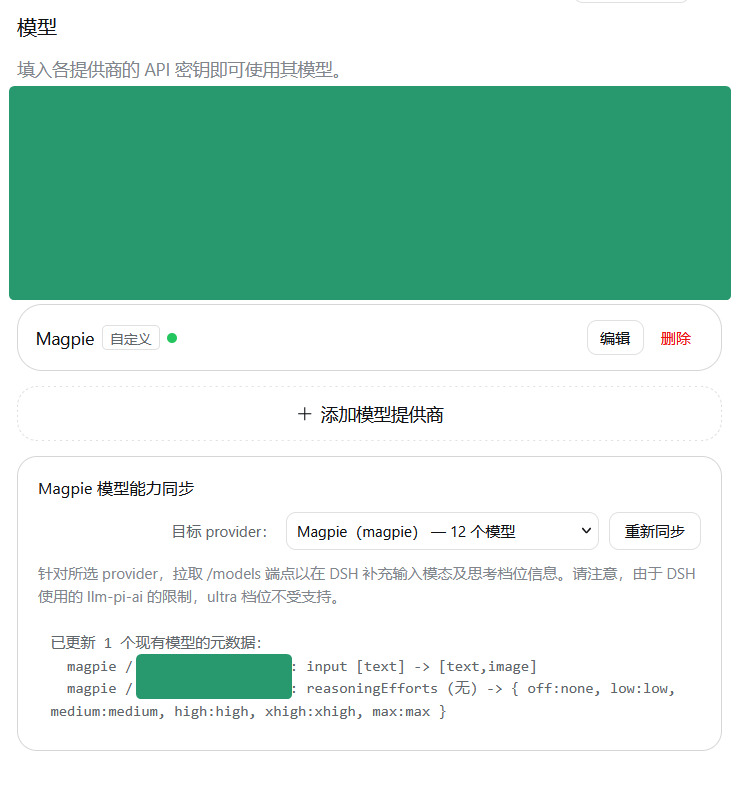
注:DSH 所使用的 llm-pi-ai 只支持以下档位名称:
尤其地,这个列表里没有 ultra。此插件暂未提供将 max 档位 map 至实际上的 ultra 的功能。
(以下内容由 LLM 生成)
DSH 内置 dsh-llm-pi-ai 在请求第三方 /v1/models 时会丢弃某些扩展字段。上游可能返回如下模型能力信息:
{
  "id": "copilot/gpt-6-sol",
  "modalities": { "input": ["text", "image"] },
  "reasoning": true,
  "reasoning_levels": ["none", "low", "medium", "high", "xhigh", "max", "ultra"]
}
同步会:
modalities.input(兼容 input_modalities / inputModalities),并将支持的文本、图片输入写入现有模型的 input 字段。supported_reasoning_levels(对象数组或字符串数组)与 reasoning_levels 字符串数组,更新现有模型的 reasoningEfforts。none 映射为 DSH 档位键 off,其对应服务端值为 off: "none";保留模型已有的 off: null 等现存值。ultra 等 DSH 不支持的档位。DSH 内置的 llm-pi-ai 适配器思考强度 Schema(THINKING_LEVELS)仅允许 off、minimal、low、medium、high、xhigh、max 七个固定档位,不接受 ultra。若写入 ultra,整个服务提供方配置会校验失败并被拒,因此同步会过滤该档位并在结果中说明原因。# 从本地仓库路径安装到 web profile
dsh plugin --profile web add @ovv/dsh-magpie-sync -w打开 Web GUI,在左侧进入 「设置 -> 模型」,确认目标服务提供方(默认 magpie),然后点击 「立即同步」。
MIT
CLASSIFICATION EVIDENCE
系统优先读取 GitHub Topics,再与站内分类词典和词根规则比对。当前命中: deepseek-harness、deepseek-harness-plugin。
morluto
Reverse engineer anything with agents, from app behavior down to native binaries.

deepseek-ai
DeepSeek Harness: Everything is a Plugin.

nexu-io
The 1st Collaborative AI Design Agent Workspace. Local-first and open source. Create motion, prototypes, websites, apps, dashboards, presentations, images, and videos with your team and AI agents. Share work, exchange feedback, and iterate together in one workspace.