
模型与 MCP
待识别

rea
morluto
Reverse engineer anything with agents, from app behavior down to native binaries.
PROJECT TOPICS
PROJECT README
MCP Apps Host plugin for DeepSeek Harness. Connects to an MCP server that declares the io.modelcontextprotocol/ui extension, preserves _meta.ui in tool results, renders interactive HTML cards in sandboxed iframes, and bridges postMessage between cards and the MCP server.
Built and verified against DSH 0.2.x (0.2.2-rc.3 at the time of writing). The client half follows the tool.call.toolview slot and the uiConversation chat target; the package carries no invariant companion (DSH removed runtime invariants in 0.2.0-rc.2).
_meta preservation — MCP tools registered with full _meta.ui payloads intactui/initialize, tools/call, resources/read, ui/update-model-context, ui/messageui/initialize reply the host posts ui/notifications/tool-input and ui/notifications/tool-result in FIFO order; new-spec cards ignore lastToolResult and subscribe to these notifications only, so late-mounting cards (replay / injected sessions) still restore the tool resultsession_id into card-initiated tools/callui/update-model-context context injected as a plugin-sourced message via agent.inject(), classified as a collapsed context row (not a visible user message bubble)/mcp-apps/<serverName>/bridge for secure iframe-to-MCP-server proxying (CORS-enabled for sandboxed cards that fetch it directly)GET /mcp-apps/<serverName>/debug returns the last 64 bridge exchanges; bridge calls bypass the agent pipeline and never reach the session JSONL, so this endpoint is the only place card-initiated tools/calls are observabledsh plugin add inserts one unconfigured row that stays dormant until you fill it in at Settings → Plugins (no hand-written overlay required)What a tool result carrying an embedded card looks like in the conversation:
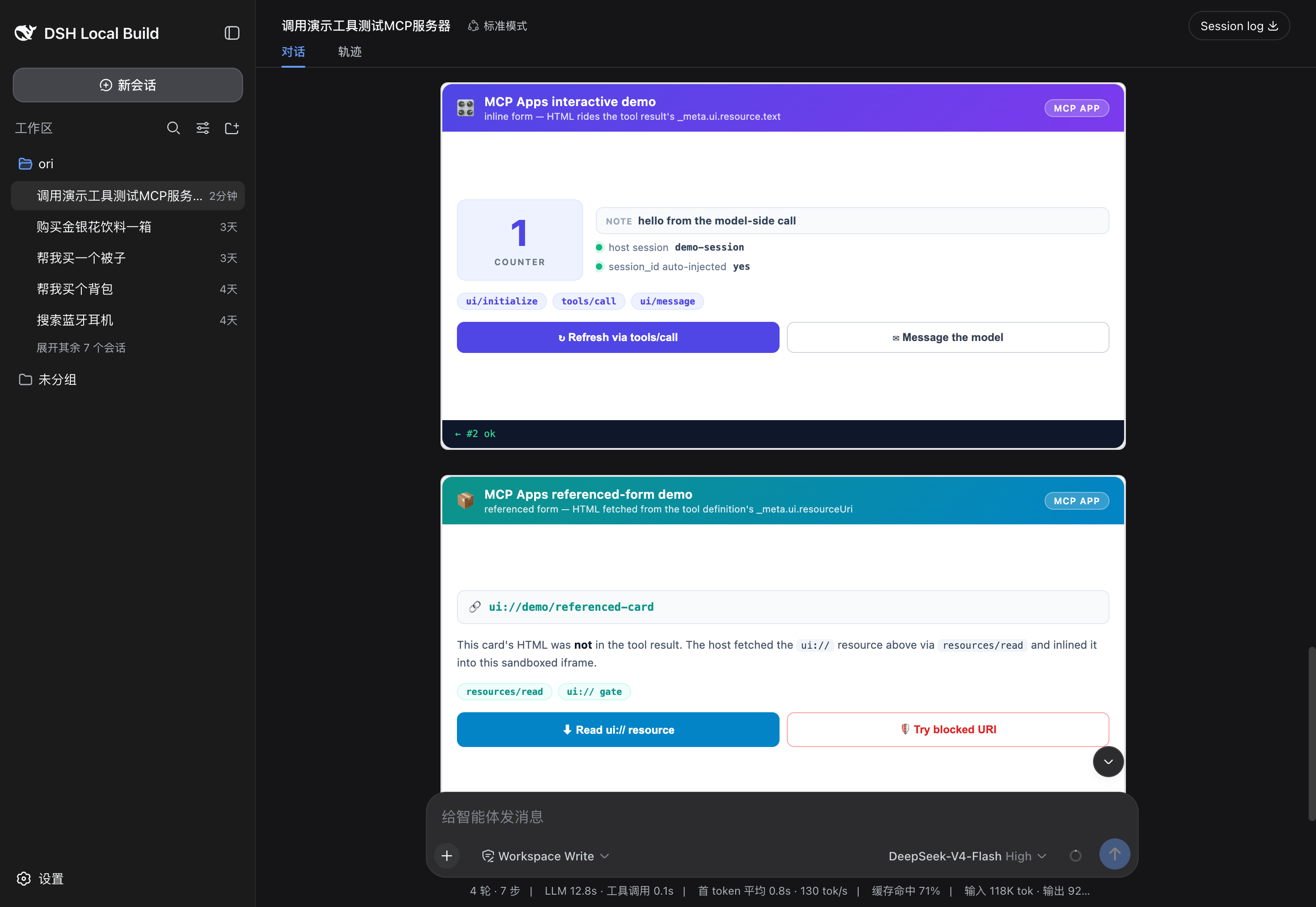
The screenshot shows both cards of the bundled demo server (demo/server.mjs — zero dependencies, Node stdio only):
demo_interactive (inline form): the tool result carries _meta.ui.resource.text, so the card HTML rides the result. Its buttons exercise the full bridge round trip: a tools/call that refreshes the card (the host auto-injects session_id), and ui/update-model-context + ui/message talking back to the model.demo_referenced (referenced form): the tool definition carries _meta.ui.resourceUri (ui://demo/referenced-card); the host resolves the HTML once via resources/read and inlines it. The card also demonstrates the bridge's ui:// security gate — a file:///etc/passwd read is refused.Try it:
# Protocol-level self-check: spawns the demo server over stdio and asserts
# the handshake, both card forms, session_id echo, and the ui:// resource
# table (8 checks, no DSH needed).
node demo/selftest.mjs

# Full E2E: launch dsh web with the demo overlay, then ask the model to call
# demo_interactive and demo_referenced. Run from the PARENT directory of this
# repo (the overlay's server path is cwd-relative); or adjust the !!js path in
# the overlay to your layout.
dsh web --patch dsh-mcp-apps-host/demo/mcp-apps-demo.cordis.ymldsh plugin --profile web add github:oriliz/dsh-mcp-apps-hostThe bundle patch inserts one mcp-apps-host row with an empty config. It stays
dormant (and logs why) until you give it a server to connect to. Configure it by
adding an id-targeted override to your profile's cordis.patch.yml (or to any
--patch overlay):
- id: mcp-apps-host
  config:
    transport: stdio
    serverName: my-server
    command: my-apps-server
    args: []
Fields:
serverName — short server id; also the tool prefix mcp__<serverName>__*
and the bridge path /mcp-apps/<serverName>/bridgetransport — stdio or streamable-httpcommand + args (stdio) or url (streamable-http)Restart the plugin (or DSH) after saving. The DSH host provides all
@deepseek-ai/dsh-* peer packages at runtime, so no peer install is needed.
To run several MCP Apps servers, add more rows in your profile's patch layer or
in a --patch overlay — one plugin instance per server, each with its own
serverName:
- insert:
    - id: mcp-apps-host-my-server
      name: '@deepseek-ai/dsh-mcp-apps-host'
      config:
        transport: stdio
        serverName: my-server
        command: my-apps-server
        args: []
        env: {}
        cwd: ''
        toolCallTimeoutMs: 60000
A ready-to-edit template ships in examples/connect-server.patch.yml:
dsh web --patch ./examples/connect-server.patch.ymlThe source layout mirrors the deepseek-harness pnpm workspace, and the committed lib/ is the built artifact (the npm install path ships it as-is; there is no build step on install):
git clone https://github.com/deepseek-ai/deepseek-harness.git
cd deepseek-harness
git clone https://github.com/oriliz/dsh-mcp-apps-host.git packages/mcp/mcp-apps-host
pnpm install
npx tsc -b packages/mcp/mcp-apps-host
pnpm --filter @deepseek-ai/dsh-mcp-apps-host bundleOverride the installed row's id as described in Install, or
declare one plugin instance per MCP Apps server in a --patch overlay
(serverName picks both the tool prefix mcp__<serverName>__* and the bridge
path /mcp-apps/<serverName>/bridge):
- insert:
    - id: mcp-apps-host-my-server
      name: '@deepseek-ai/dsh-mcp-apps-host'
      config:
        transport: stdio
        serverName: my-server
        command: my-apps-server
        args: []
        env: {}
        cwd: ''
        toolCallTimeoutMs: 60000
transport: streamable-http with a url field is also supported.
dsh --profile web --patch ./examples/connect-server.patch.ymlAsk the agent to call one of your server's tools. The tool result renders as an interactive card inside the conversation instead of a plain result row — and the card's own buttons reach back to your server through the bridge (tools/call, resources/read, ui/message). No server at hand? Use the bundled demo first.
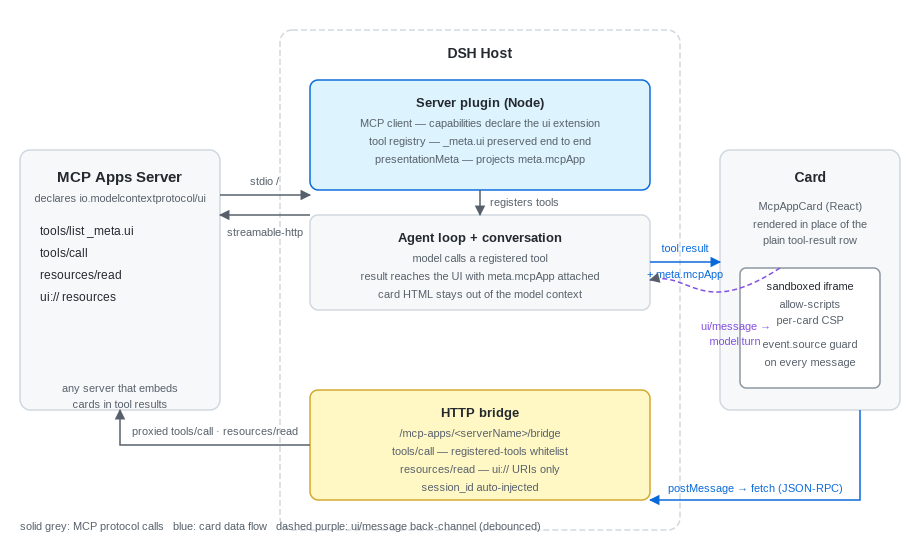
Tool results flow left to right (server → tool registry → conversation → card), and card interactions loop back through the HTTP bridge to the server. Card HTML never enters the model context, and the bridge only lets the iframe call tools registered on that server and read ui:// resources.
| File | Role |
|---|---|
src/index.ts |
Server-side: MCP connection, tool registration, HTTP bridge |
src/client/McpAppCard.tsx |
Card component: iframe, postMessage handling |
src/client/index.ts |
Client plugin: slot registration, sendUserMessage |
cordis.patch.yml |
Bundle patch: inserts the installable mcp-apps-host row |
locale/ |
Plugin title and description shown in Plugin Manager |
lib/ |
Committed build artifacts served by dsh plugin add |
demo/ |
Zero-dependency demo server + protocol self-test + overlay |
examples/ |
Connection overlay template |
# Build (inside the deepseek-harness workspace)
npx tsc -b packages/mcp/mcp-apps-host/tsconfig.json
pnpm --filter @deepseek-ai/dsh-mcp-apps-host bundle

# Run DSH with the plugin
dsh --profile web --patch ./examples/connect-server.patch.yml --port 8089
lib/ is committed because the install path (dsh plugin add github:...) does
not run a build. Rebuild it together with src/ when you change the plugin.
| # | Issue | Fix |
|---|---|---|
| P0 | Server strips _meta.ui |
Declare mimeTypes in client capabilities |
| P1 | Card renders but shows no tool data | presentationMeta() wraps result as CallToolResult-shaped object |
| P2 | session_id injection fails |
readSessionId() prefers meta.lastToolResult.structuredContent |
| P3 | External images blocked by CSP | buildCsp() adds https: to default img-src |
| P4 | ui/update-model-context was TODO |
_stagedContext Map stores and prepends context |
| P5 | Context visible as user message text | ui/inject-context bridge injects via agent.inject() as plugin-sourced message |
| P6 | Bundle installed nothing to configure | Patch inserts a defaulted row that no-ops until serverName/command (or url) are set (override it by id) |
See FINDINGS.md for detailed root cause analysis.
MIT
CLASSIFICATION EVIDENCE
系统优先读取 GitHub Topics,再与站内分类词典和词根规则比对。当前命中: mcp、mcp-apps、deepseek-harness。
morluto
Reverse engineer anything with agents, from app behavior down to native binaries.

deepseek-ai
DeepSeek Harness: Everything is a Plugin.

nexu-io
The 1st Collaborative AI Design Agent Workspace. Local-first and open source. Create motion, prototypes, websites, apps, dashboards, presentations, images, and videos with your team and AI agents. Share work, exchange feedback, and iterate together in one workspace.