
Agent 与会话
插件

nuwa-skill
alchaincyf
你想蒸馏的下一个员工,何必是同事。蒸馏任何人的思维方式——心智模型、决策启发式、表达DNA。Distill how anyone thinks.

orchivo/dsh-conversation-tree
对话树 / Conversation Tree:把 DSH 的对话列表变成一棵可折叠的树——按「工作区 → 主题 → 对话」归类,拖动整理、状态一眼可见,9 个模型工具让助手替你维护。Turn DSH's flat conversation list into a collapsible workspace → topic tree: drag to file, status at a glance, 9 model tools.
PROJECT TOPICS
PROJECT README
English | 中文




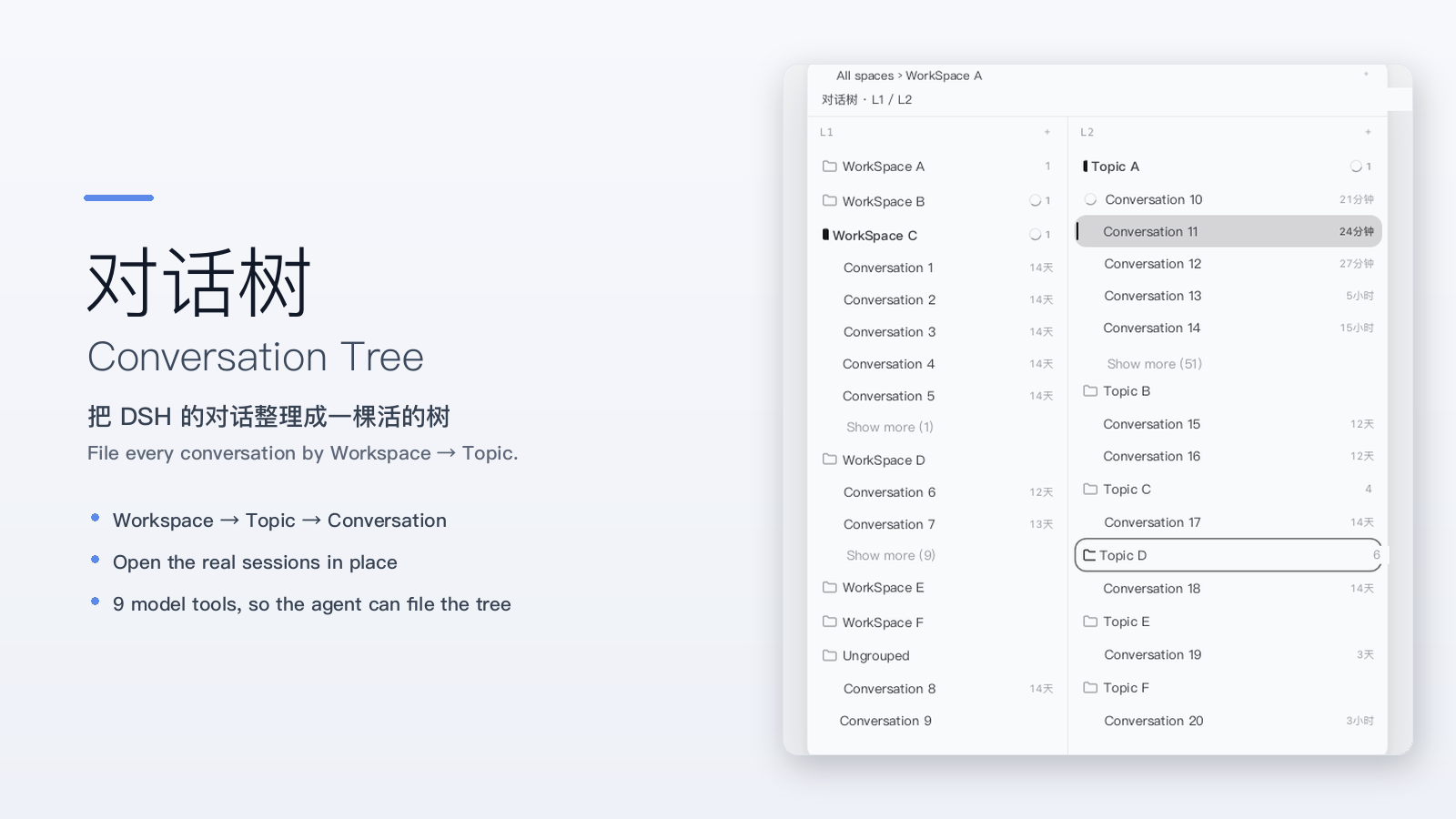
Turn DSH's conversation list into a living tree — file every conversation under «Workspace → Topic → Conversation», see the status at a glance, and let the model keep the tree tidy for you.
Screenshots use demo data: workspace, topic and conversation names are placeholders.
A DeepSeek Harness client plugin that adds a collapsible, resizable tree band to the left of the conversation column. The product's own conversation column, header, Chat/Trajectory tabs, right sidebar and composer keep rendering exactly as before — the band reserves a strip on the left and never replaces product UI.
Requires DSH >=0.2.1-rc.3 (see engines.dsh in package.json).
dsh plugin --profile web add dsh-conversation-treeThen restart DSH. The band starts collapsed: a 28×28 icon appears in the conversation header, and the persistent «Conversation Tree» row in the sidebar's panel rows works the same way.
In DSH: Plugins → Discover → Index sources, add:
https://cdn.jsdelivr.net/gh/orchivo/dsh-plugins-index@main/index.jsonThe index is served over jsDelivr's CDN; adding it to Discover makes the plugin installable from the UI.
Paste this into a DSH conversation:
Install the DSH plugin dsh-conversation-tree for me:
1. Run `dsh plugin --profile web add dsh-conversation-tree`.
2. If it is not found, add the plugin index source
   https://cdn.jsdelivr.net/gh/orchivo/dsh-plugins-index@main/index.json
   in Plugins → Discover → Index sources, then install it there.
3. Tell me to restart DSH when you are done.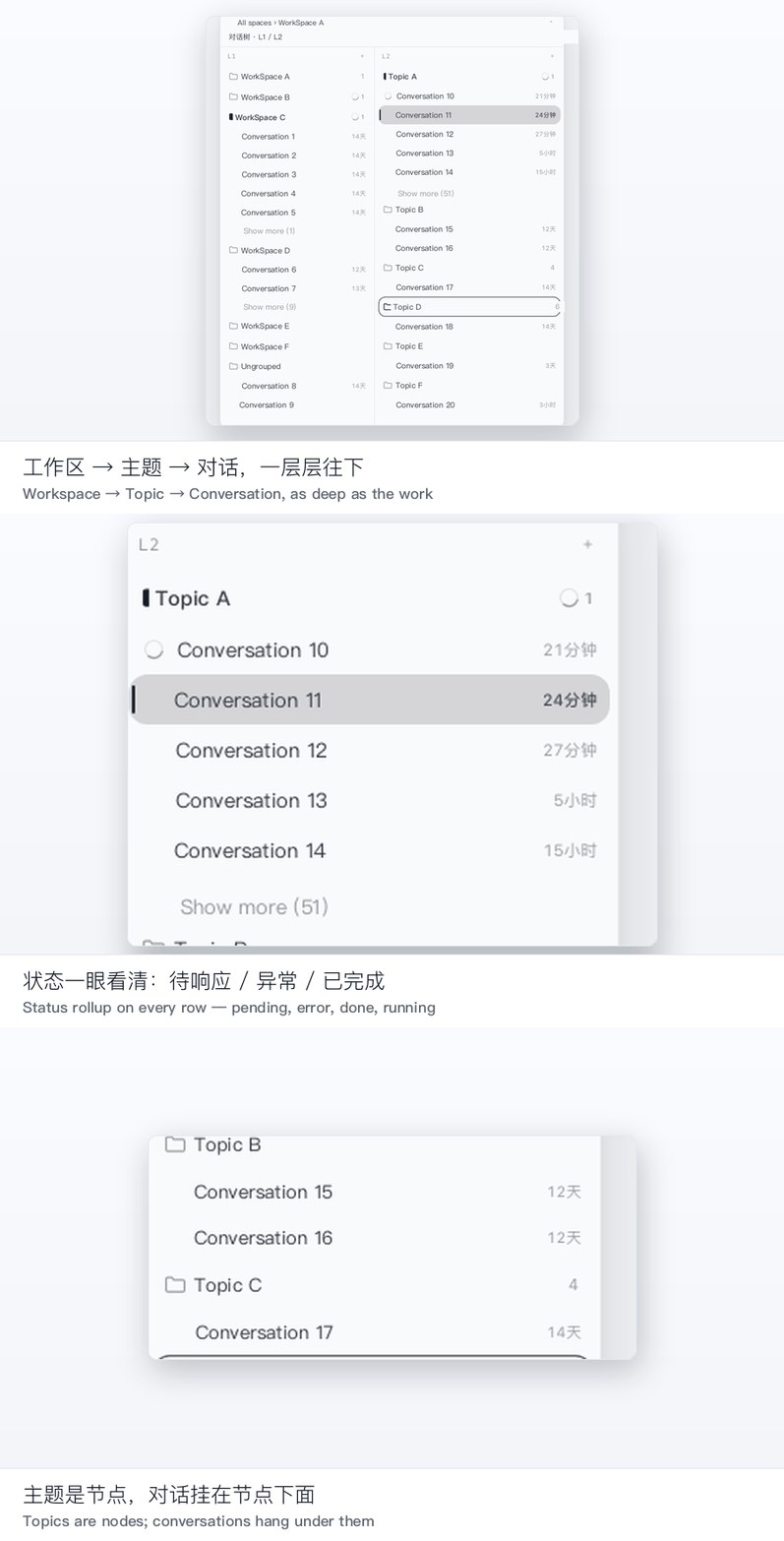
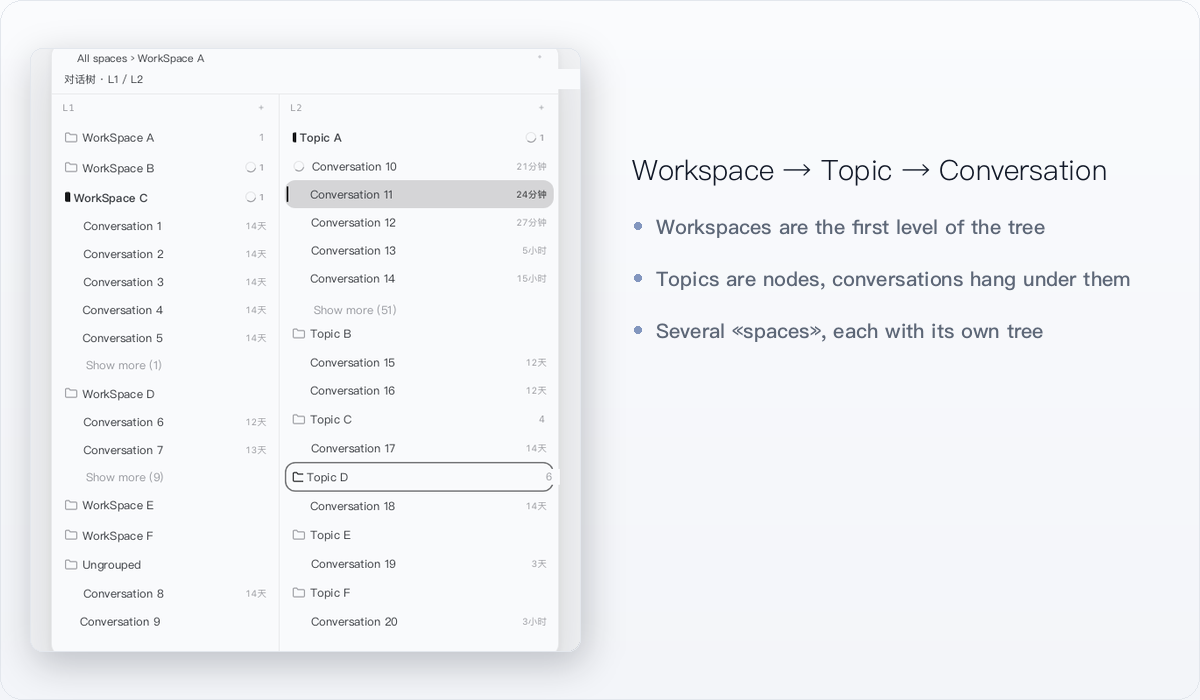
Multiple WorkSpaces, one tree. Every WorkSpace is the first level of the tree; each keeps its own conversation list. No more scrolling a single flat list wondering which project a conversation belongs to.
A long project, filed by topic. Topics are nodes, conversations hang under them, and a topic can nest as deep as the work does — goal → strategy → tasks. Open a conversation straight from the row; the tree highlight, the product's current session and the right sidebar always stay on the same conversation.
Let the model keep the tree. The plugin registers nine tools, so the agent can plan a goal structure, create/rename/move nodes and file existing conversations itself. You can literally ask: «review this thread and file it under the right topic».
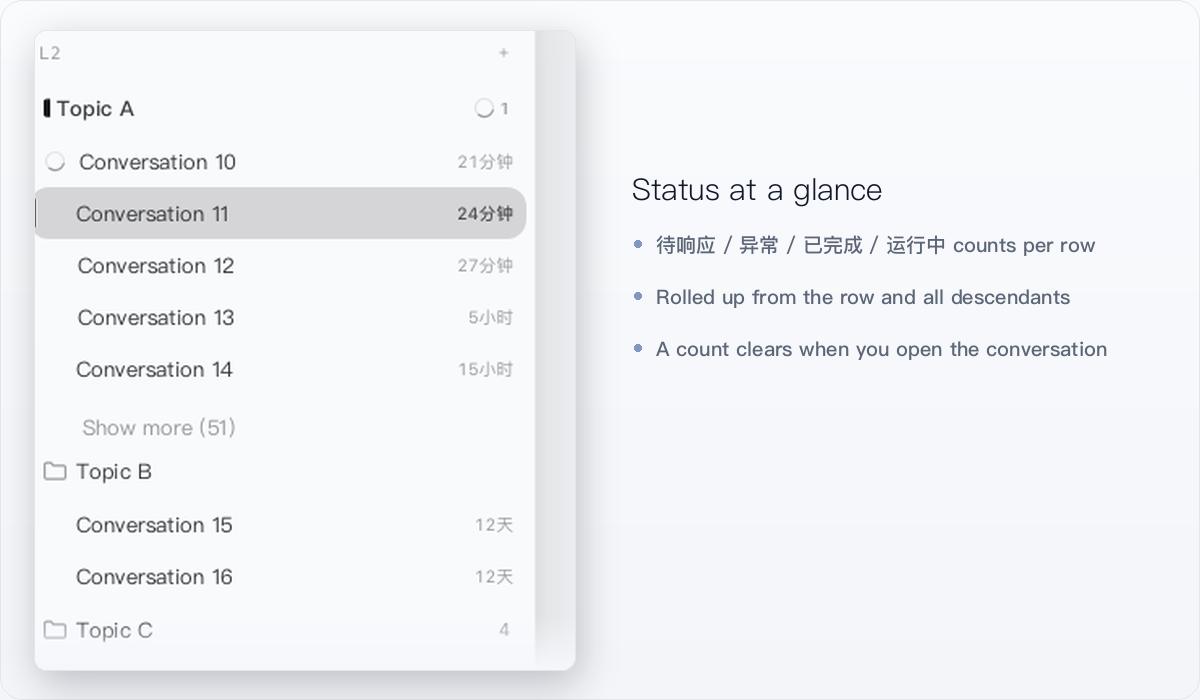
| Organise, don't replace — Workspace → topic → conversation, with nested topics and several «spaces» (each one its own tree). | Status at a glance — every row rolls up the status of its own conversations and all descendants; a count clears only when you actually open the conversation. |
 |
 |
L1 column's + dialog now has a «Workspace name» field under the directory: it fills in from the directory's final segment and can be edited, an already-registered directory keeps its name unless you change it, and a duplicate name is refused in the dialog. The directory picker also stopped moving the dialog while the system panel opens.ARCHIVED instead of touching them.space › workspace › topic › conversation title when the selection points away.There are two different plugins with a similar name, and they solve opposite problems:
| Conversation Tree (this plugin) | Unintendedz/dsh-conversation-tree | |
|---|---|---|
| Layers | Organisation: Workspace → topic → conversation | Message branch: immutable reply branches inside one conversation |
| Changes DSH UI | Adds a side band only; product UI untouched | Different data model for replies |
| Model tools | 9 tools over the conversation tree | — |
On dsh.so the canonical slug /artifact/dsh-conversation-tree/ belongs to Unintendedz (a different plugin) — our page is /artifact/dsh-conversation-tree-2/.
$DSH_HOME/conversation-map/map.json, read and written through the /conversation-map RPC channel with optimistic revision locking. The plugin makes no network requests.npm install / adding the index URL, both of which you start yourself.package.json declares no dependencies/devDependencies and no install/postinstall script — the published lib/ is prebuilt.map_delete_nodes deletes nodes only — conversations under a deleted node fall back to the Workspace root and are never deleted. Search indexing reads the session texts DSH already keeps locally, and stays in the Host process.| DSH | >=0.2.1-rc.3 (engines.dsh) |
| Verified on | DSH 0.2.1-rc.3 — dsh.so L5 runtime verification on npm 0.1.3; also loaded on the DSH desktop 0.2.1-rc.5 build (development link) |
| dsh.so | L5 runtime verification on 0.2.1-rc.3, low risk, MIT |
| Built as | prebuilt lib/; installing needs no build and no toolchain |
The plugin registers nine tools so the model can read and write the tree directly:
| Tool | Purpose |
|---|---|
map_list_workspaces |
List WorkSpaces |
map_get_state |
Read the current document (WorkSpaces, nodes, spaces, conversation filing) |
map_plan_goal |
Create a goal + strategy + task structure in one call |
map_create_nodes |
Create nodes |
map_update_nodes |
Rename / re-describe nodes |
map_move_nodes |
Re-parent or reorder nodes |
map_move_session |
File a conversation under a node, or rename/move it |
map_attach_sessions |
Attach existing conversations to a node |
map_delete_nodes |
Delete nodes (leaf / subtree, requires confirm; their conversations are kept and fall back to the Workspace row) |
shell.overlay slot, the conversation anchor, the header's leading seat, the sidebar-collapsed marker). If they change, the band degrades to a notice; the sidebar panel row keeps working.html[data-dsh-band-owner] attribute.$DSH_HOME is written by several processes, the last writer wins.dsh plugin --profile web remove dsh-conversation-tree(or delete the plugin from Plugins → Installed). Restart DSH afterwards. Your tree stays in $DSH_HOME/conversation-map/map.json, so reinstalling brings it back.
Does it replace DSH's own conversation list? No. It adds a band on the left; everything the product renders stays where it was.
Do I lose my tree if I uninstall? No — the document lives in $DSH_HOME/conversation-map/map.json and is not deleted.
Does it work in a browser-only / CLI environment? When the Host half is unavailable the plugin degrades to a browser-local mode and shows «Local mode» in the band.
Can it touch my files or run commands? No. The tools only read/write the conversation tree document; there is no shell or filesystem access in the tools.
Where is the source? https://github.com/orchivo/dsh-conversation-tree. Published to npm prebuilt; building from source needs a DSH source checkout because the project carries no npm dependencies (the bundler and type declarations are borrowed from that checkout).
MIT, see LICENSE.
CLASSIFICATION EVIDENCE
系统优先读取 GitHub Topics,再与站内分类词典和词根规则比对。当前命中: session-management。
alchaincyf
你想蒸馏的下一个员工,何必是同事。蒸馏任何人的思维方式——心智模型、决策启发式、表达DNA。Distill how anyone thinks.

freestylefly
Prompt as Code | GPT Image 2 / 2.5 提示词与案例库,530+ 个案例、20+ 套工业级模板与可复用 Skills,新增 2.5 同提示词对比专区,附完整提示词与生成记录,持续更新。

titanwings
Distilly — Distill how they think into reusable Skills for any Agent or Bot. Formerly Colleague Skill(原同事 Skill).