
模型与 MCP
待识别

rea
morluto
Reverse engineer anything with agents, from app behavior down to native binaries.
PROJECT TOPICS
INSTALL REFERENCE
dsh plugin --profile web add github:olivine13/dsh-image-scope
该命令指向仓库当前默认分支;尚无绑定当前 commit 的完整验证结果。
PROJECT README
A pixel ruler for the DeepSeek Harness (DSH) sidebar image preview. Hover to read the pixel under the pointer, drag one dashed rectangle to measure a region, and keep every measurement in true image pixels at any zoom level.
Built for development and design checks: compare screenshots, verify spacing, measure icon sizes, or inspect a single pixel.
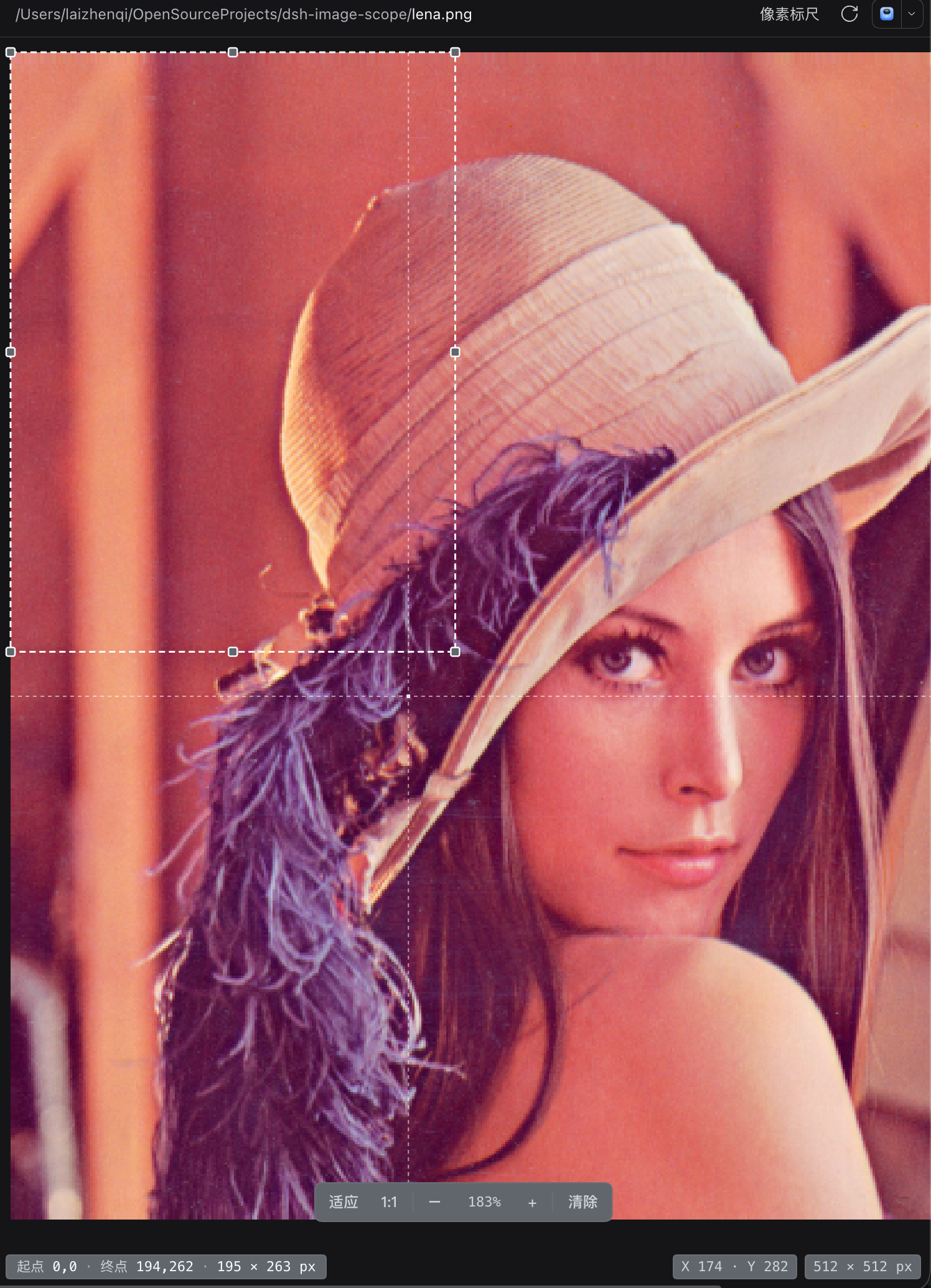
A dashed selection from (0,0) to (194,262), measured as 195 × 263 px in the bottom-left bar. The pointer is at X 174 / Y 282; the image is 512 × 512 px and is being viewed at 183%. Measurements stay in image pixels at any zoom.
width × height in whole image pixels.config.json.dsh plugin add dsh-image-scopeAdd --profile <name> if you are not on the default profile. You can also install it from Plugins → Discover once the marketplace entry is published.
Coordinates are zero-based from the top-left pixel. Width and height count whole pixels, including both ends, so a box from x=100 to x=199 is 100 px wide.
Edit config.json in the plugin package. The sections are:
| Section | What it controls |
|---|---|
font |
font families, font sizes, line heights |
canvas |
canvas background and text color, scroll padding, focus ring |
selection |
dashed box stroke, width, dash pattern, fill, fill opacity |
crosshair |
hover crosshair color, opacity, width, dash |
pixel |
hovered pixel cell outline |
handle |
the eight resize handles: size, radius, fill, stroke |
selectionInfo |
bottom-left measurement bar: position, width, spacing, padding, colors |
hud |
bottom-right hint/size bar: position, width, spacing, colors |
toolbar |
zoom toolbar and its buttons, value, separator |
status |
loading and error text |
The Host reads the file on each page boot and injects it into the browser. After editing, refresh the page. A page that was already open before the plugin was first enabled uses an embedded default style until it is refreshed; the injected file wins afterwards. If edits still do not apply after a refresh, restart DSH once so the Host half reloads.
>=0.2.1-rc.5 <0.3.0-0 || >=0.2.2-rc.1 <0.3.0-0 (tested on 0.2.1-rc.5)The viewer uses the document-preview extension point and the sidebar.right.tab.document slot. If the built-in document preview is unavailable, the viewer is not mounted.
Everything runs locally. The plugin reads only its own config.json and the image bytes the preview already provides; it does not send data anywhere and does not access credentials.
Plain JavaScript, no build step.
| Path | Purpose |
|---|---|
client.js |
browser viewer, config merge, generated stylesheet |
index.js |
Host half that injects config.json into the page |
config.json |
colors, sizes, boxes, overlay |
test/math-test.mjs |
pixel mapping, snapping, hit-testing, move/resize tests |
npm testMIT
CLASSIFICATION EVIDENCE
系统优先读取 GitHub Topics,再与站内分类词典和词根规则比对。当前命中: deepseek。
morluto
Reverse engineer anything with agents, from app behavior down to native binaries.

deepseek-ai
DeepSeek Harness: Everything is a Plugin.

nexu-io
The 1st Collaborative AI Design Agent Workspace. Local-first and open source. Create motion, prototypes, websites, apps, dashboards, presentations, images, and videos with your team and AI agents. Share work, exchange feedback, and iterate together in one workspace.