
模型与 MCP
待识别

rea
morluto
Reverse engineer anything with agents, from app behavior down to native binaries.
PROJECT TOPICS
INSTALL REFERENCE
dsh plugin --profile web add github:niushuanan/xiaozhuang-dsh
该命令指向仓库当前默认分支;尚无绑定当前 commit 的完整验证结果。
PROJECT README
English | 中文
This local source integration uses DeepSeek Harness 0.2.1-alpha.1 and 20 native plugin folders, including the locally adapted Ego Browser. All plugins are migrated with dsh-plugin-upgrade-skill. Published Xiaozhuang v0.4.2 downloads below remain the previous distribution. Upgrading this checkout preserves Harness Home, model credentials, settings and historical session generations.
Native plugins that turn DeepSeek Harness into a practical local workspace for both agent work and everyday chat.



Download · Explore all plugins · Star the project · DeepSeek Harness upstream
An independent community distribution, not an official DeepSeek product. Upstream architecture, licenses, and attribution are preserved.

Xiaozhuang DSH keeps the DeepSeek Harness core—agents, sessions, tools, models, and plugins—then fills the practical gaps around desktop control, Chat mode, parallel work, Skills, long-term memory, usage visibility, and safe updates. New capabilities are built as native plugins whenever they can be independently switched, exported, and maintained.
The sidebar and browser tab use the Xiaozhuang DSH name supplied by the product plugin. Existing imported chats and Agent sessions keep their titles, groups, and recent-activity order across the adjacent history-format upgrade. Expand each group progressively (5 → 10 → 20) to browse older conversations; history conversion preserves the original files. Safari desktop windows and Chromium browsers display Agent answers and expandable tool results through the same history reader. Reopening a desktop window restores a valid saved login automatically; an expired login can be recovered inside the window without an address bar. An open page offers an explicit reload after a server restart. Each product Settings entry retains its original icon, provided and removed by its own plugin.
| Start working | Start chatting |
|---|---|
| Bind a workspace and use agents, tools, permissions, and Skills to finish tasks. | Pick no folder and grant no execution access; just open a chat and attach images or text. |
| User task | Product capability |
|---|---|
| See everything in a workbench | A right sidebar plus bottom panel: files, editor, real terminal, Git, embedded browser, background jobs, and side conversations, isolated per session. |
| Finish complex work | Teamwork, multiple agents, and isolated Git worktrees run in parallel under one coordinating agent. |
| Manage knowledge and context | Skill management, selection quotes, side chats, and two editable long-term memory documents. |
| Keep conversations effortless | Chat mode, DeepSeek history import, split conversations, in-session mode switching, image understanding, and continuous output. |
| Understand model usage | DeepSeek, KIMI, GLM, and GPT quotas plus per-session and whole-machine token details. |
| Update without disruption | Check upstream every six hours, adapt narrowly with an agent, switch while idle, and roll back when needed. |
Xiaozhuang DSH v0.4.2 already contains the built Host, Client, and Web artifacts.
tar -xzf xiaozhuang-dsh-v0.4.2-prebuilt-source.tar.gz
cd xiaozhuang-dsh-v0.4.2
corepack enable
pnpm install --frozen-lockfile
pnpm dsh webgit clone https://github.com/niushuanan/xiaozhuang-dsh.git
cd xiaozhuang-dsh
corepack enable
pnpm install --frozen-lockfile
pnpm run build:official
pnpm dsh webRequires Node.js ^22.19.0 or >=24.0.0 and pnpm 11.7.0. The Web UI opens at http://127.0.0.1:3080 by default. Local windows enter directly and recover expired browser sessions automatically; no launch token needs to be copied.
Open Settings → Xiaozhuang Plugins to search, switch, or export them. Exported ZIP files include source, a manifest, hashes, and AI installation instructions—not credentials, conversations, settings, dependencies, or caches.
A VSCode-style right sidebar plus bottom panel: files and editor, real terminal, Git panel, a sandboxed browser with explicit URL/direct-search modes and a system-browser fallback for sites that refuse embedding, background jobs, and Codex-style side conversations — session-isolated, splittable, and open to further plugins through ctx.betterSidebar. Its Settings page uses the same clear title hierarchy and flat, border-free sections as the rest of the product.

Native subagent and subagent_fork workers handle routine parallel work. The primary agent selectively escalates difficult implementation or independent review to hot-pluggable Codex and Z Code experts through the same delegation contract, then checks and combines every result. Disabling an expert removes its callable tool; re-enabling it restores the tool without recreating the workflow.

Run parallel tasks in isolated Git worktrees, then inspect conflicts and merge safely into the current branch.

Upload an image from the composer plus menu—the same short path used for commands, plugins, and Skills.

Lives beside the composer and keeps one-click side switching, task status, voice dictation, and configurable quick actions together.

Choose no folder and grant no agent execution access; open it to chat with a model while retaining file uploads and web search.

Open Settings → Import conversations and choose an official DeepSeek JSON or ZIP export. Preview, search, and select the independent DeepSeek conversation windows before migrating their original order, titles, timestamps, answers, and exported reasoning into the native chat list. Previously imported windows are marked and skipped instead of duplicated. It can be switched and exported independently from Chat mode; the bundle repository provides both capabilities.

Place two sessions side by side in one workspace and continue each one independently.

Select text in an answer to quote it, remember it, or open a side chat without breaking the reading flow.

Keep Selection Memory and AI Memory as two visible, editable, and restorable global documents.

Check upstream every six hours, use an agent only for necessary compatibility work, switch while idle, and roll back on failure.

Read a Skill's tagged summary, tree, and files directly, or adaptively import from a file, folder, ZIP archive, or GitHub.

Messages enter the conversation immediately while reasoning, tools, and answers appear as one continuous stream.

Switch a complete tool, prompt, and capability bundle inside a session, or duplicate one to customize it.

Check the DeepSeek balance and KIMI, GLM, and GPT quotas from the conversation header, refreshed every five minutes.

Expand the current session's turns, steps, latency, time to first token, output speed, and cache hits.

Review tokens, calls, and cost trends across local clients for today, seven days, this month, or all time. Today's Settings trend shows observed and projected totals rounded to whole integers, with pale predicted remainders stacked above solid usage in the existing three-hour bars. Cumulative milestones show crossing dates, calendar and active days, stage pace, daily peaks and streaks. The curve also projects one calendar month with a dashed forecast, empirical range and rolling-error readout. The detailed report predicts remaining hours with nonlinear models every three minutes, using bounded training and a calculation deadline. Compare today, yesterday and the seven-day mean with adjacent hourly bars, or switch to cumulative solid/dashed curves; issued-forecast errors and the 10% target remain in a collapsed explanation. Model names are normalized across platforms; a compact report toolbar adds live search and searchable filter menus, and merged model detail keeps per-platform attribution.

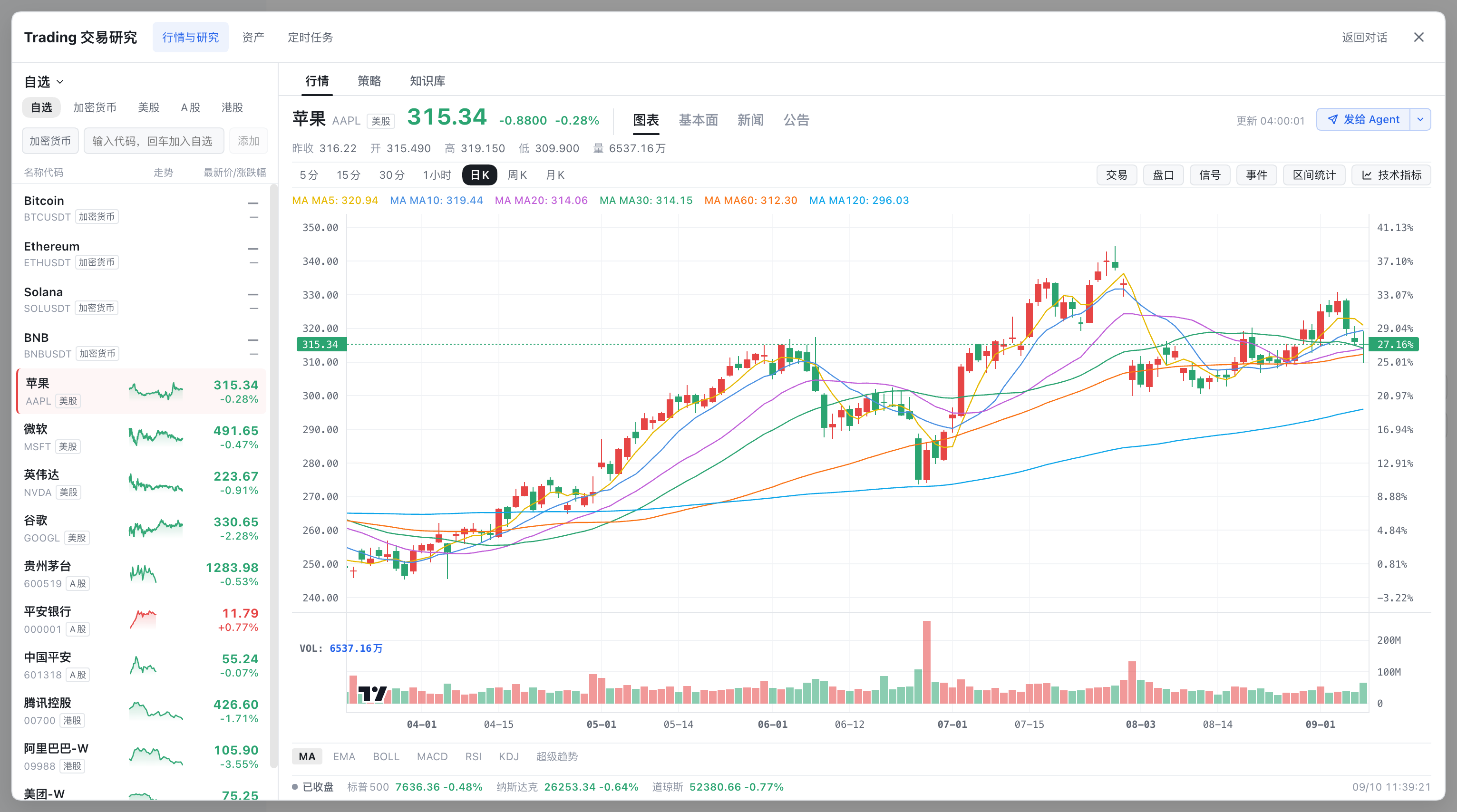
Open Trading in the sidebar to use cross-market watchlists, charts, indicators, strategies, research knowledge and holdings. Send to Agent adds the selected market context and available chart image to the current conversation draft; you review and send it yourself. Back to conversation returns to the existing workbench. Trading settings use the existing Settings window, and four optional trading presets are available alongside the ordinary presets.
Trading ships in the integrated source build under plugins/trading/, with no separate installation or distribution repository. Its data stays under $DSH_HOME/trading; existing conversations, model settings and the default preset are preserved. Orders default to simulation. Provider credentials are configured locally, and live execution retains upstream approval requirements.
The trading code derives from dsh-trading and retains its PolyForm Noncommercial 1.0.0 license. See provenance and integration scope. The trading component is not covered by the repository's MIT license; commercial use requires the upstream author's written permission.
baseURL with https://api.deepseek.com, change it to https://api.deepseek.com/anthropic to avoid HTTP_404 from the old OpenAI root.deepseek-official/deepseek-v4-flash-vision-exp; ordinary work and chat use the model selected by the user.Development guide · Architecture · Contributing guide · Issues
Propose broadly useful fixes to DeepSeek Harness upstream. This repository keeps its source and Issues public but does not currently accept external pull requests.
Core: MIT · Trading: PolyForm Noncommercial · Third-party dependencies and licenses
CLASSIFICATION EVIDENCE
系统优先读取 GitHub Topics,再与站内分类词典和词根规则比对。当前命中: deepseek-harness。
morluto
Reverse engineer anything with agents, from app behavior down to native binaries.

deepseek-ai
DeepSeek Harness: Everything is a Plugin.

nexu-io
The 1st Collaborative AI Design Agent Workspace. Local-first and open source. Create motion, prototypes, websites, apps, dashboards, presentations, images, and videos with your team and AI agents. Share work, exchange feedback, and iterate together in one workspace.