dsh-flutter-tools
A Flutter panel for the DeepSeek Harness sidebar: run, inspect and
profile a Flutter app without leaving the conversation.
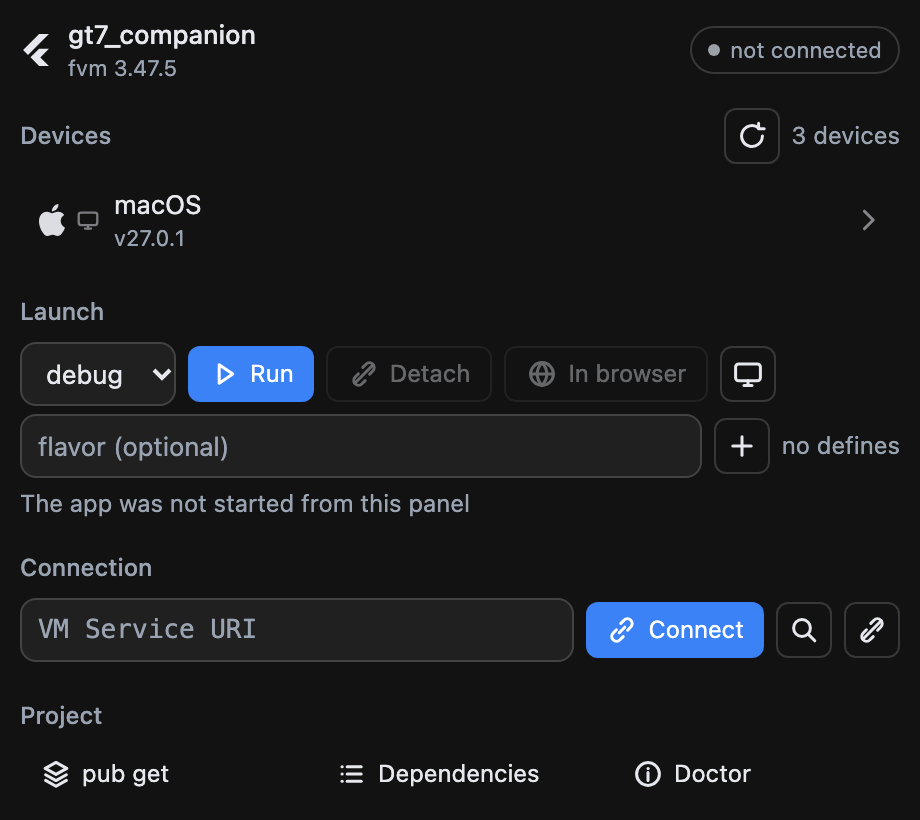
Devices come from a long-lived flutter daemon, launching is flutter run --machine with the VM
Service URI picked up automatically, and everything else goes through the running app's own VM
Service and flutter-devtools-mcp.
Features
- Devices — a long-lived
flutter daemon (events, not polling): a phone plugged in appears by
itself. The section shows one selected device with its OS logo (Apple, Android, Windows, Linux, or
a browser for web targets) plus a small kind icon; clicking opens the list to switch, and the
choice is remembered per project. Emulators come from the same daemon.
- Launch — device, mode (debug / profile / release), flavor and
--dart-define pairs, then one
button that runs or stops depending on the state. The panel reads app.debugPort and connects
itself; app logs land in the panel.
- Flavor and defines — flavors are suggested from the project (Android
productFlavors,
non-default Xcode schemes); defines are a key/value editor. Both are remembered per project and
validated before they reach the command line.
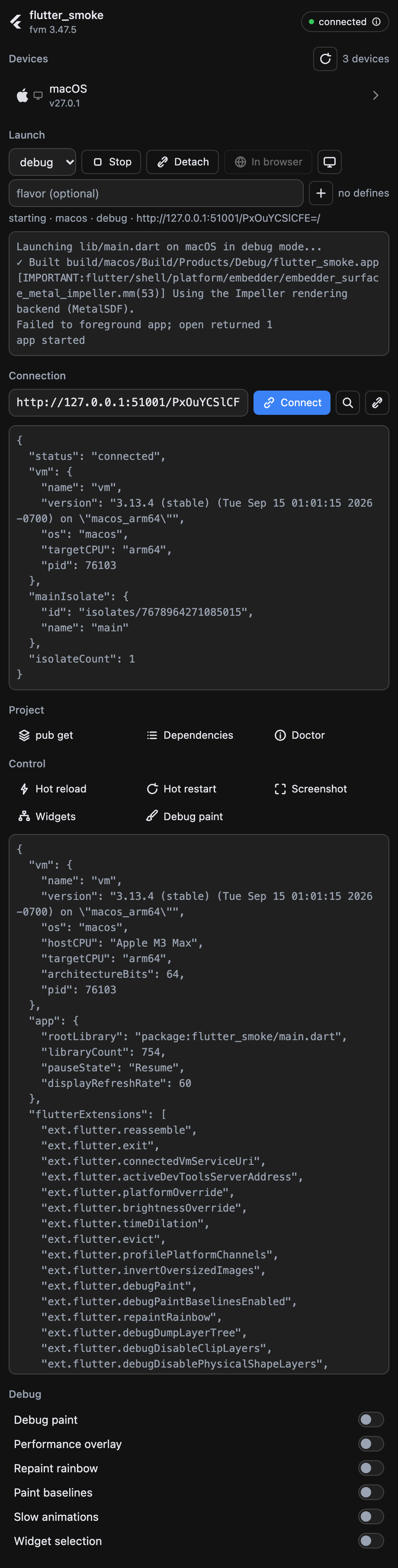
- Control — hot reload, hot restart, screenshot (inline), widget tree, debug paint.
- Debug toggles — the service extensions the app actually registered:
debugPaint,
showPerformanceOverlay, repaintRainbow, debugPaintBaselinesEnabled, timeDilation,
inspector.show.
- DevTools inside the panel — the daemon hosts the DevTools server and the panel embeds it
(inspector, performance, cpu-profiler, memory, network, logging), with a button to move the same
page into a sidebar browser tab.
- App facts and memory — VM version, platform, pid and isolates as a key/value block; live heap
readout, a GC button, saved memory snapshots and a compare of the last two.
- Captures and profiling — rebuild tracking and HTTP capture as single switches, profiling
session,
collect_performance_session with the workspace root filled in.
- Project commands —
pub get, pub outdated, flutter doctor with rendered output:
pub outdated becomes a table with the upgradable rows highlighted, flutter doctor a checklist.
- Detach and web — leave the app running while the panel stops tracking it, or open a web build
in a sidebar browser tab.
- SDK — the workspace's own pin (
.fvm/flutter_sdk, then .fvmrc) wins over whatever is on
PATH.
Install
DeepSeek Harness → Settings → Add plugin, then paste this repository's address. That field takes
a plugin package name, a GitHub repository address or a local directory. The CLI takes the same spec
(dsh plugin add …); note that a profile the desktop app manages refuses CLI changes, so the plugin
manager is the usual route.
Requirements:
- a Flutter SDK (the workspace pin is preferred,
PATH is the fallback);
npx on PATH — flutter-devtools-mcp is fetched on first use;dsh-better-sidebar for the sidebar tab;- a Flutter app running in
debug (rebuild tracking) or profile (metrics).
How it is put together
| File |
Half |
Role |
index.js |
host (Cordis) |
registers the /flutter routes, owns the flutter daemon, the flutter run child and the flutter-devtools-mcp child, serves panel.html |
panel.html |
served page |
the whole UI, plain HTML/CSS/JS — no build step |
client.js |
client bundle |
registers the sidebar tab whose body is an iframe onto /flutter |
icon.svg |
manifest asset |
the icon the plugin manager shows, declared as icon in package.json |
cordis.patch.yml |
bundle patch |
the mount row; its name must equal the package name so the client bundle is served at /plugins/dsh-flutter-tools/client.js |
dev-server.mjs |
development |
runs the same routes outside DSH for UI iteration |
docs/ |
development |
the screenshots above |
Endpoints
All under /flutter, loopback Host only.
| Route |
Purpose |
GET /flutter |
the panel page (?cwd=&sessionId=) |
GET /flutter/config |
workspace cwd, fvm pin, resolved Flutter, toggle labels |
GET /flutter/devices |
live device list (daemon) |
GET /flutter/emulators |
emulators from the daemon |
GET /flutter/flavors |
flavors found in the project (Android blocks + Xcode schemes) |
GET /flutter/run |
launch state: running, appId, mode, flavor, defines, VM Service URI, log tail |
POST /flutter/run |
launch on a device: { deviceId, mode, flavor, defines } |
POST /flutter/run/stop |
stop the launched app |
POST /flutter/run/detach |
leave the app running, stop tracking it |
POST /flutter/emulator/launch |
boot an emulator: { emulatorId } |
GET /flutter/devtools |
DevTools page URL: ?page=…&uri= |
GET /flutter/extensions |
registered debug extensions plus their current state |
POST /flutter/extension |
toggle one extension: { name, value } (allowlist only) |
GET /flutter/heap |
heap usage of the main isolate (?uri=) |
POST /flutter/gc |
collect garbage, then report heap usage |
POST /flutter/command |
one-shot CLI: pub_get | pub_outdated | doctor |
POST /flutter/call |
flutter-devtools-mcp tool call: { tool, arguments } (allowlist only) |
Notes from building it
Things that cost time, recorded so nobody pays twice.
flutter daemon --machine is not a valid flag: it exits 2 with no output. The daemon speaks
the same protocol without it.flutter emulators --machine does not exist either.--show-web-server-device is deliberately not passed: measured, it changes exactly one thing — the
synthetic web-server device appears in the list — and nothing here depends on it.flutter run, flutter daemon and npx are wrappers: the real process is a grandchild (dartvm),
so a plain child.kill() leaves it running. Children are spawned detached and killed by process
group — except after app.detach, where a group kill would take the detached app down with it, so
the tool is killed by pid instead.- Measured: the tool does not exit by itself after
app.detach (still alive 20 s later), while
the app it launched survives on its own.
- The VM Service needs an
isolateId for getMemoryUsage, and has no collectAllGarbage RPC —
that is what getAllocationProfile(gc: true) is for.
ext.flutter.brightnessOverride is not offered as a toggle: it reports the platform's effective
brightness, so "off" still reads as dark on a dark system and the switch would lie.--dart-define is compile-time: a changed define takes effect on the next launch, not on a hot
restart.- Command output is clipped head-first:
pub outdated keeps its column header at the top, and a tail
clip left the panel with rows it could not parse.
- The plugin icon is a data URL built by the harness from a top-level
icon in package.json; there
is no HTTP route for it, and the path must stay inside the manifest directory.
License
MIT — see LICENSE.
Development
node dev-server.mjs 9100 /path/to/flutter/project # the panel, outside DSH
Screenshots in docs/ were taken from that dev server with Chrome in dark mode at device scale 2.
Attribution
The tab icon and the plugin icon are Flutter's mark, taken from
simple-icons (CC0). Flutter is a trademark of Google; the mark is used
here only to label Flutter tooling.


